Noemi WordPress Theme
by PX-lab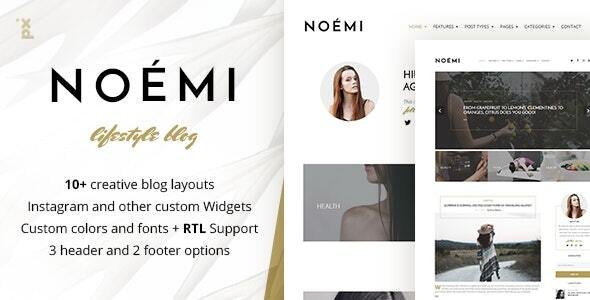
Stuck on your Noemi WordPress theme? Let's fix it.
No endless back-and-forth. Just send us the details and we'll get it done.
No obligation · Replies within 1 hour · Quote within 1 day
Setup · Customization · Bug fixes · WooCommerce integration
About Noemi WP Theme
Noemi is a WordPress theme built by PX-lab, designed primarily for creative portfolios, photography, and visual-heavy websites. It focuses on full-screen imagery, clean typography, and minimal UI so your content takes centre stage.
The theme ships with multiple homepage layouts, smooth transitions, and a customizer-based setup that avoids the need for a page builder in most cases. It works well for freelancers, photographers, and small creative studios who want a polished look without heavy development overhead.
Noemi is built on solid WordPress standards, meaning it plays well with most plugins and hosts. It supports WooCommerce for those who want to sell prints or digital work, and it keeps code relatively lean compared to multipurpose themes that bundle everything by default.
Get matched with a Noemi developer in under one day
Tell us about your Noemi project. Small fixes, Noemi theme customization, or a full website build, whatever you need, we've got it covered.
We'll connect you to the right Noemi developers, define the scope, and get everything 100% clear.
You'll get one estimate, hire your preferred developer, and start collaborating.
Noemi looks straightforward until you need it to do something specific. Custom layouts, plugin conflicts, or WooCommerce tweaks can stall a project fast. FoxyConcept connects you with vetted WordPress developers through Codeable, a platform where every developer is screened before they can take on client work. You get a free estimate with no obligation, and someone who has worked with themes like Noemi before, not a generalist guessing at the code.
Pros
- Full-screen image layouts with smooth transitions built in, no page builder required
- Multiple homepage styles included, making it suitable for different creative niches
- WooCommerce compatible for selling prints, presets, or digital downloads
- Lightweight compared to multipurpose themes, which helps with initial load times
- Clean markup that works well with popular SEO plugins without extra configuration
Cons
- Limited layout flexibility outside the bundled homepage templates without custom code
- Child theme documentation from PX-lab is sparse, which complicates safe customization
- No built-in mega menu or advanced header options for content-heavy sites
- Updates can occasionally overwrite custom CSS if changes were not made via a child theme
- Support response times from PX-lab can be slow compared to larger theme marketplaces
Who is Noemi for?
Photography Portfolio
Noemi was built with photographers in mind. Full-screen galleries, minimal navigation, and fast image rendering make it a practical choice for showcasing work. Photographers can organise shoots into portfolio categories and let the imagery do the talking without wrestling with layout options.
Freelance Creative Studio
Small studios with one to five team members use Noemi to present services cleanly. The theme handles a homepage, services overview, portfolio grid, and contact page without needing extra plugins. It keeps the site focused and avoids the bloat that comes with multipurpose themes.
Print and Digital Product Shop
With WooCommerce support built in, Noemi works for photographers or artists selling prints, digital downloads, or photo presets. The minimal design keeps the focus on the product. A developer can extend the WooCommerce templates to match the Noemi aesthetic without breaking the default shop functionality.
Wedding and Event Services
Wedding photographers and event professionals benefit from Noemi’s full-screen imagery and clean typography. The theme presents a premium feel without custom design work. Adding a booking plugin or enquiry form integrates smoothly with the existing layout and does not disrupt the visual flow.
Art and Illustration Showcase
Illustrators and artists use Noemi to display work in a gallery format that feels editorial rather than templated. The theme supports custom post types for different project categories, and its typography options handle display fonts well for branding-heavy portfolios.

Customizing Noemi
Out of the box, Noemi gives you decent control through the WordPress Customizer. You can adjust colours, fonts, layout options, header styles, and footer content without touching code. For most creative sites, that covers the basics.
Where things get more complex is when clients need custom post types, non-standard gallery behaviour, unique landing page structures, or specific WooCommerce modifications. That is where working with a Noemi expert saves real time.
A developer familiar with Noemi knows which template files to target, how PX-lab structures its child theme support, and where customizer settings end and custom CSS or PHP begins. Trying to push the theme beyond its defaults without that knowledge usually results in broken layouts or update conflicts.
Recommended plugins for Noemi
Noemi pairs well with a focused plugin stack. For contact forms, WPForms or Contact Form 7 work without styling conflicts. WooCommerce integration is supported for selling prints or services directly.
For SEO, the theme outputs clean markup that works well with Yoast or Rank Math. If site speed is a concern, pairing Noemi with a good caching plugin and a CDN makes a measurable difference. Learn more about WordPress performance optimisation and WordPress SEO to get the most out of your setup.
Not sure which plugins to use? This WordPress plugins directory covers the most popular options with reviews and setup guides.
Noemi common issues
Noemi theme images not loading correctly after update
This usually happens when the theme update resets featured image size settings or conflicts with a caching plugin serving old image files. Start by clearing your cache and regenerating thumbnails using a plugin like Regenerate Thumbnails. If images still fail to load, check whether your media settings match the dimensions Noemi expects. A developer can audit the theme’s image handling quickly. See our WordPress bug fixing service for help.
Noemi WordPress theme mobile menu not working
Mobile menu failures in Noemi are often caused by a JavaScript conflict with another plugin or a missing script dependency after an update. Open your browser console and look for JS errors. Deactivate plugins one at a time to isolate the conflict. If the issue appeared after a theme update, a child theme setup would have prevented it. A developer can patch the conflict and set up a child theme to protect future changes.
Noemi portfolio grid layout broken with WooCommerce active
Noemi’s portfolio grid and WooCommerce can conflict at the template level, particularly on archive pages where both try to apply their own layout logic. The fix usually involves overriding WooCommerce templates inside the theme’s folder structure so they inherit Noemi’s grid styles. This is not a simple CSS fix. A developer who knows how WooCommerce template hierarchy works can resolve it without breaking either section of the site.
Noemi custom CSS getting overwritten after theme update
If you added custom CSS directly to the theme’s stylesheet rather than using the WordPress Customizer’s Additional CSS field or a child theme, any theme update will overwrite your changes. The correct fix is to move all custom CSS into a child theme’s stylesheet. Going forward, no update will touch that file. Our WordPress maintenance service can handle child theme setup and keep your site update-safe long term.
Noemi FAQ
PX-lab has maintained Noemi with periodic updates, but the release cadence is slower than themes sold on ThemeForest. Before committing to Noemi for a new project, check the changelog on the theme’s purchase page for the most recent update date. If active development is a concern, using a child theme protects your customizations regardless of how frequently the parent theme updates.
Noemi is not officially built for Elementor. It has its own template structure and customizer settings. While Elementor can technically be activated on any WordPress site, mixing it with Noemi often produces layout conflicts and redundant code. For most use cases, the Customizer handles what Noemi is designed to do. A developer can advise whether a page builder is actually needed for your project.
Yes, Noemi supports WooCommerce. It handles basic shop pages, product listings, and cart flows without major styling issues. Customizing WooCommerce templates to fully match Noemi’s aesthetic does require developer work. Out of the box it is functional, but a polished storefront that feels consistent with the portfolio sections takes some template overrides and custom CSS.
Creating a child theme for Noemi involves making a new folder in your themes directory with a stylesheet that references Noemi as the parent and a basic functions.php file. This is the correct way to make any customizations safe from updates. If you are not comfortable with FTP and file editing, a developer can set this up quickly and migrate your existing custom CSS into it.
Migrating content to a new theme is straightforward for posts and pages, but your layout and styling will need to be rebuilt to match Noemi’s template structure. If you are switching from another portfolio theme, the process is usually manageable. Learn more about our WordPress migration service if you need hands-on help moving your existing site across safely.
Hire a Noemi WordPress Developer
Whether you need a full Noemi setup, a specific customization, or a fix for something that broke after an update, FoxyConcept can match you with a developer who knows this theme. All work is delivered through Codeable, so you get a vetted professional, a clear estimate, and no risk if you decide not to move forward.
Get a free estimate and hear back within 24 hours.
You'll need a free Codeable account so developers can ask questions and send their quotes.