Arredo WordPress Theme
by Select-Themes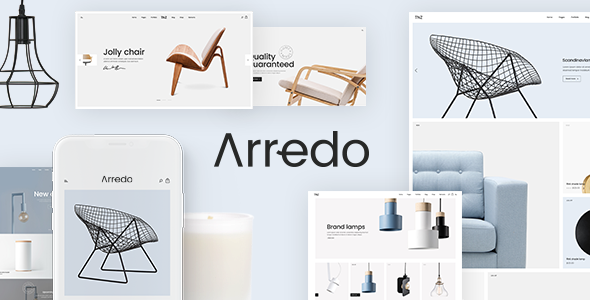
Stuck on your Arredo WordPress theme? Let's fix it.
No endless back-and-forth. Just send us the details and we'll get it done.
No obligation · Replies within 1 hour · Quote within 1 day
Setup · Customization · Bug fixes · WooCommerce integration
About Arredo WP Theme
Arredo is a premium WordPress theme by Select-Themes, built for furniture stores, interior design studios, and home decor retailers. It ships with WooCommerce support, a clean grid-based product layout, and a visual style that keeps the focus on imagery.
The theme uses the Elementor page builder, so building custom pages does not require any coding. It includes multiple homepage demos, product filtering, a wishlist feature, and AJAX cart functionality. Everything is geared toward selling physical products online.
Select-Themes has a solid reputation for clean code and regular updates. Arredo follows that pattern. It is well-documented, translation-ready, and compatible with WPML for multilingual stores. If you run a furniture or decor business and want a theme that looks polished without heavy customisation work, Arredo is a practical starting point.
Get matched with a Arredo developer in under one day
Tell us about your Arredo project. Small fixes, Arredo theme customization, or a full website build, whatever you need, we've got it covered.
We'll connect you to the right Arredo developers, define the scope, and get everything 100% clear.
You'll get one estimate, hire your preferred developer, and start collaborating.
Most WordPress themes look straightforward until you need something specific. Arredo is no different. Whether you need a custom product configurator, a modified checkout flow, or just want everything set up correctly from day one, working with a vetted developer removes the guesswork.
Through Codeable, you get matched with developers who have real WooCommerce and Arredo experience. No job boards, no guessing who you are hiring. Post your project, get a clear estimate, and decide from there. No obligation to proceed.
Pros
- Clean, image-focused layout suited to furniture and home decor products
- Full WooCommerce integration including AJAX cart, wishlist, and product filtering
- Built on Elementor, making page layout changes accessible without custom code
- Multiple pre-built homepage demos to speed up initial setup
- WPML compatible and translation-ready for multilingual store builds
Cons
- Elementor dependency means the theme is less useful if you prefer the block editor
- Heavy demo content can slow down the site if images are not properly optimised after import
- Some advanced WooCommerce features require additional paid plugins not included in the theme
- The default mobile navigation can feel cramped on smaller screens and often needs adjustment
- Select-Themes support response times can be slow during peak periods, which matters for live stores
Who is Arredo for?
Furniture Retail Store
Arredo was built with furniture retail in mind. The large product image layouts, category filtering, and AJAX cart give shoppers a clean browsing experience. Retailers selling sofas, beds, or dining sets benefit from the visual hierarchy the theme applies to product listings and individual product pages.
Interior Design Studio
Interior design studios can use Arredo as both a portfolio and a product showcase. The Elementor-based layouts make it straightforward to build project galleries alongside a curated shop. Studios that sell furniture or accessories directly to clients will find the WooCommerce integration handles that side without friction.
Home Decor Boutique
For smaller home decor boutiques, Arredo provides a polished storefront without requiring a custom build from scratch. The wishlist feature works well for gift-oriented shopping. Product collections and curated lookbook-style pages are achievable with the existing Elementor widgets and minimal extra configuration.
Lighting and Fixtures Shop
Lighting shops have large product catalogues with multiple variants. Arredo handles variable products cleanly and the grid layout scales well to high product counts. Filterable categories by room type or style help customers navigate without needing bespoke search development from the outset.
Kitchen and Bathroom Showroom
Kitchen and bathroom showrooms often need to present products in a lifestyle context rather than a plain product grid. Arredo’s full-width image sections and flexible homepage blocks allow showrooms to build room-set visuals that lead into specific product categories, which suits this buying journey well.

Customizing Arredo
Out of the box, Arredo covers the basics well. But most store owners eventually need something the default setup does not provide. That is where working with an Arredo expert makes a real difference.
Common customisation requests include custom product page layouts, modified category filtering, bespoke homepage sections, brand-specific typography, and integration with third-party tools like CRMs or booking plugins. Some clients also need the WooCommerce checkout restructured or the cart experience adjusted for their specific sales flow.
An experienced Arredo developer knows which parts of the theme to extend through child themes and hooks, and which parts are better handled with targeted CSS or custom PHP. This avoids breaking update compatibility and keeps the site maintainable long term. Getting this right from the start saves significant time and cost down the line.
Recommended plugins for Arredo
Arredo pairs well with several plugins that extend its core functionality. WooCommerce is the obvious foundation. On top of that, many stores add:
- YITH WooCommerce Wishlist for saving products
- WooCommerce Product Bundles for room sets or curated collections
- Rank Math or Yoast SEO for product and category optimisation
- WP Rocket or LiteSpeed Cache to handle image-heavy pages without speed penalties
If your store is growing, it is worth reviewing WordPress performance and SEO setup as separate workstreams. Both have a direct impact on sales.
Not sure which plugins to use? This WordPress plugins directory covers the most popular options with reviews and setup guides.
Arredo common issues
Arredo homepage not displaying correctly after demo import
Demo import issues in Arredo usually come down to missing plugins or an incomplete import process. Check that Elementor, WooCommerce, and any required Select-Themes plugins are all installed and activated before running the import. If the layout still looks broken, open the affected pages in Elementor and regenerate the CSS from the settings panel. A mismatch between the installed Elementor version and the demo content can also cause layout failures.
Arredo product images not loading or showing broken thumbnails
Broken product thumbnails after setup are almost always a regeneration issue. When you import products or switch themes, WordPress does not automatically resize existing images to the new thumbnail dimensions. Install the Regenerate Thumbnails plugin and run it across your media library. If images still do not appear, check that the upload folder has correct file permissions and that your hosting is not blocking image delivery.
Arredo theme slow page speed on WooCommerce product pages
Arredo product pages are image-heavy by design, which creates speed problems if images are not optimised. Start with a compression plugin like ShortPixel or Imagify. Enable lazy loading if it is not already active. On the server side, add a caching layer through WP Rocket or LiteSpeed Cache. If speed is still a problem after those steps, the issue is likely unminified Elementor assets or a slow hosting environment. Our WordPress performance service covers this in full.
Arredo mobile menu not working or not opening on phones
Mobile menu failures in Arredo are usually caused by a JavaScript conflict with another plugin. Open your browser console on mobile or using device emulation in Chrome DevTools and look for JS errors on page load. Deactivate plugins one at a time to isolate the conflict. If there is no conflict, check whether the mobile breakpoint in the Elementor header settings matches your actual device width. Custom CSS overrides can also accidentally hide the hamburger menu trigger.
Arredo FAQ
Select-Themes generally keeps Arredo updated alongside major WooCommerce releases. Before updating WooCommerce on a live store, check the theme changelog for confirmed compatibility. It is always safer to test updates on a staging environment first. If you are several versions behind, a developer can audit compatibility before you update.
Arredo is built around Elementor. The pre-built demo layouts and most of the customisation options depend on it. You can technically use the theme without Elementor, but you lose the visual page builder entirely and are left with a basic block editor experience that does not match the demo designs.
Create a new folder in your themes directory named arredo-child. Add a style.css file with the correct template header referencing the parent theme, and a functions.php file that enqueues the parent stylesheet. Activate the child theme from the dashboard. All custom CSS and PHP changes go into the child theme, not the parent.
Arredo itself does not handle currency switching. Multi-currency support comes from WooCommerce plugins such as WPML with WooCommerce Multilingual, or Aelia Currency Switcher. These work alongside Arredo without theme modifications. Setup does require some configuration to ensure prices display correctly across the site.
Yes, migrating an existing WooCommerce store to Arredo is possible. Products, orders, and customer data transfer independently of the theme. The main work is rebuilding your page layouts in Elementor to match the Arredo style. For a smooth transition, our WordPress migration service can handle both the data move and the front-end rebuild.
Hire an Arredo Developer
Need help setting up Arredo, customising it for your store, or fixing something that is not working as expected? A vetted Arredo expert can handle it properly without introducing new problems.
Post your project through our free estimate form and get matched with a qualified developer within 24 hours. The estimate is free and there is no obligation to hire. You stay in control throughout.
You'll need a free Codeable account so developers can ask questions and send their quotes.