BLACKMAG WordPress Theme
by envirra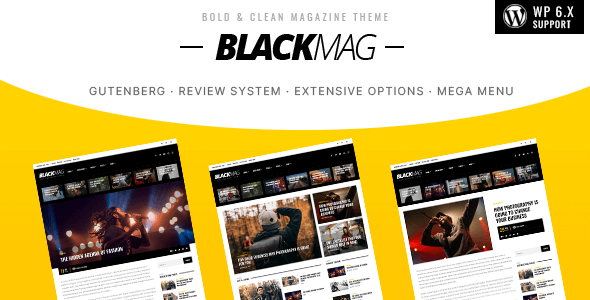
Stuck on your BLACKMAG WordPress theme? Let's fix it.
No endless back-and-forth. Just send us the details and we'll get it done.
No obligation · Replies within 1 hour · Quote within 1 day
Setup · Customization · Bug fixes · WooCommerce integration
About BLACKMAG WP Theme
BLACKMAG is a magazine-style WordPress theme built by envirra. It targets news sites, online magazines, and content-heavy blogs that need a clean, structured layout without sacrificing visual impact. The theme ships with multiple homepage layouts, a mega menu, and a custom widget system that makes it easy to organize large volumes of content into readable sections.
It supports popular page builders and integrates with WooCommerce for shops that want to sell alongside editorial content. Designed with readability in mind, BLACKMAG uses a clear typographic hierarchy and grid-based article listings. It loads reasonably fast out of the box and handles categories, tags, and archive pages well. If you run a high-traffic publication or want to launch a professional online magazine, BLACKMAG gives you a solid structural foundation to build on.
Get matched with a BLACKMAG developer in under one day
Tell us about your BLACKMAG project. Small fixes, BLACKMAG theme customization, or a full website build, whatever you need, we've got it covered.
We'll connect you to the right BLACKMAG developers, define the scope, and get everything 100% clear.
You'll get one estimate, hire your preferred developer, and start collaborating.
BLACKMAG has enough built-in flexibility for basic setups, but publication sites have specific demands. Custom ad zones, unique category templates, breaking news tickers, and high-traffic performance tuning all go beyond what the theme handles out of the box.
FoxyConcept works through Codeable, a vetted network of WordPress specialists. Every developer on the platform has been screened for quality. You post your project, get matched with a BLACKMAG developer within 24 hours, and receive a free estimate before committing to anything. No risk, no guesswork.
Pros
- Multiple pre-built homepage layouts make it fast to launch a magazine site without starting from scratch
- Built-in mega menu handles large navigation structures well, useful for sites with many categories
- Custom widget areas let you place curated content blocks, ads, and social feeds in precise positions
- WooCommerce compatibility means you can sell products or subscriptions directly from your magazine site
- Active theme updates from envirra keep the codebase compatible with current WordPress versions
Cons
- The theme options panel is large and can feel overwhelming for non-technical users setting it up for the first time
- Some layout customizations require CSS knowledge since the Customizer controls don't cover every design detail
- Page builder compatibility is functional but inconsistent, some blocks render differently across Elementor and the default editor
- Mobile menu behavior on deeply nested categories can be clunky without custom adjustments
- Default image sizes are fixed to the theme's grid, which can cause cropping issues if your media library uses non-standard dimensions
Who is BLACKMAG for?
Online News Magazine
BLACKMAG handles breaking news workflows well. Its post formats, category-based content blocks, and featured article slots give editors direct control over what appears on the homepage. Pair it with a caching layer and the layout holds up under high traffic spikes without major configuration work.
Technology Blog Network
Tech publications need clean typography, code formatting, and room for long-form analysis alongside quick news items. BLACKMAG’s grid system separates content types clearly. Custom sidebar widgets can surface trending posts, review scores, or product comparisons without cluttering the main content column.
Entertainment and Pop Culture Site
Entertainment sites live on images and video. BLACKMAG’s visual-first article cards and full-width featured sections highlight media content effectively. The theme supports video post formats natively, and its category pages can be styled to feel distinct per vertical, movies, music, TV, without needing separate themes.
Niche Lifestyle Publication
A focused lifestyle publication benefits from BLACKMAG’s ability to separate content by category while keeping a unified look. Whether it’s food, travel, fashion, or wellness, the theme’s layout options let you build distinct section pages that still feel like one coherent magazine brand.
Sports News and Commentary Site
Sports content moves fast and readers scan headlines quickly. BLACKMAG’s list-style article blocks and category filters let editors publish rapidly and keep the homepage current. The mega menu handles multiple sports or leagues cleanly, and the ad placement options suit the monetization model most sports sites rely on.

Customizing BLACKMAG
BLACKMAG gives you a lot of configuration options through the WordPress Customizer, but getting the theme to match a specific brand identity often takes more than toggling built-in settings. Custom color schemes, font stacks, ad placement adjustments, and layout modifications usually require direct CSS or PHP work.
A BLACKMAG expert can handle things like building custom post templates, adjusting the mega menu structure, creating unique category page layouts, or integrating third-party plugins without breaking the theme’s existing styling. If you want to add custom widgets, change the sidebar behavior, or restructure the homepage grid entirely, working with a developer who knows the theme saves significant time. FoxyConcept connects you with specialists who have real BLACKMAG experience, not generalists learning the theme on your project.
Recommended plugins for BLACKMAG
BLACKMAG pairs well with a focused set of plugins. For advertising, AdSanity or Advanced Ads fit cleanly into the theme’s widget areas. For social sharing, Social Warfare integrates without layout conflicts. WooCommerce works for adding a shop section to your magazine.
On the performance side, caching plugins like WP Rocket and image optimization tools help manage load times on content-heavy pages. For SEO, Rank Math or Yoast give you full control over meta and schema. If you need more granular WordPress performance improvements or want to improve your rankings with WordPress SEO work, both are areas where a developer can make a real difference beyond what plugins handle automatically.
Not sure which plugins to use? This WordPress plugins directory covers the most popular options with reviews and setup guides.
BLACKMAG common issues
BLACKMAG homepage layout not displaying correctly after update
This usually happens when a theme update changes widget area names or template structure. Go to Appearance > Widgets and check whether your homepage content blocks are still assigned to the correct areas. If they’ve been reset, reassign them. If the layout is still broken, deactivate all plugins temporarily to check for conflicts. A WordPress bug fixing service can trace the exact breakpoint if the issue persists after those steps.
BLACKMAG mega menu not working on mobile
Mobile menu issues in BLACKMAG often come from JavaScript conflicts with other plugins, particularly slider or gallery plugins that load their own scripts. Check your browser console for JS errors and identify which plugin triggers them. Disabling scripts selectively usually isolates the problem. If the issue is in the theme’s own mobile menu script, a CSS or JS override in your child theme can fix the toggle behavior without touching core theme files.
BLACKMAG featured image cropping wrong size
BLACKMAG registers specific image sizes for its grid layouts. If your uploaded images were sized before these dimensions were registered, WordPress won’t automatically regenerate them. Install the Regenerate Thumbnails plugin and run it across your media library. Going forward, upload images at the dimensions the theme expects. Check the theme documentation for exact sizes, they’re usually listed under the image settings section.
BLACKMAG slow loading on article pages with ads
Ad-heavy magazine pages slow down because ad scripts block rendering. Move ad scripts to load asynchronously where possible, and use a caching plugin like WP Rocket to serve static versions of your article pages. Lazy-loading images and deferring non-critical JavaScript also reduce initial load time. If ads are injected via widgets, check whether the widget scripts are loading in the header when they could load in the footer instead.
BLACKMAG FAQ
BLACKMAG has basic Elementor compatibility, but it wasn’t built specifically around the page builder. You can use Elementor for individual pages, but the theme’s native homepage layouts and magazine-specific widgets are separate from the Elementor editor. For core magazine functionality, use the theme’s own tools and reserve Elementor for static pages like About or Contact.
Yes, BLACKMAG includes WooCommerce support. You can add a shop section to your magazine without a separate theme or major styling conflicts. The WooCommerce pages inherit the theme’s base styling and sit within the same layout structure. Some styling adjustments may be needed to match your shop pages to custom category or article page designs.
BLACKMAG works well for multi-author publications. It displays author bylines, supports author archive pages, and the post management system handles contributions from multiple editors cleanly. Pair it with a user role plugin like PublishPress if you need more granular control over who can publish, edit, or submit content across different sections of the site.
The mega menu is configured through Appearance > Menus. Add your top-level items, then enable the mega menu option for specific items through the menu item settings panel. You can assign categories or custom links to columns within each mega menu section. The theme documentation walks through the exact steps, and the setup is straightforward once you locate the mega menu toggle in the menu item expanded view.
BLACKMAG is built with ad placements in mind. It includes dedicated widget areas and content zones that map well to standard AdSense banner sizes. The sidebar, in-content, and header zones all support ad widgets without custom coding. For heavier ad setups with multiple units per page, use Advanced Ads or AdSanity to manage placements and control which ads appear on which post types.
Hire a BLACKMAG Developer
Whether you need a layout built from scratch, a bug fixed, or a full magazine site launched, FoxyConcept can match you with a BLACKMAG developer who has done it before. Work is handled through Codeable, so quality is guaranteed and you only pay when you’re satisfied.
Get a free estimate today. No obligation, no upfront cost. Describe your project and get matched with the right developer within 24 hours.
You'll need a free Codeable account so developers can ask questions and send their quotes.