BIM WordPress Theme
by ThemesCamp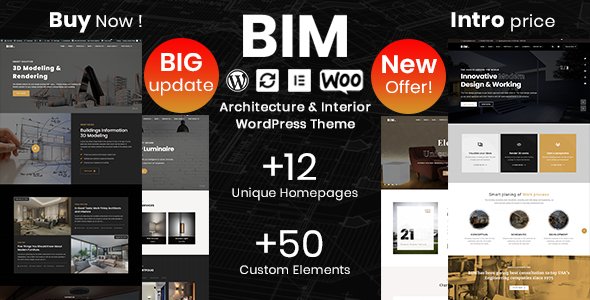
Stuck on your BIM WordPress theme? Let's fix it.
No endless back-and-forth. Just send us the details and we'll get it done.
No obligation · Replies within 1 hour · Quote within 1 day
Setup · Customization · Bug fixes · WooCommerce integration
About BIM WP Theme
BIM is a multipurpose WordPress theme built by ThemesCamp. It ships with a drag-and-drop page builder, multiple pre-built demo layouts, and a header builder that gives you control over navigation structure without touching code. The theme targets businesses, agencies, and portfolio sites that need a polished look fast.
Under the hood, BIM supports WooCommerce, custom widgets, and theme options managed through a Redux-based panel. It is translation-ready and comes with Google Fonts integration. The demo importer makes it possible to replicate any of the included layouts in a single click, cutting setup time considerably. If you need a theme that covers common use cases without requiring a specialist for initial setup, BIM is a reasonable starting point.
Get matched with a BIM developer in under one day
Tell us about your BIM project. Small fixes, BIM theme customization, or a full website build, whatever you need, we've got it covered.
We'll connect you to the right BIM developers, define the scope, and get everything 100% clear.
You'll get one estimate, hire your preferred developer, and start collaborating.
BIM is flexible, but flexibility means decisions. The wrong combination of plugins, custom CSS patches, or layout overrides can create maintenance headaches quickly. Codeable is a vetted marketplace of WordPress specialists. Every developer on the platform has passed a technical screening. When you post a project, you get estimates from developers who have worked with themes like BIM before, not generalists guessing their way through your codebase.
Pros
- One-click demo importer covers multiple layout styles including business, portfolio, and agency
- Built-in header builder with multiple layout options controlled from the theme panel
- Redux framework options panel gives granular control over colours, fonts, and layout widths
- WooCommerce ready with product page and shop templates included
- Translation-ready with .po/.mo file support for multilingual builds
Cons
- Redux options panel can feel cluttered once you load multiple demo configurations
- No built-in dark mode support, requires custom CSS to implement properly
- Some demo sections rely on bundled plugins that are not updated as frequently as the theme itself
- Documentation is limited, making advanced customisation harder without developer experience
- Page builder dependency means switching builders later requires rebuilding most templates
Who is BIM for?
Creative Agency Website
BIM includes agency-focused demo layouts with team sections, service grids, and case study templates. A developer can extend these with custom post types for projects and clients, giving an agency a structured content system rather than static pages that need manual updating every time work is added.
Freelance Portfolio
The portfolio layouts in BIM support filterable grids and full-width project pages. For freelancers, a BIM expert can add a contact form with project inquiry fields, a PDF download for rates, and a testimonials section pulled dynamically from a custom post type to keep the site easy to manage long-term.
Small Business Services
BIM suits local service businesses that need a clean homepage, a services listing, and a contact page. A developer can integrate Google Maps, build a booking or quote request form, and configure local schema markup so the site has a better chance of appearing in local search results for relevant queries.
WooCommerce Product Catalogue
With WooCommerce support built in, BIM can handle product catalogues for businesses selling physical or digital items. A BIM developer can customise the shop archive layout, add product filter widgets, and configure payment gateways so the store matches your brand without the default WooCommerce look.
Corporate Company Profile
BIM includes corporate demo layouts with sections for company history, team profiles, and service breakdowns. For a company profile site, a developer can add a news or press release section using WordPress custom post types, keeping the content structured and easy for non-technical staff to update without breaking the layout.

Customizing BIM
Out of the box, BIM gives you colour controls, typography settings, and layout options through its theme panel. Most changes are straightforward. However, deeper customisation, like modifying the header builder logic, building custom post type templates, or integrating third-party APIs, requires PHP and CSS knowledge that goes beyond what the options panel supports.
A BIM expert can restructure page templates, add custom fields using ACF, and extend the Redux options panel to match your exact requirements. If you need child theme development, custom shortcodes, or WooCommerce modifications, working with someone who knows BIM and ThemesCamp’s code patterns saves you hours of trial and error. FoxyConcept connects you with developers who have hands-on experience with this theme.
Recommended plugins for BIM
BIM works with most major WordPress plugins. WooCommerce integration is built in, making it usable for product catalogues and simple stores. Contact Form 7 and WPForms both load without conflicts. For SEO, the theme outputs clean markup that works well with Yoast or Rank Math. See our WordPress SEO service if you need structured optimisation beyond plugin defaults.
On performance, BIM’s asset loading can be optimised with caching plugins and image compression. If page speed is a priority, our WordPress performance service covers full auditing and optimisation specific to your stack.
Not sure which plugins to use? This WordPress plugins directory covers the most popular options with reviews and setup guides.
BIM common issues
BIM theme not loading demo content after import
Demo import failures in BIM are usually caused by PHP memory limits or upload size restrictions on the server. Check php.ini for memory_limit, upload_max_filesize, and max_execution_time. Increasing these values to at least 256M, 64M, and 300 seconds respectively resolves most cases. If the import still fails, try importing the XML file manually via WordPress Tools rather than using the one-click importer. Our bug fixing service can handle this if you are stuck.
BIM header layout broken after plugin update
BIM’s header builder stores settings in the Redux options panel, and plugin updates that modify scripts or styles can break the saved header configuration. Clear your caching plugin after any update. If the layout is still broken, check the browser console for JavaScript errors, which often point to a conflict with a specific plugin. Deactivating plugins one by one identifies the conflict. Rebuilding the header in a child theme prevents future plugin updates from overwriting your changes.
BIM theme slow page load speed
BIM loads several scripts and stylesheets by default, some tied to demo content you may not be using. Use a plugin like Asset CleanUp to disable unused scripts per page. Combine this with image optimisation, a caching plugin, and a CDN for static assets. If Core Web Vitals are a concern, our WordPress performance service includes a full audit and fixes tailored to your specific setup rather than generic recommendations.
BIM WooCommerce shop page not displaying correctly
WooCommerce display issues in BIM are often caused by a mismatch between WooCommerce template files and the theme’s custom shop templates. When WooCommerce updates its template structure, themes that override those files need updating too. Check WooCommerce status under WooCommerce > Status > System Status for outdated template warnings. Updating the overridden templates in BIM’s WooCommerce folder to match the current WooCommerce version fixes most layout problems. A developer can handle this without breaking your existing customisations.
BIM FAQ
ThemesCamp releases updates for BIM, but update frequency is not always consistent with major WordPress releases. Before updating WordPress core, check the ThemesCamp changelog or support forums for compatibility notes. Running updates on a staging environment first is the safest approach. If you need ongoing compatibility management, our WordPress maintenance service covers updates and testing.
BIM is built around its bundled page builder, and most demo layouts depend on it. Switching to Gutenberg or another builder means rebuilding your page layouts from scratch. It is possible, but you lose the demo structure entirely. If you want to move away from the bundled builder, a developer can migrate your content to Gutenberg blocks while preserving the visual design.
Create a folder in wp-content/themes/ named bim-child. Add a style.css with the correct theme header referencing BIM as the template, then add a functions.php that enqueues the parent stylesheet. Activate the child theme from the WordPress admin. All your customisations should go in the child theme to survive updates to the parent.
Yes, BIM includes WooCommerce support with custom shop and product templates. Basic store functionality works out of the box. For more complex setups like variable products with custom fields, subscription products, or checkout customisation, a BIM developer can extend the WooCommerce integration beyond what the default templates provide.
Migrating an existing site to BIM means rebuilding your page layouts using BIM’s page builder and theme options. Content like posts, pages, and media transfers easily using standard WordPress export tools. The design work is the time-consuming part. Our WordPress migration service can handle the technical side while a BIM developer recreates your existing layouts in the new theme.
Hire a BIM WordPress Developer
Whether you need a full site build on BIM, a specific feature added, or a problem fixed, FoxyConcept matches you with a developer who knows the theme. Projects are handled through Codeable, so you get a free estimate before any commitment. No contracts, no risk. Get your free estimate today and describe exactly what you need. A qualified BIM developer will respond within 24 hours.
You'll need a free Codeable account so developers can ask questions and send their quotes.