The Mounty WordPress Theme
by AncoraThemes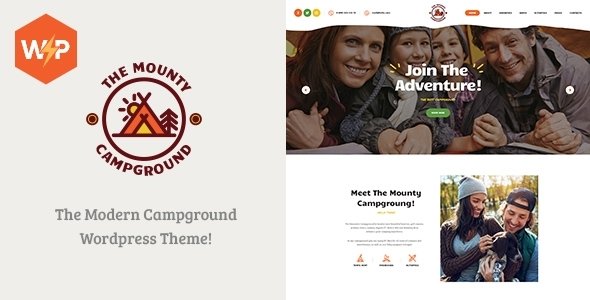
Stuck on your The Mounty WordPress theme? Let's fix it.
No endless back-and-forth. Just send us the details and we'll get it done.
No obligation · Replies within 1 hour · Quote within 1 day
Setup · Customization · Bug fixes · WooCommerce integration
About The Mounty WP Theme
The Mounty is a WordPress theme built by AncoraThemes, designed primarily for outdoor, adventure, and nature-focused websites. It ships with a clean full-width layout, strong typography, and a visual style that suits hiking guides, travel blogs, mountain resort sites, and outdoor gear shops.
AncoraThemes built The Mounty on a solid foundation — it integrates with WooCommerce, supports Elementor for page building, and includes demo content you can import in one click. The theme is translation-ready and WPML compatible, which matters if you’re running a multilingual outdoor brand or tourism site.
Out of the box, The Mounty gives you header and footer options, custom widgets, and a layout that emphasises large imagery. It’s a focused theme. It does the outdoor/adventure niche well without trying to be everything to everyone.
Get matched with a The Mounty developer in under one day
Tell us about your The Mounty project. Small fixes, The Mounty theme customization, or a full website build, whatever you need, we've got it covered.
We'll connect you to the right The Mounty developers, define the scope, and get everything 100% clear.
You'll get one estimate, hire your preferred developer, and start collaborating.
The Mounty is straightforward to launch but harder to customise precisely without the right WordPress knowledge. AncoraThemes provides documentation, but bespoke work — custom layouts, WooCommerce configuration, booking integrations, or performance tuning — needs a developer who knows what they’re doing.
FoxyConcept works through Codeable, a vetted network of WordPress specialists. Every developer on the platform is screened and reviewed. You post your project, get a clear estimate, and only proceed if it makes sense. No risk, no obligation.
Pros
- Purpose-built for outdoor and adventure niches — the design language fits without forcing it
- One-click demo import makes initial setup fast and gives a solid starting point
- Full WooCommerce compatibility for selling gear, apparel, or outdoor experiences
- Elementor support gives non-developers meaningful layout control
- WPML compatible, which matters for multilingual travel and tourism sites
Cons
- Limited built-in booking functionality — third-party plugins are required for tour or activity reservations
- Customisation outside the Customizer requires PHP knowledge or a developer
- Demo content is niche-specific — adapting it to non-outdoor use cases takes extra work
- No built-in mega menu; complex navigation structures need a plugin or custom code
- Large hero images load slowly without proper performance optimisation from the start
Who is The Mounty for?
Hiking and Trail Guide Website
The Mounty’s full-width imagery and clean post layouts make it a strong fit for trail guides and hiking information sites. You can organise trails by difficulty, region, or season using custom categories. The typography is readable for long-form route descriptions, and the layout prioritises photography — which is exactly what a trail guide site needs to draw visitors in.
Outdoor Gear WooCommerce Store
WooCommerce integration is built in, so setting up a store for hiking boots, climbing gear, or outdoor apparel is straightforward. Product pages work cleanly with the theme’s visual style. A developer can extend this with custom product filters, gear comparison features, or a wholesale pricing layer if you’re selling to clubs or retailers as well as individual customers.
Mountain Resort or Lodge
Mountain resorts and lodges need strong visual presentation and clear booking pathways. The Mounty handles the visual side well with its large image support and nature-focused aesthetic. Pair it with a booking plugin and a developer who can integrate availability calendars and room or package pages, and it becomes a solid base for a direct-booking resort website.
Adventure Travel Blog
Adventure travel bloggers get a theme that matches their content visually without needing heavy customisation. The blog layouts support featured images well, and the structure suits long-form storytelling with embedded maps or photo galleries. Social sharing and SEO plugin compatibility make it easy to build an audience around location-based adventure content.
Tour and Activity Booking Site
With the right booking plugin added — WP Travel Engine works well here — The Mounty becomes a viable base for a tour operator or activity provider. A developer can set up individual tour pages, itinerary sections, pricing tables, and enquiry forms that fit the theme’s layout. This use case needs custom development work but the foundation is appropriate for the niche.

Customizing The Mounty
The Mounty works with the WordPress Customizer, so most surface-level changes — colours, fonts, logo, header layout — are handled there without touching code. Elementor compatibility means you can build or rebuild pages visually, which covers most layout customisation needs.
Where things get more involved is custom functionality. If you need a booking system, a custom trail map section, a WooCommerce setup tailored to outdoor gear, or specific post layouts for a guide blog, you’ll want a dedicated The Mounty expert who knows the theme’s structure and won’t introduce conflicts.
Child theme development is strongly recommended before any code-level changes. A The Mounty expert can set this up properly, extend the theme’s template files, and add custom CSS or PHP without risking your changes being wiped out on the next update.
Recommended plugins for The Mounty
The Mounty pairs well with several plugins that extend its core functionality. WooCommerce turns it into a working outdoor gear or merchandise store. Elementor Pro unlocks more layout control and dynamic content options. WPML handles multilingual setup if you’re targeting multiple markets.
For a travel or adventure site, plugins like WP Travel Engine or Booking Calendar integrate cleanly with the theme’s structure. If site speed is a concern, a caching plugin and image optimisation are worth adding early — WordPress performance work makes a real difference on image-heavy outdoor sites.
SEO plugins like Rank Math or Yoast slot in without conflict, and proper WordPress SEO setup helps adventure and travel content rank for location-based searches.
Not sure which plugins to use? This WordPress plugins directory covers the most popular options with reviews and setup guides.
The Mounty common issues
The Mounty theme header not displaying correctly after update
Header display issues after an update usually point to a CSS conflict between the theme and a plugin, or custom CSS that broke when the theme’s markup changed. Open your browser’s inspector tool and check which styles are overriding the header. If you made changes directly in the theme files rather than a child theme, those changes are gone. A WordPress bug fix can identify the conflict and rebuild the header correctly in a child theme so future updates don’t cause the same problem.
The Mounty WooCommerce pages showing wrong layout
WooCommerce layout problems in The Mounty often happen when WooCommerce updates its template files and the theme’s built-in WooCommerce templates fall out of sync. Go to WooCommerce > Status > System Status and check for outdated templates. If The Mounty’s WooCommerce templates are flagged, they need to be updated manually. This is fiddly work — a developer can update the templates correctly without breaking your existing product page styling.
The Mounty demo import not working or incomplete
Failed or partial demo imports are usually caused by server memory limits, PHP timeouts, or a missing required plugin. Before importing, make sure all required plugins (Elementor, any AncoraThemes companion plugin) are active. Increase your PHP memory limit to at least 256MB if you have access. If the import still fails, import via the WordPress importer manually using the XML file. A developer can also run the import directly via WP-CLI, which is more reliable on restricted hosting environments.
The Mounty theme slow loading on mobile
Slow mobile performance on The Mounty is almost always an image problem. The theme leans on large hero images, and without proper compression and lazy loading, mobile load times suffer. Install an image optimisation plugin, enable lazy loading, and serve scaled images rather than full desktop sizes on mobile. Beyond images, check for render-blocking scripts and unneeded plugins. For a thorough fix, WordPress performance optimisation covers caching, asset minification, and core web vitals improvements that make a measurable difference.
The Mounty FAQ
Yes. The Mounty includes built-in WooCommerce support, so product pages, cart, and checkout render correctly within the theme’s layout. It suits outdoor gear, apparel, and equipment stores well. For more advanced store requirements — custom filters, variable product displays, or wholesale features — you’ll want a developer to extend the WooCommerce setup beyond what the theme provides out of the box.
Yes. The Mounty is compatible with Elementor, including Elementor Pro. You can use the page builder to create and edit pages visually. Some theme-specific sections may still be controlled through the Customizer rather than Elementor, but for building custom page layouts and landing pages, Elementor works cleanly alongside The Mounty without conflicts in most configurations.
The Mounty doesn’t include booking functionality by default. For tour or accommodation booking, you’ll need a dedicated plugin — WP Travel Engine, Booking Calendar, or Amelia are commonly used options. The theme’s layout can accommodate booking forms and availability pages well, but getting them to match the theme’s styling and work reliably usually requires some development work.
Use a child theme. Any customisations made directly in The Mounty’s theme files will be overwritten when the theme updates. A child theme keeps your changes separate, so updates to the parent theme don’t affect your custom CSS, template overrides, or PHP modifications. If you haven’t set up a child theme yet, do it before the next update — a developer can migrate your existing changes into one safely.
Yes, The Mounty is built to be responsive across mobile, tablet, and desktop. The layouts adapt to smaller screens, and the Customizer includes some controls for responsive behaviour. That said, responsiveness doesn’t automatically mean fast on mobile. Large images and unoptimised assets can hurt mobile performance significantly, so responsive design and mobile performance optimisation are two separate things worth addressing.
Hire a The Mounty Developer
Need custom work done on The Mounty? Whether it’s a WooCommerce setup, a booking integration, a child theme build, or performance fixes, a specialist gets it done right the first time.
Post your project and get a free estimate within 24 hours. No commitment required. Get your free estimate here and describe exactly what you need — a The Mounty developer will come back to you with a clear plan and price.
You'll need a free Codeable account so developers can ask questions and send their quotes.