Recipes WordPress Theme
by myTheme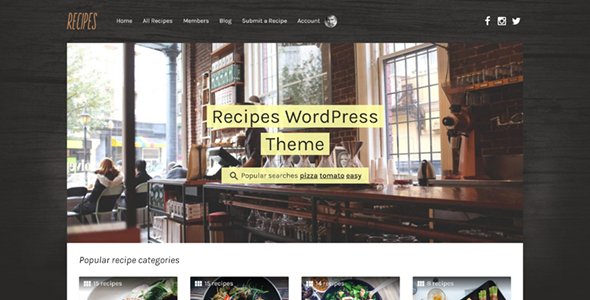
Stuck on your Recipes WordPress theme? Let's fix it.
No endless back-and-forth. Just send us the details and we'll get it done.
No obligation · Replies within 1 hour · Quote within 1 day
Setup · Customization · Bug fixes · WooCommerce integration
About Recipes WP Theme
Recipes by myTheme is a WordPress theme built specifically for food bloggers, culinary creators, and recipe-based websites. It ships with a structured recipe card layout, ingredient lists, step-by-step instructions, and print-friendly formatting out of the box.
The theme supports Schema.org recipe markup, which helps search engines display rich results like star ratings, cook times, and calorie counts directly in Google. It pairs well with plugins like WP Recipe Maker and Tasty Recipes.
Navigation is built around categories such as cuisine type, dietary preference, and meal occasion. The design keeps visual focus on food photography, with full-width featured images and clean typography that does not compete with your content. It is a solid starting point for any food-focused site.
Get matched with a Recipes developer in under one day
Tell us about your Recipes project. Small fixes, Recipes theme customization, or a full website build, whatever you need, we've got it covered.
We'll connect you to the right Recipes developers, define the scope, and get everything 100% clear.
You'll get one estimate, hire your preferred developer, and start collaborating.
Recipes is a capable theme, but getting it to perform exactly how you want takes real WordPress knowledge. A vetted developer through Codeable can handle everything from custom recipe filters to full e-commerce integration. Every expert on the platform is screened, so you are not guessing about quality.
Whether you need a single fix or a full build, working with a specialist saves time and avoids the trial-and-error that comes with doing it yourself. Check our WordPress development services to see what is possible.
Pros
- Includes built-in Schema.org recipe markup for Google rich results
- Recipe card layout is print-friendly with a single click
- Supports filtering by diet type, cuisine, and meal category
- Full-width food photography layout keeps visual focus on images
- Compatible with major recipe plugins like WP Recipe Maker and Tasty Recipes
Cons
- Customising the recipe card design requires PHP and CSS knowledge
- Built-in nutrition label support is limited without a third-party plugin
- No native meal planner or user collection feature included
- Mobile layout for long ingredient lists can feel cramped on smaller screens
- Theme updates occasionally break custom CSS added outside a child theme
Who is Recipes for?
Personal Food Blog
Recipes is a natural fit for personal food bloggers who publish regularly and want their content to rank in Google. The built-in schema markup means your recipes can show star ratings, cook times, and calorie data directly in search results, driving more clicks without extra SEO plugins.
Professional Chef Portfolio
Chefs building a professional presence online can use Recipes to showcase their menus, techniques, and signature dishes. The full-width image layouts and clean typography make food photography the main event. A developer can add a booking form or press kit section to extend the theme beyond recipes.
Dietary Niche Site
Sites focused on keto, vegan, gluten-free, or other dietary niches benefit from Recipes’ filtering system. Visitors can browse by diet type immediately. A developer can refine these filters further, add custom taxonomy pages, and improve the category structure to match a tightly focused content strategy.
Recipe Membership Site
Recipes can be extended with MemberPress or Restrict Content Pro to lock premium recipes behind a paywall. This works well for cooking course creators and food educators who want to monetise their archive. A developer handles the integration so gating and checkout work without friction for the user.
Food Brand Content Hub
Food brands running a recipe content hub alongside their product pages can use Recipes to publish structured, on-brand content that supports SEO and keeps visitors engaged. The theme can be styled to match existing brand guidelines, and WooCommerce can be added to sell products from the same install.

Customizing Recipes
Out of the box, Recipes gives you a functional food site. But most users need more than the defaults. A Recipes expert can tailor the theme to match your brand, content structure, and audience without you touching a line of code.
Common customization work includes building a custom recipe index with filtering by diet type, cuisine, or cook time, adjusting the recipe card layout to match your design preferences, and setting up a meal planner or recipe collection feature for logged-in users.
A developer can also extend the theme’s color palette, typography, and header layout, configure WooCommerce for selling cookbooks or meal plans, and optimise the mobile experience for readers browsing in the kitchen. Recipes customization is fast when handled by someone who already knows the theme’s structure.
Recommended plugins for Recipes
Recipes works well with a focused set of plugins. WP Recipe Maker adds advanced recipe card features, nutrition labels, and user ratings. Tasty Recipes is another strong option for structured recipe data.
For performance, image-heavy food sites benefit from lazy loading, a CDN, and proper caching. See our WordPress performance service for setup help.
If organic traffic matters to you, structured data and on-page SEO need attention. Our WordPress SEO service covers schema audits and technical fixes specific to recipe sites. WooCommerce, Mailchimp, and membership plugins like MemberPress can also be integrated to monetise your content.
Not sure which plugins to use? This WordPress plugins directory covers the most popular options with reviews and setup guides.
Recipes common issues
Recipes theme recipe cards not showing in Google search results
If your recipe cards are not appearing as rich results in Google, the most common cause is missing or invalid schema markup. Use Google’s Rich Results Test to check what data Google can read. Ensure you are using a supported recipe plugin like WP Recipe Maker and that all required fields, including name, image, and instructions, are filled in. If schema is present but still not showing, a developer can audit and fix the structured data output. See our WordPress bug fixing service for help.
Recipes theme images loading slowly on mobile
Slow image loading on mobile is usually caused by large uncompressed files, missing lazy loading, or no CDN in place. Start by running the site through PageSpeed Insights to identify the specific images causing delays. Install a plugin like ShortPixel or Imagify to compress existing uploads. Enable lazy loading on images within the theme settings or via a performance plugin. For a full audit and fix, our WordPress performance service covers image optimisation as part of a broader speed review.
Recipes theme custom fonts not applying to recipe card headings
Custom fonts failing to apply to recipe card headings usually means the CSS selector is targeting the wrong element. Recipe card HTML is often generated by a plugin like WP Recipe Maker, not the theme itself, so theme typography settings do not reach it. You need to inspect the card output in your browser developer tools, identify the exact class or element, and write a CSS override. Add this in your child theme’s stylesheet or the Additional CSS panel. A developer can do this quickly if you are not comfortable with CSS selectors.
Recipes theme layout broken after WordPress update
A broken layout after a WordPress update is typically caused by a conflict between the theme and an updated plugin or block editor change. First, clear your cache. Then deactivate plugins one at a time to identify the conflict. If the layout break is in the Gutenberg editor, check whether the theme has released a compatibility update. Always run updates on a staging site first to catch issues before they reach live visitors. If you need a fast fix, our WordPress bug fixing service can diagnose and resolve the conflict.
Recipes FAQ
Recipes includes Schema.org markup which helps Google display rich results for your recipe posts. That gives it a head start over generic themes. However, schema alone is not enough. You still need fast load times, proper internal linking, and well-written content. Pairing the theme with a dedicated recipe plugin and an SEO plugin like Yoast or Rank Math covers the technical side properly.
Yes. Recipes is compatible with WooCommerce. You can sell digital products like PDF cookbooks, physical items, or access to premium recipe content from the same WordPress install. The theme’s default WooCommerce styling may need some adjustments to match your design, but a developer can align the shop pages with the rest of the site without rebuilding anything.
Recipes supports the Gutenberg block editor. You can write and edit content using standard blocks. However, the recipe card itself is best managed through a dedicated recipe plugin rather than a custom Gutenberg block, as plugins handle schema output and print formatting more reliably. Check the myTheme documentation for the current list of supported blocks and any known editor conflicts.
The Recipes theme does not include a nutrition label feature by default. You need a plugin to handle this. WP Recipe Maker Pro and Nutritionix both offer nutrition fact panels that output properly formatted data. Once installed and configured, the nutrition block appears within your recipe card automatically. Make sure the plugin you choose also outputs the relevant schema fields for calories and nutrients.
Yes, migrating an existing recipe blog to the Recipes theme is straightforward if your current recipes are stored using a standard plugin like WP Recipe Maker. The recipe data transfers with the rest of your content. Switching themes does not delete posts. Visual and layout changes will need review after the switch. For a full migration with minimal downtime, our WordPress migration service can handle the process end to end.
Hire a Recipes WordPress Developer
Need help with your Recipes theme? Whether you are starting from scratch, fixing a layout issue, or adding new functionality, a dedicated Recipes developer can get it done properly. Post your project and receive a free estimate within 24 hours, with no obligation to hire.
Get a free estimate and describe what you need. A matched developer will review your project and come back with a clear scope and price before any work begins.
You'll need a free Codeable account so developers can ask questions and send their quotes.