Tempus WordPress Theme
by mallini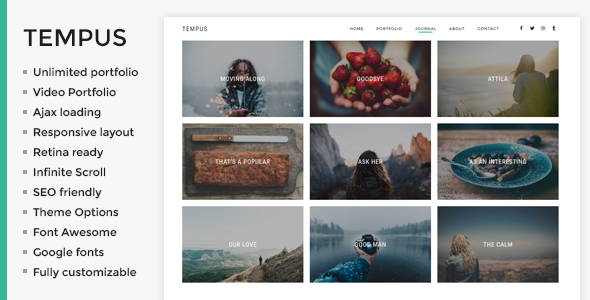
Stuck on your Tempus WordPress theme? Let's fix it.
No endless back-and-forth. Just send us the details and we'll get it done.
No obligation · Replies within 1 hour · Quote within 1 day
Setup · Customization · Bug fixes · WooCommerce integration
About Tempus WP Theme
Tempus is a WordPress theme by mallini designed with time-based content in mind. It suits blogs, magazines, and editorial sites where chronological structure matters. The theme ships with a clean typographic layout, multiple post format support, and a minimal admin experience that keeps writers focused on content rather than settings.
Built on standard WordPress template hierarchy, Tempus is straightforward to extend without fighting against heavy framework overhead. It uses native WordPress features like widgets, menus, and the Customizer rather than bundling a proprietary page builder. That makes it lighter than many competing themes and easier for developers to modify without unintended side effects.
If you run a time-sensitive publication, a personal journal, or a content-heavy archive site, Tempus provides a clean starting point without the bloat.
Get matched with a Tempus developer in under one day
Tell us about your Tempus project. Small fixes, Tempus theme customization, or a full website build, whatever you need, we've got it covered.
We'll connect you to the right Tempus developers, define the scope, and get everything 100% clear.
You'll get one estimate, hire your preferred developer, and start collaborating.
Tempus looks straightforward until you need it to do something specific. Custom archive pages, unique post type layouts, or a full brand overhaul all require someone who understands how the theme handles templates. FoxyConcept works through Codeable, a vetted network of WordPress specialists. Every developer on Codeable is screened, so you’re not taking a chance on an unknown freelancer. You get an experienced WordPress developer who can assess your Tempus setup, identify what needs changing, and deliver clean work without shortcuts.
Pros
- Lightweight template structure with no proprietary framework overhead
- Strong typographic defaults suitable for long-form editorial content
- Relies on native WordPress Customizer rather than a locked-in page builder
- Multiple post format support works well for mixed content blogs
- Clean archive and date-based navigation suited to chronological publishing
Cons
- Limited built-in layout variety compared to multi-purpose themes
- No bundled page builder means landing pages require extra plugin work
- WooCommerce product templates are not styled out of the box
- Documentation from mallini is sparse, which slows down custom development
- Less active community support compared to themes from larger commercial developers
Who is Tempus for?
Personal Blog
Tempus works naturally for personal bloggers who publish regularly and want a clean reading experience. The date-oriented layout keeps recent posts visible and archives organized. Typography defaults are readable without adjustment, and the minimal chrome keeps focus on writing rather than decoration.
Online Magazine
Small online magazines benefit from Tempus’s post format flexibility and structured archive display. Category pages are clean, and the layout handles mixed content types without looking cluttered. A developer can extend it with custom taxonomy templates if your editorial structure grows more complex.
News Publication
For news sites publishing multiple stories daily, Tempus handles volume well. Chronological sorting is built into the theme’s logic, and the lightweight code keeps page speed manageable even with high post counts. Adding a breaking news bar or sticky header takes minor template work.
Portfolio with Journal
Creatives who want to combine project showcases with written updates find Tempus useful. The journal section handles ongoing writing while a custom post type for portfolio work can be added by a developer. The result is a site that balances visual work with editorial content without a messy hybrid layout.
Niche Content Archive
Sites built around a specific subject with a large back catalog suit Tempus well. The archive structure handles hundreds of posts without degrading, and the theme’s focus on content over visual complexity keeps readers on the text. Custom taxonomy archives can be templated to match specific subject categories.

Customizing Tempus
Tempus customization is manageable for most WordPress users through the native Customizer, but deeper changes require template edits or child theme work. You can adjust typography, color schemes, sidebar layouts, and widget areas without touching code. Header configuration and menu placement are also handled through standard WordPress settings.
Where it gets more technical is custom post layouts, archive restructuring, or integrating third-party plugins that need template overrides. A Tempus expert can build a proper child theme, add custom fields with ACF, modify loop output, or rework the header without breaking future updates.
If you need Tempus to behave differently from its defaults, working with someone who knows the theme’s structure saves significant time and avoids the kind of CSS hacks that break on the next update.
Recommended plugins for Tempus
Tempus works well with standard WordPress plugins. WooCommerce can be added for simple shop functionality, though you may need template adjustments for product pages to match the theme’s style. WPForms or Gravity Forms drop in cleanly for contact and subscription forms.
For performance, pairing Tempus with a caching plugin and optimized image handling keeps load times fast. Read more about WordPress performance optimization. If you’re publishing regularly, an SEO plugin like Yoast or Rank Math integrates without issues. Explore WordPress SEO services for further help with visibility.
Not sure which plugins to use? This WordPress plugins directory covers the most popular options with reviews and setup guides.
Tempus common issues
Tempus theme header not displaying correctly after update
Header display issues after a theme update usually mean a template conflict, especially if you’ve added custom CSS or modified theme files directly. Check whether you’re running a child theme. If not, any direct edits to theme files get overwritten on update. Clear your cache first, then inspect the header template for conflicting markup. If the issue persists, a developer can audit the template and move your customizations into a proper child theme. See our WordPress bug fixing service for fast help.
Tempus WordPress theme sidebar not showing on posts
If the Tempus sidebar disappears on single posts, check the post template assigned to those posts. Some templates in Tempus are full-width by default. Go to the page/post attributes and confirm the correct template is selected. Also verify that widgets have been added to the correct sidebar widget area in Appearance > Widgets. If the sidebar area is registered but empty, it won’t render. A developer can also force a specific sidebar layout via a child theme template.
Tempus theme custom CSS not applying
Custom CSS added through the Customizer should apply immediately after saving, but browser caching often masks changes. Force a hard refresh first. If you added CSS directly to theme files, an update may have overwritten it. The fix is moving all custom CSS either into the Customizer’s Additional CSS field or into a child theme stylesheet. Specificity conflicts are another common cause, particularly if a plugin is loading styles with higher specificity than your rules.
Tempus theme featured image not showing on archive pages
Tempus archive pages may not display featured images if the theme’s archive template doesn’t call the_post_thumbnail(), or if the image size registered by the theme doesn’t match what was uploaded. Check the archive template file and confirm the thumbnail function is present. You may also need to regenerate thumbnails using a plugin like Regenerate Thumbnails after registering a new image size. A developer can modify the archive template in a child theme to ensure consistent image display.
Tempus FAQ
Tempus by mallini is available through the WordPress theme repository, which means there is a free version accessible directly from your WordPress dashboard under Appearance > Themes. Whether a premium version exists with additional features depends on mallini’s current release structure. Check the theme’s official page on WordPress.org or mallini’s site for the most current licensing details before building a production site on it.
Tempus does not include dedicated WooCommerce templates, so product pages, cart, and checkout will fall back to WooCommerce’s default styling. The theme will technically work, but the visual result on shop pages is unlikely to match the rest of your site without custom template work. A developer can create WooCommerce template overrides inside a child theme to bring product pages in line with Tempus’s design language.
You can install Elementor or another page builder alongside Tempus, but the theme was not built with a page builder in mind. Elementor’s canvas and full-width templates will bypass Tempus’s layout, which can be useful for custom landing pages. For standard blog and archive pages, the theme’s own templates handle output. Mixing both approaches requires care to avoid conflicting styles on shared pages.
Creating a child theme for Tempus follows the standard WordPress process. Create a new folder in wp-content/themes/, add a style.css file with a Template: tempus header line, and create a functions.php that enqueues the parent stylesheet. Activate the child theme from the dashboard. Any template file you copy from the parent into the child folder will override the original without being affected by theme updates.
Update frequency for Tempus depends on mallini’s current development activity. Check the theme’s WordPress.org listing for the last updated date and compatibility with the current WordPress version. Themes that haven’t been updated in over a year carry risk on modern WordPress installs. If you’re concerned about long-term support, a developer can audit the theme for compatibility issues and maintain it independently as part of a WordPress maintenance plan.
Hire a Tempus WordPress Developer
Whether you need a quick layout fix, a custom child theme, or a full site build on Tempus, FoxyConcept can match you with a developer who knows what they’re doing. Work is handled through Codeable, which means transparent pricing, a free estimate, and no obligation to proceed. Get your free estimate today and describe exactly what you need. A qualified Tempus developer will review your project and come back with a clear plan and price.
You'll need a free Codeable account so developers can ask questions and send their quotes.