Miami WordPress Theme
by fox-themes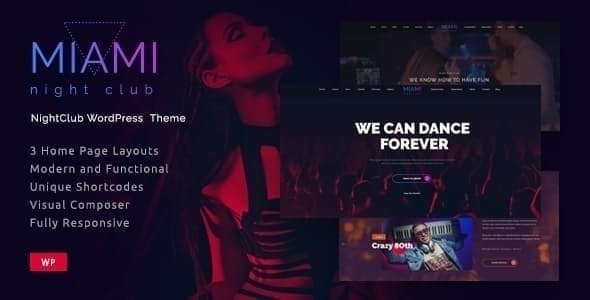
Stuck on your Miami WordPress theme? Let's fix it.
No endless back-and-forth. Just send us the details and we'll get it done.
No obligation · Replies within 1 hour · Quote within 1 day
Setup · Customization · Bug fixes · WooCommerce integration
About Miami WP Theme
Miami is a WordPress theme by fox-themes built for creative agencies, portfolios, and lifestyle brands. It ships with a bold full-screen layout, smooth scroll animations, and a clean typographic hierarchy that holds up on any screen size.
The theme is built on a lightweight codebase with no heavy page builder dependency. That means faster load times and less bloat out of the box. It supports the WordPress block editor natively, so adding and rearranging content is straightforward without touching code.
Miami includes multiple homepage layouts, portfolio post types, and pre-built inner page templates. Whether you are launching a creative studio, a photography business, or a boutique agency site, Miami gives you a solid visual foundation to start from without needing to rebuild everything from scratch.
Get matched with a Miami developer in under one day
Tell us about your Miami project. Small fixes, Miami theme customization, or a full website build, whatever you need, we've got it covered.
We'll connect you to the right Miami developers, define the scope, and get everything 100% clear.
You'll get one estimate, hire your preferred developer, and start collaborating.
Miami looks polished out of the box, but getting it to match a specific brand takes real WordPress knowledge. On Codeable, vetted developers with hands-on experience in fox-themes builds can take on your project and deliver a site that actually looks like it was designed for you. You post your project, get matched within 24 hours, and review a free estimate before committing. Explore our WordPress development services to see what is possible.
Pros
- Lightweight codebase with no forced page builder dependency keeps load times low
- Full native block editor support means content editing is straightforward
- Multiple pre-built homepage and inner page templates reduce initial build time
- Bold full-screen visual style works well for creative and portfolio sites
- Built-in portfolio post type saves time compared to setting one up manually
Cons
- Limited Customizer controls mean anything beyond basic styling needs CSS or template edits
- WooCommerce product pages require additional styling work to match the Miami aesthetic
- Scroll animations may need to be disabled for clients who prefer simpler, faster interactions
- Documentation covers basics but lacks guidance on deeper customization scenarios
- Not well-suited for content-heavy sites like news portals or large blogs without structural modifications
Who is Miami for?
Creative Agency
Miami’s full-screen layouts and bold typography make it a strong fit for creative agencies that need to show work without a cluttered interface. The built-in portfolio post type handles case studies and project showcases cleanly. A developer can wire up custom filtering and category-based archives to give prospective clients a focused browsing experience.
Photography Portfolio
The full-width image support and minimal UI make Miami a practical base for photography portfolios. Large visuals load cleanly, and the grid layouts handle galleries without much configuration. A developer can add lightbox functionality and custom album structures to give photographers more control over how work is presented.
Boutique Branding Studio
Boutique branding studios need a site that reflects taste and precision. Miami’s clean typographic system and structured whitespace handle that well. With targeted CSS adjustments and a custom color palette applied by a developer, the theme can reflect a studio’s exact brand identity without looking like a template.
Freelance Designer
Freelance designers often need a site that is fast to launch and easy to update. Miami covers both. The block editor integration means adding new projects or updating services does not require a developer each time. Initial setup and customization by a specialist gets the structure right from the start.
Lifestyle Brand
Lifestyle brands selling products, services, or content need visual impact paired with clear navigation. Miami handles the visual side well. Pairing it with WooCommerce and a developer who can align product templates with the theme’s style gives lifestyle brands a storefront that does not look disconnected from the rest of the site.

Customizing Miami
Miami’s Customizer options cover colors, fonts, header styles, and footer layouts. That gets you a decent distance without code, but most sites need more. Custom spacing, unique section arrangements, and brand-specific typography adjustments require direct CSS or template edits.
A Miami expert on Codeable can handle those customizations cleanly and without breaking core theme files. Whether you need a custom portfolio filter, a modified hero layout, or a contact section rebuilt to match your brand, a specialist who knows Miami’s structure will get it done faster and more reliably than trial and error.
fox-themes provides solid documentation, but documentation only takes you so far. For anything beyond surface-level styling, working with a dedicated Miami developer saves real time and avoids the headaches that come from modifying theme templates without a clear plan.
Recommended plugins for Miami
Miami works well with WooCommerce if you are adding a shop, but the default product templates may need styling adjustments to match the theme’s aesthetic. Plugins like Yoast SEO and Rank Math integrate without issues. For performance, pairing Miami with a caching plugin and an image optimization tool is worth doing early. Check our WordPress performance service and WordPress SEO service for help pushing scores higher. Contact Form 7 and WPForms both work, though form styles may need minor CSS tweaks to sit cleanly within Miami’s layout.
Not sure which plugins to use? This WordPress plugins directory covers the most popular options with reviews and setup guides.
Miami common issues
Miami theme header not displaying correctly on mobile
Mobile header issues in Miami usually come down to a CSS conflict with a plugin or a custom style that overrides the theme’s responsive breakpoints. Open browser dev tools, inspect the header element on mobile view, and look for conflicting rules. If a plugin is injecting styles, temporarily deactivating it confirms the source. A developer can trace and fix the conflict cleanly through a child theme without altering core files. See our WordPress bug fixing service for faster resolution.
Miami theme portfolio grid broken after WordPress update
Portfolio grid breaks after updates typically happen when a plugin or WordPress core change affects the JavaScript handling the grid layout. Check the browser console for JS errors first. Masonry or isotope-based grids are common culprits. Clearing cache and testing without other plugins active narrows it down. If the issue persists, the grid initialization script may need a targeted fix. A developer familiar with Miami’s portfolio structure can patch this without a full rebuild.
Miami theme contact form not sending emails
If your Miami theme contact form is not sending emails, the issue is almost always server-level email delivery rather than the theme itself. WordPress uses PHP mail by default, which many hosts block or filter. Installing an SMTP plugin like WP Mail SMTP and connecting it to a transactional email provider fixes this reliably. Check spam folders first to confirm whether emails are sending but being filtered. Our WordPress bug fixing service covers this kind of setup.
Miami theme slow loading on shared hosting
Miami’s codebase is reasonably lean, but shared hosting adds its own performance ceiling. Start by enabling caching with a plugin like WP Super Cache or W3 Total Cache, then optimize images using a compression plugin. Disable any scroll animations you are not using, as these load additional JS. If performance is still poor, the hosting itself is likely the bottleneck. Moving to a managed WordPress host makes a measurable difference. Visit our WordPress performance service for a full audit.
Miami FAQ
Yes. Miami includes a built-in portfolio post type, full-width image support, and grid layouts that work well for showcasing creative work. It is one of the more practical fox-themes options for agencies and freelancers. For custom filtering or unique portfolio structures, a developer can extend the default setup without rebuilding from scratch.
Miami does not officially block WooCommerce, but the theme was not built with ecommerce as a primary use case. Product pages and cart templates will need styling work to match Miami’s visual style. A developer can write targeted CSS and template overrides through a child theme to make the shop feel consistent with the rest of the site.
Miami is built for the native WordPress block editor and does not require a page builder. Using Elementor or Divi with it is technically possible but can create conflicts with the theme’s layout system. Most developers recommend sticking with the block editor and extending Miami through a child theme rather than layering a page builder on top.
Always use a child theme before making any customizations. Changes made directly to Miami’s parent theme files will be overwritten on update. With a child theme in place, updates to the parent apply cleanly. If you have already customized without a child theme, a developer can migrate your changes before the next update to prevent data loss. Our WordPress maintenance service covers ongoing update management.
Yes, Miami is responsive and adapts to mobile and tablet screen sizes. That said, some full-screen hero sections and scroll animations may behave differently on smaller screens depending on your content. Testing across real devices before launch is worth doing, and a developer can address any layout issues that appear at specific breakpoints.
Hire a Miami Theme Expert or Developer
Need someone who knows Miami inside and out? Our developers have worked on fox-themes builds across portfolios, agencies, and creative businesses. You get a specialist matched to your project within 24 hours, a free estimate upfront, and zero obligation to hire. No guesswork, no wasted time. Get a free estimate today and see exactly what your Miami project will take.
You'll need a free Codeable account so developers can ask questions and send their quotes.