Newsreader WordPress Theme
by codesupplyco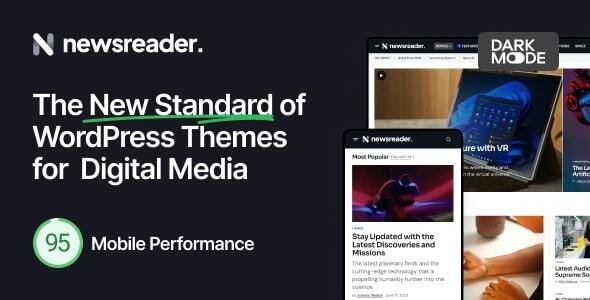
Stuck on your Newsreader WordPress theme? Let's fix it.
No endless back-and-forth. Just send us the details and we'll get it done.
No obligation · Replies within 1 hour · Quote within 1 day
Setup · Customization · Bug fixes · WooCommerce integration
About Newsreader WP Theme
Newsreader is a free WordPress theme built by Code Supply Co., designed specifically for online magazines, news portals, and editorial websites. It ships with a clean typographic layout that puts content first, making articles easy to scan and read across all devices.
The theme integrates tightly with the WordPress block editor, so building and editing page layouts requires no page builder plugins. It supports multiple homepage layouts, featured post sections, and category-based content grids straight out of the box.
Newsreader is lightweight by default, scores well on Core Web Vitals without heavy configuration, and pairs naturally with WooCommerce if you want to add a shop alongside editorial content. It is a practical starting point for anyone launching a content-heavy WordPress site without a large budget.
Get matched with a Newsreader developer in under one day
Tell us about your Newsreader project. Small fixes, Newsreader theme customization, or a full website build, whatever you need, we've got it covered.
We'll connect you to the right Newsreader developers, define the scope, and get everything 100% clear.
You'll get one estimate, hire your preferred developer, and start collaborating.
Newsreader is straightforward to set up but takes real development work to turn into a polished, high-traffic publication. Getting the template hierarchy right, optimizing for Core Web Vitals under real editorial load, and building custom content structures all require hands-on WordPress expertise.
Through Codeable, you get matched with a vetted developer who has worked specifically with themes like Newsreader. No junior freelancers, no guesswork. Explore our WordPress development services to see what is possible.
Pros
- Ships with multiple pre-built homepage layouts ready to publish without extra plugins
- Built entirely on the WordPress block editor, so no proprietary page builder lock-in
- Lightweight codebase that loads fast on shared hosting with minimal configuration
- Strong typography defaults that make long-form editorial content comfortable to read
- Active development from Code Supply Co. with regular compatibility updates
Cons
- Free version limits some layout variations that require upgrading to the Pro license
- Widget-heavy sidebar setups can look cluttered and need custom CSS to tighten up
- No built-in dark mode support, which requires third-party plugins or custom code
- Custom post type support for reviews or videos requires additional development work
- Breaking news ticker and live update features need separate plugins to implement
Who is Newsreader for?
Online News Magazine
Newsreader handles high article volumes well. Its category grid layouts let editors surface breaking news, featured stories, and evergreen content on one homepage without a page builder. The clean reading experience keeps bounce rates lower than cluttered news themes.
Tech Blog
Tech publishers benefit from Newsreader’s code block compatibility and structured heading hierarchy. Product reviews, tutorials, and opinion pieces all sit naturally in the single post template. The minimal sidebar leaves room for affiliate placements without overwhelming the main content column.
Sports Publication
Fast-moving sports coverage needs a theme that handles frequent publishing without slowing down. Newsreader’s lightweight build keeps page load times short even with large featured images. Match reports, league tables via shortcodes, and player profiles all work within the default template structure.
Food and Lifestyle Editorial
Lifestyle editorial relies heavily on visual presentation. Newsreader’s full-width featured image support and clean white space make recipe posts and travel guides look editorial rather than amateur. Category pages can be styled per section to give food, travel, and fashion distinct visual identities.
Local Community News Site
Community news sites often run on tight budgets. Newsreader’s free tier covers most needs: event listings, local business directories via custom post types, and a homepage that community editors can update without developer help. The block editor keeps the barrier to daily publishing low.

Customizing Newsreader
Out of the box, Newsreader gives you a solid foundation, but most publishers need more than default settings. The Customizer lets you adjust typography, color palettes, header layout, sidebar position, and widget areas. Block patterns included with the theme speed up homepage and category page builds considerably.
Beyond surface-level changes, a Newsreader expert can restructure template files, build custom block patterns for recurring content types, wire up custom post types for reviews or podcasts, and tune the archive and single post templates to match your editorial brand precisely.
If you have a specific layout in mind that the default options do not support, custom PHP and CSS work at the theme level is usually straightforward. A developer familiar with Newsreader knows exactly which template parts to modify without breaking future updates.
Recommended plugins for Newsreader
Newsreader works well with a focused plugin stack. For advertising, Advanced Ads slots in cleanly without layout conflicts. For newsletters, Mailchimp for WordPress or MailPoet both integrate without extra styling work.
If site speed is a priority, pairing Newsreader with a caching plugin and a CDN pays off quickly given the image-heavy nature of news sites. See our WordPress performance service for specifics.
For search visibility on competitive editorial niches, structured data for articles and breadcrumbs matters. Our WordPress SEO service covers schema markup, crawl optimization, and technical fixes relevant to Newsreader-based sites.
Not sure which plugins to use? This WordPress plugins directory covers the most popular options with reviews and setup guides.
Newsreader common issues
Newsreader theme header logo not showing correctly
This usually comes down to image size registration. Newsreader defines specific logo dimensions in the theme, and uploading an image outside those dimensions causes it to crop or disappear. Go to Appearance > Customize > Site Identity and re-upload the logo at the recommended pixel width. If the issue persists after a browser cache clear, a conflict with a caching plugin may be serving a stale header template. Our WordPress bug fixing service can diagnose this quickly.
Newsreader WordPress theme homepage layout not saving
Newsreader homepage layouts are controlled through Customizer settings and, in some cases, a static front page assignment. If changes are not saving, first confirm you have a static page set under Settings > Reading. A second common cause is a permissions conflict on the uploads directory that prevents Customizer data from writing. Deactivating plugins one by one in a staging environment usually identifies the conflict. If the problem recurs, a database or file permission issue needs direct investigation.
Newsreader theme featured image not displaying on posts
Featured images disappearing in Newsreader is almost always a thumbnail regeneration problem after theme switching or a size mismatch. Run a thumbnail regeneration plugin like Regenerate Thumbnails to rebuild image sizes to Newsreader’s registered dimensions. If images still do not appear on archive or single post pages, check whether a plugin is filtering the_post_thumbnail output. Disabling third-party image optimization plugins temporarily confirms whether they are stripping the markup.
Newsreader theme breaking after WordPress update
After a major WordPress core update, theme breakage in Newsreader typically traces back to deprecated function calls or a plugin conflict exposed by the update rather than the theme itself. Check the debug log first by enabling WP_DEBUG in wp-config.php. If the theme is also out of date, updating it often resolves the conflict. If you are running a child theme with custom function overrides, those may need adjusting. Our WordPress maintenance service keeps themes, plugins, and core in sync proactively.
Newsreader FAQ
Newsreader has a fully functional free version available on WordPress.org that covers the core layout options, homepage sections, and Customizer controls. The Pro license from Code Supply Co. unlocks additional layout variations, color scheme options, and premium support. For most small to mid-size publications, the free tier is a reasonable starting point before committing to Pro.
Newsreader outputs clean, semantic HTML with a proper heading structure, which is a solid base for SEO. It does not ship with built-in schema markup for articles, so you need an SEO plugin like Yoast or Rank Math to add structured data. Page speed is generally good out of the box, and Core Web Vitals scores tend to be above average compared to heavier news themes.
Yes, Newsreader is WooCommerce compatible. Shop pages, product archives, and cart and checkout templates render without major styling conflicts. Some minor CSS adjustments are usually needed to match the shop pages to your editorial color scheme, particularly on the cart and account pages. A developer can align these in a child theme without touching the parent theme files.
Newsreader is built for the native WordPress block editor and does not officially support Elementor or other page builders. You can install Elementor alongside it, but template conflicts often occur on archive and single post pages. Using a page builder with Newsreader typically creates more problems than it solves. Sticking with the block editor and block patterns gives a more stable result.
Newsreader registers specific widget areas defined in its functions.php file. Adding a second sidebar requires registering a new widget area via a child theme’s functions.php and then creating or modifying the relevant sidebar template part to call it. This is a straightforward PHP task but does require editing theme files, so it should be done in a child theme to survive future Newsreader updates.
Hire a Newsreader WordPress Expert
Whether you need a custom homepage layout, a new post template, or a full editorial site built on Newsreader from scratch, we can help. Work is delivered through Codeable, so you only pay when you are satisfied with the plan.
Get a free estimate with no obligation. Describe your project and receive a clear scope and price from a developer who knows the theme.
You'll need a free Codeable account so developers can ask questions and send their quotes.