Softlab WordPress Theme
by WebGeniusLab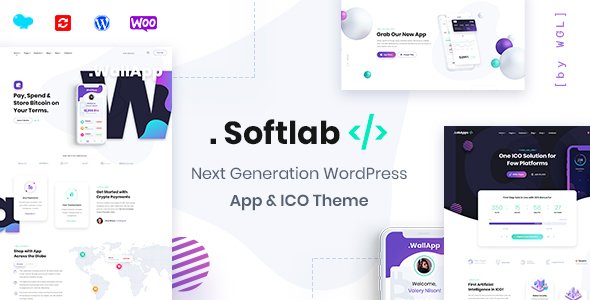
Stuck on your Softlab WordPress theme? Let's fix it.
No endless back-and-forth. Just send us the details and we'll get it done.
No obligation · Replies within 1 hour · Quote within 1 day
Setup · Customization · Bug fixes · WooCommerce integration
About Softlab WP Theme
Softlab is a multipurpose WordPress theme built by WebGeniusLab, designed primarily for tech companies, IT agencies, and software businesses. It ships with a large library of pre-built demo sites, each targeting a specific industry niche. The demos are importable in one click, giving you a working layout in minutes.
Under the hood, Softlab uses Elementor as its page builder, with a custom set of widgets built on top. It supports WooCommerce, contact forms, and portfolio post types out of the box. WebGeniusLab has maintained the theme actively, keeping it compatible with current WordPress and PHP versions.
Performance depends heavily on how many plugins and demo assets you carry over. Used selectively, Softlab produces clean, professional pages. It suits teams that want a polished tech aesthetic without building from scratch.
Get matched with a Softlab developer in under one day
Tell us about your Softlab project. Small fixes, Softlab theme customization, or a full website build, whatever you need, we've got it covered.
We'll connect you to the right Softlab developers, define the scope, and get everything 100% clear.
You'll get one estimate, hire your preferred developer, and start collaborating.
Softlab has a learning curve, especially once you move past the demo content. WebGeniusLab’s custom Elementor widgets behave differently from standard ones, and troubleshooting them without theme knowledge wastes time.
FoxyConcept connects you with vetted Softlab developers through Codeable. Every developer on the platform has passed a technical screening. You post your project, get matched within 24 hours, and receive a fixed estimate before any work begins. No guesswork, no hourly surprises.
Pros
- Large library of niche-specific demo sites importable in one click
- Built on Elementor, so the editing interface is widely understood
- Includes custom Elementor widgets tailored for tech and agency layouts
- WooCommerce and WPML compatible out of the box
- Active updates from WebGeniusLab maintaining WordPress and PHP compatibility
Cons
- Demo imports pull in many plugins, requiring cleanup to keep the install lean
- Custom Elementor widgets are theme-locked, so switching themes later is disruptive
- Page load times suffer if demo assets and sliders are not selectively removed
- Documentation covers basic setup but lacks depth on advanced customization
- Some bundled plugins like Revolution Slider require separate licenses for full functionality
Who is Softlab for?
IT & Software Companies
Softlab’s core demos are built around IT and software businesses. The service blocks, team sections, and case study layouts suit companies that need to present technical offerings clearly. Pre-styled pricing tables and feature comparison blocks save significant build time for software product pages.
Digital Marketing Agencies
Agency demos include portfolio grids, client logo sections, and results-focused layouts. The header options support mega menus, useful for agencies with multiple service lines. The Elementor foundation makes it straightforward to hand off editing to a non-technical marketing team once the site is built.
SaaS Product Landing Pages
Several Softlab demos are structured as single-product landing pages with hero sections, feature blocks, and call-to-action rows. These translate well to SaaS products needing a fast, credible web presence. Pairing the theme with a performance-focused setup keeps load times competitive.
Cybersecurity Firms
Softlab includes demo layouts suited to cybersecurity and data protection businesses. Dark color schemes, service detail pages, and trust-signal sections like certifications and client logos are pre-designed. Customizing these for a specific brand is straightforward with Elementor at the page level.
Freelance Developers and Consultants
Solo consultants and freelance developers can use Softlab’s personal portfolio and agency demos as a starting point. The theme handles case studies, a services page, and a contact form well. Keeping the plugin list minimal results in a fast, professional site without unnecessary overhead.

Customizing Softlab
Softlab gives you customization control through the WordPress Customizer and Elementor’s visual editor. You can adjust header layouts, typography, color schemes, and footer structure without touching code. The theme panel adds extra controls for sticky headers, mega menus, and preloader settings.
For anything beyond surface-level changes, you will likely need a Softlab expert. Custom widget styling, modifying demo layouts significantly, or integrating third-party APIs all require knowledge of how WebGeniusLab structured the theme’s custom Elementor modules. Trying to override these with generic CSS often causes conflicts.
Child theme setup is strongly recommended before customizing. It prevents your changes from being wiped out during updates. A developer familiar with Softlab will set this up correctly from the start and keep your customizations maintainable long term.
Recommended plugins for Softlab
Softlab includes built-in support for several plugins that extend its functionality. WooCommerce integration allows product pages styled to match the theme. WPML compatibility makes multilingual builds possible. The theme also bundles Revolution Slider and WPBakery in some versions, though the primary builder is Elementor.
For serious performance improvements, offloading assets to a CDN and implementing caching at the server level matters more than any plugin. See our WordPress performance service for specifics. If search visibility is a priority, pairing Softlab with a solid on-page structure is covered through our WordPress SEO service.
Not sure which plugins to use? This WordPress plugins directory covers the most popular options with reviews and setup guides.
Softlab common issues
Softlab theme Elementor widgets not loading after update
This usually happens when the theme update changes widget registration hooks while an older version of Elementor is still active, or vice versa. Start by updating both Softlab and Elementor to their latest versions simultaneously. Clear any server-side and plugin caches afterward. If widgets still fail to register, deactivate all non-essential plugins to isolate a conflict. If the problem persists, a developer familiar with WebGeniusLab’s widget structure can diagnose it quickly. See our WordPress bug fixing service for hands-on help.
Softlab demo import fails or is incomplete
Failed demo imports are commonly caused by PHP memory limits set too low, execution timeouts, or a missing required plugin. Increase memory_limit to at least 256MB and max_execution_time to 300 in your PHP configuration. Make sure all required plugins listed by the theme installer are activated before importing. If the import stalls on media files, a slow server connection to external asset hosts is often responsible. Retrying the import or using a staging environment with better resources usually resolves it.
Softlab theme causing slow page load speed
Softlab demo sites carry a lot of assets by default: sliders, icon fonts, multiple CSS files, and sometimes video backgrounds. Audit what is actually in use and remove what is not. Disable Revolution Slider if you are not using it. Enable lazy loading for images, minify CSS and JS through a caching plugin, and serve static assets from a CDN. Our WordPress performance service covers full optimization specific to Elementor-based themes like Softlab.
Softlab header layout broken on mobile
Softlab’s mobile header behavior is controlled through the Customizer under header settings and through Elementor’s responsive controls at the section level. Check that the mobile breakpoint in Elementor matches the breakpoint Softlab’s CSS targets. Custom CSS added to the desktop layout without responsive overrides is a frequent cause. Inspect the header in browser dev tools on a mobile viewport to identify which rule is overriding the layout, then apply a targeted fix inside a child theme stylesheet.
Softlab FAQ
Softlab is built for tech and agency use cases but the Elementor foundation makes it adaptable. The niche demos are IT-focused, so non-tech businesses will need to replace demo content significantly. If you are starting from scratch and want a general-purpose site, a different theme may require less rework. If you already own Softlab, a developer can adapt the layouts to any industry without major issues.
Softlab’s core functionality works with Elementor Free. The custom WebGeniusLab widgets are bundled with the theme itself, not dependent on Elementor Pro. However, some advanced features like popups, form styling options, and theme builder capabilities do require Elementor Pro. Most standard page builds with Softlab demos are achievable without a Pro license.
Yes. Softlab is WooCommerce compatible and includes styled product pages, cart, and checkout templates. It is not a dedicated ecommerce theme, so very large stores with complex product filtering may benefit from a more specialized solution. For a company site with a shop section or a small product catalog, Softlab handles it well without additional WooCommerce-specific plugins.
Always use a child theme. Any customizations made directly to Softlab’s parent theme files will be overwritten when you update. A child theme keeps your CSS and template overrides separate. Before updating, back up the site and check WebGeniusLab’s changelog for breaking changes. Our WordPress maintenance service handles safe updates as part of ongoing site management.
Yes, a Softlab site migrates like any other WordPress installation. You move the database and files, update the site URL in the database, and reconfigure any environment-specific settings. Elementor stores design data in the database, so it transfers correctly. Our WordPress migration service handles the full process including DNS cutover and post-migration testing.
Hire a Softlab Developer
Whether you need a full Softlab site built from a demo, a customized layout, or an existing site fixed and extended, we match you with a developer who knows the theme. Work is scoped before it starts, so you know exactly what you are paying for.
Get a free estimate and hear back within 24 hours. No obligation to hire.
You'll need a free Codeable account so developers can ask questions and send their quotes.