Co-Porlio WordPress Theme
by GoodLayers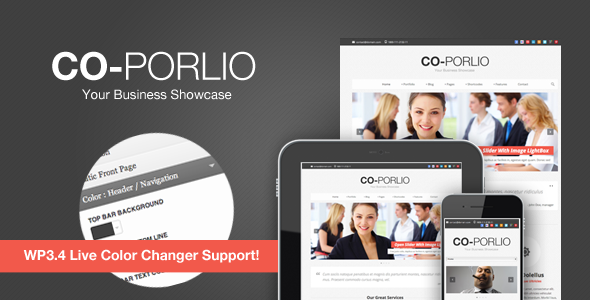
Stuck on your Co-Porlio WordPress theme? Let's fix it.
No endless back-and-forth. Just send us the details and we'll get it done.
No obligation · Replies within 1 hour · Quote within 1 day
Setup · Customization · Bug fixes · WooCommerce integration
About Co-Porlio WP Theme
Co-Porlio is a portfolio and agency WordPress theme built by GoodLayers. It ships with the GoodLayers page builder, giving you visual control over layouts without touching code. The theme targets creative agencies, freelancers, and studios that need a clean, presentation-focused site.
It includes multiple demo layouts, portfolio post types, and a header builder that lets you swap navigation styles without a child theme. Animations, grid options, and custom post filtering are all built in. GoodLayers has a reasonable track record with theme updates and documentation, making Co-Porlio a solid starting point for portfolio-heavy projects that need more visual flexibility than a generic multipurpose theme provides.
Get matched with a Co-Porlio developer in under one day
Tell us about your Co-Porlio project. Small fixes, Co-Porlio theme customization, or a full website build, whatever you need, we've got it covered.
We'll connect you to the right Co-Porlio developers, define the scope, and get everything 100% clear.
You'll get one estimate, hire your preferred developer, and start collaborating.
Co-Porlio has a learning curve. The GoodLayers builder is not Gutenberg, and documentation only goes so far when you hit an edge case. A vetted developer through Codeable has hands-on experience with GoodLayers themes and can handle customisation, plugin conflicts, and layout fixes without the trial and error. Our WordPress development services cover everything from single-page builds to full site overhauls on Co-Porlio.
Pros
- GoodLayers page builder gives genuine layout control without coding
- Built-in portfolio post type with filterable grid and multiple hover styles
- Header builder supports multiple navigation layouts and sticky options
- Includes multiple agency and portfolio demo packs importable in one click
- GoodLayers has a consistent update history and active support forum
Cons
- GoodLayers builder stores content in shortcodes, making theme switching painful
- Page load times need attention out of the box due to builder asset weight
- WooCommerce shop templates are functional but visually minimal without extra styling
- The builder interface feels dated compared to Elementor or the block editor
- Demo content import can fail on shared hosting with low PHP memory limits
Who is Co-Porlio for?
Creative Agency
Co-Porlio suits agency sites that need service pages, team profiles, and a filterable project portfolio under one roof. The demo layouts cover most agency structures. A developer can wire up custom project categories, client logos, and case study templates to match how your agency actually presents work.
Freelance Designer
Freelancers get a fast path to a portfolio site with a contact form, skills section, and project showcase. The single-page layout options work well for freelance profiles. If you need a booking form or specific inquiry workflow, a developer can add that without replacing the theme.
Photography Studio
Photography studios benefit from Co-Porlio’s full-width grid options and lightbox support. Portfolio items can be grouped by shoot type or client. For studios needing client galleries with password protection or proofing features, a developer can integrate a gallery plugin that sits cleanly within the theme layout.
Architecture Firm
Architecture firms need strong visual hierarchy and project-focused navigation. Co-Porlio handles large image grids and project detail pages well. A developer can build custom taxonomy structures for project type, location, or scale, making it easier for visitors to browse your portfolio by category.
Digital Marketing Consultancy
Consultancies need service listings, case studies, and clear calls to action. Co-Porlio’s flexible column system handles that content structure without forcing a generic layout. Adding lead generation forms, CRM integration, or downloadable resources is straightforward work for a developer familiar with the GoodLayers builder.

Customizing Co-Porlio
Co-Porlio customization goes well beyond changing colors. The GoodLayers page builder lets you control column structures, section spacing, and element order across every page. Portfolio filtering, hover effects, and grid density are all adjustable from the backend without CSS knowledge.
That said, deeper changes, such as custom post type integration, WooCommerce layout adjustments, or bespoke animations, often require PHP and CSS work that the builder cannot handle alone. A Co-Porlio expert can extend those defaults cleanly, build custom page templates, and make structural changes that survive theme updates. If your project has specific design or functional requirements beyond what the demos show, working with a developer saves significant time.
Recommended plugins for Co-Porlio
Co-Porlio works with most major WordPress plugins without conflicts. Contact Form 7 and WPForms both integrate cleanly. WooCommerce is supported, though the shop templates are basic and often need styling work to match the rest of the site.
For site speed, pairing Co-Porlio with a caching layer and image optimisation plugin is recommended, as the GoodLayers builder adds page weight. See our WordPress performance service for details. If you need better search visibility, a dedicated WordPress SEO setup on top of Co-Porlio will produce better results than relying on theme meta fields alone.
Not sure which plugins to use? This WordPress plugins directory covers the most popular options with reviews and setup guides.
Co-Porlio common issues
Co-Porlio page builder not saving changes
This usually comes down to a PHP memory limit or a JavaScript conflict blocking the builder’s save request. Start by increasing memory_limit to 256MB in your wp-config.php or php.ini. Then deactivate plugins one by one to isolate a script conflict. If the issue persists after those steps, the GoodLayers builder database tables may need repair. A developer can diagnose this quickly through the browser console and server error logs. See our WordPress bug fixing service for fast turnaround.
Co-Porlio demo import not working
Demo imports fail most often on hosts with low max_execution_time, small upload size limits, or blocked external HTTP requests. Set max_execution_time to 300 seconds and upload_max_filesize to at least 64MB. If your host blocks outbound requests, the demo content XML will need manual import via Tools > Import. Dummy images may still fail if the remote server is unreachable. A developer can import demos manually and replace placeholder assets with your content.
Co-Porlio portfolio filter broken after update
Portfolio filter issues after an update are typically caused by a JavaScript error in the Isotope or imagesLoaded script. Check the browser console for the specific error. Common causes include a jQuery version conflict introduced by a plugin or a caching plugin serving a stale script file. Clear all caches first. If the conflict is plugin-related, script load order may need adjusting. Our bug fixing service handles this type of conflict efficiently.
Co-Porlio site slow loading on mobile
Co-Porlio loads several builder scripts and stylesheets by default, which hurts mobile performance. Start with a caching plugin and a CDN to reduce server response time. Minify and combine CSS and JS where the builder allows. Lazy load images, particularly on portfolio grid pages. Large demo background images are a frequent culprit. Our WordPress performance service covers full audits and implementation for GoodLayers-based sites.
Co-Porlio FAQ
Co-Porlio is built around the GoodLayers page builder, not Elementor. Running both builders on the same site can cause script conflicts and unpredictable layout behaviour. It is possible in limited cases, but not recommended. If you want Elementor, a better option is to start with an Elementor-native theme. A developer can advise on the cleanest approach for your specific requirements.
Technically yes, but the theme’s page templates assume the GoodLayers builder is active. Without it, most pages will display unstyled shortcode text instead of rendered content. The standard WordPress editor works for blog posts and simple pages, but any demo content you imported will break visually. Migrating away from the builder entirely is a significant rebuild. See our WordPress migration service if you are considering switching platforms.
Co-Porlio includes basic WooCommerce compatibility. Standard shop, product, cart, and checkout pages function without errors. However, the shop templates use minimal styling and often look out of place next to polished portfolio pages. Getting a consistent design across the store and the rest of the site usually requires custom CSS or template overrides in a child theme.
Always use a child theme for any CSS or template changes. Updates to the parent theme will overwrite modified files directly. The GoodLayers builder saves page content to the database, so page layouts survive updates. Theme options set in the GoodLayers settings panel also persist. Before updating, take a full backup and test on a staging environment. Our WordPress maintenance service handles this process for you.
Co-Porlio produces clean HTML output and works with Yoast SEO and Rank Math without conflicts. It does not interfere with meta tags, schema, or sitemap generation. That said, the theme itself does not handle technical SEO. Page speed, structured data, and crawl optimisation all need separate attention. A proper WordPress SEO setup on top of Co-Porlio will deliver far better results.
Hire a Co-Porlio Developer
Need a Co-Porlio expert to customise your layout, fix a builder issue, or build something the demos do not cover? We match you with a vetted WordPress developer through Codeable, usually within 24 hours. Free estimate, no commitment required. Get your free estimate here and describe what you need. We will take it from there.
You'll need a free Codeable account so developers can ask questions and send their quotes.