Bezel WordPress Theme
by ThemePitch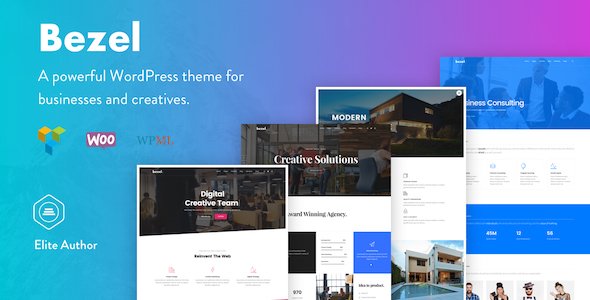
Stuck on your Bezel WordPress theme? Let's fix it.
No endless back-and-forth. Just send us the details and we'll get it done.
No obligation · Replies within 1 hour · Quote within 1 day
Setup · Customization · Bug fixes · WooCommerce integration
About Bezel WP Theme
Bezel is a premium WordPress theme built by ThemePitch, designed for agencies, portfolios, and creative businesses that want a clean, professional look without a heavy page builder dependency. It ships with a set of pre-built demo layouts you can import in one click, covering everything from digital agencies to product showcases.
The theme is built on a solid grid structure with attention to typography and whitespace. It supports the WordPress block editor and includes custom widgets and shortcodes for layout flexibility. ThemePitch maintains the theme with regular updates, keeping it compatible with current WordPress versions and popular plugins like WooCommerce and Contact Form 7.
If you want a structured, visually polished site without starting from scratch, Bezel gives you a strong foundation to work from.
Get matched with a Bezel developer in under one day
Tell us about your Bezel project. Small fixes, Bezel theme customization, or a full website build, whatever you need, we've got it covered.
We'll connect you to the right Bezel developers, define the scope, and get everything 100% clear.
You'll get one estimate, hire your preferred developer, and start collaborating.
Most Bezel customization issues come down to not having a child theme set up correctly, or making edits that disappear after an update. A developer who knows the theme’s structure can get this right the first time.
Through Codeable, you get matched with vetted WordPress developers who have worked with premium themes like Bezel. You post your project, get an estimate within 24 hours, and only move forward if the scope makes sense. No obligation, no risk. Explore our WordPress development services to see what’s possible.
Pros
- Clean, minimal design that works for agencies, portfolios, and product sites without heavy modification
- One-click demo import makes it fast to get a working starting point before customizing
- Built-in WooCommerce compatibility with styled templates included in the theme package
- Customizer-based options cover colors, fonts, headers, and footers without requiring code knowledge
- ThemePitch provides regular updates that keep Bezel compatible with current WordPress and PHP versions
Cons
- Limited layout flexibility compared to themes built specifically around Elementor or the block editor
- Custom post type support is basic — complex archive or single layouts require manual template work
- Demo content can be slow to load on shared hosting due to image-heavy sections
- The shortcode system feels dated if you prefer working entirely within the block editor
- Documentation is sparse in places, making some advanced customizations harder to figure out without developer help
Who is Bezel for?
Digital Agency Website
Bezel’s agency demo layouts include service sections, team grids, and case study structures. A developer can strip the demo to your actual services and content, set up a child theme, and configure contact or lead forms. The result is a professional agency site that looks custom without being built from zero.
Freelance Portfolio
Freelancers get a fast path to a portfolio with Bezel’s project grid and filterable gallery options. The typography is clean enough to let your work do the talking. A developer can wire up a custom portfolio post type with category filtering and a detail page layout that matches your personal brand.
Small Product Business
Bezel’s WooCommerce support makes it a reasonable option for businesses selling a focused product line. The theme handles product pages and cart styling without needing a separate WooCommerce theme. Custom product layouts or subscription logic would require additional plugin work on top of the base theme.
Corporate Brochure Site
Companies that need a clean, credible web presence without ecommerce or complex functionality get a lot from Bezel’s corporate demo. Service pages, an about section, and a contact form cover most of what a brochure site needs. Setup is fast, and the result holds up well against more expensive custom builds.
Creative Studio Showcase
Design studios, photographers, and creative teams can use Bezel’s full-width layouts and image-forward sections to put work front and center. With some CSS adjustments and a custom color palette applied through the Customizer, the theme moves away from its default look and takes on a more distinctive character.

Customizing Bezel
Bezel exposes most of its visual options through the WordPress Customizer, so you can adjust colors, fonts, header layout, and footer structure without touching code. That covers the basics. For anything beyond that — custom post type layouts, unique landing page sections, or integrating third-party tools — you will need to work with template files directly.
A Bezel expert can help you strip out demo content cleanly, rework the default layouts to match your brand, and extend the theme without creating a mess that breaks on the next update. This is typically done using a child theme so your changes stay intact when ThemePitch pushes a new version.
If your site needs custom functionality layered on top of Bezel — membership logic, custom queries, or advanced filtering — that work goes beyond theme settings and into plugin or PHP territory.
Recommended plugins for Bezel
Bezel works with the standard WordPress plugin ecosystem. WooCommerce integration is supported for product-based sites, and the theme styles common WooCommerce templates out of the box. For performance, caching plugins like WP Rocket or LiteSpeed Cache pair well with Bezel, and image optimization tools help offset heavier demo assets. Learn more about WordPress performance tuning.
On the SEO side, Bezel’s structured markup is compatible with Yoast SEO and Rank Math. If you need deeper technical SEO work on top of the theme, see our WordPress SEO service.
Not sure which plugins to use? This WordPress plugins directory covers the most popular options with reviews and setup guides.
Bezel common issues
Bezel theme demo import not working
Demo import failures in Bezel are usually caused by a server timeout or a PHP memory limit that’s too low. The importer pulls in images and content simultaneously, which can exceed default hosting limits. Set max_execution_time to at least 300 and memory_limit to 256M in your php.ini or wp-config.php. If the problem persists, try importing the XML file manually through WordPress’s built-in importer under Tools > Import. If you need help, our WordPress bug fixing service can resolve this quickly.
Bezel child theme changes disappearing after update
If edits you made to Bezel are disappearing after an update, you edited the parent theme files directly instead of using a child theme. ThemePitch’s updates overwrite those files. The fix is to create a child theme that inherits Bezel’s styles and only contains your customizations. Move your changes there and they will survive every future update. This is a one-time setup that any WordPress developer can do in under an hour.
Bezel portfolio filter not working on mobile
Portfolio filter issues on mobile in Bezel are usually a JavaScript conflict or a CSS overflow problem cutting off the filter bar. Check the browser console for JS errors first. If a plugin is loading a conflicting jQuery version, that’s the likely cause. On the CSS side, the filter container sometimes needs explicit width and overflow handling at smaller breakpoints. Temporarily switching to a default WordPress theme confirms whether the issue is Bezel-specific or plugin-related.
Bezel theme slow loading after demo import
Demo imports bring in every image from the demo, many of which you won’t use. After import, delete unused pages and media files, then run an image optimization plugin like ShortPixel or Imagify on what remains. Also check whether Bezel is loading Google Fonts for multiple font families you’re not actually using — trimming the font stack in the Customizer reduces render-blocking requests. See our WordPress performance service for deeper optimization work.
Bezel FAQ
Bezel is not built specifically for Elementor, but the page builder can be installed alongside it. You would build individual pages with Elementor while Bezel handles the header, footer, and global styles. Conflicts can appear around font loading and some spacing overrides. If you plan to use Elementor heavily, a theme built around it natively may cause fewer issues long-term.
Yes. Bezel includes WooCommerce template support and styles the main shop pages, product pages, and cart out of the box. For more complex ecommerce setups — custom product types, subscription billing, or advanced filtering — you’ll need additional plugins. The base WooCommerce experience works without extra development work on simple product catalogues.
Always use a child theme for any customizations to Bezel. Changes made directly to parent theme files are overwritten every time ThemePitch releases an update. With a child theme in place, you can update the parent freely. Customizer settings are stored in the database and survive updates regardless. If you haven’t set up a child theme yet, do it before your next update.
Bezel works with WPML and Polylang for multilingual setups. The theme doesn’t include built-in translation features, so you’ll need one of those plugins. String translation for theme-specific text is handled through WPML’s string translation module. For sites that need right-to-left language support, additional CSS adjustments may be required depending on the language.
ThemePitch has continued releasing updates for Bezel, keeping it compatible with current WordPress versions. Before purchasing or building on the theme, check the ThemeForest changelog to confirm recent update activity. A theme that hasn’t been updated in over a year can become a compatibility and security risk, so update frequency is worth checking before committing to it.
Hire a Bezel WordPress Developer
Whether you need a Bezel site built from one of the demo layouts, a custom child theme, or specific functionality added on top of what ThemePitch ships, we can help. Work is handled through Codeable, so you get a vetted developer, a clear estimate, and no surprise costs. Get a free estimate and describe what you need. You’ll hear back within 24 hours with a realistic scope and price.
You'll need a free Codeable account so developers can ask questions and send their quotes.