Softwerk WordPress Theme
by Select-Themes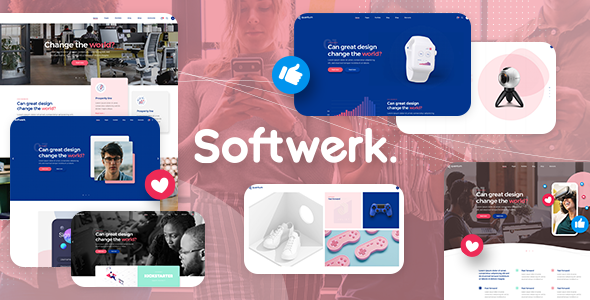
Stuck on your Softwerk WordPress theme? Let's fix it.
No endless back-and-forth. Just send us the details and we'll get it done.
No obligation · Replies within 1 hour · Quote within 1 day
Setup · Customization · Bug fixes · WooCommerce integration
About Softwerk WP Theme
Softwerk is a WordPress theme built by Select-Themes, aimed at software companies, SaaS products, and tech startups. It ships with a clean, minimal design that puts the focus on your product rather than decorative noise.
The theme is built on a custom framework and comes with multiple homepage layouts, pricing table sections, feature blocks, and testimonial areas. It uses the classic WordPress Customizer for configuration, meaning no page builder dependency out of the box.
Softwerk suits businesses that want a professional online presence without spending weeks on setup. That said, getting the most out of it, especially for custom landing pages or unique brand styling, usually requires someone who knows the theme’s structure well. The codebase follows standard WordPress conventions, which makes it approachable for developers.
Get matched with a Softwerk developer in under one day
Tell us about your Softwerk project. Small fixes, Softwerk theme customization, or a full website build, whatever you need, we've got it covered.
We'll connect you to the right Softwerk developers, define the scope, and get everything 100% clear.
You'll get one estimate, hire your preferred developer, and start collaborating.
Softwerk looks straightforward until you need something specific. Custom post types, modified template hierarchies, or connecting your stack to WordPress all require real development knowledge.
Through Codeable, you get matched with a vetted WordPress developer who has worked on themes like Softwerk before. No agencies, no bidding wars. You post your project, get a clear estimate, and decide if you want to move forward. The work gets done right the first time, and your site stays maintainable. That matters more than a cheap fix that breaks six months later. Our team at FoxyConcept delivers exactly that kind of quality through WordPress development services.
Pros
- Clean, minimal design suited to software and SaaS products without heavy visual clutter
- Multiple homepage layout options included, reducing the need for custom development at the start
- Built-in pricing table and feature block sections that match typical SaaS page structures
- No mandatory page builder dependency, keeping the codebase lighter and faster
- Follows standard WordPress template hierarchy, making it straightforward for developers to extend
Cons
- The Customizer options are limited, so visual changes beyond color and fonts need code edits
- Not built for WooCommerce out of the box, requiring extra work to style shop and product pages
- Select-Themes support is limited compared to larger marketplaces like ThemeForest
- No block editor or Gutenberg-native templates, which can frustrate editors used to the new WordPress experience
- Design feels dated compared to newer SaaS-focused themes built in the last two years
Who is Softwerk for?
SaaS Product Websites
Softwerk was designed with SaaS in mind. The pricing tables, feature sections, and clean hero layouts map directly to what a SaaS homepage needs. Add a billing integration like Stripe or a trial signup flow and you have a solid foundation for a product site that converts visitors into trial users.
Software Agency Sites
Software agencies need to present services clearly without distraction. Softwerk’s layout structure works well for service pages, case studies, and team sections. A developer can extend the theme with custom post types for projects and testimonials, keeping the content manageable through the WordPress admin.
App Landing Pages
Single-product app pages benefit from Softwerk’s focused design. You can build a tight landing page with a hero, screenshots, feature highlights, and a download or signup button. The theme doesn’t fight you on structure, which makes these kinds of focused pages faster to build and test.
IT Consulting Firms
IT consultancies need a site that looks credible and loads fast. Softwerk’s minimal aesthetic does that without requiring a designer. You can add a blog for thought leadership content, a contact form for inquiries, and a clear services page. It covers the basics a consulting firm actually needs.
Tech Startups
Startups often need to move fast with limited budgets. Softwerk gives you a professional-looking base without custom design costs. Once you have traction and budget, the theme’s structure makes it easy to hand off to a developer for more specific customization as your product and brand evolves.

Customizing Softwerk
Out of the box, Softwerk gives you color controls, font options, and layout switches through the WordPress Customizer. That covers basic branding changes without touching code.
For anything beyond that, such as custom section layouts, modified pricing tables, or integrating a CRM or demo-request form, you need to go deeper. A Softwerk expert can modify the theme’s template files properly, add child theme overrides, and keep your customizations intact through future updates.
Common requests include adjusting the homepage hero section, adding new feature block variations, customizing the navigation, and connecting third-party tools like HubSpot or Intercom. These are all doable, but doing them cleanly requires knowing how Select-Themes structured the theme. Guesswork leads to broken layouts or code that conflicts with the next theme update.
Recommended plugins for Softwerk
Softwerk pairs well with several WordPress plugins depending on what your software business needs. WooCommerce works if you sell licenses or subscriptions directly. Contact Form 7 or Gravity Forms handles lead capture and demo requests. For analytics and conversion tracking, MonsterInsights or a custom GTM setup integrates without issues.
If you want to improve site speed, image optimization plugins like Imagify combined with a caching layer such as WP Rocket make a noticeable difference. For organic visibility, proper on-page structure matters as much as the plugin you choose. You can learn more about WordPress performance optimization and WordPress SEO to get more from your Softwerk site.
Not sure which plugins to use? This WordPress plugins directory covers the most popular options with reviews and setup guides.
Softwerk common issues
Softwerk homepage sections not displaying correctly after update
This usually happens when a theme update changes section class names or template files that your customizations rely on. The safest fix is to use a child theme so your changes sit separately from the parent theme files. If you updated without a child theme, you need to compare the current template files against your edits and reapply them. If you’re not sure where things broke, a WordPress bug fixing service can diagnose and resolve it quickly.
Softwerk custom CSS not applying to pricing table
Custom CSS not applying to the pricing table usually means a specificity conflict. The theme’s own styles are overriding yours. Open browser DevTools, inspect the element, and identify which selector is winning. You need a more specific selector or add your override in a child theme stylesheet. Avoid using !important everywhere as it creates maintenance problems later.
Softwerk mobile menu not working on iOS
Mobile menu issues on iOS are often caused by JavaScript conflicts with other plugins, or a missing touch event handler. Check the browser console on an iOS device for JS errors. Disable plugins one at a time to isolate a conflict. If the issue is inside the theme’s own navigation script, a developer needs to patch it in a child theme without modifying the parent files directly.
Softwerk contact form not sending emails
Contact form emails not sending is almost always a mail delivery issue, not a form configuration problem. WordPress uses PHP mail by default, which most hosts block. Install an SMTP plugin like WP Mail SMTP and connect it to a transactional email service such as Mailgun or SendGrid. Test after setup. If the form still fails, check the plugin’s email log for specific error messages.
Softwerk FAQ
Softwerk was built before the block editor became the default WordPress experience. It works with Gutenberg for basic post and page content, but the theme’s custom homepage sections and layouts are not block-based. You manage those through the Customizer or theme-specific widgets. If you need a fully block-native workflow, Softwerk is not the best match.
You can install WooCommerce on a Softwerk site and it will function. The theme does not include WooCommerce-specific templates, so shop pages, product pages, and the cart will use WooCommerce’s default styling. This usually looks inconsistent. A developer can write custom WooCommerce templates that match Softwerk’s design, but it requires extra work.
Softwerk can technically run alongside page builders like Elementor, but it is not optimized for them. The theme’s own section system and a page builder will load separately, adding weight to the page. Most developers recommend picking one approach and sticking with it. Mixing both creates conflicts and makes maintenance harder over time.
Always use a child theme for any code customizations. Changes made directly to Softwerk’s parent theme files will be overwritten when you update. Settings saved through the Customizer are stored in the database and survive updates. If you have not been using a child theme, you need to extract your customizations before updating. A developer can set this up properly.
Migrating content from an existing site to Softwerk is straightforward using WordPress’s built-in import tools or a migration plugin. The harder part is rebuilding your design inside Softwerk’s section system. Page layouts, navigation structure, and widget areas all need to be reconfigured. You can learn more about our WordPress migration service if you need help with this process.
Hire a Softwerk Developer
Need help with your Softwerk site? Whether it’s a layout change, a broken section, a new feature, or a full build from scratch, we can help. FoxyConcept works through Codeable to match you with developers who know WordPress themes inside out.
The process is simple. Post your project, get a free estimate, and only hire if you’re happy with the plan. No commitment upfront. Get a free estimate today and have a developer reviewing your project within 24 hours.
You'll need a free Codeable account so developers can ask questions and send their quotes.