Recibo WordPress Theme
by GoodLayers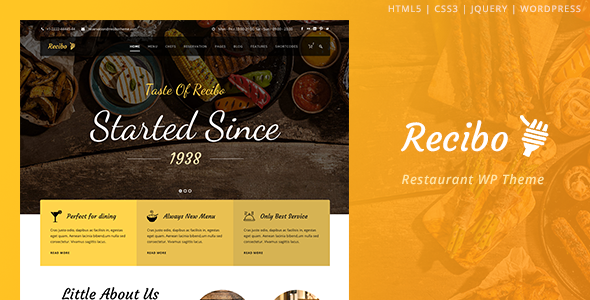
Stuck on your Recibo WordPress theme? Let's fix it.
No endless back-and-forth. Just send us the details and we'll get it done.
No obligation · Replies within 1 hour · Quote within 1 day
Setup · Customization · Bug fixes · WooCommerce integration
About Recibo WP Theme
Recibo is a WordPress theme built by GoodLayers, designed specifically for restaurant and food businesses. It ships with a drag-and-drop page builder, pre-built demo layouts, and a built-in menu display system that handles food items, pricing, and categories without needing a separate plugin.
The theme supports online reservations, event listings, and multiple header styles, making it practical for cafes, fine dining restaurants, and food delivery concepts. GoodLayers has a track record of maintaining their themes, so Recibo gets updates that keep it compatible with current WordPress versions.
Out of the box, Recibo is well-structured for restaurants that want a polished site without heavy custom development. However, getting the most from its builder and demo content still takes time, especially if you need to match an existing brand or extend the default functionality.
Get matched with a Recibo developer in under one day
Tell us about your Recibo project. Small fixes, Recibo theme customization, or a full website build, whatever you need, we've got it covered.
We'll connect you to the right Recibo developers, define the scope, and get everything 100% clear.
You'll get one estimate, hire your preferred developer, and start collaborating.
GoodLayers builds capable themes, but Recibo’s page builder has its own logic that takes time to learn properly. A developer who has worked with it before will not spend hours figuring out layout quirks or why a section breaks on mobile. Through Codeable, you get access to vetted WordPress developers who know GoodLayers themes well. Post your project, get a fixed estimate within 24 hours, and only proceed if the scope and price make sense. No commitment required upfront.
Pros
- Built-in food menu module handles categories, pricing, and item descriptions without extra plugins
- Multiple pre-built restaurant demo layouts that can be imported with one click
- GoodLayers page builder gives visual control over most layout elements without writing code
- Includes a reservation form and event listing feature suited to restaurant use cases
- Regular updates from GoodLayers maintain WordPress and WooCommerce compatibility
Cons
- The GoodLayers page builder is proprietary, so content is harder to migrate to another theme later
- Default scripts and styles add page weight, which requires performance tuning for fast load times
- Demo import can bring in placeholder content that takes considerable time to replace properly
- Support from GoodLayers is ticket-based and response times can be slow for complex issues
- Limited flexibility outside the builder components without custom CSS or a child theme
Who is Recibo for?
Restaurant Website
Recibo was designed for restaurants. The food menu module, table reservation form, and opening hours display all come built in. A developer can configure these sections around your actual menu structure, set up location pages for multiple branches, and connect a booking system that notifies your team in real time.
Cafe or Coffee Shop
Cafes benefit from Recibo’s clean layout options and the ability to display seasonal menus without heavy custom work. The theme handles gallery sections well for showcasing interiors and drinks. A developer can strip out restaurant-specific sections that are not relevant and simplify the layout for a smaller operation.
Food Delivery Business
With WooCommerce added, Recibo can power an online ordering setup for food delivery. Products map to menu items, categories separate cuisine types, and checkout handles order collection. A developer needs to configure this properly since the theme does not set up WooCommerce automatically.
Private Dining or Events Venue
Private dining venues and event spaces can use Recibo’s event listing and reservation features to display packages and accept enquiries. A developer can extend the booking form to capture guest count, dietary requirements, and event type, feeding data directly into your CRM or email system.
Food Blog with Restaurant Reviews
Food bloggers can use Recibo’s editorial layout options alongside its restaurant features. Review posts, location guides, and recipe content fit within the theme’s structure. The built-in components cover most needs, though custom post types for reviews or ratings require developer work to set up correctly.

Customizing Recibo
Recibo gives you a lot of control through its page builder, but the customization depth depends on how well you understand the theme’s own component system. Changing fonts, colors, and layout grids is straightforward from the theme options panel. More complex work, like custom menu card designs, animated sections, or modified reservation flows, requires someone who knows the GoodLayers framework.
A Recibo expert can rebuild demo layouts around your actual brand, set up the food menu module with real categories and pricing, and integrate third-party booking tools if the built-in reservation form falls short. Custom CSS and child theme work are also common requests that go beyond what the visual builder handles alone.
If your restaurant has specific needs, working with a developer who knows Recibo saves significant time over trial and error with the builder.
Recommended plugins for Recibo
Recibo works well with WooCommerce for online ordering, letting you sell dishes or gift vouchers directly from the site. WPForms or Gravity Forms can replace the default reservation form if you need conditional logic or payment collection at booking.
For performance, pairing Recibo with a caching plugin and optimized image delivery is important since GoodLayers themes can load multiple scripts. See our WordPress performance service for specifics. If search visibility matters, structured data for restaurants and local SEO setup is handled separately through our WordPress SEO service.
Not sure which plugins to use? This WordPress plugins directory covers the most popular options with reviews and setup guides.
Recibo common issues
Recibo page builder sections not displaying correctly on mobile
Mobile layout issues in Recibo usually come from fixed column widths set inside the page builder that do not stack properly on small screens. Open the affected section in the builder, check column settings for mobile breakpoints, and override widths using the responsive controls. If the builder does not expose those controls, targeted CSS in a child theme fixes most cases. Our WordPress bug fixing service can diagnose and resolve this quickly.
Recibo food menu module not showing updated prices
When Recibo’s food menu shows old prices after you update them, the most common cause is a caching layer serving a stored version of the page. Clear your WordPress cache plugin, your hosting-level cache, and any CDN cache if one is active. If prices still do not update, check whether the menu items are saved as custom post types with their own cache settings that need to be flushed separately.
Recibo reservation form not sending email notifications
Recibo’s reservation form relies on WordPress’s default mail function, which many hosts block or route incorrectly. Install an SMTP plugin such as WP Mail SMTP, connect it to a transactional mail service like SendGrid or Mailgun, and test the form again. Also check your spam folder before assuming mail is not sending. If the form itself is broken, inspect the developer console for JavaScript errors that might be preventing submission.
Recibo demo import fails or stops halfway
Failed demo imports in Recibo are usually caused by PHP memory or execution time limits set too low on your server. Increase max_execution_time and memory_limit in your PHP configuration or ask your host to raise them temporarily. Import large demos in parts if the tool allows it. If the import completes but images are missing, re-run the media import step separately through the theme’s importer.
Recibo FAQ
GoodLayers updates Recibo regularly to maintain WordPress compatibility. Check the theme’s changelog on ThemeForest before updating to confirm the current version supports your WordPress release. Always test updates on a staging site first, since major WordPress releases occasionally affect how the GoodLayers builder renders certain components.
Yes, Recibo is compatible with WooCommerce. You can set up a product catalog that mirrors your food menu and use WooCommerce checkout to handle orders. The theme does not configure WooCommerce automatically, so a developer needs to map menu categories to product categories and style the shop pages to match the rest of your site.
Recibo is built around the GoodLayers page builder, not Elementor. You can technically install Elementor alongside it, but sections built in one builder will not be editable in the other. Mixing builders creates maintenance problems. If you prefer Elementor, a different theme base is worth considering rather than forcing it onto Recibo.
Migrating a Recibo site involves moving files, the database, and updating URLs in the database to match the new domain or server path. Use a plugin like Duplicator or All-in-One WP Migration to handle the transfer. Update your DNS, test all pages on the new host, and check that theme license keys are reactivated. Our WordPress migration service handles this end to end.
Recibo’s code output is reasonably clean, but SEO performance depends on more than theme structure. Page speed is the main concern since GoodLayers themes load several scripts by default. With proper caching, image optimization, and an SEO plugin like Yoast or Rank Math configured correctly, Recibo sites can rank well. Schema markup for restaurants needs to be added separately.
Hire a Recibo Developer
Need help setting up Recibo, customizing layouts, or fixing something that broke after an update? Our developers work with GoodLayers themes regularly and can handle everything from full site builds to specific fixes. Work is delivered through Codeable, so you get a vetted developer, a clear estimate, and no risk. Get a free estimate and describe your project. You will hear back within 24 hours.
You'll need a free Codeable account so developers can ask questions and send their quotes.