GoGreen WordPress Theme
by Wyde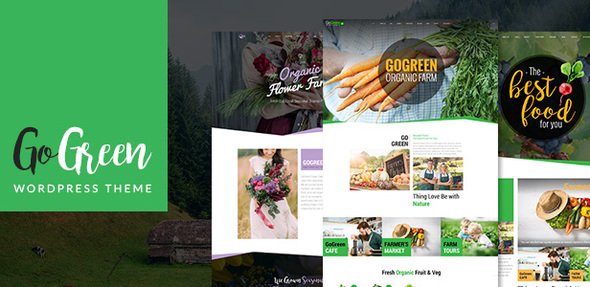
Stuck on your GoGreen WordPress theme? Let's fix it.
No endless back-and-forth. Just send us the details and we'll get it done.
No obligation · Replies within 1 hour · Quote within 1 day
Setup · Customization · Bug fixes · WooCommerce integration
About GoGreen WP Theme
GoGreen is a WordPress theme by Wyde built for environmental organizations, eco-friendly businesses, and sustainability-focused nonprofits. It comes with a clean, nature-inspired design that works well for charities, green energy companies, and organic product brands.
The theme includes a drag-and-drop page builder, pre-built demo content, and WooCommerce support. You get dedicated sections for campaigns, donation integrations, and event listings out of the box. It is compatible with popular plugins like WPML for multilingual sites and Contact Form 7 for lead capture.
GoGreen is responsive across all devices and ships with multiple header layouts and color scheme options. For organizations that need a professional online presence without building from scratch, it covers most of the ground quickly.
Get matched with a GoGreen developer in under one day
Tell us about your GoGreen project. Small fixes, GoGreen theme customization, or a full website build, whatever you need, we've got it covered.
We'll connect you to the right GoGreen developers, define the scope, and get everything 100% clear.
You'll get one estimate, hire your preferred developer, and start collaborating.
GoGreen has enough configuration options that small mistakes add up fast. Layout conflicts, slow load times, or plugin incompatibilities are common when setting it up without experience. A developer who has worked with the Wyde theme framework knows where those problems typically appear.
Through Codeable, you can connect with vetted WordPress developers who have hands-on GoGreen experience. You get a free estimate before committing to anything, and projects are matched within 24 hours. No guesswork, no junior freelancers.
Pros
- Purpose-built design for environmental and nonprofit organizations saves significant setup time
- Includes pre-built demo content with donation sections, campaigns, and event layouts ready to import
- WooCommerce compatible for selling eco-products or merchandise alongside campaign content
- WPML ready, making it practical for international organizations running multilingual sites
- Multiple header styles and homepage section layouts give decent design flexibility without custom code
Cons
- Page builder included by Wyde is less capable than Elementor or Gutenberg, limiting complex layouts
- Theme updates from Wyde have historically been infrequent, raising long-term compatibility concerns
- Default page load speed is slow on shared hosting without additional performance optimization
- Limited official documentation makes troubleshooting harder for non-developers
- Demo content import can be unreliable and sometimes requires manual cleanup after installation
Who is GoGreen for?
Environmental Nonprofits
GoGreen’s campaign sections and donation integration make it a practical choice for environmental charities. You can showcase active campaigns, collect donations via GiveWP, and post updates without needing a custom theme. The built-in event section also works well for fundraising events and volunteer drives.
Organic Food and Product Brands
Organic brands can combine GoGreen’s clean aesthetic with WooCommerce to sell products directly. The nature-inspired design language aligns with organic and sustainable branding without heavy customization. Adding a blog for content marketing fits naturally within the theme’s existing layout structure.
Green Energy Companies
Solar, wind, and other green energy businesses benefit from GoGreen’s service-showcase sections. You can highlight offerings, feature case studies, and capture leads through contact forms. The professional layout works for both B2C and B2B energy providers targeting environmentally aware clients.
Eco-Tourism and Travel
Eco-tourism operators can use GoGreen to present tours, destinations, and sustainability credentials. The visual layout handles image-heavy content well, and adding a booking plugin is straightforward. It positions an operator’s environmental commitment front and center, which matters to this audience.
Sustainability Consultancies
Consultancies focused on sustainability reporting, carbon footprinting, or green certifications need a credible online presence. GoGreen provides the right visual tone and enough layout options to build a service-focused site. A developer can extend it with custom case study templates or lead capture flows.

Customizing GoGreen
GoGreen gives you a solid starting point, but most sites need adjustments before they are production-ready. The theme’s Customizer options cover fonts, colors, and layout choices. Beyond that, you will likely need custom CSS or PHP edits to match a specific brand identity.
Common customization requests include modifying the donation section layout, adjusting homepage block order, integrating third-party CRM tools, or building custom campaign pages. If the built-in page builder feels limiting, a GoGreen expert can extend it with custom Elementor or Gutenberg blocks instead.
Working with someone who knows the Wyde framework saves time. A GoGreen expert understands which theme options to use natively and where custom code is the cleaner solution, avoiding workarounds that cause problems later.
Recommended plugins for GoGreen
GoGreen pairs well with several plugins that extend its core functionality. WooCommerce turns it into a shop for eco-products. GiveWP or Charitable handle donation campaigns cleanly. The Events Calendar works with its built-in events section.
For better site speed, image optimization and caching plugins are worth adding since GoGreen can load heavy on shared hosting. A full WordPress performance audit helps identify bottlenecks early. If your organization targets search traffic, pairing the theme with a proper WordPress SEO setup will make a measurable difference in organic visibility.
Not sure which plugins to use? This WordPress plugins directory covers the most popular options with reviews and setup guides.
GoGreen common issues
GoGreen theme demo import not working
Demo import failures in GoGreen usually come down to server memory limits or PHP timeout settings. The import process pulls in images, widgets, and content simultaneously, which exceeds default limits on many hosts. Increase max_execution_time and memory_limit in your php.ini or wp-config.php. If the problem persists, import the XML content manually and set up widgets separately. A developer can handle this cleanly if the hosting environment is locked down.
GoGreen theme slow loading on mobile
GoGreen loads several scripts and stylesheets by default, many of which are not needed on every page. Start by enabling a caching plugin like WP Rocket or W3 Total Cache. Compress and lazy-load images, and defer non-critical JavaScript. If scores are still low, a deeper look at render-blocking resources is needed. Our WordPress performance service covers this end to end and typically brings significant improvements to Core Web Vitals.
GoGreen page builder sections not displaying correctly
Layout breaks in GoGreen’s page builder sections are often caused by a plugin conflict or a CSS clash with a recently added plugin. Start by switching to a default WordPress theme temporarily to confirm the theme is the source. Then deactivate plugins one by one to isolate the conflict. If the issue appeared after a Wyde update, check the changelog for known breaking changes. A WordPress bug fixing service can diagnose and resolve this faster than manual testing.
GoGreen theme broken after WordPress update
GoGreen breaking after a WordPress core update usually means a theme function is calling a deprecated API. Check the browser console and PHP error log first for specific error messages. In many cases, a simple theme update from Wyde resolves it. If no update is available or the update does not fix the issue, the affected functions need manual patching. This is a common scenario with themes from developers who release updates infrequently, and it requires direct PHP-level fixes.
GoGreen FAQ
GoGreen is one of the more focused nonprofit and environmental themes available. It ships with campaign sections, donation plugin compatibility, and event listings. For small to mid-size nonprofits, it covers most structural needs without custom development. Larger organizations with complex donation flows or membership systems may need additional plugin integrations built on top of it.
GoGreen is compatible with Elementor, though it ships with its own Wyde page builder. Most developers prefer replacing the built-in builder with Elementor for more layout control and a better editing experience. Some theme-specific sections still require the Wyde builder or direct CSS edits, so expect minor adjustments when mixing the two tools on the same site.
GoGreen does not include a native donation system. The standard approach is to install GiveWP or Charitable, then add a donation button or form using a shortcode or block in any page or widget area. Both plugins work cleanly with the theme’s layout. A developer can style the donation form to match the theme’s design if the default appearance does not fit.
Wyde’s update frequency for GoGreen has been inconsistent. The theme receives occasional updates but is not on a regular release schedule. Before committing to it for a long-term project, check the ThemeForest changelog for the last update date. For sites that need guaranteed compatibility with future WordPress versions, having a developer on call for maintenance is advisable.
Yes, migrating an existing site to GoGreen is possible. Content migrates cleanly since it is stored in WordPress, but you will need to rebuild page layouts using GoGreen’s structure. Custom post types, widgets, and menus all need reconfiguring. For a smooth transition, professional WordPress migration support reduces the risk of data loss or layout issues during the switch.
Hire a GoGreen WordPress Developer
Whether you need a full GoGreen setup, design customizations, or help fixing a specific issue, working with an experienced developer gets it done right the first time. Every project starts with a free estimate and no obligation to proceed.
FoxyConcept works through Codeable, matching you with vetted WordPress developers who know the GoGreen theme. Get your free estimate today and have a developer reviewed your project within 24 hours.
You'll need a free Codeable account so developers can ask questions and send their quotes.