Dendrite WordPress Theme
by neuronthemes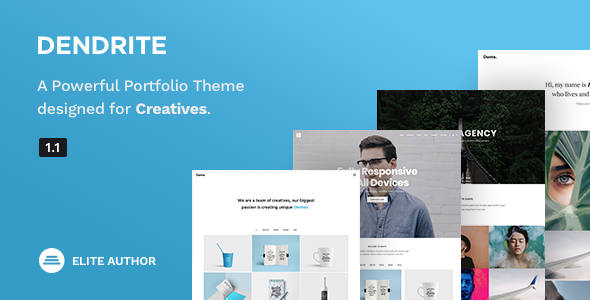
Stuck on your Dendrite WordPress theme? Let's fix it.
No endless back-and-forth. Just send us the details and we'll get it done.
No obligation · Replies within 1 hour · Quote within 1 day
Setup · Customization · Bug fixes · WooCommerce integration
About Dendrite WP Theme
Dendrite is a WordPress theme built by neuronthemes, aimed at creative agencies, portfolios, and digital studios. It ships with a clean visual structure, multiple header layouts, and a page builder-friendly design that works well with Elementor. The theme focuses on presenting work clearly — galleries, case studies, and service sections are all part of the core offering.
neuronthemes maintains active development on Dendrite, with updates covering compatibility with newer WordPress versions and WooCommerce. The theme is sold on ThemeForest and comes with six months of author support. It uses a modular approach to layout building, so most of the design decisions happen at the page level rather than through a rigid global template. That gives you flexibility but also means setup time is longer than simpler themes.
Get matched with a Dendrite developer in under one day
Tell us about your Dendrite project. Small fixes, Dendrite theme customization, or a full website build, whatever you need, we've got it covered.
We'll connect you to the right Dendrite developers, define the scope, and get everything 100% clear.
You'll get one estimate, hire your preferred developer, and start collaborating.
Dendrite looks straightforward in the demo but gets complex fast once you start building real pages. The Neuron Builder dependency, the custom post type structure, and the number of layout options mean small mistakes create inconsistencies across the site. Working with a vetted developer through Codeable means you get someone who has handled these setups before. No trial and error on your live site. If you need Dendrite configured, extended, or fixed, the right developer will get it done correctly the first time.
Pros
- Ships with Neuron Builder, a solid Elementor extension that adds purpose-built widgets for agency-style layouts
- Multiple prebuilt demo sites cover agencies, portfolios, and digital studios — useful starting points that reduce build time
- Custom portfolio post type keeps project content structured and separate from standard pages
- WooCommerce support is built in, making it usable for shops that also need a strong portfolio or services section
- Active updates from neuronthemes covering WordPress and WooCommerce compatibility
Cons
- Neuron Builder adds a plugin dependency — removing it breaks most page layouts
- Initial setup takes significant time due to the number of layout options and demo content import steps
- Support is limited to six months after purchase unless you pay for an extension
- Heavy use of full-width Elementor sections can create performance issues without additional optimisation
- Documentation covers basics well but leaves gaps for advanced customisation like custom archive templates
Who is Dendrite for?
Creative Agency Website
Dendrite suits agencies that need to display client work, describe services, and present a team. The portfolio post type and case study layouts handle project showcases well. A developer can configure custom templates for each project category, keeping the structure consistent as the portfolio grows without manual page-by-page formatting.
Freelance Portfolio
For individual freelancers, Dendrite provides enough layout variety to build a distinctive portfolio without starting from zero. The prebuilt demo pages cover the sections most freelancers need — work samples, about, services, and contact. A quick customisation pass by a developer sets up the typography and colour scheme to match personal branding properly.
Digital Studio
Digital studios handling branding, UX, or development work benefit from Dendrite’s structured portfolio system and Elementor flexibility. The theme supports video backgrounds and animated section entrances that suit studios wanting a more dynamic presentation. Keeping those elements from slowing the site down requires performance work alongside the build.
Product and Service Business
Businesses selling services or products alongside a content-heavy site can use Dendrite’s WooCommerce integration. Product pages inherit the theme styling, and service sections can be built using the Neuron Builder widgets. The combination works well for consultancies, SaaS landing pages, and boutique product brands that need more than a plain shop template.
Photography or Visual Arts Site
Photographers and visual artists benefit from Dendrite’s gallery layouts and full-width image sections. The theme supports masonry and grid gallery styles through Elementor. For large image libraries, pairing Dendrite with proper image compression and lazy loading is essential — the layouts are built to show imagery but can be slow without those additions.

Customizing Dendrite
Dendrite customization covers header and footer layout variations, typography controls, colour schemes, and section-level design options through Elementor widgets bundled with the theme. The theme registers custom post types for portfolio items and team members, which keeps structured content separate from standard pages.
That said, getting the most out of Dendrite without spending hours in the page builder takes experience. A Dendrite expert can configure the theme correctly from the start — setting up global styles, custom templates for archive and single portfolio pages, and making sure WooCommerce pages match the rest of the design. If your customization needs go beyond what the Elementor widgets support, custom child theme work or PHP-level changes are usually needed. That is where hiring a specialist pays off.
Recommended plugins for Dendrite
Dendrite works with the plugins neuronthemes bundles — primarily Neuron Builder, their Elementor extension, along with WooCommerce for shop functionality. For contact forms, most developers pair it with WPForms or Gravity Forms. WPML and Polylang are both compatible for multilingual builds.
If you want to improve load times, Dendrite benefits from a caching layer and image optimisation — the theme ships with several full-width sections that can get heavy quickly. Pairing it with a proper WordPress performance setup makes a real difference. For visibility, connecting it to a solid WordPress SEO strategy helps the portfolio and service pages rank properly.
Not sure which plugins to use? This WordPress plugins directory covers the most popular options with reviews and setup guides.
Dendrite common issues
Dendrite demo import not working or stuck
Demo import failures in Dendrite usually come from PHP memory limits, max execution time settings, or a missing required plugin. The importer needs Neuron Builder and Elementor active before it runs. Check your server’s php.ini for memory_limit (256MB minimum) and max_execution_time (300 seconds). If the import still hangs, try importing XML content manually rather than using the one-click importer. If you need help, a WordPress bug fixing service can resolve this quickly.
Neuron Builder widgets missing or not showing in Elementor
If Neuron Builder widgets are not appearing in the Elementor editor, the plugin is either inactive, running an incompatible version, or has a licence issue. Go to Plugins and confirm Neuron Builder is active. If you installed Dendrite from ThemeForest, make sure you are using the bundled plugin version from the theme package, not a separate download. Updating Elementor independently can sometimes break widget registration — keeping both plugins in sync fixes this in most cases.
Dendrite portfolio pages showing wrong layout or blank
Blank or incorrectly styled portfolio pages usually mean the portfolio post type template is not assigned or the Elementor template was not set up for archives. Dendrite uses custom page templates for portfolio archives and single project pages. In the Elementor Theme Builder, check that the portfolio single and archive conditions are set correctly. If you edited the template and something broke, reverting to a saved version or rebuilding from the demo template solves it without touching code.
Dendrite site slow to load after building pages
Slow load times with Dendrite come from unoptimised images inside full-width Elementor sections, unminified CSS from Neuron Builder, and render-blocking scripts. Start by running a test on GTmetrix or PageSpeed Insights to identify the largest assets. Compress images before upload, enable CSS and JS minification through a caching plugin, and activate lazy loading. A full WordPress performance audit will identify exactly where the time is being lost.
Dendrite FAQ
neuronthemes updates Dendrite regularly to maintain compatibility with current WordPress releases. Before updating WordPress on a live site running Dendrite, check the changelog on ThemeForest for any noted conflicts. Staging environment updates are the safe route — test the update there before pushing to production. Most compatibility issues surface in WooCommerce or Elementor interactions rather than core WordPress itself.
Dendrite is built around Elementor and Neuron Builder. Without both active, the prebuilt layouts break and most page content will not display correctly. There is no Gutenberg-native version of Dendrite. If you need a block editor-based workflow, Dendrite is not the right fit. All serious customisation of Dendrite assumes Elementor is part of the stack.
Dendrite is listed as WPML compatible. The theme structure supports string translation for theme-specific text, and the portfolio post type can be translated using WPML’s post translation feature. Setting up a multilingual Dendrite site correctly takes configuration time — a developer familiar with both WPML and Elementor should handle the initial setup to avoid translation sync issues later.
Always use a child theme for any code-level changes to Dendrite. Elementor page templates and global style settings are stored in the database, so they survive theme updates. After updating, check the header and footer templates in Elementor Theme Builder and verify that custom CSS added through the Customizer is still intact. A staging update test before touching the live site is the safest approach.
You can move an existing WordPress site to Dendrite, but it is a redesign process rather than a straight theme swap. Content migrates fine — posts, pages, and media transfer cleanly. The design work, however, starts from scratch in Elementor with the Dendrite templates. If your current site has complex custom post types, a developer should handle the WordPress migration to make sure nothing breaks during the transition.
Hire a Dendrite WordPress Developer
Whether you need a Dendrite theme set up from scratch, customized beyond its defaults, or debugged after something breaks, FoxyConcept connects you with experienced developers through Codeable. You get a free estimate within 24 hours and no obligation to hire. Projects are matched to developers who know WordPress themes at the code level, not just the page builder surface. Get your free estimate now and describe what you need — the process takes two minutes.
You'll need a free Codeable account so developers can ask questions and send their quotes.