Luxe WordPress Theme
by GloriaThemes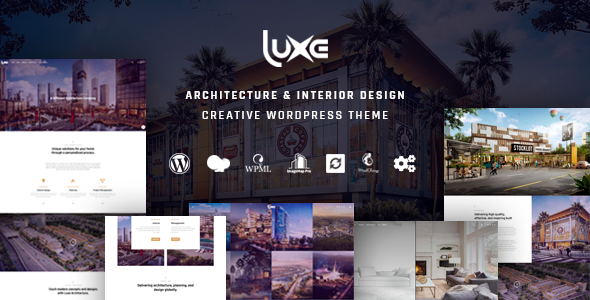
Stuck on your Luxe WordPress theme? Let's fix it.
No endless back-and-forth. Just send us the details and we'll get it done.
No obligation · Replies within 1 hour · Quote within 1 day
Setup · Customization · Bug fixes · WooCommerce integration
About Luxe WP Theme
Luxe is a premium WordPress theme by GloriaThemes built for high-end service businesses and luxury brands. It ships with a clean, editorial layout, smooth typography, and a visual style that leans toward minimalism without feeling sparse.
The theme is block-editor compatible and includes several pre-built page templates you can use as a starting point. It’s aimed at photographers, boutique agencies, interior designers, and similar businesses that lead with visuals.
GloriaThemes has a solid track record with design-focused themes, and Luxe reflects that. The code is clean, the defaults are sensible, and it loads reasonably fast out of the box. That said, getting the most out of it still requires some hands-on configuration, especially if you’re pushing it beyond the demo layout.
Get matched with a Luxe developer in under one day
Tell us about your Luxe project. Small fixes, Luxe theme customization, or a full website build, whatever you need, we've got it covered.
We'll connect you to the right Luxe developers, define the scope, and get everything 100% clear.
You'll get one estimate, hire your preferred developer, and start collaborating.
GloriaThemes builds themes for people who care about design. Luxe reflects that. But design-focused themes often require more precise customisation to stay on-brand, not less. A developer who knows Luxe’s template structure, its hooks, and how GloriaThemes handles child theme support can make changes that hold up across updates.
Through Codeable, you get matched with vetted WordPress developers who have real experience with themes like Luxe. No generalist freelancers, no guesswork. Just developers who know what they’re doing.
Pros
- Clean, editorial design that suits luxury and lifestyle brands straight out of the box
- Block editor compatible with a usable set of pre-built page templates
- GloriaThemes provides regular updates and maintains decent documentation
- Typography defaults are well-chosen and work well on high-resolution screens
- Reasonably lightweight base with no unnecessary plugin dependencies bundled in
Cons
- Limited layout flexibility beyond what the Customizer exposes without custom code
- WooCommerce styling requires additional CSS work to match the Luxe aesthetic properly
- Mobile menu customisation is restricted without editing template files directly
- Pre-built templates are visually strong but few in number, limiting starting points
- No built-in mega menu support, which limits complex navigation structures
Who is Luxe for?
Interior Design Studios
Interior designers need a portfolio that lets the work speak. Luxe’s image-forward layout and whitespace-heavy design make it a strong fit. You can structure project pages with full-width galleries, project details, and a clean contact flow without the site feeling cluttered or corporate.
Luxury Wedding Photographers
Wedding photographers need a site that feels as considered as the photos they take. Luxe handles large imagery well and the typography gives it the premium feel that attracts the right clients. A developer can extend it with a custom gallery system or booking form that fits the design.
Boutique Hotels and Guesthouses
Boutique accommodation businesses benefit from Luxe’s editorial style. You can build room pages, experience sections, and a clean booking call-to-action without the theme fighting your content. It feels personal rather than corporate, which suits smaller luxury properties well.
High-End Fashion and Lifestyle Brands
Fashion and lifestyle brands need visual consistency across every page. Luxe’s minimal aesthetic keeps the focus on product imagery. With some custom development, you can integrate a WooCommerce shop that matches the Luxe design closely rather than looking like an afterthought.
Creative Agencies and Consultants
Agencies and solo consultants in creative fields need a site that positions them clearly. Luxe gives you the right visual tone without being flashy. Use it for case studies, service pages, and a professional contact section. A developer can tighten the structure to match your specific service offering.

Customizing Luxe
Luxe gives you a good set of controls through the WordPress Customizer, covering fonts, colours, header layout, and footer structure. Most adjustments are straightforward for someone comfortable with WordPress. But the moment you want something outside the default template structure, such as a custom portfolio grid, a bespoke pricing section, or a modified mobile nav, you’ll need to write code or hire someone who knows the theme well.
A Luxe expert can rebuild your header, create custom post type templates, modify the loop output, and adapt the design to your brand without touching things that should stay intact. If you’ve been clicking around the Customizer and hitting walls, that’s the point where outside help saves time.
Recommended plugins for Luxe
Luxe works well with WooCommerce if you’re selling products or services. It also integrates cleanly with most popular form plugins and portfolio plugins that output standard shortcodes or blocks.
For performance tuning, caching and image optimisation work well on Luxe with the right setup. Check our WordPress performance service if your Luxe site is loading slowly. If you’re working on organic visibility, our WordPress SEO service covers technical and on-page work that applies directly to Luxe-built sites.
Not sure which plugins to use? This WordPress plugins directory covers the most popular options with reviews and setup guides.
Luxe common issues
Luxe theme header not showing correctly on mobile
Mobile header issues in Luxe are usually caused by a CSS conflict with a plugin, a custom CSS snippet applied incorrectly, or a Customizer setting that affects breakpoint behaviour. Start by deactivating plugins one at a time to isolate the conflict. If the header was working before a change, check your custom CSS in the Customizer and clear your cache. If you can’t identify the cause, a developer can inspect it quickly. Our WordPress bug fixing service covers exactly this kind of issue.
Luxe WordPress theme fonts not loading or displaying wrong
Font loading problems in Luxe usually come from a caching plugin blocking the Google Fonts request, a Content Security Policy header on the server, or a performance plugin that’s inlining or deferring CSS incorrectly. Check your browser console for blocked requests. If you’re using a performance plugin, temporarily disable font optimisation settings. If the font was changed via the Customizer and isn’t reflecting, clear all caches including server-side. Persistent issues may need a developer to audit the font loading stack.
Luxe theme homepage layout broken after WordPress update
Homepage layout breaks after a WordPress update are often caused by a block editor change that affects how certain blocks render, or a Luxe template file that conflicts with a new core behaviour. First, check if the issue appeared immediately after the update and switch to a child theme if you’re modifying the parent directly. Restore a backup if available, then update incrementally. If you don’t have a backup workflow in place, our WordPress maintenance service includes regular backups and update monitoring.
Luxe theme slow to load on mobile devices
Slow mobile load times on Luxe usually come down to unoptimised images, render-blocking scripts, or a hosting environment not suited to the traffic. Run the site through PageSpeed Insights and look at the specific recommendations for mobile. Luxe’s base is clean, so the culprit is usually large image files or a plugin adding unnecessary scripts. Start with image compression and lazy loading. For a full audit and fixes, see our WordPress performance service.
Luxe FAQ
Yes, Luxe is compatible with the WordPress block editor. You can use core blocks to build and edit pages. GloriaThemes has updated the theme to work with modern WordPress. That said, some of the more design-specific layouts work best using the pre-built templates rather than building purely from blocks, so there’s a learning curve if you’re starting from scratch.
Luxe works with WooCommerce, but the out-of-the-box styling won’t perfectly match the Luxe aesthetic. Product pages, cart, and checkout will use WooCommerce’s default template structure. To get the shop looking consistent with the rest of your Luxe site, you’ll need custom CSS or a developer to build proper WooCommerce template overrides.
Yes, Luxe supports child themes, and using one is strongly recommended before making any code-level customisations. Without a child theme, your changes will be overwritten when the theme updates. GloriaThemes follows standard WordPress child theme conventions, so any developer familiar with WordPress can set one up quickly.
Yes, migrating an existing WordPress site to the Luxe theme is possible. It involves setting up Luxe, rebuilding your page layouts using Luxe’s templates, and adjusting content to fit the new structure. It’s not a one-click switch, especially if your current site has a lot of custom layouts. Our WordPress migration service can manage this process cleanly.
The cost depends on the scope of work. Small changes like colour, font, or layout tweaks are relatively quick. Custom templates, WooCommerce integration, or structural changes take longer. Through Codeable, you post your project and get a free estimate with no obligation to hire. Most Luxe customisation projects fall between a few hundred and a few thousand dollars depending on complexity.
Hire a Luxe WordPress Developer
Whether you need a full Luxe setup, specific design changes, or something custom added to an existing site, the right developer makes the difference between a site that almost looks right and one that actually does.
Post your project and get a free estimate from a vetted Luxe developer within 24 hours. No obligation to hire. Get your free estimate here.
You'll need a free Codeable account so developers can ask questions and send their quotes.