Travelista WordPress Theme
by BloomPixel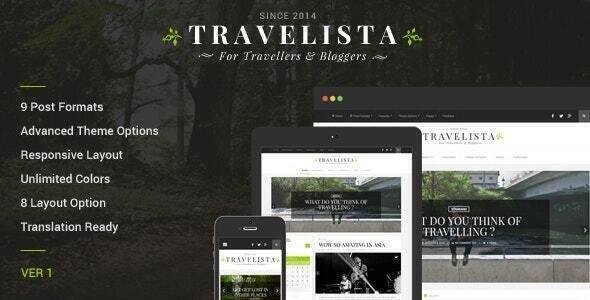
Stuck on your Travelista WordPress theme? Let's fix it.
No endless back-and-forth. Just send us the details and we'll get it done.
No obligation · Replies within 1 hour · Quote within 1 day
Setup · Customization · Bug fixes · WooCommerce integration
About Travelista WP Theme
Travelista is a WordPress theme built by BloomPixel, designed specifically for travel bloggers, tour operators, and destination-focused websites. It ships with a clean layout, full-width imagery support, and a structure that puts visual storytelling first. The theme includes pre-built page templates for destination guides, travel itineraries, and trip reviews, making it easier to get a professional-looking site live without starting from scratch.
Travelista works with the WordPress block editor and includes options for custom headers, sticky navigation, and featured post sliders. BloomPixel has focused on keeping the codebase lightweight, which helps with page load times on media-heavy travel content. If you run a travel agency, an adventure tourism brand, or a personal travel blog with monetization goals, Travelista gives you a solid visual foundation to build from.
Get matched with a Travelista developer in under one day
Tell us about your Travelista project. Small fixes, Travelista theme customization, or a full website build, whatever you need, we've got it covered.
We'll connect you to the right Travelista developers, define the scope, and get everything 100% clear.
You'll get one estimate, hire your preferred developer, and start collaborating.
Travelista has enough flexibility for most travel sites, but getting it to behave exactly how you need often takes more than clicking through the Customizer. BloomPixel built solid foundations, but edge cases, plugin conflicts, and layout customizations still require real development work.
Through Codeable, you get matched with vetted WordPress developers who have worked on travel-focused themes. Post your project, get an estimate within 24 hours, and only move forward if it makes sense. No risk, no pressure.
Pros
- Purpose-built for travel content with destination and itinerary templates included out of the box
- Lightweight codebase from BloomPixel keeps load times manageable even on image-heavy travel pages
- Full-width featured image support works well for hero photography and destination showcases
- Compatible with WP Travel Engine for tour package listings and booking forms
- Customizer-based settings make basic styling changes accessible without code knowledge
Cons
- Advanced layout changes like custom taxonomy archives or modified itinerary templates require PHP edits
- Limited third-party documentation outside BloomPixel's own support channels
- The built-in booking inquiry form is basic and needs plugin support for serious travel agency use
- WooCommerce styling requires manual CSS adjustments to match the rest of the theme design
- Update frequency from BloomPixel has been inconsistent, which can create compatibility concerns over time
Who is Travelista for?
Travel Blog
Travelista’s post grid layouts, featured sliders, and category-based homepage sections are built for bloggers who publish frequently. You can organize content by region, trip type, or travel style. The typography and whitespace choices keep long-form articles readable, which matters when posts run several thousand words.
Tour Operator Website
Paired with WP Travel Engine, Travelista becomes a functional base for tour operators who need to display packages, pricing, duration, and booking forms. The destination template works well for individual tour pages. A developer can customize the booking flow and package archive pages to match your specific offering.
Destination Travel Guide
If you are building a guide site around one or several destinations, Travelista’s page templates and widgetized sidebars let you organize attractions, tips, and itineraries clearly. The full-width image support makes destination hero sections look sharp without extra plugin overhead.
Adventure Tourism Brand
Adventure brands need strong visuals and a fast site. Travelista handles both reasonably well. The full-screen header, video background support, and bold typography options suit brands selling hiking tours, diving trips, or overland expeditions. Custom color schemes can be set to match brand guidelines.
Travel Affiliate Site
Affiliate travel sites depend on clean layouts, fast load times, and clear calls to action. Travelista’s grid-based post display and banner widget areas work well for affiliate placements. Adding custom affiliate disclosure blocks or comparison tables requires some developer input but integrates cleanly.

Customizing Travelista
Travelista exposes most of its settings through the WordPress Customizer, covering typography, color schemes, header layouts, and sidebar positions. You can switch between homepage layouts, adjust the post grid style, and configure the featured destination section without touching code. The theme also includes widget-ready areas for social feeds, newsletter signups, and recent posts.
Beyond the basics, deeper customization starts to require CSS or PHP edits. Things like restyling the booking inquiry form, adding custom destination taxonomy pages, or modifying the itinerary template structure often need a hands-on approach. A Travelista expert can handle these changes cleanly and efficiently. Whether you need a minor tweak or a full child theme built on top of Travelista, working with someone who knows the theme saves significant time and avoids breaking things mid-edit.
Recommended plugins for Travelista
Travelista pairs well with several popular plugins. WooCommerce can be added to sell travel guides, itineraries, or merchandise directly from your site. WP Travel Engine integrates well for tour bookings and package listings. For performance on image-heavy pages, caching and image optimization plugins are worth adding early. See our WordPress performance service for help there.
On the SEO side, the theme outputs clean HTML but you will still want a dedicated SEO plugin and proper schema markup for travel content. Our WordPress SEO service covers those optimizations in full.
Not sure which plugins to use? This WordPress plugins directory covers the most popular options with reviews and setup guides.
Travelista common issues
Travelista featured slider not showing on homepage
This usually comes down to one of three things: the slider posts do not have a featured image assigned, the homepage template is set to a static page rather than the blog template, or a caching plugin is serving a stale version. Clear your cache first. Then check that each post in the slider has a featured image that meets the minimum dimensions BloomPixel specifies in their theme documentation. If the issue persists, a plugin conflict is likely. Disable plugins one by one to identify the culprit. Our WordPress bug fixing service can trace this quickly.
Travelista theme not compatible with Elementor
Travelista was designed around the native block editor, not Elementor. Most layout conflicts come from Elementor’s own CSS overriding Travelista’s template styles. You can set Elementor to use its canvas template on specific pages to strip out the theme’s header and footer interference. For full-site builds with Elementor, you will need a developer to reconcile the CSS and make sure theme templates and Elementor templates are not fighting each other across different page types.
Travelista mobile menu not opening on iOS
iOS-specific mobile menu failures in Travelista almost always trace back to a JavaScript conflict or a touch event not being bound correctly. Check the browser console on an iOS device for JS errors. A common fix is ensuring the mobile menu toggle script loads after jQuery. If a recent plugin update broke this, roll back the plugin and test. For persistent issues, this is a straightforward fix for a developer but time-consuming to debug alone without knowing the theme’s JS structure.
Travelista child theme not inheriting parent styles correctly
If your Travelista child theme is missing styles, the most common cause is the child theme’s stylesheet not properly enqueueing the parent theme’s styles. Make sure your child theme’s functions.php uses wp_enqueue_style with the parent stylesheet as a dependency, not an @import rule in the CSS file. Also confirm the child theme’s style.css header correctly references Travelista as the Template. If layout elements are still broken, check whether BloomPixel uses inline styles or theme-specific CSS variables that the child theme is not inheriting.
Travelista FAQ
BloomPixel has updated Travelista to work with recent versions of WordPress, but compatibility can lag behind major core releases. Always check the theme’s changelog before updating WordPress on a live site. Running a staging environment before any major update is the safest approach. If you are on an older version of Travelista, a developer can review compatibility and apply any fixes needed before you update.
Yes, but the theme’s built-in inquiry form is basic. For real booking functionality, you will need WP Travel Engine or a similar plugin. Travelista integrates reasonably well with WP Travel Engine’s tour listing templates, though some CSS adjustments are needed to keep styling consistent. For agencies with complex booking requirements, a developer can wire up the right plugin stack on top of Travelista.
Travelista is not an officially WooCommerce-ready theme, meaning WooCommerce pages will work but will not inherit Travelista’s full styling automatically. Product pages, cart, and checkout will need manual CSS work to match the rest of the site. If selling digital products or travel guides is a core part of your site, factor in developer time to make WooCommerce look right.
Travelista’s Customizer includes a typography section where you can select from a preset list of Google Fonts. To add fonts outside that list, you will need to enqueue them in a child theme’s functions.php and override the relevant CSS classes. Custom font files like purchased webfonts require the same process. A child theme is the right place to make these changes so updates do not wipe them out.
Migrating content from an existing travel site to Travelista is doable, but the effort depends on your current setup. Post content and images transfer cleanly. Custom post types, booking data, or theme-specific layouts from a previous theme will need to be rebuilt. Our WordPress migration service handles content transfer and helps map your existing structure into Travelista’s templates properly.
Hire a Travelista Expert Developer
Need help customizing Travelista, fixing a layout issue, or adding new functionality to your travel site? Our WordPress developers know the theme inside out. From child theme builds to plugin integrations and performance fixes, we handle it properly the first time. Get a free estimate with no obligation to hire. You will have a clear scope and price before any work begins.
You'll need a free Codeable account so developers can ask questions and send their quotes.