Photography WordPress WordPress Theme
by ThemeGoods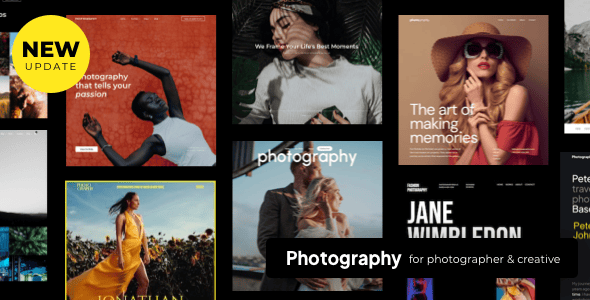
Stuck on your Photography WordPress WordPress theme? Let's fix it.
No endless back-and-forth. Just send us the details and we'll get it done.
No obligation · Replies within 1 hour · Quote within 1 day
Setup · Customization · Bug fixes · WooCommerce integration
About Photography WordPress WP Theme
Photography WordPress is a theme by ThemeGoods built for photographers who need a clean, image-first portfolio. It ships with fullscreen galleries, a drag-and-drop page builder, multiple homepage layouts, and WooCommerce support for selling prints or digital downloads. The theme is coded to keep photo quality front and centre, with minimal UI chrome getting in the way of the work.
Out of the box you get portfolio post types, lightbox galleries, lazy loading, and a contact form. It supports Elementor and WPBakery, so layout changes don’t require touching code. Built-in AJAX navigation keeps page transitions smooth, which matters when you’re showing a large body of work. It’s a solid starting point for professional photographers, studio sites, and creative agencies who shoot.
Get matched with a Photography WordPress developer in under one day
Tell us about your Photography WordPress project. Small fixes, Photography WordPress theme customization, or a full website build, whatever you need, we've got it covered.
We'll connect you to the right Photography WordPress developers, define the scope, and get everything 100% clear.
You'll get one estimate, hire your preferred developer, and start collaborating.
ThemeGoods builds solid themes, but every photography business has different needs. A developer who knows Photography WordPress can reconfigure layouts, build custom gallery types, integrate booking or print-sale workflows, and fix conflicts that appear after plugin updates.
All work through FoxyConcept is delivered via Codeable, a vetted network of WordPress specialists. You post a project, get matched with a developer within 24 hours, and receive a free estimate before committing to anything. No risk, no obligation.
Pros
- Fullscreen image layouts load without distraction, keeping focus on photography
- Multiple pre-built homepage styles reduce initial setup time significantly
- WooCommerce compatibility lets photographers sell prints or digital files directly
- AJAX page transitions work well with large portfolios and smooth navigation
- Compatible with both Elementor and WPBakery, giving layout flexibility without code
Cons
- Page builder shortcodes create lock-in that complicates switching themes later
- Default image optimisation settings are not aggressive enough for fast load times
- Mobile gallery layouts occasionally need manual CSS fixes on smaller screens
- ThemeGoods support response times can be slow on complex technical issues
- EXIF data display is limited and requires custom code to show camera metadata properly
Who is Photography WordPress for?
Wedding Photographers
Wedding photographers need galleries that showcase emotion without technical clutter. Photography WordPress supports full-width slideshows, album groupings by event, and password-protected client galleries. A developer can add a contact form tied to a booking calendar, making the site a working business tool rather than just a portfolio.
Commercial Photography Studios
Commercial studios shooting product, architecture, or fashion need categorised portfolios with clear client navigation. The theme’s portfolio post types handle this well. A Photography WordPress developer can extend it with custom filterable categories, a client login area, and a quote request form wired to the studio’s CRM.
Fine Art Print Sellers
Photographers selling limited-edition prints need WooCommerce configured properly. Photography WordPress includes WooCommerce support, but a developer should set up product variations for print sizes, configure shipping rules, and integrate Stripe or PayPal. Thumbnail quality on shop pages also needs specific image size settings to look right.
Photo Journalism Portfolios
Photojournalists and documentary photographers need a clean editorial layout that lets work speak without heavy branding. Photography WordPress can be stripped back to a minimal grid with story-based organisation. A developer can add custom taxonomy for topics or regions, making large archives browsable without a complex plugin.
Photography Agencies
Multi-photographer agencies need team profiles, shared portfolios, and separate project pages per client. Photography WordPress supports this structure with custom post types. A Photography WordPress specialist can build user role logic so individual photographers manage their own content without touching the rest of the site.

Customizing Photography WordPress
The theme’s customizer covers fonts, colours, header styles, and logo placement without touching a stylesheet. Portfolio grid options let you switch between masonry, justified, and square tiles. You can set hover effects, overlay colours, and caption behaviour per project.
Beyond the defaults, a Photography WordPress expert can push the theme further. Custom post meta for EXIF data, client-gated galleries behind a password, or a booking form wired to a calendar plugin are all achievable but require developer-level work. A Photography WordPress expert can also strip out unused scripts, tighten the CSS, and configure caching so large image libraries don’t slow the site down. If your requirements go beyond what the theme panel offers, hiring a specialist saves time and avoids breaking things in the process.
Recommended plugins for Photography WordPress
Photography WordPress pairs well with several plugins. Envira Gallery or FooGallery add album management beyond the built-in portfolio. WooCommerce handles print sales cleanly with the theme’s existing styling. For client proofing, Pixproof integrates without much friction.
Performance matters more on image-heavy sites. A developer can configure ShortPixel or Imagify for bulk compression and set up a CDN so galleries load fast globally. Check the WordPress performance service for that work. On the visibility side, pairing the theme with Rank Math and structured data markup helps image search rankings. The WordPress SEO service covers schema, sitemaps, and technical fixes specific to photography sites.
Not sure which plugins to use? This WordPress plugins directory covers the most popular options with reviews and setup guides.
Photography WordPress common issues
Photography WordPress gallery not loading on mobile
This usually comes down to a JavaScript conflict or the theme’s mobile detection logic failing. Open the browser console on a mobile device or using Chrome DevTools in mobile emulation and look for JS errors. Common culprits are outdated slider plugins conflicting with the theme’s gallery script. Disable plugins one at a time to isolate the conflict. If the gallery uses a custom script bundled with the theme, check for a theme update from ThemeGoods. If issues persist, the WordPress bug fixing service can trace and resolve the conflict.
Photography WordPress lightbox not opening on click
Lightbox failures in Photography WordPress are almost always caused by a jQuery conflict or a plugin loading its own version of jQuery that overrides the theme’s. Check if another plugin, such as a slider or form plugin, is enqueuing a separate jQuery. Also verify that the lightbox script is not being blocked by a caching plugin. Clear all caches, disable caching temporarily, and test. If the issue appeared after a plugin update, deactivate recent additions and check whether lightbox function restores.
Photography WordPress images look blurry or pixelated
Blurry images in Photography WordPress usually mean WordPress is serving a smaller regenerated thumbnail instead of the full-size image. Go to Settings, Media and check your image size dimensions. Then use the Regenerate Thumbnails plugin to rebuild all sizes. Also check that the theme’s image size declarations in functions.php match what the gallery template is calling. If images are being compressed too heavily, review the settings in any image optimisation plugin you have active.
Photography WordPress portfolio filter not working
Portfolio filter buttons failing to sort or hide items usually point to an Isotope or MixItUp JavaScript error. Open the console and check for errors when clicking a filter. The most common cause is a script load order issue where the filter library loads before jQuery is ready. A developer can fix this by adjusting the wp_enqueue_script dependency array. Also check that portfolio items have the correct category taxonomy assigned, as empty or mismatched terms will cause filters to appear broken.
Photography WordPress site loading slowly with lots of images
Image-heavy sites on Photography WordPress need several layers of optimisation. Start with a compression plugin like ShortPixel set to lossy compression for JPEGs. Enable lazy loading if the theme doesn’t do it natively. Add a CDN such as Cloudflare or BunnyCDN to serve images from edge locations. Set browser caching headers via your server config or a caching plugin. For deeper performance work including server-level config and Core Web Vitals tuning, see the WordPress performance service.
Photography WordPress WooCommerce shop page layout broken
WooCommerce layout breaks in Photography WordPress often happen after a WooCommerce major version update that changes template file structure. The theme’s bundled WooCommerce templates may be out of date. Go to WooCommerce, Status, System Status and look for outdated templates. Update them by copying the new template files from the WooCommerce plugin folder into the theme’s woocommerce directory. If you’re not comfortable editing template files, the WordPress bug fixing service handles this kind of update conflict regularly.
Photography WordPress contact form not sending emails
Contact form email failures in Photography WordPress are rarely a theme issue. The problem is almost always server-level mail delivery. WordPress uses PHP mail by default, which most hosting providers block or flag as spam. Install WP Mail SMTP and connect it to a transactional email service such as Mailgun, SendGrid, or your Google Workspace account. Set up SPF and DKIM records on your domain. Test using the plugin’s built-in send test tool. If forms still fail after this, check that the form plugin itself is correctly configured and not hitting a honeypot or validation error silently.
Photography WordPress Elementor page not saving changes
Elementor not saving in Photography WordPress is commonly caused by a PHP memory limit that’s too low, a REST API conflict, or a security plugin blocking Elementor’s save requests. First increase the PHP memory limit to at least 256MB in wp-config.php. Then check that the WordPress REST API is functioning by visiting yoursite.com/wp-json. If a security plugin is active, add Elementor’s REST API endpoints to the whitelist. Also try switching to the default WordPress theme temporarily to rule out a theme-specific conflict.
Photography WordPress white screen after plugin update
A white screen after a plugin update on Photography WordPress is a PHP fatal error, usually a function conflict between the updated plugin and either the theme or another plugin. Enable WP_DEBUG in wp-config.php to surface the actual error message. If you can’t access wp-admin, connect via FTP or file manager and rename the most recently updated plugin folder to deactivate it. Once you’re back in, check the error log and identify the conflicting function. If you need help getting the site back fast, the WordPress bug fixing service can recover it quickly.
Photography WordPress custom logo not showing in header
Custom logo not appearing in the Photography WordPress header usually means the theme’s header template is not pulling from the custom logo setting added via the WordPress customizer. Check that the theme declares add_theme_support for custom-logo in its functions.php. If it does, go to Appearance, Customize, Site Identity and re-upload the logo. If a caching plugin or server-level cache is active, purge everything after saving. If the header is built with a page builder, the logo placement may be set independently inside the builder and won’t respond to the customizer setting.
Photography WordPress FAQ
Yes, it’s designed specifically for photographer portfolios. Fullscreen layouts, AJAX navigation, lightbox galleries, and WooCommerce support make it a practical choice. That said, getting the most out of it for a professional site usually means some developer input, particularly for performance, SEO, and custom workflows like booking or client delivery.
Yes. Photography WordPress includes WooCommerce compatibility. You can sell physical prints, digital downloads, or framed products. A developer should configure product variations for print sizes, set up payment gateways, and ensure the shop page inherits the theme’s styling correctly. Basic WooCommerce setup is doable without code, but a polished print store benefits from custom configuration.
Yes, Photography WordPress supports Elementor. Most layout sections can be edited with Elementor’s drag-and-drop interface. Some theme-specific elements like portfolio post types still use the theme’s own templates, so not everything is controlled through Elementor. A developer familiar with both the theme and Elementor can clarify what’s editable where and build custom sections as needed.
Photography WordPress doesn’t include client proofing or password-protected galleries natively. You can use WordPress’s built-in page password feature for basic protection. For a proper client gallery experience with selective image approval and download controls, a plugin like Pixproof or a custom-built solution is needed. A Photography WordPress developer can build this into your existing site structure cleanly.
Photography WordPress is responsive and adapts to mobile screen sizes. However, image-heavy themes often need additional tuning to perform well on mobile. Gallery layouts, font sizes, and navigation menus sometimes need CSS adjustments for smaller screens. Testing across real devices is important, and a developer can fix layout issues that the theme’s default responsive rules don’t handle correctly.
The theme itself doesn’t limit photo volume, but WordPress and your hosting stack do. Large galleries with thousands of images need proper media library organisation, lazy loading, image compression, and a CDN. Without those in place, admin screens slow down and front-end load times suffer. A performance-focused developer can configure the stack to handle a large archive without noticeable slowdowns.
Before updating Photography WordPress, back up the site fully including files and database. If you have customised any theme files directly, those changes will be lost unless you’re using a child theme. Always test updates on a staging environment first. After updating, check key pages, gallery functionality, and any active plugins for conflicts. Using a child theme from the start prevents most update-related issues.
Yes, Photography WordPress supports embedded video within portfolio items. You can embed from YouTube or Vimeo using standard WordPress oEmbed. Fullscreen video backgrounds are also supported in certain header styles. For more complex video portfolio needs, such as self-hosted video with custom players or video lightboxes, a developer can integrate a dedicated video plugin that matches the theme’s styling.
Costs vary depending on scope. Small fixes or configuration tasks typically run between $100 and $300. A full custom build on Photography WordPress, including portfolio setup, WooCommerce, booking integration, and performance work, can range from $1,500 to $5,000 or more. Getting a scoped estimate before committing is the best approach. FoxyConcept provides free estimates through Codeable with no obligation to proceed.
Yes, migrating an existing portfolio to Photography WordPress is straightforward for content. Posts, pages, and media can be migrated using WordPress export and import tools. Portfolio structure, custom fields, and gallery configurations will need to be rebuilt in the new theme’s format. A WordPress migration specialist can handle the full process, including redirects and SEO preservation, so you don’t lose rankings or break existing links.
Hire a Photography WordPress Expert
Whether you need a Photography WordPress developer to build a site from scratch, customise an existing setup, or fix something that broke, FoxyConcept can help. Work is scoped clearly, priced upfront, and delivered by a vetted specialist. Get a free estimate and describe your project. You’ll hear back within 24 hours with a plan and a price, no strings attached.
You'll need a free Codeable account so developers can ask questions and send their quotes.