MediCenter WordPress Theme
by QuanticaLabs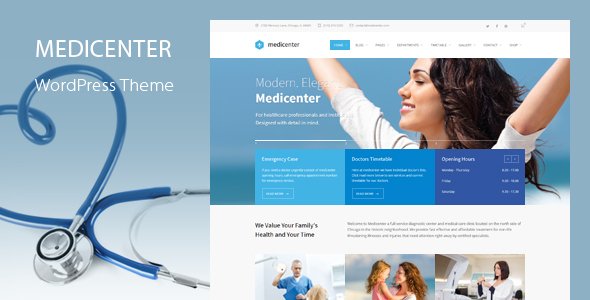
Stuck on your MediCenter WordPress theme? Let's fix it.
No endless back-and-forth. Just send us the details and we'll get it done.
No obligation · Replies within 1 hour · Quote within 1 day
Setup · Customization · Bug fixes · WooCommerce integration
About MediCenter WP Theme
MediCenter is a WordPress theme built by QuanticaLabs specifically for medical and healthcare websites. It ships with pre-built demos for clinics, hospitals, dental practices, and private practitioners, so you can get a professional medical site live without starting from scratch.
The theme includes a built-in appointment booking system, doctor profile pages, department listings, and timetable functionality. It is compatible with WooCommerce for selling medical products or supplements, and it works with Elementor for drag-and-drop page editing.
QuanticaLabs keeps MediCenter actively maintained, with regular updates for WordPress and WooCommerce compatibility. For clinics and practices that need a reliable, feature-rich healthcare theme, MediCenter covers most of the core requirements out of the box.
Get matched with a MediCenter developer in under one day
Tell us about your MediCenter project. Small fixes, MediCenter theme customization, or a full website build, whatever you need, we've got it covered.
We'll connect you to the right MediCenter developers, define the scope, and get everything 100% clear.
You'll get one estimate, hire your preferred developer, and start collaborating.
MediCenter has a lot of moving parts. The appointment system, timetables, doctor CPTs, and WooCommerce integration all need to work together cleanly. When something breaks or needs extending, a generalist developer will spend hours just getting familiar with the theme structure.
A vetted MediCenter developer on Codeable already knows the theme inside out. You get accurate estimates, faster turnaround, and work that holds up under future updates. No wasted time, no trial and error on a live medical site.
Pros
- Built-in appointment booking system designed specifically for medical practices
- Includes doctor and staff profile custom post types with timetable support
- Multiple clinic and hospital demo layouts that can be imported with one click
- WooCommerce compatible for selling health products directly from the site
- Actively maintained by QuanticaLabs with regular compatibility updates
Cons
- The built-in booking system lacks advanced features like payment processing and reminders
- Elementor dependency adds page weight that needs performance tuning on production
- Theme options panel is large and can be confusing without prior MediCenter experience
- Limited HIPAA or GDPR tooling built in, compliance plugins must be added separately
- Child theme is not included by default, so custom CSS risks being overwritten on updates
Who is MediCenter for?
Private Medical Clinics
MediCenter fits private clinics that need doctor profiles, service pages, and an appointment booking form without custom development. A MediCenter specialist can configure department pages, set individual doctor timetables, and connect a booking confirmation email workflow so new patient enquiries are handled automatically from day one.
Dental Practices
Dental practices benefit from MediCenter’s service listing structure and before-and-after gallery support. A MediCenter developer can build out individual treatment pages with pricing tables, configure a booking form that routes to the right dentist, and integrate Google Reviews to build trust with prospective patients searching locally.
Physiotherapy and Rehabilitation Centres
Physiotherapy centres often need detailed therapist profiles, session type pages, and an online booking flow that shows real availability. MediCenter’s timetable system covers the basics, and a MediCenter expert can extend it with a third-party scheduling plugin if the built-in functionality does not meet the practice’s operational requirements.
Hospitals and Multi-Department Facilities
Larger facilities with multiple departments and teams can use MediCenter’s taxonomy structure to organise content by speciality. A MediCenter developer can build location-specific pages, department archives, and filtered doctor directories so patients can find the right contact quickly across a complex site structure.
Health Product Shops
MediCenter’s WooCommerce compatibility makes it a practical choice for health brands selling supplements, medical equipment, or wellness products alongside clinical content. A MediCenter specialist can style the shop to match the medical branding, configure product categories, and set up a checkout flow that aligns with the rest of the site.

Customizing MediCenter
MediCenter gives you a solid starting point, but most clinics need adjustments that go beyond what the Theme Options panel can handle. A MediCenter expert can restructure your homepage layout, modify the appointment booking flow, restyle the doctor profiles to match your branding, and create custom department or service pages.
More advanced work includes integrating third-party booking systems like Calendly or Doctoralia, adding multilingual support via WPML, setting up patient intake forms with conditional logic, and connecting the theme to an external CRM or EHR system.
If you are running multiple clinic locations, a MediCenter specialist can build out location-specific pages with separate teams, hours, and contact details while keeping everything under one WordPress install. Custom child themes are also recommended to protect changes across future updates.
Recommended plugins for MediCenter
MediCenter works well with several plugins that extend its core functionality. For SEO, pairing the theme with Yoast or Rank Math is standard practice. A MediCenter developer can configure schema markup for medical practitioners, which helps search engines display rich results. See our WordPress SEO service for more detail.
On the performance side, MediCenter loads multiple scripts and stylesheets that need pruning on production sites. Caching, image optimisation, and deferring unused scripts make a measurable difference. Our WordPress performance service covers the full stack from server to browser.
Not sure which plugins to use? This WordPress plugins directory covers the most popular options with reviews and setup guides.
MediCenter common issues
MediCenter appointment form not sending email notifications
This is almost always an email delivery problem, not a form configuration issue. WordPress sends email through the server’s default mail function, which many hosts block or flag as spam. Install an SMTP plugin like WP Mail SMTP, connect it to a transactional mail service such as SendGrid or Mailgun, and run the test email tool to confirm delivery. Also check that the notification email address in the MediCenter booking settings is correct and not routed to a spam folder.
MediCenter doctor timetable not displaying correctly
Timetable display issues in MediCenter are usually caused by a conflict between the theme’s timetable shortcode and a caching plugin serving a stale version of the page. Clear all caches first. If the issue persists, check whether the timetable data is saved correctly under the doctor’s profile in the WordPress dashboard. A corrupted import or missing timetable assignment is a common culprit. If you need hands-on help, our WordPress bug fixing service can diagnose and resolve it quickly.
MediCenter homepage slider not loading after update
Slider failures after a theme or plugin update are often caused by a JavaScript conflict. Open your browser console and look for errors referencing the slider library. MediCenter uses Revolution Slider in some configurations. Check that the Revolution Slider plugin is up to date and that no other plugin is loading a conflicting version of jQuery. Deactivate plugins one by one to isolate the conflict if the console does not give a clear pointer.
MediCenter WooCommerce shop page layout broken
MediCenter’s WooCommerce styles are enqueued conditionally, and they can break when WooCommerce is updated to a version that changes its template structure. First, check for a WooCommerce compatibility notice in the WordPress dashboard. Run the WooCommerce database updater if prompted. If the layout is still broken, you may need to override the shop template files inside a child theme to restore the expected structure without touching core theme files.
MediCenter Elementor sections showing blank after WordPress update
Blank Elementor sections typically appear after a WordPress or Elementor update that changes widget registration or deprecates an element. Go to Elementor’s Tools panel and run the Regenerate CSS and Sync Library options. If specific widgets show a warning icon, those widgets may have been removed in a newer Elementor version. You will need to rebuild those sections using current Elementor elements or restore from a pre-update backup. Our WordPress bug fixing service can handle Elementor recovery efficiently.
MediCenter mobile menu not opening on iOS
iOS-specific mobile menu failures in MediCenter are usually tied to a touch event binding issue in the theme’s navigation JavaScript. Check whether the problem occurs in Safari specifically, as iOS Safari handles click and touch events differently from Android. A one-line fix adding a cursor pointer rule to the menu trigger element often resolves the tap issue. If the menu uses a custom hamburger icon added via a child theme, verify the click handler is still attached correctly.
MediCenter custom CSS being lost after theme update
Custom CSS added directly to MediCenter’s theme files or the built-in custom CSS field inside the theme options panel can be wiped when the theme updates. The correct approach is to use a child theme for any file-level changes, and to add CSS through the WordPress Customizer’s Additional CSS field or a dedicated custom CSS plugin. Both methods survive theme updates. If you have lost changes already, check your hosting provider’s file backups for the previous version.
MediCenter Google Maps not displaying on contact page
Google Maps stopped working on most WordPress themes because the Google Maps JavaScript API now requires a billing-enabled API key. Go to the Google Cloud Console, create a Maps JavaScript API key, enable billing on the project, and paste the key into MediCenter’s theme options under the Maps section. Make sure the API key has the correct domain restrictions set so it does not get abused. Once the key is saved, clear your cache and reload the contact page.
MediCenter search results page returning no results
MediCenter search issues can stem from the theme using a custom search template that conflicts with plugins like Relevanssi or SearchWP. Start by testing with the default WordPress search by temporarily switching to a default theme to confirm the posts are indexed. If default search works, the issue is in MediCenter’s search template file. Check the searchform.php and search.php files in the theme for hardcoded post type filters that may be excluding your content. Our WordPress bug fixing service can trace and fix template-level issues like this.
MediCenter demo import failing or incomplete
MediCenter demo imports fail for two main reasons: server timeout limits and insufficient PHP memory. Check your hosting PHP settings and set max_execution_time to at least 300 seconds and memory_limit to 256M. Large demo packages also require upload_max_filesize and post_max_size to be raised. If the import runs but leaves pages empty, the XML file may not have imported cleanly. Try importing content manually by separating the demo XML from the widget and theme settings files and importing each in sequence.
MediCenter FAQ
MediCenter is not HIPAA compliant out of the box. The theme handles design and content, not data security. To build a HIPAA-compliant healthcare site you need a compliant hosting provider, SSL, encrypted forms, and a Business Associate Agreement with your host. These are infrastructure and legal requirements that sit outside what a WordPress theme covers.
Yes. MediCenter supports Elementor for page editing. Most of the demo content is built with Elementor, so you can edit layouts visually. That said, some MediCenter-specific elements like the doctor timetable and appointment form are theme-native and managed separately from the Elementor editor through the WordPress dashboard and shortcodes.
Yes. MediCenter is a practical choice for dental practices. It supports service listing pages, staff profiles with timetables, before-and-after image galleries, and an appointment booking form. A MediCenter developer can customise the demo layout to match your clinic’s branding and configure the booking flow to route to specific dentists or treatment types.
MediCenter includes a built-in appointment booking module. Patients can select a department, choose a doctor, and pick an available time slot. The system sends a basic notification email. For more advanced booking needs, such as online payments, automated reminders, or two-way calendar sync, a third-party plugin like Bookly or Simply Schedule Appointments is a better fit.
Always use a child theme for any code-level customisations. Add CSS through the WordPress Customizer’s Additional CSS field rather than editing theme files directly. Before updating, back up the site via your host or a plugin like UpdraftPlus. That way a problematic update can be rolled back quickly. If you are unsure whether your setup is update-safe, our WordPress maintenance service can audit and protect it.
MediCenter is listed as WPML compatible. QuanticaLabs has registered theme strings for translation, so you can translate static text through the WPML String Translation panel. For full multilingual sites, you will also need to translate custom post types like doctors and departments using WPML’s post translation workflow. A MediCenter specialist can configure the full multilingual setup correctly from the start.
Yes, with some configuration. MediCenter does not have a native multi-location manager, but a developer can create location-specific pages using custom taxonomies or page templates, assign doctors to specific locations, and display filtered content per location. For large networks, a MediCenter expert might recommend WordPress Multisite as a cleaner architecture depending on how different each location’s content needs to be.
In the WordPress dashboard, go to MediCenter Doctors and click Add New. Fill in the doctor’s details, specialty, timetable, and photo. Assign the doctor to a department using the taxonomy panel on the right. Once published, the doctor will appear in the relevant department archive and can be displayed on any page using the provided shortcode or Elementor widget included with the theme.
MediCenter can be slow if left unconfigured. It loads Elementor assets, Revolution Slider scripts, and Google Fonts on every page, including pages that do not use them. With a caching plugin, image compression, script optimisation, and a good host, you can get strong performance scores. Our WordPress performance service handles this specifically for theme-heavy sites like MediCenter.
You can hire a vetted MediCenter developer through Codeable, a platform that screens developers before they can take on projects. Post your project, get matched with a specialist within 24 hours, and receive a free estimate before committing. For healthcare sites where reliability matters, working with an experienced MediCenter developer is worth it from the start.
Hire a MediCenter Expert Developer
Whether you need a full MediCenter setup, a custom feature added, or a specific bug resolved, working with a specialist saves time and avoids costly mistakes on a healthcare site. Our developers have hands-on experience with QuanticaLabs themes and the plugins that surround them.
Get a Free Estimate and describe your project. You will hear back within 24 hours with a clear scope and no obligation to proceed.
You'll need a free Codeable account so developers can ask questions and send their quotes.