Travel Tour WordPress Theme
by GoodLayers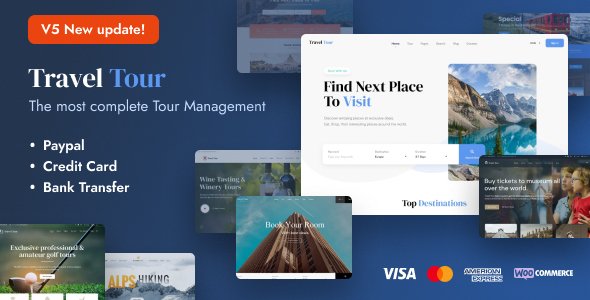
Stuck on your Travel Tour WordPress theme? Let's fix it.
No endless back-and-forth. Just send us the details and we'll get it done.
No obligation · Replies within 1 hour · Quote within 1 day
Setup · Customization · Bug fixes · WooCommerce integration
About Travel Tour WP Theme
Travel Tour is a WordPress theme built by GoodLayers, designed specifically for travel agencies, tour operators, and booking-focused businesses. It ships with a dedicated tour post type, built-in booking forms, itinerary builders, and a drag-and-drop page builder called PageBuilder by GoodLayers.
The theme handles the heavy lifting most travel sites need: price tables, availability calendars, departure dates, gallery sliders, and review systems. It integrates with WooCommerce for payment processing, making it a practical choice for sites that need to accept deposits or full payments online.
GoodLayers maintains the theme actively, with updates that track WordPress core changes. It runs on a custom framework rather than a third-party builder, which keeps the codebase tighter but means some developers need time to learn its structure before customizing efficiently.
Get matched with a Travel Tour developer in under one day
Tell us about your Travel Tour project. Small fixes, Travel Tour theme customization, or a full website build, whatever you need, we've got it covered.
We'll connect you to the right Travel Tour developers, define the scope, and get everything 100% clear.
You'll get one estimate, hire your preferred developer, and start collaborating.
GoodLayers built Travel Tour with a custom framework, which means generic WordPress advice doesn’t always apply. A Travel Tour specialist who has worked on multiple builds with this theme knows where the edge cases are, how the booking templates are structured, and which customizations are safe across updates.
Through Codeable, you get matched with vetted WordPress developers who have demonstrable experience with themes like Travel Tour. No bidding wars, no guesswork. Post a project, get a clear estimate, and move forward knowing the work is backed by Codeable’s quality guarantee.
Pros
- Dedicated tour post type with itinerary builder, pricing tables, and departure dates built in
- WooCommerce integration allows real payment collection directly from tour listing pages
- GoodLayers PageBuilder is lightweight compared to Elementor or WPBakery for this specific use case
- Built-in review and rating system for tours without needing a third-party plugin
- Active theme updates and a large user base means community support and documentation are available
Cons
- Custom GoodLayers framework has a steep learning curve for developers unfamiliar with it
- The booking system is functional but limited compared to dedicated plugins like WooCommerce Bookings or Amelia
- Page speed requires extra optimization work due to bundled scripts and slider assets loading on all pages
- Limited flexibility in the tour search filter without custom code changes
- Child theme documentation is sparse, making safe customization harder for non-developers
Who is Travel Tour for?
Tour Operator Websites
Travel Tour was designed with tour operators in mind. You get departure date management, group size controls, and per-person pricing built into each listing. An operator running multiple routes can organize tours by type, duration, or destination using the built-in taxonomy system, keeping the catalog organized without custom development.
Adventure Travel Agencies
Adventure travel sites need to communicate risk ratings, physical difficulty levels, and required gear. Travel Tour’s itinerary builder handles day-by-day breakdowns, and custom fields can be extended by a Travel Tour developer to include activity-specific data. WooCommerce handles deposits and full payments at checkout.
Destination Wedding Planners
Destination wedding planners can use Travel Tour’s package structure to present tiered offerings with pricing, included services, and gallery imagery. The inquiry and booking forms collect lead information, and the review system builds social proof. A Travel Tour specialist can adapt the tour templates to fit wedding package content without rebuilding from scratch.
Day Trip and Excursion Booking Sites
Day trip and excursion businesses benefit from Travel Tour’s availability calendar and quick booking flow. Customers can see open dates, select participant counts, and pay in a few steps. The theme handles the core logic well, though a developer is usually needed to tighten the mobile booking experience for users on phones.
Multi-Destination Travel Blogs with Booking
Travel blogs that have grown into booking platforms find Travel Tour useful because it handles both content and commerce. Blog posts link naturally to tour listings, and the theme supports destination archive pages that work as landing pages for SEO. A Travel Tour developer can wire up the two content types cleanly.

Customizing Travel Tour
Travel Tour gives you a lot out of the box, but most agencies need changes that go beyond the theme options panel. Adjusting the tour search filters, modifying how departure dates display, or restructuring the booking flow all require template-level edits or custom PHP hooks.
A Travel Tour expert can handle these without breaking the theme’s update compatibility. Child themes are the right approach here, and a specialist will know which template files to override versus which actions to hook into.
Color schemes, typography, and layout adjustments are manageable through the built-in settings. But anything structural, like adding custom tour taxonomies, modifying the itinerary builder output, or integrating a third-party CRM, needs someone who has worked inside GoodLayers’ framework before. Hiring a Travel Tour developer saves time you’d otherwise spend reverse-engineering the codebase.
Recommended plugins for Travel Tour
Travel Tour pairs well with several plugins that extend its core functionality. WooCommerce handles bookings and payments. WPML or Polylang work for multilingual tour listings. Yoast SEO or Rank Math help structure tour and destination pages for search, and pairing either with a proper WordPress SEO strategy makes a real difference for destination-based queries.
On the performance side, Travel Tour’s slider assets and gallery scripts can slow load times. A caching layer like WP Rocket combined with image optimization goes a long way, and a structured WordPress performance setup keeps the booking flow fast, which directly affects conversion rates.
Not sure which plugins to use? This WordPress plugins directory covers the most popular options with reviews and setup guides.
Travel Tour common issues
Travel Tour booking form not sending confirmation emails
Confirmation email failures in Travel Tour are usually caused by server-side mail delivery issues, not the theme itself. WordPress uses the PHP mail function by default, which many hosts block. Install an SMTP plugin like WP Mail SMTP and connect it to a transactional email service such as SendGrid or Mailgun. Test the form after configuration. If emails still fail, check the WooCommerce email settings and confirm the booking notification templates are enabled.
Travel Tour tour price not displaying correctly on listing page
Incorrect price display often comes from a conflict between Travel Tour’s pricing fields and a currency or WooCommerce settings change. Check the tour’s custom fields in the admin and confirm the price format matches your WooCommerce currency settings. If the price shows as zero or blank, a JavaScript conflict may be preventing the field from rendering. Deactivate plugins one at a time to isolate the conflict. If the issue persists, a WordPress bug fixing service can trace it faster.
Travel Tour PageBuilder content not showing after update
PageBuilder content disappearing after a Travel Tour update typically means the update overwrote a template file you had edited directly in the theme folder. This is why child themes matter. If you were editing parent theme files, your changes are gone. A Travel Tour developer can recover the content from a backup and migrate it into a proper child theme structure. Always use a child theme with GoodLayers themes to protect customizations through updates.
Travel Tour availability calendar not working
The availability calendar in Travel Tour depends on correctly configured departure dates in the tour admin panel. If the calendar shows nothing, check that departure dates are published and set to future dates. Also verify that the calendar shortcode or template tag is present in the page template. JavaScript errors from plugin conflicts can also break calendar rendering. Open the browser console and check for script errors to narrow down the cause.
Travel Tour WooCommerce checkout page broken
A broken WooCommerce checkout page alongside Travel Tour usually means a template compatibility conflict. Travel Tour overrides some WooCommerce templates, and a WooCommerce major version update can break those overrides. Check the WooCommerce System Status page under Tools for outdated template warnings. Update the overridden templates inside the theme’s woocommerce folder. If you are not comfortable doing this, a WordPress bug fix specialist can resolve it quickly.
Travel Tour slider not loading on mobile
Mobile slider issues in Travel Tour are often caused by the slider script loading before the DOM is ready, or a CSS conflict with a mobile-specific rule. Open the page on a mobile device and inspect the slider container in browser dev tools. Check for a height of zero or a hidden overflow rule. Also confirm that lazy loading on images is not preventing the first slide from rendering. Disabling lazy load on the hero slider usually resolves blank slider issues on mobile.
Travel Tour search filter returning no results
The Travel Tour search filter returns no results when the search parameters do not match the stored tour meta. This happens after importing demo content or changing tour taxonomies without re-saving tours. Go into each tour and click Update without making changes to refresh the meta. Also check that the search widget is configured with the correct post type. Custom filter fields that were added by a developer may also need their query arguments updated to match current taxonomy slugs.
Travel Tour itinerary section not saving in admin
Itinerary sections not saving in the Travel Tour admin are usually caused by the PHP max_input_vars limit being too low. The itinerary builder sends many form fields at once, and if the server truncates the request, data gets lost silently. Contact your host and ask them to increase max_input_vars to at least 3000. This can also be set in a php.ini or .htaccess file depending on your hosting environment. After the change, re-enter and save the itinerary.
Travel Tour theme update broke custom CSS
Custom CSS added directly to the Travel Tour parent theme’s style.css gets wiped on every theme update. Going forward, add custom CSS through the WordPress Customizer’s Additional CSS field, a child theme stylesheet, or a plugin like Simple Custom CSS. To recover lost styles, check your browser cache or a site backup for the previous CSS rules. A WordPress bug fixing service can help restore and migrate styles into a safe location before the next update.
Travel Tour Google Maps not showing on tour page
Google Maps failing to display on Travel Tour pages is almost always an API key issue. Google requires a valid, billing-enabled API key for Maps to load. Go to Travel Tour’s theme settings and confirm an API key is entered. Then check the Google Cloud Console to verify the Maps JavaScript API is enabled for that key and that the domain is not restricted incorrectly. If the map container shows but the map tiles are blank, check the browser console for a specific API error message.
Travel Tour FAQ
GoodLayers updates Travel Tour regularly to track WordPress core releases. Check the theme changelog on ThemeForest for the latest compatible version. Before updating WordPress on a live site, test on a staging environment first, especially if you have customizations. A Travel Tour specialist can manage updates safely if you are not comfortable doing it yourself.
Yes, Travel Tour integrates with WooCommerce. Tour listings can be linked to WooCommerce products, allowing you to collect payments, manage orders, and issue refunds through the standard WooCommerce checkout flow. You can accept deposits or full payments and configure tax and shipping settings as needed for your business model.
Basic tasks like creating tour listings, adjusting colors, and editing page content are manageable without code. Structural changes, custom filters, or booking flow modifications require PHP and CSS knowledge. Most agencies hire a Travel Tour developer for the initial setup and rely on the admin panel for day-to-day content updates after the site is built.
In the WordPress admin, navigate to Tours and click Add New. Fill in the tour title, description, and use the custom fields panel to set pricing, duration, group size, and departure dates. Add itinerary items using the built-in itinerary section. Assign the tour to relevant categories and tags, then publish. The tour will appear in your listings automatically based on your template settings.
Travel Tour is compatible with WPML and Polylang for multilingual sites. You can translate tour listings, destination pages, and booking confirmation text. Setup requires configuring WPML correctly with the theme’s string translations registered. A Travel Tour developer familiar with multilingual builds can handle the initial configuration and flag any strings that need manual registration.
Migrating to Travel Tour from another theme involves moving your content, rebuilding page layouts in GoodLayers PageBuilder, and re-entering tour-specific data into the new custom fields. It is not an automatic process. A WordPress migration specialist with Travel Tour experience can plan the migration properly and minimize downtime during the transition.
GoodLayers PageBuilder is a proprietary drag-and-drop builder included with Travel Tour. It does not replace Elementor but can be used alongside it on different pages. Most Travel Tour users stick with the GoodLayers builder since it includes travel-specific elements like tour grids and destination maps. Mixing builders on the same page can cause conflicts and is not recommended.
Start by enabling a caching plugin, optimizing images, and using a CDN. Travel Tour loads several scripts globally that can be dequeued on pages that do not use them. A structured WordPress performance setup targeting Core Web Vitals makes the biggest difference for booking conversion rates. Hosting quality also matters significantly for this theme.
Travel Tour includes a basic built-in booking system with departure dates, availability settings, and a booking form. It connects to WooCommerce for payment. For more advanced booking needs like resource management, multi-room availability, or complex pricing rules, a dedicated plugin like Amelia or WooCommerce Bookings is a better fit and can be integrated by a Travel Tour specialist.
Post your project on Codeable to get matched with a vetted Travel Tour developer. Describe what you need, whether it is a full build, a specific customization, or a bug fix. You will receive a clear estimate within 24 hours. There is no obligation to hire. Codeable developers are screened for WordPress expertise, so you are not taking a chance on an unknown freelancer.
Hire a Travel Tour Expert Developer
Whether you need a Travel Tour developer to build a site from scratch, customize existing templates, fix a broken booking flow, or integrate a payment gateway, the right specialist makes the difference between a site that works and one that converts. Get matched with an experienced Travel Tour developer through Codeable’s vetted network. Get a Free Estimate with no obligation to hire.
You'll need a free Codeable account so developers can ask questions and send their quotes.