Sober WordPress Theme
by uixthemes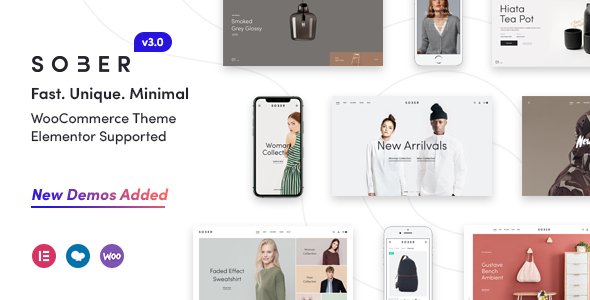
Stuck on your Sober WordPress theme? Let's fix it.
No endless back-and-forth. Just send us the details and we'll get it done.
No obligation · Replies within 1 hour · Quote within 1 day
Setup · Customization · Bug fixes · WooCommerce integration
About Sober WP Theme
Sober is a WooCommerce-focused WordPress theme built by uixthemes. It targets fashion, lifestyle, and modern retail stores that need a clean, minimal layout without sacrificing feature depth. The theme ships with multiple homepage demos, a mega menu, AJAX cart and search, product quick view, and a built-in lookbook feature. It runs on WPBakery Page Builder and supports Elementor through additional configuration. Sober is translation-ready, WPML-compatible, and includes RTL support. The codebase is structured around WooCommerce hooks rather than template overrides, which makes updates less fragile. For store owners who want a polished storefront with solid demo content to import and customize, Sober delivers a practical starting point. Performance out of the box is acceptable, though image-heavy demos benefit from additional optimization. Theme updates from uixthemes have been consistent since launch, and documentation covers the core setup steps in reasonable detail.
Get matched with a Sober developer in under one day
Tell us about your Sober project. Small fixes, Sober theme customization, or a full website build, whatever you need, we've got it covered.
We'll connect you to the right Sober developers, define the scope, and get everything 100% clear.
You'll get one estimate, hire your preferred developer, and start collaborating.
Sober has enough moving parts that generic WordPress help rarely cuts it. A developer who knows the theme’s hook structure, its WPBakery dependencies, and how uixthemes handles WooCommerce template registration will solve problems faster and build cleaner solutions. Through Codeable, you get matched with vetted WordPress developers who have hands-on experience with themes like Sober. Post your project, get a free estimate within 24 hours, and only move forward if the proposal fits. No risk, no obligation.
Pros
- Deep WooCommerce integration with AJAX cart, quick view, and product filters built in
- Multiple polished demo imports covering fashion, furniture, and lifestyle niches
- WPML-compatible with RTL support for multilingual and international stores
- Lookbook feature built into the theme without needing a separate plugin
- WooCommerce hooks used for template customization instead of full template overrides, reducing update conflicts
Cons
- WPBakery dependency makes migrating to Elementor or block editor time-consuming
- Demo content is image-heavy and requires performance work before going live
- Customizer options are extensive but not always intuitive in how they interact
- Limited block editor support means the classic editor or WPBakery is still required for most page building
- Some advanced layout changes require child theme PHP edits rather than panel settings
Who is Sober for?
Fashion & Apparel Stores
Sober’s lookbook feature and variation swatches support make it a practical choice for fashion stores. A Sober developer can configure color and size swatches, set up outfit-style lookbook grids, and wire in a wishlist plugin so shoppers can save items. The minimal grid layout keeps product photography front and center without visual clutter.
Furniture & Home Decor Shops
The theme’s clean whitespace and large product image support work well for furniture and home decor. A Sober specialist can set up room-scene product galleries, configure a filtered catalog with attribute-based navigation, and build out category landing pages using WPBakery rows. The result is a browsable, editorial-style store.
Beauty & Cosmetics Retailers
Beauty brands benefit from Sober’s flexible header options and full-width banner sections. A Sober expert can build ingredient or feature highlight sections, configure a sticky add-to-cart bar on product pages, and integrate review plugins that match the theme’s minimal design. The typography controls allow close brand alignment without custom CSS on every element.
Lifestyle & Accessories Brands
Lifestyle and accessories stores need fast browsing and clear product differentiation. Sober’s AJAX filtering and quick view reduce friction for customers moving through a catalog. A Sober developer can configure these features, set up a mega menu with category thumbnails, and ensure the mobile experience matches the desktop layout at every breakpoint.
Multi-Category WooCommerce Stores
Stores selling across multiple categories need a homepage that directs traffic cleanly. Sober’s multi-section homepage demos handle this well, with category blocks, featured product rows, and promotional banners. A Sober specialist can adapt the demo layout to your specific category structure without the final result looking like an unmodified template.

Customizing Sober
Sober exposes a large set of options through the WordPress Customizer, covering typography, color schemes, header layout, footer columns, and WooCommerce-specific settings like catalog mode and product card style. Switching between these without breaking your layout takes some familiarity with how the theme layers its CSS. A Sober expert can move faster here because they know which settings conflict and which require a child theme override instead of a Customizer toggle. Custom header layouts, sticky cart behavior, and lookbook section styling are common customization requests that go beyond what the panel offers. WPBakery shortcodes handle most layout work, but any structural change to the product archive or single product template needs direct PHP editing. Hiring a Sober specialist means getting those changes done cleanly, with a child theme in place to survive future updates.
Recommended plugins for Sober
Sober is built to work with WooCommerce extensions including WooCommerce Subscriptions, Product Bundles, and Variation Swatches. It also integrates cleanly with YITH plugins for wishlist and compare functionality. For SEO, pairing Sober with Yoast or Rank Math and following structured data best practices for products is covered in our WordPress SEO service. On the speed side, Sober’s slider and image assets can bloat load times, and our WordPress performance service addresses that directly with proper caching, image optimization, and script deferral configured specifically for WooCommerce stores running Sober.
Not sure which plugins to use? This WordPress plugins directory covers the most popular options with reviews and setup guides.
Sober common issues
Sober theme WooCommerce quick view not working
Quick view failures in Sober are usually caused by a JavaScript conflict with another plugin or a missing nonce passed through the AJAX request. Open your browser console and check for JS errors on the quick view trigger. If a plugin like a popup builder or cookie script is loading jQuery in compatibility mode, that can break Sober’s AJAX calls. Disable plugins one at a time to isolate the conflict. If the issue persists after troubleshooting, our WordPress bug fixing service can resolve it without disrupting your store.
Sober WordPress theme AJAX add to cart broken
Broken AJAX add-to-cart in Sober typically points to a caching layer intercepting the POST request or a plugin removing the WooCommerce AJAX hooks. Check your caching plugin settings and exclude the cart and checkout endpoints from full-page caching. Also verify that WooCommerce’s wc-ajax actions are not being blocked by a security plugin. Clearing object cache and regenerating transients often resolves intermittent cart behavior. A misconfigured CDN can also strip necessary cookies from AJAX requests.
Sober theme mega menu not showing on mobile
Sober’s mega menu uses JavaScript to detect viewport width and switch to a mobile drawer. If the mega menu columns are visible but misaligned on mobile, or the trigger button is missing entirely, a CSS conflict from another plugin is usually responsible. Check for conflicting z-index or display rules in the browser inspector. If a third-party slider or gallery plugin is injecting its own responsive CSS globally, it can override Sober’s menu breakpoints. A child theme stylesheet fix scoped to the nav component resolves this cleanly.
Sober WooCommerce variation swatches not displaying
Sober includes variation swatch support but it depends on the WooCommerce attribute setup being correct. Swatches only display when product attributes are set as global attributes in WooCommerce settings, not local per-product attributes. If you added attributes directly on the product page without registering them under Products > Attributes first, swatches fall back to dropdowns. Re-register the attributes globally, reassign them to your products, and the swatch display will activate. A Sober developer can automate this for large catalogs using a migration script.
Sober theme demo import failing or incomplete
Demo import failures in Sober are often caused by server memory limits or PHP execution time limits cutting the import short. The XML demo files can be large, and shared hosting environments with 128MB memory limits will time out mid-import. Increase WP_MEMORY_LIMIT to 256MB in wp-config.php and raise max_execution_time to 300 seconds via php.ini or .htaccess. If the import completes but images are missing, that is a separate issue with the external URL fetch during media import. Our WordPress bug fixing service handles both scenarios.
Sober theme WPBakery elements not loading
WPBakery elements not loading in Sober usually means either WPBakery is not activated with a valid license, or the theme’s bundled version conflicts with a standalone WPBakery installation. Sober bundles WPBakery through Envato’s licensing, so you should not install a separate WPBakery purchase on the same site. If you see blank shortcodes or raw WPBakery markup on the frontend, navigate to WPBakery settings and run the database update. Deactivating and reactivating the plugin after a theme update also clears stale shortcode registrations.
Sober lookbook section images not aligning
Lookbook image misalignment in Sober is almost always a CSS specificity issue triggered by a conflicting plugin stylesheet or an image size that does not match the registered crop dimensions. Sober registers specific thumbnail sizes for the lookbook grid. If your images were uploaded before those sizes were registered, WordPress serves the original uncropped version, which breaks the grid ratio. Regenerate thumbnails using a plugin like Regenerate Thumbnails after confirming the theme’s image sizes are registered correctly on a clean cache.
Sober theme slow loading on WooCommerce product pages
Slow product pages in Sober on WooCommerce are usually caused by unoptimized product images, multiple render-blocking scripts from plugins, and WooCommerce’s own session handler creating excess database queries. Start by running a query monitor to identify slow queries. Sober loads slider assets on every page by default, including pages that have no slider, which adds unnecessary script weight. A developer can conditionally load those assets. For a full performance audit and fix, see our WordPress performance service.
Sober theme Customizer settings not saving
Customizer settings not saving in Sober can stem from a PHP memory issue during the save process, a REST API conflict, or insufficient file write permissions on wp-content. Open your browser’s network tab while saving and look for a failed POST to the Customizer endpoint. A 403 or 500 response will tell you whether it is a permissions or server error. Security plugins that restrict REST API access are a common culprit. Temporarily disabling your security plugin and attempting a save will confirm whether that is the cause.
Sober child theme not inheriting parent styles correctly
A Sober child theme that is not inheriting parent styles correctly is almost always missing the correct enqueue function in functions.php. Do not use @import in the child theme stylesheet. Instead, use wp_enqueue_style with the parent theme’s handle as a dependency. If you are seeing the child theme’s styles load before the parent’s, the dependency array in your enqueue call is wrong or missing. Also confirm the child theme’s style.css Template tag matches the parent folder name exactly, as a mismatch will cause WordPress to load the child theme standalone without pulling parent assets.
Sober FAQ
Sober has limited native block editor support. Most of its page layouts rely on WPBakery shortcodes, which render as raw text in the block editor without WPBakery active. You can use the classic editor block to maintain compatibility, but building new pages with the Gutenberg block editor in Sober requires workarounds or significant additional development.
Sober works with WooCommerce Subscriptions in standard configurations. The theme’s AJAX cart and checkout flow do not conflict with subscription product types. You may need minor styling adjustments to the subscription details section on the product page, as Sober’s default product template does not include specific styles for subscription meta output from WooCommerce Subscriptions.
Sober is not officially built for Elementor. Its demo layouts are constructed with WPBakery. Elementor can be installed alongside Sober, but you will need to rebuild page layouts in Elementor manually since WPBakery shortcodes do not convert automatically. A Sober developer can handle that migration, but it is a meaningful time investment depending on the number of pages involved.
Sober includes a one-click demo importer accessible from the theme options panel after activation. Go to Appearance > Sober Options > Demo Importer, select the demo you want, and run the import. Your server needs adequate PHP memory and execution time limits for the import to complete. Back up your site before importing, as the process replaces existing settings and menus.
Yes, Sober is WPML-compatible. uixthemes has registered the theme’s strings with WPML’s String Translation module, and the WooCommerce Multilingual plugin works alongside Sober without known conflicts. RTL language support is also built in. For complex multilingual setups with multiple currencies and country-specific catalogs, some additional developer configuration is needed.
Sober uses WPBakery Page Builder as its primary page builder. The theme bundles WPBakery as part of the Themeforest purchase, so you do not need a separate WPBakery license. Custom Sober content elements are registered as WPBakery modules, meaning they only function within WPBakery and are not available in other builders without custom development.
Yes, Sober is fully responsive. It includes a mobile-specific header with a hamburger menu, touch-friendly product sliders, and a stacked mobile cart layout. However, the mega menu requires testing on real devices when you have more than two levels of navigation, as complex menu structures can overflow on smaller screens without CSS adjustments.
Always run Sober updates with a child theme in place. Any modifications made directly to the parent theme files will be overwritten on update. If you have not started with a child theme, create one before updating and move your custom CSS and template overrides into it. Back up your database and files before applying any theme update, then test on a staging environment first.
Yes. A Sober specialist can handle everything from layout adjustments to custom WooCommerce functionality built on top of the theme. Through our service, you can get a free estimate from a vetted WordPress developer with Sober experience. Projects are matched within 24 hours through Codeable with no obligation to hire.
Sober is uixthemes’ most feature-complete WooCommerce theme, with a lookbook, mega menu, and multiple demo categories. Their other themes tend to be more niche-specific or simpler in scope. Sober is the better choice if you need a full-featured store with strong visual customization options. Simpler uixthemes products may suit single-category stores with fewer configuration requirements.
Hire a Sober WordPress Developer
Whether you need a Sober expert to set up your store, fix a layout issue, or build a custom feature on top of the theme, you can get matched with the right developer fast. Post your project through our service and receive a free estimate with no obligation to hire. Work is handled through Codeable, a vetted developer network with a 100% satisfaction guarantee. Get a Free Estimate and have a developer reviewing your project within 24 hours.
You'll need a free Codeable account so developers can ask questions and send their quotes.