Elessi WordPress Theme
by NasaTheme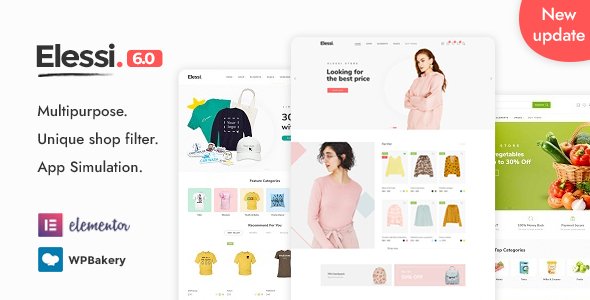
Stuck on your Elessi WordPress theme? Let's fix it.
No endless back-and-forth. Just send us the details and we'll get it done.
No obligation · Replies within 1 hour · Quote within 1 day
Setup · Customization · Bug fixes · WooCommerce integration
About Elessi WP Theme
Elessi is a WooCommerce theme built by NasaTheme, designed specifically for online stores. It ships with Ajax filtering, a live search bar, quick view, wishlist, and a multi-vendor ready layout. The theme is built on a custom framework rather than a page builder dependency, which keeps the front end lean compared to many competitors.
Elessi works well for fashion, electronics, furniture, and general merchandise stores. It supports RTL languages, WPML, and includes over 20 pre-built demo stores you can import in one click. The theme receives regular updates and has sold over 50,000 copies on ThemeForest, making it one of the more proven WooCommerce options in the market.
Get matched with a Elessi developer in under one day
Tell us about your Elessi project. Small fixes, Elessi theme customization, or a full website build, whatever you need, we've got it covered.
We'll connect you to the right Elessi developers, define the scope, and get everything 100% clear.
You'll get one estimate, hire your preferred developer, and start collaborating.
Elessi has a lot of moving parts. The NASA Options panel, custom hooks, Ajax cart, and filter system all interact in ways that can break if you modify the wrong file. A vetted Elessi developer on Codeable has already worked through those edge cases. You get someone who knows the theme’s architecture, not a generalist who will figure it out on your dime. Projects are scoped upfront with a clear estimate, and you only proceed when you agree on scope and price.
Pros
- Ajax product filtering built in, no extra plugin needed for standard use cases
- 50,000+ sales on ThemeForest with consistent update history and active support
- 20-plus one-click demo imports covering fashion, electronics, furniture, and general stores
- Native RTL support and WPML compatibility for multilingual and regional stores
- Lightweight custom framework instead of Elementor dependency keeps page weight manageable
Cons
- NASA Options panel has a steep learning curve with hundreds of settings and minimal in-panel documentation
- Child theme setup is not straightforward, and direct edits get overwritten on updates
- Some bundled plugins like WooCommerce Brands require manual updates outside the theme updater
- Ajax filter conflicts with third-party caching plugins unless configured carefully
- Support response times vary and complex issues often need developer intervention beyond what the ticket system covers
Who is Elessi for?
Fashion and Apparel Stores
Elessi’s lookbook layouts, size guide support, and color swatch filtering make it a practical fit for clothing stores. The quick view and wishlist features reduce friction in the browsing flow, and the built-in sticky cart keeps conversion paths short. Fashion stores with large catalogs benefit most from the Ajax layer handling attribute filtering without page reloads.
Electronics and Gadget Retailers
Electronics stores need comparison tables, detailed spec listings, and fast filtering by brand, price, and features. Elessi handles all of these through its product comparison module and Ajax filter. The theme’s mega menu can display product categories with icons, which helps customers navigate large inventories quickly without digging through nested dropdowns.
Furniture and Home Decor Shops
Furniture stores rely on visual impact. Elessi’s full-width product images, zoom on hover, and room-scene gallery layouts support high-resolution photography without slowing the page down significantly. The theme also handles variable products well, which matters when a single sofa comes in twelve fabric options across three sizes.
Multi-Vendor Marketplaces
Elessi includes basic multi-vendor support and integrates with Dokan and WCFM Marketplace. Vendors get their own store pages, and the admin can control commission structures through the plugin layer. An Elessi developer can extend this with custom vendor dashboards or restricted product submission workflows that go beyond what the default integration provides.
Beauty and Cosmetics Stores
Beauty stores benefit from Elessi’s badge system, sale countdowns, and ingredient-list-style product tabs. The theme supports custom product tabs through a simple interface, so you can add sections for ingredients, how-to-use, or certifications without coding. Pair that with color swatch filtering and quick view, and the browsing experience works well for high-SKU beauty catalogs.

Customizing Elessi
Elessi exposes most of its options through a custom panel called NASA Options, which controls header layouts, color schemes, typography, product card styles, and sticky elements. You can switch between multiple header presets and configure mega menus without touching code.
However, deeper changes, like custom product page templates, checkout flow modifications, or brand-specific Ajax filter behavior, typically require PHP and CSS knowledge. An Elessi expert can extend the theme cleanly without breaking update compatibility. If you need a tailored look or custom functionality that goes beyond the panel settings, working with an Elessi specialist saves time and avoids the usual trial-and-error that comes with undocumented hooks.
Recommended plugins for Elessi
Elessi works out of the box with most major WooCommerce plugins. For product filtering, it has its own Ajax layer, but some stores bolt on FiboFilters or YITH WooCommerce Ajax Product Filter for more control. Currency switchers and multi-language plugins like WPML and Polylang integrate reliably.
On the performance side, the theme is compatible with caching plugins and image optimization tools, though Ajax-heavy features need careful configuration. See our WordPress performance service for help tuning Elessi stores under load. For SEO, the theme outputs clean markup and works alongside Rank Math or Yoast. Explore our WordPress SEO service for structured data and crawl optimization.
Not sure which plugins to use? This WordPress plugins directory covers the most popular options with reviews and setup guides.
Elessi common issues
Elessi Ajax filter not working after update
This usually happens when a WooCommerce or plugin update breaks the Ajax nonce or changes the query structure Elessi hooks into. First, clear all caches including server-level and object cache. Deactivate third-party filter plugins temporarily to isolate the conflict. Check the browser console for 400 or 500 errors on the Ajax request. If the issue persists, the NASA filter hooks may need patching to match the updated WooCommerce API. Our WordPress bug fixing service handles this regularly.
Elessi sticky header not showing on mobile
The sticky header in Elessi is controlled through NASA Options under the Header section. If it works on desktop but not mobile, check whether the mobile header is set to a different layout that doesn’t have the sticky option enabled. Also verify that no custom CSS is setting position:static on the mobile header wrapper. Some caching plugins strip inline scripts that control the sticky threshold, so test with caching disabled first.
Elessi quick view popup blank or not loading
A blank quick view modal almost always points to a JavaScript conflict or a missing product template. Open the browser console and look for JS errors when the popup triggers. Common culprits are jQuery version conflicts introduced by other plugins or a custom product template that Elessi’s quick view can’t locate. Switching to a default WooCommerce product template temporarily will confirm whether it’s a template issue. If confirmed, an Elessi specialist can rebuild the compatible template.
Elessi product page showing wrong price after variation select
Wrong price on variation select is typically a WooCommerce variation script conflict. Elessi overrides the default variation form behavior to enable its own price swap logic. If another plugin or custom script also hooks into variation changes, they can fire out of order. Check for plugins like currency switchers or custom pricing plugins. Disabling them one by one in a staging environment will isolate the conflict. Our WordPress bug fixing service can trace and patch the exact hook collision.
Elessi child theme not inheriting parent styles
Elessi’s child theme setup requires enqueuing parent styles correctly in the child theme’s functions.php. If you’re using the default WordPress child theme method with @import in style.css, that can cause load order issues. Instead, use wp_enqueue_style in functions.php with the parent stylesheet as a dependency. Also confirm that NASA Options settings are being read from the parent theme’s option keys, as some settings don’t transfer automatically to child theme contexts.
Elessi one-click demo import failing or stuck
Demo import failures in Elessi usually stem from PHP memory limits, execution time limits, or a blocked external request to NasaTheme’s demo server. Set memory_limit to at least 256M and max_execution_time to 300 in php.ini or wp-config.php. Also whitelist the demo import URL in any firewall rules. If the import stops partway, importing XML content and widgets separately through the WordPress importer often completes successfully where the one-click method stalls.
Elessi WooCommerce cart not updating without page refresh
Elessi uses Ajax for cart updates, but some configurations break this. The most common cause is a caching plugin caching the cart fragment request. Exclude the wc-ajax=get_refreshed_fragments endpoint from caching rules. Also check whether a CDN is serving a cached version of the cart response. WooCommerce’s built-in fragment caching can also conflict with Elessi’s custom cart overlay, which may need a targeted script dependency fix. See our WordPress bug fixing service for cart-specific issues.
Elessi mega menu not displaying on tablet
Elessi’s mega menu uses CSS and JS that depend on screen-width breakpoints defined in NASA Options. On tablets, the theme sometimes switches to a mobile menu layout before the mega menu has a chance to render. Check the mobile breakpoint setting in NASA Options and adjust the tablet threshold. If the mega menu columns are collapsing incorrectly, a targeted CSS override scoped to mid-range viewports usually resolves the display issue without affecting desktop or phone layouts.
Elessi product images not zooming on hover
Product image zoom in Elessi relies on the EasyZoom or similar library bundled with the theme. If zoom stops working, first check whether the product images meet the minimum resolution threshold the zoom script requires. Elessi’s zoom typically needs source images at least twice the display size. Also confirm no lazy-load plugin is intercepting the image src before the zoom script can read it. Disabling lazy load on product images and retesting confirms whether that’s the cause.
Elessi custom CSS not applying after save
Custom CSS added through NASA Options or the WordPress Customizer can appear not to save if a caching layer is serving a stale stylesheet. Always clear site cache, browser cache, and any CDN cache after saving custom CSS. If the styles still don’t apply, check whether the CSS is being output in the page source at all. If not, a plugin conflict may be preventing the customizer from writing to the database correctly. Temporarily deactivate security or optimization plugins and retest.
Elessi FAQ
Elessi is a solid choice for mid-to-large WooCommerce stores that need built-in Ajax filtering, wishlist, quick view, and multi-vendor support. It has over 50,000 sales and consistent updates. It works best for stores with structured product catalogs where attribute-based filtering adds real value to the shopping experience.
Elessi has limited native Elementor support. It uses its own NASA framework for layouts. Some users force Elementor onto product pages, but this creates conflicts with Elessi’s custom templates and Ajax behavior. For complex page designs, an Elessi developer can build custom page templates that match your design without introducing compatibility issues.
Before updating Elessi, create a full backup of files and the database. Test the update on a staging site first. If you’ve made changes directly in the theme files, document them before updating, as they will be overwritten. Using a child theme for customizations is the right way to preserve changes across updates without manual re-patching each time.
Yes, Elessi officially supports WPML. You can translate product pages, category pages, and theme strings through the WPML String Translation module. Some NASA Options settings need to be configured per language manually. If you’re running a multilingual store, an Elessi specialist can set up the WPML configuration correctly to avoid duplicated content issues.
Create a new folder in wp-content/themes with a style.css that references Elessi as the template. In functions.php, enqueue the parent theme stylesheet using wp_enqueue_style with the parent as a dependency. Avoid using @import in style.css for parent styles. Activate the child theme from the WordPress dashboard and verify that NASA Options settings carry over correctly.
Elessi supports multi-vendor setups and integrates with Dokan and WCFM Marketplace. The theme provides vendor store pages and compatible layouts out of the box. For advanced marketplace features like custom commission tiers, vendor analytics dashboards, or restricted product types, you’ll need a developer to extend the integration beyond the default plugin configuration.
Elessi loads several Ajax scripts and image assets that can add weight on mobile. Common causes include unoptimized images, uncached Ajax requests, and render-blocking scripts. Configuring a caching plugin correctly, enabling lazy loading for off-screen images, and deferring non-critical scripts typically reduces mobile load time significantly. See our WordPress performance service for a full audit.
Go to NASA Options in the WordPress dashboard and find the Demo Importer section. Select the demo you want, click import, and wait for the process to complete. Make sure your server has at least 256MB memory and a 300-second execution time limit set. If the import fails, try importing the XML content file separately using the WordPress built-in importer tool.
Elessi outputs standard WooCommerce and WordPress markup, so Rank Math and Yoast SEO both work without issues. Schema for products, breadcrumbs, and reviews is handled through the SEO plugin of your choice. No special Elessi configuration is needed for basic SEO plugin compatibility, though some structured data settings benefit from manual review by an SEO specialist.
Migrating to Elessi from another WooCommerce theme involves transferring product data, rebuilding page templates in the new theme’s framework, and reconfiguring navigation and widgets. Product data migrates cleanly through standard WooCommerce export tools. Page layouts need to be rebuilt manually or with help from an Elessi developer. Check our WordPress migration service for a managed approach.
Hire an Elessi Expert Developer
Need custom layouts, filter modifications, speed fixes, or a full Elessi build from scratch? Our vetted Elessi developers deliver clean, maintainable work with a clear scope before any work begins. No guesswork, no hidden costs. Get a Free Estimate and describe your project. You’ll hear back within 24 hours with a realistic plan from a developer who knows the theme.
You'll need a free Codeable account so developers can ask questions and send their quotes.