Jarida WordPress Theme
by TieLabs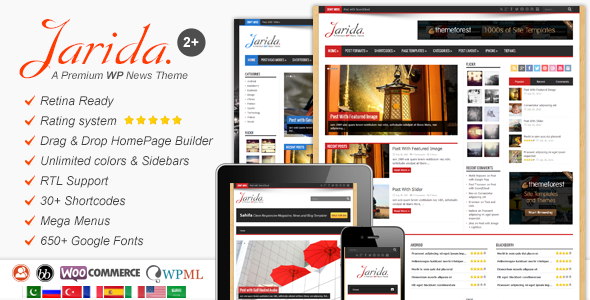
Stuck on your Jarida WordPress theme? Let's fix it.
No endless back-and-forth. Just send us the details and we'll get it done.
No obligation · Replies within 1 hour · Quote within 1 day
Setup · Customization · Bug fixes · WooCommerce integration
About Jarida WP Theme
Jarida is a premium WordPress theme built by TieLabs, designed specifically for news, magazine, and blog publishers. It ships with a drag-and-drop homepage builder, multiple pre-built layouts, and a widget-heavy sidebar system that gives editors fine control over content presentation without touching code.
The theme supports RTL languages, making it a practical choice for Arabic and Hebrew publications. Performance is reasonable out of the box, with lazy loading for images and minified assets included. Jarida also integrates with WooCommerce for shops attached to editorial sites, and it plays well with major ad management plugins, which matters for ad-driven revenue models. TieLabs maintains the theme actively, with updates that track WordPress core changes.
Get matched with a Jarida developer in under one day
Tell us about your Jarida project. Small fixes, Jarida theme customization, or a full website build, whatever you need, we've got it covered.
We'll connect you to the right Jarida developers, define the scope, and get everything 100% clear.
You'll get one estimate, hire your preferred developer, and start collaborating.
Jarida has enough configuration options that small changes can have unintended effects on layout or performance. A Jarida developer who knows the theme’s template hierarchy and hook system can work faster and with fewer risks than experimenting alone. Through Codeable, you get matched with vetted WordPress specialists who have hands-on experience with themes like Jarida. Post a project, get a free estimate, and only move forward if the scope and price make sense. No obligation, no upfront payment.
Pros
- Built-in homepage drag-and-drop builder designed for magazine layouts
- RTL language support included, no extra plugin needed
- Native WooCommerce compatibility for hybrid shop and editorial sites
- Ad management-friendly with dedicated widget areas for banner placement
- Active development from TieLabs with regular updates for WordPress compatibility
Cons
- Homepage builder is proprietary, so layouts don't transfer if you switch themes
- Default font loading can slow initial page render on large content sites
- Limited block editor support; many features still rely on classic editor workflows
- Some template overrides require editing core theme files, which complicates updates without a child theme
- Documentation is functional but thin on advanced use cases and developer hooks
Who is Jarida for?
Online News Portals
Jarida handles high article volume cleanly, with category-based homepage sections and breaking news tickers. News portals benefit from its multiple post format support and the ability to surface trending or featured content without custom development. A Jarida specialist can tune archive templates and pagination for high-traffic environments.
Sports and Entertainment Blogs
The theme’s visual layout flexibility works well for sports and entertainment sites that mix video embeds, galleries, and written content. Sidebar widgets and featured post sliders let editors promote time-sensitive content quickly. A Jarida developer can extend these with real-time score widgets or social media feeds.
Technology Review Sites
Tech review sites need structured layouts for spec comparisons, star ratings, and affiliate links. Jarida’s review post format handles this reasonably well. A Jarida expert can integrate custom review schemas and comparison table plugins to strengthen search visibility and conversion on product roundups.
Arabic and RTL Language Publications
Jarida’s built-in RTL support makes it one of the cleaner options for Arabic, Hebrew, or Persian publications on WordPress. Text alignment, sidebar positioning, and widget layout all adapt correctly. A Jarida specialist can handle any RTL edge cases that appear with specific plugins or custom post types.
Ad-Supported Content Networks
Ad-driven sites need precise control over banner placement without breaking layout. Jarida includes dedicated ad widget areas throughout the template. A Jarida developer can implement header bidding scripts, sticky ad units, or custom ad injection into post content without disrupting the theme’s styling.

Customizing Jarida
Jarida gives you a lot to work with inside the WordPress Customizer: color schemes, font controls, header styles, and layout options for individual sections. The homepage builder lets you stack and reorder content blocks visually, which is useful for editors who update layouts frequently.
That said, deeper customizations, like custom post type integration, advanced ad placement logic, or restructuring the category archive templates, require PHP and CSS work. A Jarida expert can also help you create child themes to protect your changes from being overwritten on updates. If you want Jarida to behave in ways it doesn’t support natively, whether that’s a custom breaking news ticker, a membership paywall, or a branded mobile experience, working with a Jarida specialist saves significant trial and error.
Recommended plugins for Jarida
Jarida pairs well with several plugins that extend what the theme does by default. For speed, combining it with a caching plugin and a CDN makes a real difference, especially on image-heavy news sites. A WordPress performance audit can identify exactly where your Jarida site is losing load time.
On the SEO side, Jarida supports schema markup through Yoast and Rank Math, but getting structured data right for news articles and category archives takes configuration. A WordPress SEO specialist can ensure your Jarida setup meets Google News requirements and passes Core Web Vitals checks.
Not sure which plugins to use? This WordPress plugins directory covers the most popular options with reviews and setup guides.
Jarida common issues
Jarida homepage builder sections not saving
Homepage builder sections failing to save usually points to a JavaScript conflict with another plugin, or a REST API permission issue blocking autosave requests. Open your browser console while saving and check for 403 or 401 errors. Disabling plugins one at a time isolates the conflict. If REST API requests are being blocked by a security plugin, whitelist the Jarida builder endpoints. If the issue persists after plugin isolation, a WordPress bug fixing specialist can trace the root cause quickly.
Jarida theme breaking after WordPress update
WordPress core updates occasionally change functions that themes depend on, especially in areas like query handling and template loading. When Jarida breaks post-update, check the PHP error log first. Common culprits are deprecated functions TieLabs hasn’t patched yet or conflicts introduced by simultaneous plugin updates. Roll back to a backup if the site is non-functional, then apply updates individually to isolate what triggered the break. Running a child theme prevents some of these issues from affecting customizations directly.
Jarida featured image not showing on posts
If featured images aren’t displaying on Jarida posts, the most common causes are a missing post thumbnail support declaration, a caching layer serving stale HTML, or an image size that hasn’t been generated for that template. Run the Regenerate Thumbnails plugin to rebuild image sizes. Clear all caches after. If the problem is template-specific, like featured images missing on category archives but not single posts, the template file for that view likely has a conditional logic issue that a Jarida developer can fix.
Jarida slider not working on mobile
Slider issues on mobile in Jarida are often tied to touch event library conflicts or CSS overflow settings that hide slides on smaller viewports. Check whether the slider script is loading correctly on mobile using browser DevTools in responsive mode. If a security or optimization plugin is deferring or blocking the slider JavaScript, whitelist it. Some Jarida slider configurations also need manual breakpoint settings adjusted for tablet and phone. A WordPress bug fix can resolve persistent mobile slider failures efficiently.
Jarida slow loading time on news site
Slow load times on Jarida news sites usually come from unoptimized images, too many ad scripts loading synchronously, or the theme’s font files being served without caching headers. Start with a GTmetrix or PageSpeed Insights report to identify the biggest offenders. Enable lazy loading for images if not already active, switch to a system font stack to cut font requests, and defer non-critical scripts. A proper caching and CDN setup on top of that brings Jarida sites to acceptable load times even with heavy content.
Jarida WooCommerce pages showing wrong layout
Jarida’s WooCommerce integration covers the basics, but shop pages, cart, and checkout can inherit editorial layout styles that don’t suit a commerce context. If your WooCommerce pages are showing the wrong column layout or sidebar, the issue is likely in how Jarida’s page templates assign sidebars. A Jarida developer can create a child theme override for WooCommerce templates that applies the correct layout classes without modifying the parent theme files, keeping updates clean.
Jarida custom logo not displaying correctly
Custom logos not displaying correctly in Jarida are usually a sizing or retina display issue. The theme expects a specific logo dimensions range defined in its Customizer settings. If your logo looks blurry or oversized, upload a higher-resolution version and set explicit width values in the Customizer or via CSS. If the logo disappears after an update, check whether the custom logo setting was reset, which can happen when theme options are stored in a non-persistent way. Re-uploading and saving usually resolves it.
Jarida breaking news ticker not updating
The Jarida breaking news ticker pulls from a specific category or tag assigned in the theme settings. If it stops updating, first verify the category assignment in the Customizer is still correct. Plugin caching can also cause the ticker to serve a stale feed. Purge all caches and test. If you’re using an external caching plugin with object caching enabled, the ticker query may be cached at the object level. Exclude the ticker’s query from object caching or reduce its TTL to keep it current. A WordPress specialist can dig into persistent cases.
Jarida widgets disappeared after update
Widgets disappearing after a Jarida update usually means the widget area IDs changed or were re-registered with different names. WordPress stores widget assignments by sidebar ID, so if TieLabs renamed a sidebar in an update, your widgets are still in the database but not assigned to any visible area. Go to Appearance > Widgets and check for an Inactive Widgets section. Re-assign them to the correct sidebar. For future updates, running a child theme and backing up before updating prevents this kind of disruption.
Jarida RTL layout misaligned with plugin
RTL layout breaks in Jarida are most often caused by plugins that inject LTR-only CSS without RTL overrides. Identify which plugin is causing the misalignment by deactivating them one at a time. Once isolated, the fix is usually a targeted CSS rule in your child theme’s RTL stylesheet that overrides the plugin’s conflicting styles. If the misalignment is in Jarida’s own templates rather than a plugin, check whether you’re running the latest version, as TieLabs does patch RTL issues in updates.
Jarida FAQ
TieLabs updates Jarida to maintain compatibility with current WordPress versions. That said, compatibility depends on which version of Jarida you’re running. Always update to the latest theme version before updating WordPress core, and test on a staging site first. Some older Jarida installations using heavily customized templates may need adjustments after a major WordPress release.
Jarida has its own homepage builder and isn’t designed to work alongside Elementor or similar drag-and-drop builders. Using both simultaneously causes conflicts in most cases. If you need Elementor-level flexibility on interior pages, a Jarida developer can create custom page templates that allow Elementor on specific pages while keeping the theme’s magazine layout intact elsewhere.
Creating a Jarida child theme requires a new folder in your themes directory with a style.css file that references the parent theme and a functions.php that enqueues the parent stylesheet. Any template file you copy from Jarida into the child theme folder will override the parent version. This protects your customizations from being overwritten when TieLabs releases updates.
Jarida is built for content-heavy, category-driven sites. It works for blogs, review sites, and niche magazines outside of news. However, if your site is a portfolio, agency, or e-commerce store, Jarida’s templates and layout assumptions won’t fit well without significant custom development. There are better-suited themes for those use cases.
Jarida can meet Google News technical requirements, but you need to configure it correctly. This includes proper article schema markup, distinct publication dates in metadata, and a clean URL structure. Out of the box it handles the basics. For full Google News compliance and indexing, working with a Jarida specialist who understands structured data is a faster path than configuring it manually.
The biggest wins for Jarida speed come from enabling image lazy loading, serving fonts locally instead of from Google Fonts, using a caching plugin, and reducing ad script load. On image-heavy news sites, a CDN makes a significant difference. Avoid loading all Jarida slider scripts globally if you only use the slider on the homepage. Scope script loading to the pages that actually need it.
Jarida includes basic WooCommerce support. Shop, product, cart, and checkout pages render without fatal errors. However, the styling is adapted from the editorial theme and may not look polished without CSS customization. If you’re running a significant shop alongside your editorial content, a Jarida developer can build proper WooCommerce template overrides that match your site’s visual standard.
Migrating to Jarida from another theme involves re-assigning your content to Jarida’s post formats, rebuilding the homepage layout in Jarida’s builder, and re-creating your widget areas. Your posts and pages carry over automatically, but design elements don’t. If you’re also changing hosting at the same time, a WordPress migration service can handle both the server move and the theme transition cleanly.
TieLabs recommends pairing Jarida with plugins for SEO (Yoast or Rank Math), contact forms (Contact Form 7), and social sharing. For ad management, plugins like Ad Inserter work well with Jarida’s widget areas. For performance, any major caching plugin works. The theme doesn’t bundle required plugins beyond what’s needed for demo content import.
TieLabs provides support through ThemeForest comments and a dedicated support forum for verified buyers. Response times vary. For faster resolution, especially on custom modifications or conflicts that fall outside what TieLabs covers, a Jarida developer through a platform like Codeable can diagnose and fix issues with a clear scope and timeline.
Hire a Jarida Developer
Whether you need a Jarida expert to build out a custom homepage layout, fix a display bug, or integrate a plugin the theme doesn’t support out of the box, FoxyConcept connects you with vetted WordPress developers through Codeable. Work is scoped before any money changes hands. Get a free estimate and know exactly what you’re paying before the project starts.
You'll need a free Codeable account so developers can ask questions and send their quotes.