Constructo WordPress Theme
by Anps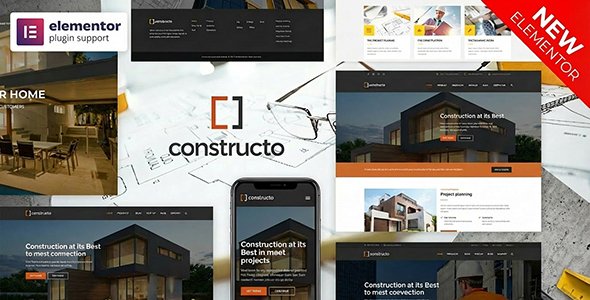
Stuck on your Constructo WordPress theme? Let's fix it.
No endless back-and-forth. Just send us the details and we'll get it done.
No obligation · Replies within 1 hour · Quote within 1 day
Setup · Customization · Bug fixes · WooCommerce integration
About Constructo WP Theme
Constructo is a WordPress theme built by Anps, designed specifically for construction companies, contractors, and building firms. It ships with a page builder, project portfolio layouts, team sections, and service pages that match the way construction businesses present work to clients.
The theme uses a structured grid layout with strong typography and image-heavy sections, suited to showcasing completed projects. It includes pre-built inner page templates, contact forms, and a Google Maps integration out of the box. The admin panel gives site owners control over colors, fonts, and layout without touching code. Constructo runs on standard WordPress infrastructure, which makes it straightforward to extend with plugins and custom development when business needs grow beyond what the theme provides by default.
Get matched with a Constructo developer in under one day
Tell us about your Constructo project. Small fixes, Constructo theme customization, or a full website build, whatever you need, we've got it covered.
We'll connect you to the right Constructo developers, define the scope, and get everything 100% clear.
You'll get one estimate, hire your preferred developer, and start collaborating.
Most Constructo issues, whether layout bugs, plugin conflicts, or custom feature requests, require someone who knows how Anps themes are structured. A specialist wastes no time diagnosing where the problem sits. Through Codeable, you get matched with vetted WordPress developers who have hands-on experience with construction themes like Constructo. You post your project, receive a free estimate, and only move forward when the scope is clear. No guesswork, no offshore lottery.
Pros
- Purpose-built for construction and contracting businesses with relevant pre-built sections
- Includes project portfolio layouts with category filtering out of the box
- Built-in Google Maps and contact form integration on the default templates
- Clean admin options panel that non-technical site owners can manage without developer help
- Compatible with major page builders, allowing layout changes without custom PHP
Cons
- Page builder implementation can create bloated shortcode output that complicates future migrations
- Theme updates from Anps are infrequent, which creates compatibility risks with newer WordPress versions
- Mobile responsiveness on complex inner pages sometimes requires manual CSS fixes
- Limited documentation makes troubleshooting non-standard configurations difficult without developer support
- Default slider and gallery sections are image-heavy and can significantly slow page load times without optimisation
Who is Constructo for?
General Contractors
Constructo gives general contractors a structured way to present services, past projects, and team credentials. The portfolio section handles before/after project galleries well. A Constructo developer can extend this with lead capture forms, service area maps, and quote request workflows that feed directly into a CRM or email system used by the business.
Civil Engineering Firms
Civil engineering firms need to communicate technical credibility. Constructo’s project pages support detailed case study layouts with statistics, client names, and project scope sections. A Constructo specialist can customize these templates to include downloadable project briefs, filterable project archives by type, and team profile pages linked to specific completed works.
Home Renovation Companies
Home renovation businesses benefit from Constructo’s before/after image support and testimonial sections. The theme handles visual proof well, which matters when homeowners are choosing a contractor. A Constructo expert can add review integrations, service-specific landing pages for SEO, and booking or consultation request forms tailored to how the business qualifies new leads.
Architecture Studios
Architecture studios need precise layout control and high image quality presentation. Constructo’s grid-based project portfolio works as a starting point, but most studios require heavier customization. A Constructo developer can rebuild the portfolio using custom post types, add lightbox galleries with project metadata, and create a visual identity that moves beyond the default theme styling.
Roofing and Specialist Trades
Roofing companies and specialist trades use Constructo to establish trust quickly through service pages, project photos, and certifications. The theme supports this content structure well. A Constructo specialist can add location-specific service pages for local SEO, integrate review widgets, and set up contact forms that route leads by service type or geographic area.

Customizing Constructo
Constructo’s theme options panel covers the basics: logo upload, color schemes, font selection, and layout width. For deeper changes, a Constructo expert will work directly with the child theme and custom CSS to adjust spacing, section structure, and responsive behavior without breaking updates.
Common customization work includes restructuring the homepage to match a client’s service model, building out custom project portfolio filtering, modifying the contact and quote request forms, and integrating third-party booking or estimation tools. If the default page builder templates feel restrictive, a Constructo developer can rebuild specific templates with Elementor or custom PHP to give the site more flexibility and a tighter match to brand guidelines. This is especially useful for firms with multiple service lines or regional office pages.
Recommended plugins for Constructo
Constructo pairs well with plugins that handle the operational side of a construction business website. WooCommerce can be added for selling products or services. WPML handles multilingual sites for firms operating across regions. For organic visibility, structured SEO work on service and project pages makes a real difference. See our WordPress SEO optimisation service for that.
Site speed matters for lead generation. Heavy project galleries and sliders can slow Constructo down without proper optimisation. Our WordPress performance service covers image optimisation, caching configuration, and database cleanup to keep load times under control.
Not sure which plugins to use? This WordPress plugins directory covers the most popular options with reviews and setup guides.
Constructo common issues
Constructo theme not updating in WordPress
Constructo theme updates require a valid Envato purchase key entered in the theme settings or via the Envato Market plugin. If the update prompt is not appearing, check that the API key is active and correctly saved. If the theme was installed manually, re-upload the latest version from ThemeForest without deleting your child theme. Always back up before updating. If the issue persists after these steps, a developer can diagnose whether a plugin conflict or server permission issue is blocking the update process.
Constructo homepage layout broken after WordPress update
Homepage layout breaks after a core WordPress update are usually caused by outdated shortcodes from the bundled page builder or a JavaScript conflict with an updated plugin. Start by clearing all caches and checking the browser console for JS errors. Disable plugins one by one to isolate the conflict. If the layout uses Visual Composer or WPBakery, check whether the bundled version needs updating separately. For persistent layout issues, our WordPress bug fixing service can identify and resolve the root cause without disrupting the rest of the site.
Constructo portfolio filter not working
The Constructo portfolio filter relies on jQuery and the Isotope library. If filtering stops working, the most common causes are a jQuery version conflict introduced by another plugin, a caching plugin serving a stale JavaScript file, or a theme update that changed how filter classes are assigned. Clear all caches first. Then check the browser console for uncaught JavaScript errors. If a plugin is loading its own jQuery version, use a script manager to prevent the conflict. A Constructo developer can resolve persistent filter failures without breaking other interactive elements on the page.
Constructo slider not showing on mobile
Constructo’s slider uses a bundled slider plugin that sometimes hides on mobile through CSS display rules. Open the slider settings in the WordPress admin and check the mobile visibility toggle. If it is enabled but the slider still does not show, inspect the element in a mobile browser to see which CSS rule is hiding it. A common culprit is a custom CSS snippet added to the theme options that targets mobile breakpoints too broadly. If the slider is simply not suited to mobile performance, replacing it with a lightweight alternative is often the better long-term fix.
Constructo contact form not sending emails
Constructo uses a contact form plugin, typically Contact Form 7 or a bundled equivalent, that depends on your server’s mail configuration to send messages. If emails are not arriving, the issue is almost always the server’s PHP mail function being blocked by the hosting provider. Install an SMTP plugin such as WP Mail SMTP and connect it to a transactional email service like SendGrid or Mailgun. This routes form submissions through a proper mail server. Also check spam folders and verify the form’s recipient email address in the plugin settings before assuming a code-level problem.
Constructo page builder shortcodes showing as plain text
Shortcodes appearing as plain text in Constructo usually means the page builder plugin bundled with the theme has been deactivated or removed. Go to Plugins and check whether Visual Composer or WPBakery is installed and active. If you switched themes temporarily and then switched back, bundled plugins sometimes get deactivated automatically. Reactivate the plugin and the shortcodes should render correctly. If the plugin is active but shortcodes still show as text, check for a PHP error in the error log that may be preventing the plugin from loading its rendering functions. Our WordPress bug fixing service handles these conflicts quickly.
Constructo theme slow loading speed
Constructo sites slow down primarily because of large uncompressed images in project galleries, render-blocking scripts from the bundled slider, and unoptimised database queries from portfolio custom post types. Start with image compression using a plugin like ShortPixel. Configure a caching plugin such as WP Rocket or LiteSpeed Cache. Use a CDN to serve static assets. For persistent speed problems, a Constructo developer can audit the theme’s enqueued scripts, defer non-critical JavaScript, and identify any database queries that are running on every page load unnecessarily.
Constructo header logo not displaying correctly
If the Constructo header logo is not displaying or appears at the wrong size, first check the logo upload field inside the theme options panel, not the WordPress native site identity settings, as Constructo uses its own logo field. Ensure the uploaded image is a PNG or SVG with appropriate dimensions, typically under 300px wide. If the logo shows at an unexpected size, a custom CSS rule targeting the header logo container can fix the dimensions. Check for conflicting CSS from a child theme or custom CSS box that may be overriding the display property on the logo image element.
Constructo Google Maps not loading on contact page
Google Maps stopped loading on Constructo contact pages in most cases because the Google Maps JavaScript API key is missing, expired, or has billing restrictions. Google requires a valid billing-enabled API key for Maps to load. Enter your API key in the Constructo theme options under the maps section. Ensure the Maps JavaScript API and Geocoding API are enabled in your Google Cloud console. If the key is valid but the map still fails, check for browser console errors referencing the API key or domain restrictions that may be blocking the request from your site’s domain.
Constructo child theme not inheriting parent styles
A Constructo child theme that is not inheriting parent styles is almost always a functions.php issue. The child theme must enqueue the parent stylesheet using wp_enqueue_scripts and wp_get_theme, not a simple @import in style.css. If you are using @import, switch to the functions.php enqueue method. Also confirm the child theme’s style.css header correctly references Constructo as the Template value. If styles are partially loading, open the browser inspector and check which stylesheet is being loaded and whether the parent theme’s CSS file path is resolving correctly on the server. Our WordPress bug fixing service can audit and fix child theme setup issues properly.
Constructo FAQ
Constructo was built for an earlier generation of WordPress and Anps updates it infrequently. It generally works on current WordPress versions, but some bundled plugins like the page builder may require separate updates to stay compatible. Testing on a staging site before updating your live WordPress installation is strongly recommended. A Constructo developer can run compatibility checks and fix any issues that surface after a major WordPress release.
You can use Elementor with Constructo, but there are overlaps between Elementor’s layout system and the theme’s bundled page builder. Running both on the same page can create conflicts or redundant code. The cleaner approach is to pick one and disable the other. Many Constructo developers recommend building new pages in Elementor while keeping the theme’s core structure intact, then disabling the bundled builder on those specific pages.
Constructo uses a custom Projects post type. In the WordPress admin, go to Projects, click Add New, and fill in the title, description, featured image, and any custom fields the theme provides for project details. Assign the project to a category if you want portfolio filtering to work. Save and publish. The project will automatically appear in portfolio sections that use the theme’s portfolio shortcode or template.
Constructo does not include WooCommerce-specific templates, so the default WooCommerce pages will use a basic layout that may not match the theme’s design. It functions, but shop pages will look generic without custom styling. A Constructo specialist can add WooCommerce template overrides to bring the shop, product, and cart pages in line with the rest of the site design.
Official support for Constructo comes through the Anps ThemeForest profile. Response times and support quality can vary. For faster resolution of specific bugs, layout issues, or custom requests, working with an independent Constructo expert through a service like Codeable is often quicker and more reliable than waiting on theme author support tickets.
Constructo’s templates and default content are built around construction services, so using it for an unrelated business means overwriting most of the default sections. It is possible, but the effort involved in repurposing it often exceeds the effort of starting with a more neutral theme. A Constructo developer can assess whether adapting it makes sense for your specific use case.
Go to Appearance, then Customize or the theme’s own options panel, depending on the Constructo version you have installed. Color and font controls are in the styling or typography sections. Changes preview live in most setups. For changes beyond what the panel allows, custom CSS added via the Additional CSS box or a child theme stylesheet gives you full control without editing core theme files.
Constructo is translation-ready and works with WPML and Polylang for multilingual sites. String translation for theme-specific labels requires WPML’s String Translation module or manual .po file editing. A Constructo specialist can set up full multilingual support including translated portfolio categories, service pages, and contact forms if your business operates across multiple language markets.
Migrating a Constructo site involves moving files, the database, and updating the site URL in WordPress settings. Use a plugin like Duplicator or All-in-One WP Migration to package the site, then restore it on the new host. Update the wp-config.php database credentials and run a search-replace on the URL in the database. See our WordPress migration service if you need this handled professionally without downtime.
Constructo produces clean enough HTML for basic on-page SEO, but it does not include built-in schema markup for construction services or advanced SEO controls. Pairing it with Yoast SEO or Rank Math covers meta tags and sitemaps. For technical SEO, page speed optimisation, and structured data for local businesses, you will need additional configuration beyond what the theme provides out of the box.
Hire a Constructo Expert Developer
Whether you need a layout rebuilt, a bug fixed, or a full Constructo site built from scratch, working with a specialist saves time and avoids costly mistakes. Our developers know the Anps theme structure and can scope your project accurately from day one. Get a Free Estimate and find out exactly what your project needs before committing to anything.
You'll need a free Codeable account so developers can ask questions and send their quotes.