Konte WordPress Theme
by uixthemes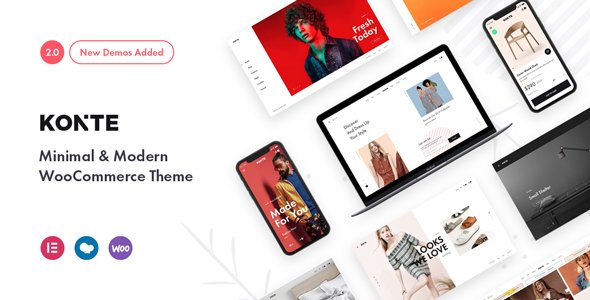
Stuck on your Konte WordPress theme? Let's fix it.
No endless back-and-forth. Just send us the details and we'll get it done.
No obligation · Replies within 1 hour · Quote within 1 day
Setup · Customization · Bug fixes · WooCommerce integration
About Konte WP Theme
Konte is a WooCommerce-focused WordPress theme built by uixthemes. It ships with a clean, minimal aesthetic aimed at fashion, lifestyle, and home decor stores. The theme runs on Elementor and WPBakery, includes multiple pre-built demos, and supports Ajax cart, wishlist, quick view, and product filtering out of the box.
Performance is reasonable on a well-configured host, and the codebase is organized enough for developers to extend without major headaches. RTL support is included, and the theme handles variable products, lookbooks, and mega menus without requiring extra plugins. It is not the lightest theme on the market, but for WooCommerce stores that need a polished front-end without heavy custom development, Konte covers most bases at the theme level.
Get matched with a Konte developer in under one day
Tell us about your Konte project. Small fixes, Konte theme customization, or a full website build, whatever you need, we've got it covered.
We'll connect you to the right Konte developers, define the scope, and get everything 100% clear.
You'll get one estimate, hire your preferred developer, and start collaborating.
Konte covers a lot at the theme level, but store-specific requirements always surface. Whether that is a custom product layout, a checkout modification, a performance issue, or a conflict between Konte and a plugin you need, a specialist who knows the theme saves time. Through Codeable, you get matched with vetted WordPress developers who have hands-on experience with WooCommerce themes like Konte. Post a project, get a free estimate, and only move forward if the fit is right. No retainers, no guesswork.
Pros
- Multiple demo imports covering fashion, furniture, and lifestyle niches reduce setup time significantly
- Built-in Ajax cart, wishlist, and quick view work without extra plugins
- Supports both Elementor and WPBakery, giving layout flexibility depending on your team
- RTL language support is included and functional without additional configuration
- Mega menu builder handles large product catalogs with dropdown image support
Cons
- Asset load is heavier than lightweight WooCommerce themes, requiring performance work on shared hosting
- Some Customizer options only apply to specific header types, which is not always obvious in the UI
- WPBakery content does not transfer cleanly if you switch to Elementor after building pages
- Demo content imports can conflict with existing media library items during partial imports
- Documentation covers the basics but does not address edge cases or advanced WooCommerce template overrides
Who is Konte for?
Fashion and Apparel Stores
Konte’s lookbook feature and variable product handling make it a practical fit for clothing stores. Size guides, color swatches, and the Ajax filter work well for catalog-heavy fashion sites. A Konte developer can extend the lookbook with shoppable image pins or custom collection pages that go beyond the default template.
Home Decor and Furniture Shops
The clean grid layouts and large image support suit furniture and home decor product photography. Konte’s mega menu handles deep category structures common in home stores. A Konte specialist can configure room-scene imagery, custom product comparison tables, or fabric/finish swatch selectors that the default theme does not include.
Beauty and Skincare Brands
Beauty brands need strong visual hierarchy and ingredient transparency. Konte’s typography controls and product tab system handle this reasonably well. A Konte expert can add custom ingredient lists, bundle product displays, or subscription billing integration that turns a standard product page into a conversion-focused layout.
Lifestyle and Accessories Boutiques
Lifestyle boutiques often carry mixed product types across jewelry, bags, and seasonal items. Konte’s filtering and wishlist features reduce friction for browsing customers. A Konte developer can set up conditional category layouts so handbag pages present differently from jewelry pages without duplicating templates across the site.
Multi-Category WooCommerce Stores
Stores with multiple product categories benefit from Konte’s flexible homepage builder and category-specific headers. A Konte specialist can configure separate mega menu columns per department, apply category-level banners, and set up distinct shop page layouts without creating separate theme instances or heavy page builder overrides.

Customizing Konte
Konte’s Customizer panel gives you control over typography, colors, header layouts, and footer columns. You can switch between several header styles, enable sticky navigation, and adjust the shop grid density without touching code. For deeper changes, a Konte expert will typically work inside the child theme rather than modifying core files.
Custom modifications commonly requested include reworking the checkout flow, adding custom product badges, adjusting the lookbook layout for specific image ratios, and integrating third-party subscription or booking plugins. A Konte developer can also wire up custom Elementor widgets or override WooCommerce templates to match a specific brand system. If the Customizer options feel limiting for your project, targeted PHP and CSS work inside a child theme is the practical path forward.
Recommended plugins for Konte
Konte works alongside most major WooCommerce extensions without conflicts. Common additions include currency switchers, size guide plugins, product bundles, and review plugins. Page speed does require attention when stacking multiple plugins on top of Konte’s existing asset load. A proper WordPress performance audit is worth running before launch, especially if you are loading Elementor alongside WooCommerce on high-traffic category pages.
For stores targeting organic traffic, structured data for products, breadcrumb schema, and clean URL handling matter. Pairing Konte with a dedicated WordPress SEO setup ensures the theme’s output does not work against your rankings.
Not sure which plugins to use? This WordPress plugins directory covers the most popular options with reviews and setup guides.
Konte common issues
Konte theme Ajax filter not working after plugin update
Ajax filter failures in Konte are usually caused by a JavaScript conflict introduced by a plugin update, or a WooCommerce version change that altered the query structure the filter hooks into. Check the browser console for JS errors first. Disable recently updated plugins one at a time to isolate the conflict. If the issue persists across plugins, the filter script may need its nonce or endpoint updated to match the current WooCommerce version. A developer can patch the relevant filter files in a child theme to restore functionality.
Konte sticky header overlapping content on scroll
Sticky header overlap in Konte typically happens when the header height is set dynamically but the offset value for the page content is not recalculated after the sticky class activates. Open your browser inspector, check the padding-top on the main content wrapper, and compare it to the actual sticky header height. A small CSS fix targeting .site-main or the wrapper class Konte applies usually resolves this without touching PHP.
Konte demo import failed or stuck at 0%
Demo import failures in Konte are often caused by server execution time limits, memory caps, or file upload size restrictions. Before importing, set max_execution_time to 300, memory_limit to 256M, and upload_max_filesize to 64M in your PHP configuration. If your host does not allow these changes, import the demo content in parts using the WordPress importer manually. If imports keep stalling, our WordPress bug fixing service can handle the environment setup and import cleanly.
Konte product quick view not opening on mobile
Quick view failures on mobile in Konte are usually a touch event conflict or a CSS z-index issue with the modal overlay. On mobile, hover-triggered buttons sometimes do not fire correctly. Check whether the quick view button appears in the DOM on mobile using your browser’s device toolbar. If it renders but does not trigger, the issue is likely a touch event binding problem in Konte’s product card script that needs a targeted JavaScript fix in a child theme or custom plugin.
Konte wishlist button not showing on shop page
If the Konte wishlist button is not appearing on shop pages, the most common causes are a disabled option in the Customizer under the shop settings panel, a caching plugin serving a stale page without the button, or a conflict with a third-party wishlist plugin that disables Konte’s native functionality. Check Appearance > Customize > Shop and confirm wishlist is enabled. Clear all cache layers and test in an incognito window before assuming a code-level issue.
Konte WooCommerce cart count not updating without page refresh
Konte uses Ajax to update the cart fragment. If the count is not updating, the cart fragment request is likely failing. Open your browser’s network tab, add a product, and look for the wc-ajax=get_refreshed_fragments request. A 404 or 500 response indicates a broken WooCommerce endpoint. This is often caused by permalink issues. Go to Settings > Permalinks and save without changes to flush rewrite rules. If that does not fix it, a bug fix may be needed to restore the endpoint.
Konte Elementor sections not displaying correctly after theme update
After a Konte theme update, Elementor sections can break if the theme has removed or renamed CSS classes that your Elementor layout depends on. Compare the changelog for the update against your custom CSS. Elementor’s own version mismatches with the theme can also cause widget rendering issues. Regenerate the Elementor CSS cache via Elementor > Tools > Regenerate Files, then check whether layout issues persist. If they do, the fix usually involves updating class references in your Elementor templates or custom CSS file.
Konte lookbook images not loading on product pages
Lookbook image failures in Konte are often caused by attachment ID mismatches after a media library migration, or a lazy loading conflict where the lookbook script fires before images are in the viewport. Disable your lazy load plugin temporarily and test. If images return, configure your lazy load plugin to exclude the lookbook container class Konte uses. If you recently migrated the site, regenerate thumbnails using a plugin like Regenerate Thumbnails to restore the correct image sizes Konte expects.
Konte mega menu not saving changes in Customizer
Konte’s mega menu changes not saving in the Customizer is usually a permissions or nonce timeout issue. Long Customizer sessions can expire the save token. Reload the Customizer, make the change again, and save immediately. If the issue repeats, check whether a security plugin is blocking the Customizer’s AJAX save request. Whitelist the Customizer endpoint in your security plugin settings. Persistent issues may indicate a database write permission problem that needs server-level investigation.
Konte theme slow loading on WooCommerce category pages
Slow WooCommerce category pages in Konte are usually caused by unoptimized product images, multiple render-blocking scripts from Elementor and WooCommerce loading together, or the Ajax filter making redundant database queries. Start by running a GTmetrix or PageSpeed test to identify the heaviest requests. Enable object caching, defer non-critical scripts, and convert images to WebP. For a full audit and fix, our WordPress performance service covers Konte-specific optimization in detail.
Konte FAQ
Konte is built specifically around WooCommerce. It includes native Ajax filtering, cart fragments, wishlist, quick view, and product swatch support. For fashion, lifestyle, and home decor stores, it provides enough out-of-the-box functionality to reduce the plugin count. Performance does need attention on larger catalogs, but the WooCommerce integration is solid at the theme level.
Yes, Konte officially supports Elementor. Most pre-built demos are built with Elementor page templates. You can use Elementor for landing pages, homepages, and custom layouts while keeping WooCommerce shop and product pages on the theme’s own templates. Note that mixing WPBakery and Elementor content on the same site creates long-term maintenance problems and is not recommended.
Konte can technically run without WooCommerce, but it is designed around ecommerce. Disabling WooCommerce removes a large portion of the theme’s features including shop pages, product templates, and cart functionality. For non-ecommerce sites, Konte’s design works as a portfolio or blog theme, but it is not optimized for that use case and you will carry unnecessary code weight.
After activating Konte, go to Appearance > Import Demo Data. Install the required plugins when prompted, then choose your demo and click Import. Set your PHP memory limit to at least 256M and execution time to 300 seconds before starting. Large demos with many images take several minutes. Do not refresh the page mid-import or you will need to clean up partial data manually before trying again.
Konte does not include a native multi-currency switcher. You will need a plugin like CURCY or WooCommerce’s own Multi-Currency add-on. Konte is compatible with most currency switcher plugins, but the cart header display may need minor CSS adjustments to fit the switcher into the header layout cleanly, especially if you are using one of the more compact header styles.
Konte lists WPML compatibility and the theme structure supports translated strings. For full multilingual WooCommerce stores, you will also need WooCommerce Multilingual alongside WPML. Some Konte Customizer settings may need to be reconfigured per language. RTL support is built in, which helps for Arabic and Hebrew translations without needing separate style overrides.
Create a folder in your wp-content/themes directory named konte-child. Inside it, add a style.css file with the standard child theme header referencing Template: konte, and a functions.php file that enqueues the parent theme’s stylesheet. Activate the child theme from Appearance > Themes. All customizations go into the child theme so future Konte updates do not overwrite your changes.
Konte does not conflict with Rank Math or Yoast SEO. Both plugins handle their own meta output independently of the theme. For WooCommerce product schema, Rank Math’s WooCommerce module adds structured data that Konte’s templates do not block. Either plugin works fine. Yoast does add some page weight, so factor that into your performance budget if speed is a priority.
Migrating an existing WooCommerce store to Konte is possible but involves more than a theme switch. Product data, orders, and customers move with the database, but your existing page layouts will not carry over. You will need to rebuild pages in Elementor or Konte’s templates, reconfigure headers, menus, and widgets, and retest checkout and email flows. A WordPress migration service can handle the transition with minimal downtime.
Codeable is a vetted WordPress developer network where you can post your Konte project and get matched with experienced developers within 24 hours. You receive a free estimate before committing to anything. For scoped Konte work including customization, bug fixes, or performance improvements, it is a reliable way to find a specialist without searching freelancer marketplaces manually.
Hire a Konte Developer for Your WooCommerce Store
If you need a Konte expert to customize your store, fix a bug, or build something the theme does not support out of the box, the fastest route is a scoped project with a developer who knows the theme. Describe what you need, get matched within 24 hours, and receive a clear estimate before any work starts. Get a Free Estimate and see exactly what your project will cost.
You'll need a free Codeable account so developers can ask questions and send their quotes.