North WordPress Theme
by Veented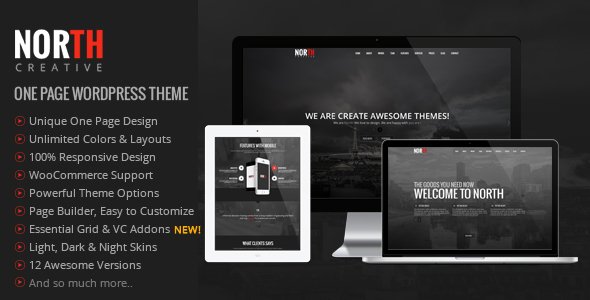
Stuck on your North WordPress theme? Let's fix it.
No endless back-and-forth. Just send us the details and we'll get it done.
No obligation · Replies within 1 hour · Quote within 1 day
Setup · Customization · Bug fixes · WooCommerce integration
About North WP Theme
North is a WordPress theme built by Veented, designed for clean, minimal websites with a focus on portfolio and agency use cases. It ships with a drag-and-drop page builder, pre-built demo content, and a header builder that gives you real control over layout without touching code.
The theme is built on a custom framework rather than a generic base, which keeps it relatively lightweight compared to multipurpose themes. It supports WooCommerce, has built-in mega menu options, and works with popular plugins out of the box. Licensing is handled through ThemeForest, and updates have been reasonably consistent over the years.
If you need a polished starting point for a creative agency, freelancer portfolio, or small business site, North gives you the structure to get there without excessive bloat. That said, some features require familiarity with the theme’s own settings panel, which has a learning curve.
Get matched with a North developer in under one day
Tell us about your North project. Small fixes, North theme customization, or a full website build, whatever you need, we've got it covered.
We'll connect you to the right North developers, define the scope, and get everything 100% clear.
You'll get one estimate, hire your preferred developer, and start collaborating.
Finding someone who knows North’s specific options panel, template hierarchy, and builder quirks is harder than finding a generic WordPress developer. Codeable connects you with vetted developers who have real theme experience, not generalists guessing their way through unfamiliar code. Every project starts with a free estimate, and you only hire if you’re satisfied with the plan. No risk, no retainer, no wasted time posting on job boards and sifting through unqualified responses.
Pros
- Clean minimal design that works well for portfolios and agency sites without heavy styling overhead
- Built-in header builder with multiple layout options that don't require a separate plugin
- WooCommerce compatible out of the box with styled product and checkout pages
- Reasonably lightweight compared to large multipurpose themes, which helps baseline performance
- Pre-built demo content makes initial setup faster for common site types
Cons
- Theme options are split between the Customizer and a separate Theme Options panel, which creates a confusing workflow
- The built-in page builder is not Elementor or Gutenberg, so switching builders later can require significant rework
- Documentation is sparse for edge cases and advanced customization scenarios
- Support response times on ThemeForest can be slow, especially for complex issues
- Some demo layouts are difficult to replicate exactly without importing demo data first, which can overwrite existing content
Who is North for?
Creative Agency
North suits creative agencies that need a professional presentation without a bloated feature set. The header builder and portfolio post types let agencies showcase work and services cleanly. A North developer can configure the layout to match brand guidelines and set up team pages, service grids, and contact flows without relying on excessive third-party plugins.
Freelance Portfolio
For freelancers, North provides a focused portfolio layout with minimal distractions. Project galleries, skills sections, and a clean contact page are achievable with the built-in tools. A North specialist can customize typography and color schemes to match a personal brand and ensure the site performs well on mobile without extra tweaks.
Small Business Website
Small businesses benefit from North’s pre-built page structures for services, about pages, and lead generation. The theme handles basic SEO requirements and integrates with popular form plugins. A North expert can set up a site that converts visitors without overcomplicating the design or adding unnecessary functionality the business doesn’t need.
WooCommerce Store
North’s WooCommerce support makes it a workable option for small to mid-sized online stores. Product pages are styled consistently with the rest of the theme, and checkout flows don’t require major overrides. A North developer can configure shop layouts, handle payment gateway integration, and customize product display to match specific catalog needs.
Photography Website
Photographers need clean gallery display and fast image loading. North’s minimal design keeps the focus on images rather than interface. A North specialist can configure full-width layouts, lazy loading, and lightbox functionality to deliver the kind of visual experience photography clients expect, without the theme interfering with image quality or presentation.

Customizing North
North uses a combination of its own Theme Options panel and the WordPress Customizer, which means settings are split across two places. That can slow you down when you’re trying to make quick design decisions. Typography, colors, spacing, and header layouts are all configurable, but getting a truly custom result often means overriding CSS or editing template files.
The built-in page builder handles most layout needs, but it has limits when you want complex or unique section designs. A North expert can map out exactly which customizations are achievable natively versus what requires custom code, saving you hours of trial and error.
If you need custom post types, unique header behavior, or WooCommerce modifications specific to your workflow, working with a North developer who knows the theme’s structure is the fastest path to a stable result without hacks that break on updates.
Recommended plugins for North
North works with WooCommerce for product pages, Contact Form 7 and WPForms for lead capture, and WPML for multilingual setups. For SEO, pairing North with Yoast or Rank Math is straightforward, and the theme outputs clean markup that supports structured data. You can read more about getting the most from your setup on our WordPress SEO optimisation page.
On the performance side, North benefits from caching plugins like WP Rocket and image optimization tools. The theme doesn’t load excessive scripts by default, which helps. For a deeper look at speed tuning, visit our WordPress performance page.
Not sure which plugins to use? This WordPress plugins directory covers the most popular options with reviews and setup guides.
North common issues
North theme page builder not loading in WordPress editor
This is usually a JavaScript conflict with another plugin. Open your browser console and look for JS errors. Deactivate plugins one by one to isolate the conflict. Caching plugins can also serve stale assets that prevent the builder from initializing. Clear all caches and test in a private browser window. If the problem persists after isolating plugins, the builder may need a script dependency fix specific to your hosting environment.
North theme header not displaying correctly on mobile
North’s header builder has separate mobile settings that are easy to miss. Check the mobile header configuration in the Theme Options panel under Header. If you’re using a custom header layout, it may not have a mobile fallback configured. You may also have conflicting CSS from a child theme or custom CSS box. Use browser DevTools to inspect which styles are overriding the mobile header and correct them at the source.
North theme demo import failing or incomplete
Demo imports fail most often due to server memory limits or file upload restrictions. Set upload_max_filesize and post_max_size to at least 64MB in your PHP configuration. If the import completes but content is missing, it’s likely a timeout issue. Try importing in smaller chunks or use the theme’s individual content import options if available. Contact your host to increase execution time limits before retrying.
North theme WooCommerce product page layout broken
WooCommerce layout issues in North are often caused by a WooCommerce update that changed template file structure. North’s bundled WooCommerce templates may be outdated. Check the WooCommerce status screen under Tools for template override warnings. Updating those templates or removing the overrides and relying on default WooCommerce output usually resolves the issue. If you need help with persistent layout breaks, our WordPress bug fixing service can resolve it quickly.
North theme custom CSS not applying after update
If custom CSS stops applying after a North theme update, it’s often because the CSS was added to the parent theme’s stylesheet directly rather than through the Customizer’s Additional CSS field or a child theme. Theme updates overwrite parent theme files. Move your custom CSS to the Customizer or create a child theme to prevent this from happening again. If styles are in the right place but not rendering, clear your caching plugin and CDN cache.
North theme mega menu not working
The mega menu in North requires specific menu item configuration in Appearance > Menus. Each top-level item has a mega menu toggle that must be enabled, and sub-items need to be assigned to columns. If the mega menu is enabled but not displaying, check for a JavaScript conflict using the browser console. Plugin conflicts and missing theme scripts are the most common causes. Disabling caching temporarily can confirm if cached scripts are the problem.
North theme slider not showing on homepage
Slider issues in North are usually tied to the Revolution Slider or the theme’s built-in slider not being assigned to the correct page. Check the page settings for your homepage and confirm the slider is selected in the page options meta box. If Revolution Slider is used, verify it’s activated with a valid license. A blank white area where the slider should appear usually indicates a missing or expired plugin activation, not a theme bug.
North theme fonts not loading or reverting to default
Google Fonts loading issues in North are often caused by conflicting font plugins or a misconfigured CDN blocking external requests. First, check whether fonts are set correctly in Theme Options under Typography. If fonts load in one browser but not another, it’s likely a caching issue. If your site is behind Cloudflare or another CDN, ensure Google Fonts requests aren’t being blocked or redirected. For persistent issues, our WordPress bug fixing service can diagnose the root cause.
North theme update broke site layout
When a North theme update breaks layout, the most common cause is a conflict between updated theme files and a child theme that references old template structures. Compare your child theme templates against the updated parent theme. CSS overrides written against specific class names can also break if the theme update changed markup. Roll back to the previous version using a backup, then test the update on a staging site before applying it to production.
North theme portfolio filter not working
Portfolio filter failures in North are almost always a JavaScript conflict. The filter relies on Isotope or a similar library that can conflict with other plugins loading jQuery in different modes. Check the browser console for errors. Try switching to the default WordPress theme temporarily to confirm it’s theme-specific. If the filter worked previously and broke after a plugin install, deactivate recent plugins to isolate the conflict. See our WordPress bug fixing service for targeted help.
North FAQ
North is a functional option for portfolio, agency, and small business sites. It’s not the most actively developed theme on ThemeForest, so check the update history and support forum activity before purchasing. If your site requirements are straightforward and match the demo layouts, it still delivers a solid result. For complex builds, factor in the cost of developer time to extend it.
North has its own page builder and is not optimized for Elementor. You can technically install Elementor alongside it, but conflicts are common and the integration is not officially supported by Veented. Most developers recommend using either the built-in builder as intended or migrating to a different theme if Elementor is a hard requirement for your workflow.
Create a folder in wp-content/themes/ named north-child. Add a style.css with the required header including Template: north and a functions.php that enqueues the parent stylesheet using wp_enqueue_style. Activate the child theme in Appearance > Themes. All customizations go in the child theme to survive parent theme updates.
Yes, North includes WooCommerce support with styled shop, product, cart, and checkout pages. For straightforward store setups it works well without additional configuration. More complex WooCommerce builds, such as custom product types or non-standard checkout flows, may require a North developer to handle template overrides and styling adjustments.
After activating North, you’ll see a prompt to install required plugins. Once those are installed, go to Appearance > Import Demo Data and select the demo that matches your layout goal. Make sure your server’s PHP memory limit and upload limits are set high enough. The process can take several minutes. Always run demo imports on a fresh WordPress installation to avoid content conflicts.
You can use Gutenberg blocks with North, but the theme’s templates and styling are optimized for its own builder. Pages built without the native builder may look inconsistent or lack the layout options the theme demos show. If you prefer Gutenberg or another builder, a North specialist can help bridge the gap with custom CSS and template adjustments.
The safest way is to use a child theme for all customizations before updating. Any changes made directly to parent theme files will be overwritten. Back up your site before every update, then run the update on a staging environment first. Check the theme changelog for template changes that might affect your existing pages and adjust your child theme files accordingly.
North is listed as WPML compatible, meaning the theme’s strings can be translated and it works with WPML’s language switcher. Full multilingual setups still require WPML configuration and sometimes string translation work within the Theme Options panel. A North developer familiar with WPML can handle the full setup, including RTL adjustments if needed.
Rates for a North theme developer on Codeable typically range based on project scope. Simple fixes and customizations are on the lower end. Full site builds or complex integrations cost more. Every project on Codeable starts with a free estimate so you know the cost upfront before committing. There’s no obligation to proceed after receiving the estimate.
Official support comes through the ThemeForest comments section for the North theme listing. Response times vary. For faster, more reliable help, working with an independent North specialist through a platform like Codeable gives you direct access to someone who knows the theme and can resolve issues without back-and-forth delays typical of marketplace support threads.
Hire a North WordPress Developer or Expert
Whether you need a full North theme setup, custom design modifications, plugin integrations, or bug fixes, working with a developer who knows the theme saves significant time. Post your project and get matched with a North specialist within 24 hours. Get a Free Estimate with no obligation to hire. Every estimate is free, every developer is vetted, and the process is fully risk-free.
You'll need a free Codeable account so developers can ask questions and send their quotes.