KnowHow WordPress Theme
by HeroThemes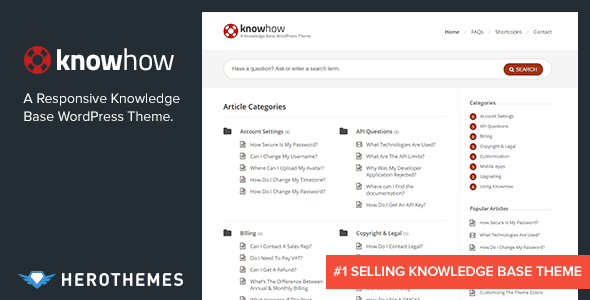
Stuck on your KnowHow WordPress theme? Let's fix it.
No endless back-and-forth. Just send us the details and we'll get it done.
No obligation · Replies within 1 hour · Quote within 1 day
Setup · Customization · Bug fixes · WooCommerce integration
About KnowHow WP Theme
KnowHow is a WordPress knowledge base theme built by HeroThemes. It is designed specifically for creating searchable, structured documentation and support centers. The theme ships with a prominent Ajax-powered search bar, category-based article organisation, and a clean reading layout that keeps users focused on content rather than navigation clutter.
Under the hood, KnowHow uses a custom post type for articles, making it easy to separate knowledge base content from standard blog posts. It supports widgets for popular articles and categories, and the front page is purpose-built for self-service support. If you run a SaaS product, plugin, or any service that needs structured documentation, KnowHow gives you a solid starting point without requiring a full custom build.
Get matched with a KnowHow developer in under one day
Tell us about your KnowHow project. Small fixes, KnowHow theme customization, or a full website build, whatever you need, we've got it covered.
We'll connect you to the right KnowHow developers, define the scope, and get everything 100% clear.
You'll get one estimate, hire your preferred developer, and start collaborating.
KnowHow is straightforward to install but harder to customise correctly. Template files are not complex, but getting the article structure, search behaviour, and access rules right takes real WordPress experience. Through Codeable, you get matched with a vetted KnowHow developer who has handled these projects before. No agencies, no guesswork. Post your project, get a clear estimate, and only proceed if it makes sense for your budget.
Pros
- Purpose-built for knowledge bases, not adapted from a generic theme
- Ajax search works on the homepage without a page reload
- Custom post type keeps KB articles separate from blog posts
- Clean, minimal reading layout with low distraction
- Lightweight codebase with no excessive bundled plugins
Cons
- Theme options panel is basic and lacks granular layout controls
- No built-in article feedback or rating system out of the box
- Not compatible with full-site editing or block-based customisation
- Category display on the homepage is rigid and hard to rearrange without coding
- No built-in multi-language support, requires WPML or Polylang setup
Who is KnowHow for?
SaaS Product Documentation
SaaS teams use KnowHow to host product documentation that customers can search before submitting a support ticket. A KnowHow developer can extend the setup with gated access for paying customers, version-specific article tagging, and integration with tools like Intercom or Zendesk for escalation when self-service fails.
WordPress Plugin Support Site
Plugin authors hosting their own support docs use KnowHow to reduce repetitive forum questions. Articles can be organised by plugin version or feature area. A KnowHow specialist can connect the theme to a changelog, add code snippet formatting, and make article search return accurate results even for technical terms.
Internal Company Wiki
Teams running internal wikis on WordPress find KnowHow useful because of its structured category layout and search. A KnowHow expert can lock the entire site behind a login, assign editing roles to specific departments, and build a submission workflow so team members can propose new articles without full admin access.
E-commerce FAQ and Help Center
WooCommerce stores reduce support volume by building a help center with KnowHow. Common topics include returns, shipping policies, and product guides. A KnowHow developer can pull in WooCommerce order data or link articles to specific product categories, making it easier for customers to find relevant answers quickly.
IT and Technical Support Portal
IT teams use KnowHow to document internal processes, troubleshooting guides, and system configurations. Access can be restricted by user role. A KnowHow specialist can add print-friendly templates, integrate with Active Directory via LDAP plugins, and structure categories to match team or department divisions.

Customizing KnowHow
Out of the box, KnowHow covers the basics: logo upload, colour controls, and widget areas. But most serious setups quickly outgrow the default options. A KnowHow expert can rework the category layout, add custom article templates, build out a tabbed or filtered article index, and integrate live search with more advanced filtering logic.
Common customisation requests include adding a feedback system (was this article helpful?), restricting knowledge base access to logged-in users, creating role-based content visibility, and connecting the theme to a helpdesk plugin like Awesome Support or Help Scout. A KnowHow specialist can also handle deeper PHP and template work to match your brand without breaking the theme’s built-in functionality.
Recommended plugins for KnowHow
KnowHow pairs well with several plugins that extend its core functionality. For search accuracy and indexing, SearchWP improves on the default WordPress search significantly. TablePress handles structured comparison content inside articles. For site speed, object caching and image optimisation matter more than ever on documentation-heavy sites. See our WordPress performance service for details on that. If your knowledge base needs to rank for support and how-to queries, structured SEO work is worth doing early. Our WordPress SEO service covers schema markup, content structure, and technical fixes that help knowledge base articles get found.
Not sure which plugins to use? This WordPress plugins directory covers the most popular options with reviews and setup guides.
KnowHow common issues
KnowHow search not returning results
KnowHow uses WordPress’s native search filtered to its custom post type. If search returns nothing, the first thing to check is whether your articles are published under the correct post type and not as standard posts. Also verify that the search form is pointing to the right post type parameter. Flushing rewrite rules by visiting Settings > Permalinks often resolves indexing gaps. If the issue persists after that, a WordPress bug fixing specialist can audit the query logic directly.
KnowHow homepage categories not showing articles
If categories appear on the homepage but articles are missing, the most common cause is a mismatch between the category assigned in the Knowledge Base category taxonomy and the one selected in the homepage widget. Check that articles are assigned to Knowledge Base categories, not standard WordPress categories. Also confirm that the category count shown in the widget settings matches your published article count. Re-saving the widget after re-assigning categories usually fixes the display.
KnowHow theme breaking after WordPress update
WordPress core updates occasionally break theme functionality, especially in older versions of KnowHow that rely on deprecated functions. Check the browser console and PHP error log for specific errors. Common culprits are deprecated the_widget() calls and changes to the REST API. Updating the theme to the latest HeroThemes release resolves most cases. If you have customisations in the parent theme rather than a child theme, those changes will be lost on update. A WordPress bug fixing service can recover and migrate those safely.
KnowHow custom CSS not applying
Custom CSS added via the WordPress Customizer should apply globally, but some KnowHow templates use inline styles or highly specific selectors that override general rules. Use browser DevTools to identify the exact selector being applied. If you’re adding CSS to a child theme’s stylesheet, confirm the child theme is active and that the stylesheet is enqueued with a dependency on the parent theme’s style handle. Specificity conflicts are the most common reason CSS appears to have no effect.
KnowHow article page showing 404 error
A 404 on a KnowHow article page almost always means the permalink structure is out of sync. Go to Settings > Permalinks and click Save Changes without changing anything. This flushes the rewrite rules and re-registers the custom post type URLs. If the 404 persists, check that the knowledge base post type is set to public and that its rewrite slug does not conflict with any existing page or category slug on your site.
KnowHow search bar not working on mobile
The KnowHow Ajax search bar uses JavaScript that can conflict with certain mobile-optimised caching or script-deferral setups. Check whether the issue appears on a non-cached version of the page. If it works without cache, add the KnowHow search script to your cache plugin’s exclusion list. Also verify the search input does not have a z-index or overflow issue in your CSS that collapses it on smaller screens. A WordPress bug fixing developer can trace the exact JS conflict quickly.
KnowHow sidebar not displaying widgets
KnowHow registers specific widget areas tied to its templates. If a widget area appears empty, check that you are adding widgets to the correct sidebar in Appearance > Widgets. The article sidebar and the homepage sidebar are separate. Also confirm that the template for the page you are viewing actually calls dynamic_sidebar() for that area. If a child theme template overrides the parent without that call, the sidebar will not render regardless of what is assigned in the admin.
KnowHow slow loading on article pages
Knowledge base sites with many articles can slow down due to unoptimised category queries on each page load. Install Query Monitor to identify slow or repeated database queries. Common fixes include enabling object caching, adding a persistent caching layer like Redis, and optimising the widget queries that count articles per category. Lazy loading images inside article content also helps. For a full performance audit, see our WordPress performance service.
KnowHow not compatible with WPML
KnowHow does not advertise official WPML compatibility, but it can work with the plugin when set up correctly. The main issue is that the Knowledge Base custom post type needs to be registered as translatable inside WPML’s settings. Article slugs must be translated manually per language. Category taxonomy also needs to be configured inside WPML’s taxonomy translation settings. String translations for the theme’s UI labels are handled via WPML’s String Translation module.
KnowHow child theme changes not taking effect
If a KnowHow child theme stylesheet is not applying changes, first confirm the child theme is active in Appearance > Themes. Then check that the child theme’s functions.php correctly enqueues the parent stylesheet using wp_enqueue_style with the parent as a dependency. Simply using @import in the child stylesheet is unreliable. Also verify there is no caching layer serving the old stylesheet. Clear all cache layers, including browser cache, before testing changes.
KnowHow FAQ
HeroThemes has shifted focus toward their Heroic KB plugin, but KnowHow does still receive occasional updates. It is no longer their primary product. If long-term support and active development matter to your project, it is worth considering whether a plugin-based solution or a more actively maintained theme better fits your needs. A KnowHow developer can advise on whether migration makes sense.
Yes. KnowHow can be locked down to registered users only using a members plugin like Members by MemberPress or a simple snippet that redirects guests. The theme itself has no built-in access control, so this needs to be handled at the plugin or code level. A KnowHow specialist can set this up cleanly without affecting your admin access or public-facing pages.
KnowHow predates the block editor and is not a Gutenberg-native theme. Article content can be edited with blocks, but the theme templates and layout controls do not use the block editor. Elementor can be used inside article content, but the homepage and category templates are controlled by the theme and cannot be edited visually in Elementor without custom template overrides.
KnowHow has no built-in article voting or rating system. The most common approach is adding a plugin like Helpful or building a custom meta-based voting system. HeroThemes’ own Heroic KB plugin includes this feature natively if you want to move in that direction. A KnowHow developer can build a lightweight custom voting system that stores results in post meta without third-party dependencies.
KnowHow and WooCommerce can coexist on the same WordPress install. The knowledge base functions independently of WooCommerce templates. The common use case is a help center that sits alongside a store, with articles covering shipping, returns, and product questions. You can link from product pages to specific articles manually or with a plugin that creates contextual support links.
KnowHow does not include access restriction natively. The simplest approach is using a plugin like Password Protected, Members, or a redirect snippet in functions.php that checks login status and redirects guests. For more granular control, such as restricting specific categories to certain user roles, a KnowHow specialist can write custom logic tied to the knowledge base post type and taxonomy.
KnowHow is a standalone theme. Heroic KB is a WordPress plugin that adds knowledge base functionality to any theme. HeroThemes now recommends Heroic KB as their primary product. The plugin offers more features, including article voting, contact forms, and search analytics. KnowHow is simpler and lighter but receives less active development. The right choice depends on how much flexibility and ongoing feature development you need.
KnowHow is built around a single knowledge base structure. Supporting multiple separate knowledge bases, such as one per product or department, is not a built-in feature. It can be approximated using categories, but a true multi-base setup requires custom post types or a plugin like MultiKnowHow. A KnowHow developer can advise on the cleanest approach without overcomplicating the data structure.
On shared hosting, the biggest wins for KnowHow speed come from enabling a caching plugin, compressing images inside article content, and disabling unused widgets. WP Super Cache or LiteSpeed Cache work well. Reducing the number of articles loaded per category on the homepage also helps. If your host supports PHP 8.x, upgrading from older PHP versions makes a noticeable difference on query-heavy knowledge base pages.
KnowHow articles are stored as a custom post type. Migrating them means either re-registering that post type in the new theme or converting them to standard posts. The content itself is portable, but URLs, categories, and any theme-specific meta fields need to be mapped carefully. See our WordPress migration service if you are planning a full platform move.
Hire a KnowHow Developer
Whether you need a KnowHow expert to build your knowledge base from scratch, fix a specific issue, or extend the theme with custom functionality, the process is straightforward. Post your project through our free estimate page and get matched with a developer who knows the theme. No commitment required until you approve the estimate. Work is delivered through Codeable, so quality is vetted before anyone touches your site.
You'll need a free Codeable account so developers can ask questions and send their quotes.