Lobo WordPress Theme
by VanKarWai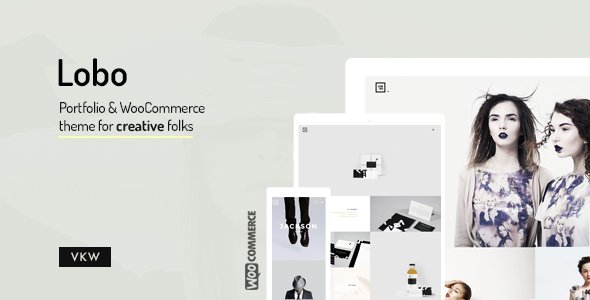
Stuck on your Lobo WordPress theme? Let's fix it.
No endless back-and-forth. Just send us the details and we'll get it done.
No obligation · Replies within 1 hour · Quote within 1 day
Setup · Customization · Bug fixes · WooCommerce integration
About Lobo WP Theme
Lobo is a WordPress theme by VanKarWai built for creative agencies, photographers, and portfolio-focused businesses. It ships with a full-screen layout, smooth scroll transitions, and a minimal aesthetic that keeps the focus on visual content. The theme supports Elementor and comes with pre-built demo pages that cover common portfolio structures.
Under the hood, Lobo uses a clean codebase with custom post types for portfolio items and a built-in lightbox for image galleries. It is translation-ready and WPML-compatible, which makes it a practical choice for multilingual creative studios. Performance is respectable out of the box, though image-heavy builds will need additional optimization to hit strong Core Web Vitals scores.
Get matched with a Lobo developer in under one day
Tell us about your Lobo project. Small fixes, Lobo theme customization, or a full website build, whatever you need, we've got it covered.
We'll connect you to the right Lobo developers, define the scope, and get everything 100% clear.
You'll get one estimate, hire your preferred developer, and start collaborating.
Most Lobo issues come down to conflicts between the theme’s built-in scripts and third-party plugins, or customizations applied directly to theme files that break on updates. A vetted Lobo developer on Codeable has seen these patterns before and can diagnose and fix them without unnecessary back-and-forth. Codeable only works with senior WordPress developers, so you are not experimenting with an untested freelancer. You get a scoped estimate before any work starts and no obligation to proceed.
Pros
- Full-screen visual layout works well for image-heavy portfolios without extra configuration
- Clean codebase with minimal bloat makes it faster to customize than many competing portfolio themes
- WPML-compatible out of the box, which is useful for agencies serving international clients
- Elementor support means page layout changes do not require touching theme files
- Built-in lightbox and custom portfolio post type reduce dependency on additional plugins
Cons
- Full-screen image sections load slowly on mobile if images are not properly compressed and lazy-loaded
- Scroll animations can cause accessibility issues for users who prefer reduced motion settings
- Limited layout variation for the portfolio grid without custom CSS or developer intervention
- Demo import does not always replicate exactly due to font license restrictions on bundled typefaces
- Updates from VanKarWai are infrequent, which can create compatibility gaps with newer WordPress versions
Who is Lobo for?
Photography Studios
Lobo’s full-screen image display and built-in lightbox make it a natural fit for photographers. A Lobo specialist can configure gallery categories by shoot type, add client-facing password-protected galleries, and optimize image delivery so large files do not drag down page speed scores.
Creative Agencies
Agencies use Lobo to present case studies and service offerings in a visually clean format. A Lobo developer can extend the portfolio post type to include client name, project scope, and results fields, giving each case study a structured layout that is easy to manage from the WordPress dashboard.
Freelance Graphic Designers
Freelance designers need a portfolio that loads fast and looks sharp on every screen size. Lobo handles the visual side well. A Lobo expert can add a project inquiry form tied to specific portfolio items, giving potential clients a direct path from viewing work to making contact.
Architects and Interior Designers
Architecture and interior design work is detail-oriented, and Lobo’s minimal aesthetic keeps the focus on project imagery. A Lobo developer can set up before-and-after image sliders, project filtering by type or location, and a clean contact flow suited to high-value project inquiries.
Film and Video Production Companies
Video production companies can embed showreels and project videos directly into Lobo’s full-screen sections. A Lobo specialist can configure autoplay video backgrounds, add a services breakdown section, and connect a booking or inquiry form to streamline how new client projects get submitted.

Customizing Lobo
Lobo gives you a solid starting point, but most client sites need changes that go beyond what the WordPress Customizer covers. Fonts, color schemes, and layout widths are all adjustable, but custom header layouts, modified portfolio grid behavior, or bespoke animation timing require direct theme file edits or targeted CSS.
A Lobo expert can handle those modifications without breaking update compatibility by using a child theme. Common customization requests include adding custom hover effects to portfolio cards, adjusting the full-screen hero to support video backgrounds, and restructuring the services section to match a specific brand layout. If you need the theme to behave differently from its defaults, working with a Lobo specialist saves time and avoids introducing bugs into your live site.
Recommended plugins for Lobo
Lobo works well with WooCommerce for simple digital product sales, Contact Form 7 or WPForms for lead capture, and WPML for multilingual sites. For studios running content marketing alongside their portfolio, adding an SEO plugin and configuring it properly makes a measurable difference. See our WordPress SEO optimisation service for help with that setup.
On the performance side, Lobo’s full-screen images and scroll animations can slow load times on mobile. Pairing the theme with a caching layer and a CDN is recommended. Our WordPress performance service covers full audits and implementation for Lobo-based sites.
Not sure which plugins to use? This WordPress plugins directory covers the most popular options with reviews and setup guides.
Lobo common issues
Lobo theme portfolio grid not displaying correctly after update
Portfolio grid layout breaks are usually caused by a CSS conflict introduced by a plugin update or a caching layer serving stale styles. Clear your cache first, then check the browser console for CSS errors. If the grid structure is broken at the HTML level, the issue is likely a JavaScript conflict disabling the masonry or isotope library Lobo uses. Deactivate plugins one by one to isolate the cause. For persistent layout issues, a WordPress bug fixing service can trace the root conflict quickly.
Lobo full-screen hero image not loading on mobile
Full-screen hero images that fail on mobile are almost always an image size or object-fit CSS issue. Lobo sets the hero as a CSS background image, and some mobile browsers handle large background images inconsistently. Check that your image is at least 1200px wide, and add background-attachment: scroll for mobile via a media query. Fixed attachment backgrounds do not render correctly on iOS Safari. A Lobo developer can apply the correct mobile-specific overrides in a child theme stylesheet.
Lobo theme scroll animations not working
Scroll animations in Lobo rely on a JavaScript library, typically ScrollMagic or a custom implementation. If animations stop working, check whether a performance or optimization plugin is deferring or blocking that script. WP Rocket and similar plugins have exclusion lists where you can whitelist Lobo’s animation scripts. Also check for JavaScript console errors that indicate a library failed to load. Reinstalling the theme in a staging environment can confirm whether the issue is theme-specific or plugin-related.
Lobo demo import failing or importing blank pages
Lobo demo imports fail for several reasons: the XML file hits PHP upload limits, required plugins are not installed first, or the server times out on large media files. Before importing, install all required plugins listed in the theme documentation, raise max_execution_time and upload_max_filesize in your PHP config, and import content in sections if the theme supports it. If pages import but appear blank, the Elementor data likely did not transfer. Re-save each page in Elementor to regenerate the CSS.
Lobo theme conflict with Elementor after WordPress update
Lobo and Elementor conflicts after a WordPress core update usually stem from deprecated functions or changed hooks in either the theme or the page builder. Check both the Lobo changelog and Elementor’s release notes to see if a compatibility fix has been released. If not, rolling back Elementor to the previous version via a plugin like WP Rollback buys time. For a permanent fix, a WordPress bug fixing specialist can patch the conflict at the theme level without waiting for an official update.
Lobo lightbox not opening on portfolio images
The Lobo lightbox relies on JavaScript event listeners attached to portfolio image links. If it stops working, the most common cause is a plugin replacing or conflicting with the lightbox library. Check whether another plugin, such as a gallery or slider plugin, loads its own lightbox and overrides Lobo’s. Deactivate suspect plugins and test. Also confirm the portfolio image links are formatted correctly in the source HTML. The href should point to the full-size image URL, not the attachment page.
Lobo theme navigation menu not showing on mobile
Mobile menu failures in Lobo are usually a JavaScript toggle issue. The hamburger icon triggers a JS function that adds a class to the nav element. If a plugin defers or minifies Lobo’s main JS file incorrectly, that function never runs. Exclude Lobo’s navigation script from minification in your optimization plugin settings. If the menu HTML is not rendering at all, check whether a caching plugin is serving a desktop-cached version to mobile visitors. Enabling separate mobile caching or a device-aware cache rule resolves this.
Lobo custom fonts not loading after switching hosting
Custom fonts in Lobo are typically loaded via Google Fonts or a locally hosted font file referenced in the theme stylesheet. After a hosting migration, local font paths break if the site URL or directory structure changed. Check the font-face declarations in your child theme CSS and update any absolute paths to relative ones or correct domain references. If you migrated from HTTP to HTTPS, mixed content errors can also silently block font loading. Run your site through an SSL checker to confirm all assets load over HTTPS. Our bug fixing service covers post-migration issues like this.
Lobo theme white screen of death after plugin install
A white screen after installing a plugin almost always points to a PHP fatal error caused by a memory limit or a direct code conflict. Enable WordPress debug mode by adding define('WP_DEBUG', true); to wp-config.php and reload the page. The error log will name the file and line causing the crash. If the error is in a plugin file, deactivate that plugin via FTP by renaming its folder. If the error is in Lobo itself, a function the plugin calls may conflict with the theme. Switching to a default theme temporarily confirms this.
Lobo portfolio filter returning no results
Portfolio filter buttons in Lobo use taxonomy terms assigned to portfolio items. If filtering returns no results, check that your portfolio posts have the correct taxonomy terms assigned and that the filter widget or shortcode is referencing the right taxonomy slug. JavaScript errors can also prevent the filter from executing. Open the browser console while clicking a filter and look for errors referencing isotope or the custom filter function. Rebuilding the filter section in Elementor or re-saving the portfolio items often clears taxonomy caching issues that cause empty results.
Lobo FAQ
Lobo is generally compatible with current WordPress versions, but VanKarWai releases updates infrequently. Before updating WordPress core on a Lobo site, test in a staging environment first. If you are running an older version of Lobo, check the theme’s changelog and the VanKarWai support forums for known compatibility issues with the WordPress version you are upgrading to.
Yes, Lobo supports Elementor. Most of the pre-built demo pages are built with Elementor, which makes layout changes straightforward without editing theme files. Some Lobo-specific sections, such as the portfolio post type display, may need custom Elementor widgets or additional configuration to behave as expected alongside native theme functionality.
Lobo is not a dedicated WooCommerce theme, but it handles basic store setups adequately. Simple product listings and single product pages will display with default WooCommerce styling. For a polished storefront, you will need custom CSS or a developer to align the WooCommerce templates with Lobo’s visual style. Complex shop features are better served by a theme built specifically for ecommerce.
Create a child theme by making a new folder in wp-content/themes, adding a style.css file with the correct Template header referencing lobo, and an functions.php that enqueues the parent stylesheet. Any customizations go into the child theme files. This protects your changes when Lobo updates. A Lobo developer can set this up correctly if you want to avoid doing it manually.
Lobo’s code is reasonably clean, but the theme does not do much SEO configuration on its own. You will need an SEO plugin like Yoast or Rank Math to handle meta titles, descriptions, and schema markup. The bigger SEO challenge with Lobo is performance: large hero images and scroll animations can hurt Core Web Vitals scores, which directly affect search rankings on mobile.
Start by compressing all portfolio and hero images before uploading. Use a caching plugin and enable lazy loading for images below the fold. Lobo’s scroll animation scripts should be excluded from deferral in your optimization plugin. A CDN makes a significant difference for image-heavy Lobo sites. For a full audit and implementation, see our WordPress performance service.
Yes, Lobo is WPML-compatible and translation-ready. You can run a multilingual portfolio site using WPML or Polylang. Menus, portfolio items, and page content can all be translated. Setting up WPML correctly with Lobo requires care to avoid duplicate content issues and to ensure language switchers appear in the right locations within the theme’s navigation structure.
Lobo’s hero section supports background images natively, but video backgrounds typically require either a custom Elementor section with a video background option enabled, or direct modification of the hero template. The most reliable approach is using an Elementor full-width section set to video background and placing it as the first section on the page. Autoplay video backgrounds are muted by default in all modern browsers due to browser policy.
FoxyConcept connects you with vetted Lobo WordPress developers through Codeable. You post your project, describe what you need, and get a scoped estimate within 24 hours. All developers on Codeable are pre-vetted senior WordPress specialists. Get a free estimate to get started with no obligation to hire.
Migrating an existing site to Lobo is possible but involves rebuilding your page layouts to match Lobo’s structure, especially if your current site uses a different page builder or theme framework. Content like posts, pages, and media transfers cleanly. Custom post types and layout-specific content will need manual reconstruction. See our WordPress migration service for professional help with the process.
Hire a Lobo WordPress Expert
Whether you need a Lobo developer to build a portfolio from scratch, customize an existing site, or fix something that has broken, FoxyConcept matches you with a vetted specialist through Codeable. Work is scoped upfront so there are no surprises. Get a free estimate and describe your project. You will hear back within 24 hours with a clear proposal and no obligation to hire.
You'll need a free Codeable account so developers can ask questions and send their quotes.