GymBase WordPress Theme
by QuanticaLabs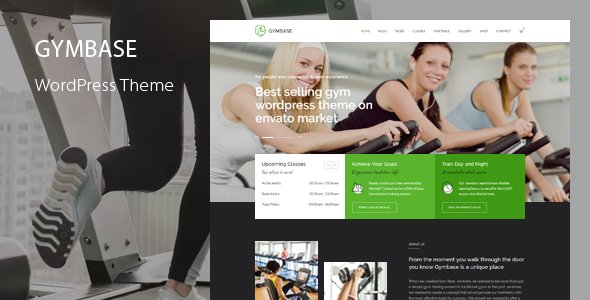
Stuck on your GymBase WordPress theme? Let's fix it.
No endless back-and-forth. Just send us the details and we'll get it done.
No obligation · Replies within 1 hour · Quote within 1 day
Setup · Customization · Bug fixes · WooCommerce integration
About GymBase WP Theme
GymBase is a WordPress theme built by QuanticaLabs specifically for gyms, fitness studios, personal trainers, and sports clubs. It ships with a visual page builder, pre-built demo content, class schedule functionality, a trainer roster layout, and pricing table templates. The theme is built on a custom framework with Bootstrap and supports WooCommerce for selling memberships or merchandise online.
Out of the box, GymBase gives fitness businesses a professional starting point without needing to code from scratch. The demo importer makes setup fast, and the built-in shortcodes handle most common fitness site needs: timetables, counters, progress bars, and call-to-action sections. It works well for single-location gyms and multi-branch fitness brands alike.
Get matched with a GymBase developer in under one day
Tell us about your GymBase project. Small fixes, GymBase theme customization, or a full website build, whatever you need, we've got it covered.
We'll connect you to the right GymBase developers, define the scope, and get everything 100% clear.
You'll get one estimate, hire your preferred developer, and start collaborating.
GymBase has a lot of moving parts: bundled plugins, a custom options panel, shortcodes, and demo content that doesn’t always match what your business needs. A GymBase specialist who has worked with the theme before will know where the limitations are and how to work around them.
Through Codeable, you get matched with vetted WordPress developers who have real experience with fitness themes. No agencies, no juniors. Post a project, get a free estimate, and only hire if it makes sense for you.
Pros
- Pre-built fitness demo content speeds up initial setup significantly
- Built-in class timetable shortcode handles weekly schedules without extra plugins
- WooCommerce compatibility allows membership and product sales out of the box
- Trainer profile layouts are purpose-built, not generic portfolio templates
- Revolution Slider and WPBakery are bundled, saving license costs
Cons
- WPBakery lock-in makes switching to Gutenberg or Elementor a significant rebuild
- Redux Framework options panel feels dated compared to the Customizer-based approach
- Theme updates have slowed down, raising long-term compatibility concerns
- Timetable shortcode lacks dynamic filtering without additional customization
- Demo import can overwrite existing content and settings if not handled carefully
Who is GymBase for?
Commercial Gyms
GymBase gives commercial gyms a professional multi-page site with membership pricing tables, class schedules, and trainer rosters. WooCommerce integration supports online membership sales or day pass purchases. A GymBase developer can extend the theme with a booking plugin and member portal for larger facilities managing hundreds of members.
Personal Training Studios
Personal trainers need a clean site that showcases their credentials, services, and transformation results. GymBase’s trainer profile layouts and before/after section options work well for this. A GymBase specialist can strip the site down to a focused single-trainer brand without the full gym structure getting in the way.
Yoga and Pilates Centers
Yoga and Pilates studios benefit from GymBase’s class timetable and booking-ready structure. The theme’s clean design adapts well to calmer, wellness-focused branding with the right color and font customizations. A GymBase expert can integrate WooCommerce class packs or a booking plugin to handle session reservations directly on site.
CrossFit and Functional Fitness Boxes
CrossFit boxes need a site that feels high-energy and communicates community. GymBase’s counter sections, pricing tables, and WOD-style content blocks can be customized to fit. A GymBase developer can add a custom WOD post type, leaderboard section, or results tracker to give members a reason to visit the site regularly.
Sports Clubs and Martial Arts Schools
Martial arts schools and sports clubs often need event listings, belt or ranking progression info, and multiple instructor profiles. GymBase handles the instructor roster and schedule well. A GymBase specialist can wire up The Events Calendar and add custom taxonomy structures for different class types, skill levels, or age groups.

Customizing GymBase
GymBase includes a theme options panel powered by Redux Framework, giving you control over fonts, colors, header styles, and layout widths without touching code. The Visual Composer (WPBakery) integration lets you drag and drop sections into place, and the bundled Revolution Slider handles hero images and promotional banners.
For deeper changes, a GymBase expert can modify the timetable layout, restructure the trainer profile pages, add custom post types for classes or locations, or build out a members-only area using a plugin like MemberPress. Custom CSS and child theme development keep your changes safe across updates. Whether you need minor styling tweaks or a full redesign, hiring a GymBase developer saves hours of trial and error.
Recommended plugins for GymBase
GymBase pairs well with several plugins that extend its core functionality. WooCommerce handles membership sales and merchandise. The Events Calendar integrates cleanly for class scheduling. Contact Form 7 or Gravity Forms work for trainer inquiries and booking requests.
To keep your fitness site fast, especially with image-heavy trainer and class pages, proper caching and image optimization matter. See our WordPress performance services for setup help. If you want your gym to rank locally or for fitness-related keywords, structured WordPress SEO optimisation work on top of GymBase gives you a real edge over competitors using the same theme.
Not sure which plugins to use? This WordPress plugins directory covers the most popular options with reviews and setup guides.
GymBase common issues
GymBase timetable not displaying correctly on mobile
The built-in GymBase timetable uses an HTML table structure that doesn’t reflow well on small screens. The fix involves adding custom CSS to make the table horizontally scrollable on mobile, or replacing the shortcode output with a responsive grid-based alternative. Check the theme’s CSS for .timetable and add overflow-x: auto to the wrapper. For complex cases, a GymBase developer can rebuild the timetable section with a mobile-first layout.
GymBase demo import fails or gets stuck
Demo import failures in GymBase usually come from PHP memory limits, execution time limits, or a conflicting plugin. Increase memory_limit to at least 256MB and max_execution_time to 300 in your php.ini or wp-config.php. Deactivate all non-essential plugins before running the importer. If the importer still fails mid-way, check the server error log for the exact failure point. If you need help, our WordPress bug fixing service can handle demo import issues quickly.
GymBase Revolution Slider not showing after update
Revolution Slider stops displaying after updates when there’s a version mismatch between the bundled theme copy and the installed plugin. Go to Plugins, deactivate and delete the current Revolution Slider, then reinstall the version bundled with your GymBase download package. Do not update Revolution Slider through the WordPress plugin screen unless QuanticaLabs has released a theme update that supports the newer version. Always test slider changes on a staging site first.
GymBase WooCommerce shop page layout broken
WooCommerce shop page layout breaks in GymBase when the WooCommerce template files conflict with theme overrides. Check if GymBase includes a /woocommerce/ folder in its directory. If those template files are outdated relative to your WooCommerce version, they need updating. Copy the relevant templates from the WooCommerce plugin into your child theme’s /woocommerce/ folder and update them to match the current WooCommerce structure. Our WordPress bug fixing service can handle WooCommerce template conflicts.
GymBase header menu not opening on mobile
Mobile menu failures in GymBase are usually caused by a JavaScript conflict with another plugin or a missing jQuery dependency. Open your browser console and look for JS errors on mobile or when resizing the window. Common culprits include caching plugins serving outdated JS or optimization plugins deferring jQuery incorrectly. Exclude jquery.js and GymBase’s main navigation script from deferral in your optimization plugin settings. Clear all caches after making changes.
GymBase page builder content showing as shortcode text
When WPBakery shortcodes appear as raw text instead of rendered content, it usually means WPBakery Page Builder is deactivated or missing. GymBase bundles WPBakery, so check if it’s listed and active under Plugins. If you’ve switched to a different page builder or deactivated WPBakery, the shortcodes won’t render. Reactivate WPBakery or use a shortcode cleanup plugin to strip the tags before rebuilding pages with your preferred editor.
GymBase contact form not sending emails
GymBase contact forms not sending email is almost always a server mail configuration issue, not a theme problem. WordPress relies on PHP mail by default, which many hosts block. Install the WP Mail SMTP plugin and configure it with an authenticated SMTP provider like Gmail, Mailgun, or SendGrid. Set up a test email after configuration. Also check your spam folder before assuming emails aren’t being delivered. This fix applies whether you’re using Contact Form 7 or Gravity Forms with GymBase.
GymBase Google Fonts not loading
If Google Fonts fail to load in GymBase, first check whether your site is running over HTTPS while the font URLs are using HTTP. The theme options panel in GymBase generates font URLs, so make sure your site URL is set to HTTPS in Settings. Also check if a privacy or cookie plugin is blocking external font requests. As a fallback, you can self-host your chosen fonts using the OMGF plugin, which also improves page load speed by eliminating the Google Fonts external request entirely.
GymBase child theme not inheriting parent styles
A GymBase child theme that isn’t picking up parent styles is usually missing the correct wp_enqueue_style call in its functions.php. Do not use @import in style.css to load parent styles. Instead, enqueue the parent stylesheet with get_template_directory_uri() and the child stylesheet separately with get_stylesheet_directory_uri(). Make sure the child theme’s style.css header declares the correct Template: gymbase value matching the parent theme’s folder name exactly.
GymBase trainer section images not displaying properly
Trainer images not displaying in GymBase are often caused by incorrect image dimensions or a thumbnail regeneration issue. GymBase registers custom image sizes for trainer profile photos. If you uploaded images before activating the theme, those sizes won’t have been generated. Install the Regenerate Thumbnails plugin and run it across your media library. Also check that trainer images are being set as Featured Images on the trainer post type, not inserted into the content body. Our WordPress bug fixing service can diagnose display issues quickly.
GymBase FAQ
QuanticaLabs has slowed update frequency on GymBase compared to its early releases. The theme still works with current WordPress versions, but bundled plugins like WPBakery and Revolution Slider may fall behind. Before building a long-term site on GymBase, check the ThemeForest changelog and factor in potential compatibility issues as WordPress and WooCommerce continue updating.
GymBase is built around WPBakery Page Builder and is not designed for Gutenberg or Elementor natively. You can install Elementor on a GymBase site, but the theme’s template structure and shortcodes are WPBakery-dependent. A GymBase developer can migrate page content to Elementor, but it requires rebuilding layouts rather than a simple switch.
Yes. GymBase works well for solo personal trainers. You can use the trainer profile layout for yourself, strip out multi-trainer sections, and focus the homepage on your services and booking. A GymBase specialist can simplify the demo content into a lean, single-trainer site without the full commercial gym structure.
GymBase supports WooCommerce, so you can sell memberships, class packs, or merchandise directly from your site. For recurring billing, you’ll need the WooCommerce Subscriptions extension. A GymBase developer can set up the full payment flow, including membership tiers, access restrictions, and checkout customization.
After activating GymBase, go to Appearance and look for the theme’s import option, or navigate to the QuanticaLabs panel. You’ll need the required plugins activated first, including WPBakery and Revolution Slider. Run the import on a fresh WordPress install to avoid content conflicts. Increase your PHP memory limit before importing to reduce the chance of a timeout.
Technically yes, but practically it’s difficult. GymBase’s pre-built pages are built with WPBakery shortcodes. Without WPBakery active, those pages show raw shortcode text. You can build new pages using Gutenberg blocks, but the existing demo content won’t render. A GymBase expert can clean up the content and rebuild pages in a WPBakery-free setup if needed.
GymBase is responsive and adapts to mobile screens. However, some elements like the class timetable and wide content sections need additional CSS work to display cleanly on small devices. The theme passes basic mobile usability tests, but a thorough mobile audit and targeted CSS fixes are recommended before launching a client-facing fitness site.
GymBase includes a class timetable shortcode for displaying schedules, but it does not include a booking engine. For actual class bookings with slots, confirmations, and capacity limits, you need a plugin like Bookly, Amelia, or WooCommerce Bookings added on top. A GymBase developer can integrate these cleanly with the theme’s existing schedule layout.
Create a folder named gymbase-child in your wp-content/themes/ directory. Add a style.css file with the required header including Template: gymbase. Add a functions.php file that enqueues the parent and child stylesheets using wp_enqueue_scripts. Activate the child theme from Appearance. Always make customizations in the child theme to keep changes safe during GymBase updates.
Yes, you can migrate an existing gym website to GymBase. The complexity depends on your current setup. Moving from another WordPress theme involves rebuilding page layouts in WPBakery and migrating content. See our WordPress migration service for help with theme switches and full site migrations without losing content or SEO history.
Hire a GymBase Developer
If your GymBase site needs custom work, bug fixes, or a full build from scratch, working with a specialist is faster and less stressful than figuring it out alone. FoxyConcept delivers GymBase development through Codeable, where every developer is vetted and rated. You get a free estimate before committing to anything. Get a Free Estimate and describe your project today.
You'll need a free Codeable account so developers can ask questions and send their quotes.