Attorney WordPress Theme
by GoodLayers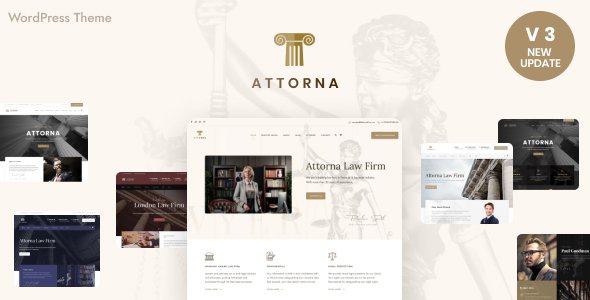
Stuck on your Attorney WordPress theme? Let's fix it.
No endless back-and-forth. Just send us the details and we'll get it done.
No obligation · Replies within 1 hour · Quote within 1 day
Setup · Customization · Bug fixes · WooCommerce integration
About Attorney WP Theme
Attorney is a WordPress theme built by GoodLayers, designed specifically for law firms, solo practitioners, and legal consultancies. It ships with GoodLayers’ PageBuilder, giving you drag-and-drop layout control without touching code. The theme includes pre-built page templates for practice areas, attorney profiles, case results, and client testimonials.
The design leans professional and authoritative, with clean typography, muted color palettes, and structured layouts that suit legal branding. It supports multiple header styles, a sticky navigation option, and a built-in contact form setup. Out of the box, it integrates with WPBakery and includes demo content you can import in one click. For law firms that want a polished site without building from scratch, Attorney covers the basics well.
Get matched with a Attorney developer in under one day
Tell us about your Attorney project. Small fixes, Attorney theme customization, or a full website build, whatever you need, we've got it covered.
We'll connect you to the right Attorney developers, define the scope, and get everything 100% clear.
You'll get one estimate, hire your preferred developer, and start collaborating.
GoodLayers themes have a specific page builder structure that behaves differently from Elementor or Gutenberg. Developers unfamiliar with it often run into layout conflicts or break the demo structure during customization. The Attorney specialists available through Codeable have worked with GoodLayers themes directly and understand how its modules, shortcodes, and template hierarchy interact. That means faster delivery, fewer revisions, and no guesswork on billing.
Pros
- Includes purpose-built templates for law firm pages including attorney profiles, practice areas, and case results
- GoodLayers PageBuilder allows flexible layout changes without code
- One-click demo import gets a professional-looking site up quickly
- Multiple header styles and sticky navigation options built in
- Clean, authoritative design with typography suited to legal branding
Cons
- GoodLayers PageBuilder is not Gutenberg or Elementor, so it has a steeper learning curve and fewer third-party tutorials
- Demo content can be slow-loading out of the box due to unoptimized images and heavy builder output
- Attorney profile and directory functionality is limited compared to dedicated legal directory plugins
- Customizing archive and taxonomy templates requires PHP knowledge beyond what the builder supports
- Theme updates can occasionally break custom CSS or layout tweaks made through the PageBuilder
Who is Attorney for?
Solo Law Practitioners
Solo attorneys need a site that looks credible without requiring ongoing maintenance. Attorney’s pre-built templates cover the essentials: a bio page, practice area summaries, a contact form, and a testimonials section. A developer can strip out unused modules and tighten the layout for a fast, focused single-practitioner site.
Multi-Partner Law Firms
Firms with multiple partners need a structured staff directory and individual profile pages. Attorney’s team post type handles this, but firms with more than five attorneys often need a developer to build a filterable directory, add department groupings, or integrate partner profile data with a CRM or intake system.
Legal Consultancies
Legal consultancies often serve business clients and need a more corporate visual tone than litigation-focused law firms. Attorney’s color scheme and header options can shift in that direction, but a specialist can refine typography, layout density, and service presentation to match a consultancy’s brand positioning more precisely.
Immigration Lawyers
Immigration law sites often need multilingual support and detailed service breakdowns by visa type or nationality. Attorney pairs with WPML or Polylang for translation, and its practice area templates can be repurposed for immigration categories. A developer familiar with both the theme and WPML avoids the common layout breakage that comes with multilingual setups.
Personal Injury Attorneys
Personal injury firms rely heavily on case results, client reviews, and strong calls to action for free consultations. Attorney supports testimonial and case result sections, but conversion-focused customization, like adding urgency cues, optimizing the contact form flow, or integrating a click-to-call button, typically needs a developer to implement properly.

Customizing Attorney
Attorney’s GoodLayers PageBuilder handles most layout work, but getting the theme to match a specific firm’s brand often requires deeper customization. Practice area archive layouts, attorney profile card styles, and the homepage hero section all have limits when using only the built-in options.
An experienced Attorney expert can extend these areas properly, modifying template files, adding custom post types for case results, or building a filterable attorney directory. CSS overrides alone won’t always produce the result you need, particularly with the theme’s slider and portfolio modules.
Custom work might also include integrating a legal intake form, connecting a CRM, or restructuring the navigation for firms with many practice areas. A developer who knows the GoodLayers framework avoids the workarounds that slow sites down or break on updates.
Recommended plugins for Attorney
Attorney works with most major WordPress plugins, but some additions are worth handling carefully. Contact Form 7 and WPForms both integrate cleanly for client intake. For appointment scheduling, Bookly or Simply Schedule Appointments drop in without conflicts.
On the performance side, the GoodLayers PageBuilder can generate heavy page output, so proper caching and asset optimization matter. A dedicated WordPress performance setup keeps load times reasonable, especially on pages with multiple staff profiles or case galleries.
For firms investing in organic search, pairing Attorney with a structured WordPress SEO strategy helps practice area pages rank for local legal queries, where competition is high and content structure matters.
Not sure which plugins to use? This WordPress plugins directory covers the most popular options with reviews and setup guides.
Attorney common issues
Attorney theme demo import not working
Failed demo imports in Attorney are usually caused by server memory limits or PHP execution timeouts. Raise max_execution_time to at least 300 seconds and memory_limit to 256MB in your php.ini or wp-config.php. Also ensure the required GoodLayers plugins are activated before running the import. If the import still stalls, try importing XML content and theme options separately using the WordPress importer and GoodLayers’ options panel.
GoodLayers PageBuilder not loading in Attorney theme
If the GoodLayers PageBuilder shows a blank screen or fails to load, a plugin conflict is the most likely cause. Deactivate all plugins except the GoodLayers core plugin and test the builder. Re-enable plugins one at a time to isolate the conflict. Also check your browser console for JavaScript errors, which often point to a script conflict with a caching or optimization plugin that’s combining JS files incorrectly.
Attorney theme contact form not sending emails
Attorney theme contact forms failing to send email is almost always a server mail delivery issue, not a theme bug. Install the WP Mail SMTP plugin and configure it with an authenticated SMTP service like SendGrid, Mailgun, or your email provider’s SMTP settings. Test delivery using WP Mail SMTP’s built-in send test. If you need ongoing help with theme issues beyond email, see our WordPress bug fixing service.
Attorney theme slow loading on mobile
Attorney can be slow on mobile because GoodLayers PageBuilder outputs render-blocking scripts and uncompressed images. Start by enabling lazy loading for images and compressing existing uploads. Then use a caching plugin like WP Rocket or LiteSpeed Cache to defer JavaScript and minify CSS. Audit which PageBuilder modules are loading assets site-wide and disable unused ones through the GoodLayers settings panel.
Attorney theme attorney profile images not displaying correctly
Attorney profile images appearing stretched, cropped incorrectly, or blank are usually caused by mismatched image dimensions for the team post type thumbnail. Go to Settings and confirm the thumbnail size registered by the theme. Use the Regenerate Thumbnails plugin to reprocess existing images to the correct dimensions. If images were uploaded before the theme was activated, they may not have been cropped to the expected ratio.
Attorney theme header overlapping page content
A header overlapping page content in Attorney is typically caused by the transparent or sticky header option being enabled without a corresponding top padding on the content area. In the GoodLayers page options, find the header settings and either disable the transparent mode or add a top padding value to the first page section equal to the header height. This is a per-page setting, so check it on each affected template.
Attorney theme practice area pages showing 404 error
Practice area pages returning 404 errors after setup usually mean WordPress permalink rules need to be flushed. Go to Settings, then Permalinks, and click Save Changes without changing anything. This regenerates the rewrite rules. If the 404 persists, check whether the practice area custom post type was registered correctly and whether the slug set in GoodLayers theme options matches the URL structure. If issues continue, our WordPress bug fixing service can diagnose it directly.
Attorney WordPress theme not compatible with latest WordPress update
GoodLayers themes including Attorney may show visual or functional issues after a major WordPress core update if the theme has not been updated to match. Check the ThemeForest changelog for Attorney and update the theme through the GoodLayers updater or by re-uploading via the theme panel. Always back up before updating. If the theme is significantly outdated, a developer may need to patch specific template files for compatibility rather than relying on an update.
Attorney theme slider not working on homepage
The Attorney homepage slider failing to play or display often comes down to a JavaScript conflict with another plugin, or the slider plugin bundled with GoodLayers not being activated. Check the Required Plugins notice in the WordPress dashboard and install or reactivate any listed slider dependency. Also test with other plugins disabled. If the slider worked previously and broke after an update, check the browser console for JS errors and identify which script is failing. Our WordPress bug fixing service handles these conflicts efficiently.
Attorney theme custom fonts not applying
Custom fonts not applying in Attorney can happen when Google Fonts fail to load due to a privacy plugin blocking external requests, or when a caching plugin has served a stale stylesheet. First, check the GoodLayers typography settings and confirm the correct font is selected and saved. Then purge all caches. If your site uses a GDPR plugin that blocks Google Fonts, either self-host the fonts using a plugin like OMGF or whitelist the Google Fonts domain in your consent settings.
Attorney FAQ
Attorney by GoodLayers is a practical choice for law firms that want a professional site quickly. It includes templates for the pages most firms need, installs fast with demo content, and has enough design flexibility for different legal niches. For firms with complex requirements like large attorney directories or custom intake systems, a developer will likely need to extend it.
Attorney is built around the GoodLayers PageBuilder, not Elementor. While Elementor can technically be installed alongside it, mixing the two builders on the same site creates conflicts and bloat. If you want to use Elementor, a developer can help migrate the Attorney theme’s templates into an Elementor-compatible structure, though this involves significant rework.
Attorney uses a custom post type for team members. In your WordPress dashboard, look for a Team or Attorneys menu item added by the GoodLayers plugin. Add a new entry, fill in the name, bio, photo, and practice area, then assign it to the relevant team page template. The GoodLayers PageBuilder team module pulls from this post type automatically.
The Attorney theme is designed to work with GoodLayers PageBuilder. Most of the demo layouts and inner page templates depend on it. You can edit basic content using the standard WordPress editor, but you’ll lose access to the layout modules that make the theme function as intended. Using it without the builder is possible but severely limits what you can build.
Yes, Attorney is mobile responsive out of the box. GoodLayers PageBuilder includes responsive visibility controls per module, so you can show or hide elements at specific breakpoints. That said, complex layouts with sliders, multi-column grids, or large hero sections may need manual adjustments to look clean on smaller screens.
Go to the WordPress Customizer or the GoodLayers Theme Options panel, depending on which version of Attorney you have. Look for the Header section, where you’ll find a Logo upload field. Upload an SVG or PNG file. Retina support typically requires a 2x resolution image. Some header styles also have a separate sticky logo upload field for the scrolled state.
Attorney theme is compatible with WPML and Polylang for multilingual sites. GoodLayers PageBuilder content can be translated using WPML’s String Translation module. Full multilingual setup requires careful configuration to avoid layout conflicts, especially with custom post types like attorney profiles and practice areas. A developer familiar with both WPML and GoodLayers is recommended for this.
Before updating, back up your site files and database. Customizations made through the GoodLayers Theme Options panel are stored in the database and survive theme updates. Changes made directly to theme template files will be overwritten. Use a child theme for any PHP or template customizations so updates don’t erase your work.
Attorney works well with WPForms or Contact Form 7 for intake forms, Yoast SEO or Rank Math for search optimization, WP Rocket for performance, and WPML for multilingual support. For scheduling, Simply Schedule Appointments integrates cleanly. Avoid combining multiple page builders or heavy visual editors alongside GoodLayers PageBuilder.
Yes. Attorney includes standard WordPress blog support with category and tag archive pages. The blog layout is clean and readable, which suits a legal insights or news section. For firms that want their blog to rank well for legal search terms, pairing the theme with a structured SEO setup and well-organized categories makes the blog section more effective.
Hire an Attorney WordPress Developer
Whether you need a full site build, a layout fix, or a custom feature added to your Attorney theme, working with a specialist saves time and avoids technical debt. GoodLayers’ framework has quirks that generalist developers often underestimate. Get a Free Estimate and get matched with a vetted Attorney developer through Codeable within 24 hours. No obligation, no upfront cost.
You'll need a free Codeable account so developers can ask questions and send their quotes.