OneCommunity WordPress Theme
by Diabolique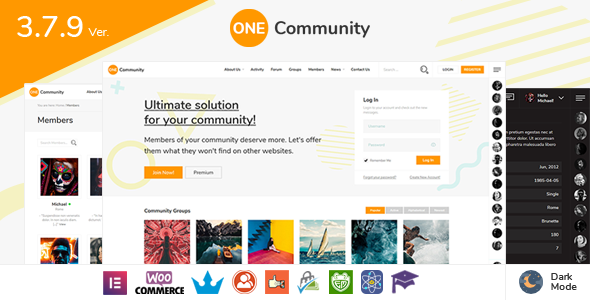
Stuck on your OneCommunity WordPress theme? Let's fix it.
No endless back-and-forth. Just send us the details and we'll get it done.
No obligation · Replies within 1 hour · Quote within 1 day
Setup · Customization · Bug fixes · WooCommerce integration
About OneCommunity WP Theme
OneCommunity is a premium WordPress theme built by Diabolique, designed specifically for online communities, social networks, and membership sites. It integrates tightly with BuddyPress and bbPress, giving you activity feeds, member profiles, group management, and forums out of the box.
The theme is structured around real community interaction — private messaging, friend connections, notifications, and user-generated content all work without extra plugins. It also supports WooCommerce, making it a practical choice for communities that sell memberships, courses, or physical products.
OneCommunity ships with multiple demo layouts, a front-end profile editor, and a custom admin panel with extensive options. It targets site owners who want a polished social platform without building one from scratch in a page builder.
Get matched with a OneCommunity developer in under one day
Tell us about your OneCommunity project. Small fixes, OneCommunity theme customization, or a full website build, whatever you need, we've got it covered.
We'll connect you to the right OneCommunity developers, define the scope, and get everything 100% clear.
You'll get one estimate, hire your preferred developer, and start collaborating.
OneCommunity sits at the intersection of WordPress theming and BuddyPress development. Most generalist developers know one but not both. A dedicated OneCommunity developer understands the template stack, the component hooks, and where the theme’s custom code interacts with community plugins.
Through Codeable, you get access to vetted WordPress specialists who have worked on community and social network sites built on OneCommunity. No agencies, no outsourcing — just experienced developers matched to your project within 24 hours.
Pros
- Native BuddyPress and bbPress integration with purpose-built templates for community pages
- Front-end profile editing lets members update avatars, cover photos, and profile fields without going to the dashboard
- Multiple pre-built demo layouts targeting different community types, importable in one click
- WooCommerce compatibility allows membership products, digital downloads, and paid group access
- Active development history from Diabolique with regular updates for BuddyPress version compatibility
Cons
- Deep BuddyPress dependency means switching themes later requires rebuilding community functionality
- Options panel is large and can be overwhelming; finding the right setting takes time without prior familiarity
- Some layout changes to activity and profile pages require PHP template overrides, not just CSS
- Performance degrades on large member databases without server-side caching and query optimization
- Limited Gutenberg block support for community-specific pages; most editing still happens through theme options
Who is OneCommunity for?
Private Online Communities
OneCommunity fits private communities where members connect, post updates, join groups, and message each other. With BuddyPress handling the social layer and the theme providing polished profile and group pages, you can launch a gated community with registration controls, invite-only groups, and activity moderation without custom development.
Membership-Based Learning Sites
Pairing OneCommunity with LearnDash or LifterLMS creates a learning platform where students have social profiles, can form study groups via BuddyPress groups, and post questions in bbPress forums. The WooCommerce integration handles course purchases and membership tiers cleanly within the same theme.
Niche Social Networks
Niche communities around hobbies, professions, or interests benefit from OneCommunity’s group and activity structure. Members can create topic-specific groups, share updates to a feed, and connect directly. The theme’s profile system supports custom fields for niche-specific member data like skills, location, or credentials.
Corporate Intranet Portals
OneCommunity can serve as an internal team network when installed on a subdomain or intranet server. Employee directories, department groups, and internal forums via bbPress give teams a central platform. Access can be locked to registered users only, with admin-controlled registration.
Fan and Creator Communities
Creator and fan communities need member interaction, content sharing, and a sense of belonging. OneCommunity’s activity feeds, notification system, and group structure support this without third-party social plugins. Paid fan tiers can be added through WooCommerce memberships, with content restricted by role.

Customizing OneCommunity
OneCommunity has a deep options panel, but customizing it beyond the defaults takes real knowledge of how BuddyPress templates work. The theme uses its own template hierarchy layered on top of WordPress and BuddyPress, so standard child theme approaches need to account for both.
An OneCommunity expert can rework member profile layouts, adjust group pages, add custom profile fields that display correctly across all views, and tune the activity feed to show only what your community needs. Color schemes and typography changes through the panel are straightforward, but layout changes to core community pages require template overrides done correctly.
Custom registration flows, onboarding steps, and role-based content visibility are common requests. Getting these right without breaking BuddyPress compatibility is where hiring an OneCommunity specialist saves significant time.
Recommended plugins for OneCommunity
OneCommunity works with a wide range of BuddyPress add-ons including BuddyBoss-compatible plugins, GamiPress for gamification, and PeepSo crossover features. WooCommerce integration supports paid memberships through plugins like Paid Memberships Pro or MemberPress.
Performance is a real concern on community sites with high query loads from activity streams and member data. A proper caching and database optimization setup is critical. See our WordPress performance services for how we handle this at scale.
If your community depends on organic traffic, structured SEO across profile and group pages matters. Our WordPress SEO optimization service covers the technical side for OneCommunity setups.
Not sure which plugins to use? This WordPress plugins directory covers the most popular options with reviews and setup guides.
OneCommunity common issues
OneCommunity BuddyPress activity feed not loading
Activity feed failures in OneCommunity are usually caused by a BuddyPress version mismatch after an update, a caching plugin serving stale AJAX responses, or a JavaScript conflict from another plugin. Start by clearing all caches and testing with plugins deactivated one by one. Check the browser console for JS errors. If the issue persists, confirm your BuddyPress version matches the theme’s tested range in the changelog.
OneCommunity member profile page showing 404 error
A 404 on member profile pages almost always points to a BuddyPress permalink flush issue. Go to Settings > Permalinks and save without changing anything. Also confirm that BuddyPress is active and that the Member Pages component is enabled in BuddyPress settings. If you recently moved the site, the domain in BuddyPress options may still point to the old URL. Our WordPress bug fixing service handles these after-migration issues routinely.
OneCommunity bbPress forums not displaying correctly
bbPress display issues in OneCommunity typically stem from the theme’s bbPress template files conflicting with a recent bbPress update. Check whether the theme has a dedicated bbpress folder in its template directory. If the styling is broken, a CSS conflict from a plugin is likely. Disable plugins selectively to isolate the source. For persistent layout breaks, template file overrides in a child theme are the clean solution.
OneCommunity registration page not working
Registration problems in OneCommunity are often caused by BuddyPress registration not being enabled. Go to BuddyPress > Settings and ensure registration is set to allow visitors to register. Also confirm WordPress’s general Settings > Membership option is checked. If the form submits but nothing happens, check for CAPTCHA plugin conflicts or email delivery failures that are blocking the confirmation step.
OneCommunity notifications not sending emails
OneCommunity relies on WordPress’s wp_mail function and BuddyPress’s notification system for emails. If emails are not sending, the issue is almost always server-level email delivery. Install an SMTP plugin like WP Mail SMTP and connect it to a transactional email service. Also check BuddyPress > Settings to confirm email notifications are enabled and that users have not turned off notifications in their own profile settings.
OneCommunity WooCommerce pages broken after update
WooCommerce layout breaks after an update usually mean OneCommunity’s WooCommerce template files are out of date. WooCommerce flags this in Appearance > WooCommerce Status. Update the outdated templates through the theme or via a child theme override using the current WooCommerce template. Avoid editing theme core files directly. If you need help resolving template conflicts cleanly, see our WordPress bug fixing service.
OneCommunity group page layout missing components
Missing group page components in OneCommunity are usually due to BuddyPress group components being disabled. Go to BuddyPress > Settings > Components and enable the Groups component fully. Also check group-specific settings within the group admin panel. If the layout itself is broken rather than missing components, a CSS or JavaScript conflict from a third-party plugin is the next thing to check.
OneCommunity slow loading on large member sites
Community sites built on OneCommunity generate high database query loads from activity feeds, member lookups, and notification counts. Without object caching, every page load hits the database hard. Install a caching solution with Redis or Memcached if your host supports it. Also enable BuddyPress activity stream caching and consider paginating activity feeds more aggressively. A query profiler like Query Monitor will show exactly where the bottlenecks are.
OneCommunity child theme not overriding templates
OneCommunity uses a layered template system that includes BuddyPress template overrides. A child theme needs to mirror the correct folder structure. For BuddyPress templates, files go in yourchildtheme/buddypress/. For OneCommunity-specific templates, match the parent theme’s folder path exactly. If your overrides are not taking effect, double-check the file path and confirm the child theme is active. Incorrect folder naming is the most common cause. Our WordPress bug fixing service can audit and fix your child theme setup.
OneCommunity avatar upload not working
Avatar upload failures in OneCommunity are often caused by incorrect file permission settings on the uploads directory, or a PHP upload size limit that is too low. Check wp-content/uploads/ permissions are set to 755. Also verify upload_max_filesize and post_max_size in your PHP configuration. If those are fine, test with BuddyPress’s built-in avatar crop screen directly to confirm whether it is a theme issue or a server configuration issue.
OneCommunity FAQ
OneCommunity is built around BuddyPress. Without it, you lose the core community functionality including member profiles, activity feeds, groups, and messaging. The theme will still load as a standard WordPress theme, but the community-specific pages and templates will have nothing to display. BuddyPress is a required dependency for the theme to function as intended.
Diabolique releases updates alongside major BuddyPress releases, but there is often a short lag after BuddyPress updates before the theme catches up. Always check the theme changelog on ThemeForest before updating BuddyPress on a live site. Test updates on a staging environment first. An OneCommunity developer can help you manage update sequencing safely.
Yes. OneCommunity includes WooCommerce compatibility. For paid memberships specifically, you need a membership plugin like Paid Memberships Pro, MemberPress, or WooCommerce Memberships layered on top. OneCommunity provides the front-end experience while WooCommerce and the membership plugin handle payment and access control.
OneCommunity can work in a WordPress multisite setup, but BuddyPress multisite configuration adds complexity. BuddyPress in network mode centralizes community data, which changes how member profiles and groups work across subsites. This setup requires careful configuration and is best handled by an OneCommunity specialist familiar with both BuddyPress network mode and multisite architecture.
Create a folder in wp-content/themes/ with a name like onecommunity-child. Add a style.css file with the Template header pointing to the parent theme’s folder name, and a functions.php file that enqueues the parent stylesheet. For BuddyPress template overrides, create a buddypress/ subfolder in the child theme and mirror the parent’s file paths for templates you want to override.
Yes, OneCommunity is built with a responsive layout that adapts to mobile and tablet screen sizes. Community-specific pages like activity feeds, member directories, and group pages are all designed to work on smaller screens. That said, heavily customized installs should always be tested across devices since custom CSS or plugin additions can break the responsive behavior.
Elementor can be used for standard WordPress pages within an OneCommunity site, such as landing pages, about pages, or static content. However, BuddyPress community pages like profiles, groups, and activity feeds are controlled by BuddyPress templates, not page builder content. You cannot meaningfully edit those community pages with Elementor without significant custom development.
Custom profile fields are managed through BuddyPress, not the theme itself. Go to Users > Profile Fields in the WordPress admin and add field groups and individual fields there. OneCommunity then displays these fields on member profile pages automatically. For front-end editing, the theme’s built-in profile editor will surface those fields to members.
Migrating a BuddyPress site to OneCommunity is possible. The BuddyPress data stays in the database and will carry over, but the front-end templates change completely with the new theme. You will need to remap any custom profile field layouts, verify group and activity pages display correctly, and rebuild any theme-specific customizations. See our WordPress migration service for structured help with this process.
Yes, OneCommunity includes purpose-built templates for bbPress forums. When bbPress is installed and active, forum pages automatically inherit the OneCommunity styling. The theme provides matching forum listing, topic, and reply layouts that fit the community design. You can assign forums to BuddyPress groups so each group has its own discussion area.
Hire an OneCommunity Expert Developer
Whether you need a new OneCommunity site built from a demo, custom BuddyPress integrations added, or existing issues resolved, working with a specialist gets it done correctly the first time. Post your project and get a free, no-obligation estimate from a vetted OneCommunity developer. Get a Free Estimate and describe what you need — there’s no cost to find out what’s involved.
You'll need a free Codeable account so developers can ask questions and send their quotes.