Gridlove WordPress Theme
by meks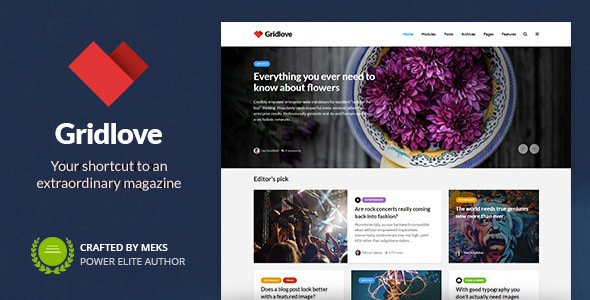
Stuck on your Gridlove WordPress theme? Let's fix it.
No endless back-and-forth. Just send us the details and we'll get it done.
No obligation · Replies within 1 hour · Quote within 1 day
Setup · Customization · Bug fixes · WooCommerce integration
About Gridlove WP Theme
Gridlove is a WordPress news and magazine theme built by Meks, a developer studio known for clean, performance-conscious themes. It uses a flexible grid layout system that lets editors mix different post tile sizes across the homepage and category pages. The result is a dense, visual content feed that works well for high-volume publishing.
The theme ships with a custom widget-based layout builder, multiple header styles, and tight integration with Meks Smart Author Widget and other Meks plugins. It supports standard post formats, sticky posts, and infinite scroll. Built on a lightweight codebase, Gridlove loads fast out of the box without requiring a page builder. It suits news sites, tech blogs, and entertainment portals that need a structured, grid-first presentation without heavy plugin dependencies.
Get matched with a Gridlove developer in under one day
Tell us about your Gridlove project. Small fixes, Gridlove theme customization, or a full website build, whatever you need, we've got it covered.
We'll connect you to the right Gridlove developers, define the scope, and get everything 100% clear.
You'll get one estimate, hire your preferred developer, and start collaborating.
Meks builds solid themes, but documentation only goes so far. When you hit a layout conflict, a custom grid requirement, or a plugin integration that isn’t working the way you need, you want someone who has worked inside Gridlove’s codebase before. Through Codeable, you get matched with vetted WordPress developers who know Meks themes specifically. Post your project, get a free estimate, and talk to a Gridlove developer before you commit to anything.
Pros
- Lightweight codebase with no page builder dependency keeps baseline performance high
- Widget-based grid builder gives editors visual control without touching code
- Multiple tile size options create genuine content hierarchy on busy news feeds
- Clean Meks plugin ecosystem integrates natively without compatibility issues
- Supports post formats, sticky posts, and infinite scroll out of the box
Cons
- Category-specific grid layouts require PHP overrides and cannot be set from the Customizer
- Typography options are limited compared to themes that support variable fonts or Google Fonts libraries
- No native Elementor or block editor grid integration, limiting non-developer customization
- Tile hover effects and animations are minimal and require custom CSS to extend
- WooCommerce support is not built in and requires third-party styling to look consistent
Who is Gridlove for?
Tech News Sites
Gridlove handles fast-moving tech news well. The grid layout keeps a high volume of posts visible without the page feeling cluttered. Category filtering and sticky post support let editors surface breaking stories above the fold. A Gridlove developer can add custom taxonomies or source labels directly into tile templates to match editorial workflows.
Entertainment and Pop Culture Blogs
Entertainment sites benefit from Gridlove’s image-forward tiles and flexible column ratios. Featured images dominate the layout, which suits celebrity, film, and music content. The theme’s support for multiple post formats means video and gallery posts display correctly without extra plugins. A Gridlove specialist can customize hover states and overlay styles to match a brand’s visual tone.
Sports Coverage Portals
Sports portals need fast updates and clear team or league navigation. Gridlove’s widget-based layout lets editors assign different grid zones to different sports or competitions. Combined with a custom taxonomy structure built by a Gridlove expert, the result is a browsable archive that mirrors how sports fans actually navigate content.
Digital Magazines
Digital magazines publishing long-form features alongside daily news need a layout that handles both content types. Gridlove’s large tile option gives feature pieces visual weight, while smaller tiles fill in around them. A Gridlove developer can create separate grid templates for editorial sections, keeping long reads distinct from news briefs.
Niche Topic Blogs with High Post Volume
Niche blogs publishing daily, whether finance, food, or health, need a grid that surfaces recent content without burying older posts. Gridlove’s infinite scroll and category widgets keep readers moving through an archive. A Gridlove specialist can configure custom homepage sections that highlight content by tag, author, or custom field without extra plugins.

Customizing Gridlove
Gridlove’s customization works through the WordPress Customizer and its own layout builder panel. You can control grid column counts, tile aspect ratios, color schemes, typography, and header layout from one place. Each widget area maps to a specific grid zone, giving editors real control over content hierarchy.
That said, deeper changes, like custom tile templates, modified archive layouts, or category-specific grid rules, require PHP and CSS work. A Gridlove expert can build child theme overrides cleanly, hook into Meks-specific filters, and extend the grid system without breaking theme update compatibility. If you need a layout that goes beyond the default options, or want to integrate custom post types into the grid, working with a Gridlove specialist saves significant trial and error.
Recommended plugins for Gridlove
Gridlove pairs well with caching plugins like WP Rocket or LiteSpeed Cache, and its lean markup responds well to image optimization tools like Imagify or ShortPixel. For high-traffic news sites, combining these with a CDN can meaningfully cut load times. See our WordPress performance services for that kind of setup.
On the SEO side, Gridlove works cleanly with Yoast SEO and Rank Math. Neither requires theme modification. For structured data, schema markup for news articles, or advanced sitemap configuration, our WordPress SEO optimisation service covers the full stack.
Not sure which plugins to use? This WordPress plugins directory covers the most popular options with reviews and setup guides.
Gridlove common issues
Gridlove grid layout broken after WordPress update
Grid layout breaks after a WordPress core update usually point to a JavaScript conflict introduced by the update or a deprecated function in the theme. Start by checking the browser console for JS errors. If a script is failing to load, check whether any enqueued scripts have changed paths. If the issue appeared immediately after updating, temporarily switch to a default theme to isolate the cause. For persistent layout failures, our WordPress bug fixing service can diagnose and patch the root issue.
Gridlove homepage widgets not saving
Widgets not saving in Gridlove’s layout builder usually comes down to a PHP session issue, a caching plugin aggressively caching admin requests, or a conflict with a security plugin blocking AJAX calls. First, clear all caches and try saving again. Then disable security plugins one by one to identify a block. If you’re on a managed host with server-level caching, exclude wp-admin from the cache rules. If the problem persists across sessions, a database write permission issue may be involved.
Gridlove featured image not showing in grid tiles
If featured images aren’t appearing in grid tiles, the most common cause is a missing image size registration. Gridlove registers its own thumbnail sizes on activation. If the theme was activated after images were uploaded, those sizes won’t exist yet. Run a thumbnail regeneration tool like Regenerate Thumbnails to rebuild all registered sizes. Also confirm the featured image is actually set on the post and that the image dimension meets the minimum required by the tile size in use.
Gridlove infinite scroll not working
Infinite scroll failures in Gridlove are usually caused by a JavaScript error stopping the scroll handler, a caching plugin returning stale paginated results, or a permalink structure that doesn’t support clean pagination. Open the browser console and scroll to the bottom of the page to watch for JS errors. If requests are firing but returning 404s, check your permalink settings and flush them. If results load but display incorrectly, a query conflict from a plugin modifying the main loop is likely the cause.
Gridlove custom logo not displaying in header
A custom logo not displaying in the Gridlove header after upload usually means the Customizer saved the change but a caching layer is serving the old header. Clear your WordPress cache, CDN cache, and browser cache in that order. If the logo still doesn’t appear, check whether your child theme or custom CSS is overriding the header logo CSS with a hardcoded image. Also verify the image dimensions match the header area, as very large images can be clipped by container overflow settings.
Gridlove category page showing wrong grid layout
Category pages in Gridlove using the wrong grid layout typically means the category template isn’t reading the layout widget area correctly. Gridlove maps widget areas to specific template files. If a category doesn’t have widgets assigned to its specific area, it falls back to a default. Assign the correct widget layout to that category’s sidebar in Appearance > Widgets. If you need unique layouts per category that the widget system doesn’t support, a Gridlove developer can create custom category templates. Our WordPress bug fixing service handles this type of template issue.
Gridlove mobile menu not opening
A Gridlove mobile menu not opening points to a JavaScript conflict. The mobile toggle relies on a small JS handler that can be blocked or overwritten by other plugins enqueuing conflicting jQuery versions or by a minification plugin merging scripts in the wrong order. Disable JS minification or concatenation in your caching or optimization plugin and test. If the menu works after that, re-enable scripts selectively to find the conflict. Also check that wp_footer() is present in your footer template, as Gridlove loads menu scripts there.
Gridlove slow loading on shared hosting
Gridlove is a lightweight theme but shared hosting constraints can still cause slow load times if images aren’t optimized and no caching is in place. Install a caching plugin like WP Super Cache or W3 Total Cache, enable GZIP compression at the server level, and run images through a compression tool before uploading. If you’re seeing slow first-byte times, the bottleneck is likely server-side. Consider moving to a managed WordPress host or a VPS. For a full performance audit and optimization setup, see our WordPress performance service.
Gridlove breaking with Elementor installed
Gridlove is not built for Elementor and conflicts can appear when Elementor tries to override template rendering on pages Gridlove controls. Typically, Elementor works on single pages or posts while Gridlove controls archive and homepage templates. If Elementor is replacing a Gridlove-controlled template, check the Elementor Theme Builder settings and remove any conflicting conditions. Gridlove’s homepage grid cannot be rebuilt inside Elementor without significant custom work. Keep Elementor scoped to static pages only.
Gridlove child theme not inheriting parent styles
A Gridlove child theme not inheriting parent styles almost always means the child theme’s functions.php is enqueueing styles incorrectly. The correct approach is to enqueue the parent stylesheet using wp_enqueue_style with the parent theme’s handle as a dependency, not using @import in the child stylesheet. Also confirm the child theme’s style.css has the correct Template header pointing to the exact parent theme folder name. If styles partially load, check the load order in the Network tab of your browser’s developer tools.
Gridlove FAQ
Yes. Gridlove is purpose-built for news and magazine sites. Its widget-based grid system handles high post volumes well, and features like sticky posts, post formats, and infinite scroll match how news editors publish. It works best when post thumbnails are consistently sized and categories are clearly structured.
Gridlove works alongside the block editor for writing individual posts and pages, but its homepage and archive layouts are controlled through a widget-based grid system, not blocks. You won’t build the grid using Gutenberg blocks. The block editor does not replace or conflict with Gridlove’s layout engine, they operate in separate parts of the site.
Basic setup, choosing grid columns, setting colors, uploading a logo, is all doable through the Customizer without code. Beyond that, custom tile templates, layout overrides, or integrating additional post types require PHP and CSS knowledge. For anything beyond the Customizer options, working with a Gridlove specialist is the practical route.
WooCommerce can be installed alongside Gridlove, but the theme has no native WooCommerce styling. Product pages, cart, and checkout will use WooCommerce defaults, which won’t match Gridlove’s design. Making them consistent requires custom CSS or a developer adding theme-specific WooCommerce templates.
Grid layouts in Gridlove are controlled through the widget areas in Appearance > Widgets. Each widget area corresponds to a grid zone on the homepage or category pages. You assign content widgets to those zones and configure tile sizes within each widget’s settings. Changes take effect immediately without needing to save a separate layout file.
Gridlove doesn’t natively surface custom post types in its grid without code changes. The grid widget pulls from standard WordPress post queries. A developer can modify the widget query or create a custom widget that pulls from a specific post type, but this requires PHP work and is not available through the Customizer.
Gridlove produces clean HTML with a logical heading structure and fast load times by default, both of which support good SEO. It doesn’t add schema markup for news articles automatically, so pairing it with a plugin like Rank Math or Yoast SEO is recommended for structured data and meta tag control.
Yes. Through Codeable, you can post a project and get matched with a vetted Gridlove developer who can handle customizations, bug fixes, or full site builds. FoxyConcept connects clients to Codeable’s developer network. Every project starts with a free estimate and there’s no obligation to proceed. Get a free estimate here.
Create a new folder in wp-content/themes with a name like gridlove-child. Inside it, add a style.css file with the correct WordPress child theme header, including Template: gridlove pointing to the parent folder name. Add a functions.php file that enqueues the parent stylesheet using wp_enqueue_style with the parent handle as a dependency. Activate the child theme from Appearance > Themes.
Meks has continued to maintain Gridlove with compatibility updates for recent WordPress versions. Check the theme’s changelog on ThemeForest or the Meks website for the latest release date. For any site running Gridlove in production, keeping both the theme and WordPress core up to date reduces the risk of compatibility issues.
Hire a Gridlove Expert Developer
Whether you need a layout tweak, a full site build on Gridlove, or help fixing something that broke after an update, a qualified Gridlove developer can scope and solve it quickly. FoxyConcept delivers WordPress work through Codeable, so every developer is vetted and every project starts with a free estimate. No obligation, no risk. Get a free estimate and describe your project today.
You'll need a free Codeable account so developers can ask questions and send their quotes.