Bifrost WordPress Theme
by neuronthemes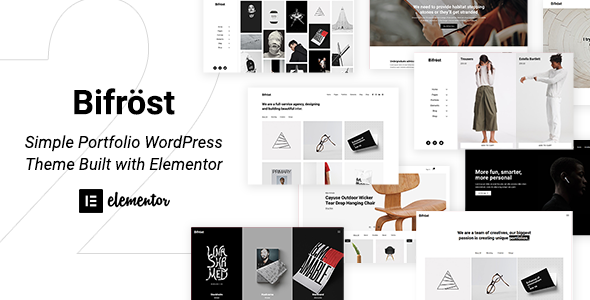
Stuck on your Bifrost WordPress theme? Let's fix it.
No endless back-and-forth. Just send us the details and we'll get it done.
No obligation · Replies within 1 hour · Quote within 1 day
Setup · Customization · Bug fixes · WooCommerce integration
About Bifrost WP Theme
Bifrost is a multipurpose WordPress theme by NeuronThemes, built for agencies, portfolios, and business sites. It ships with Elementor support, a library of pre-built demo sites, and clean, structured markup out of the box.
The theme is WPML-compatible, translation-ready, and designed to work with WooCommerce for light e-commerce needs. NeuronThemes maintains active updates, which keeps compatibility with the latest WordPress core in reasonable shape.
Where Bifrost stands out is its demo import system. You can drop a full site layout in minutes, then rework it with Elementor. Performance depends heavily on how many demo assets you carry forward, so stripping unused styles and scripts matters from day one.
Get matched with a Bifrost developer in under one day
Tell us about your Bifrost project. Small fixes, Bifrost theme customization, or a full website build, whatever you need, we've got it covered.
We'll connect you to the right Bifrost developers, define the scope, and get everything 100% clear.
You'll get one estimate, hire your preferred developer, and start collaborating.
Bifrost is flexible, but that flexibility creates decisions. Which demo to start from, what to strip out, how to extend Elementor templates without breaking updates. These calls are faster and cheaper with someone who has done it before.
Through Codeable, you get matched with a vetted Bifrost developer who has real project history. No agencies padding hours. Post your project, get a free estimate, and see exactly what the work costs before you commit.
Pros
- Ships with a wide library of one-click demo imports covering multiple industries
- Deep Elementor integration with custom widgets included in the theme package
- WPML-compatible and translation-ready for multilingual site builds
- WooCommerce support built in without requiring a separate plugin for basic stores
- NeuronThemes provides regular updates and maintains a support forum with reasonable response times
Cons
- Default demo imports pull in a large number of images and assets that inflate page weight
- Heavy reliance on Elementor means switching page builders later is a significant rebuild
- Some header and footer options are locked behind Elementor Pro, which is a separate paid license
- Theme options in the Customizer can feel scattered across multiple panels without clear grouping
- Documentation is adequate but lacks depth on advanced customization like custom post type integration
Who is Bifrost for?
Creative Agency
Bifrost’s agency demo layouts handle case studies, service pages, and team sections without needing custom post types from scratch. An experienced Bifrost developer can extend these layouts with custom Elementor templates and dynamic content pulled from ACF, giving client work a structured and repeatable presentation.
Freelance Portfolio
Portfolio-focused demos in Bifrost support filterable project grids and full-width project detail pages. A Bifrost specialist can add custom taxonomy filtering, lightbox integration, and per-project meta fields so your work is organized by type, client, or technology without cluttering the nav structure.
Corporate Business Site
The corporate demo includes service listings, about sections, and a clean blog layout. Where businesses need more, such as a careers page, document library, or multi-location setup, a Bifrost expert can build those out as custom templates wired into the existing theme structure without breaking updates.
WooCommerce Online Store
Bifrost’s WooCommerce compatibility covers product pages, cart, and checkout with styled templates that match the theme. A Bifrost developer can customize product archive layouts, add custom attribute filters, and integrate payment gateways or subscription plugins within the existing design system.
Marketing or Landing Page Site
Single-page and campaign sites work well with Bifrost’s section-based Elementor layouts. A Bifrost specialist can strip out unused theme features to reduce load time, configure conversion-focused layouts, and connect lead forms to CRM tools or email platforms through standard WordPress plugin integrations.

Customizing Bifrost
Bifrost customization runs through two main channels: the WordPress Customizer for global settings like typography, colors, and header layout, and Elementor for page-level design work.
Header and footer builder options give you reasonable control without touching code. For deeper changes, like custom post type templates, modified archive layouts, or tweaked WooCommerce pages, you need a Bifrost expert who knows where the theme’s hooks and filters sit.
Child theme setup is strongly recommended before any code-level changes. A Bifrost specialist can handle custom Elementor widget styling, CSS overrides that survive updates, and PHP-level customization that the visual builder cannot reach.
Recommended plugins for Bifrost
Bifrost pairs well with caching plugins like WP Rocket or LiteSpeed Cache, but the theme loads multiple scripts by default that need selective disabling per page type. Getting that right makes a measurable difference. See our WordPress performance service if load times are a concern after launch.
For search visibility, Bifrost’s schema output is basic. Pairing it with Rank Math or Yoast, then configuring structured data correctly, is handled through our WordPress SEO service.
Not sure which plugins to use? This WordPress plugins directory covers the most popular options with reviews and setup guides.
Bifrost common issues
Bifrost demo import not working
Demo import failures in Bifrost are usually caused by insufficient PHP memory, a max execution time that’s too low, or a missing required plugin like Elementor or the NeuronThemes core plugin. Set memory_limit to at least 256MB and max_execution_time to 300 in your php.ini or via your host’s control panel. Install all required plugins before running the importer. If it still fails, try importing XML content manually through WordPress’s built-in importer.
Bifrost header not showing correctly on mobile
Mobile header issues in Bifrost typically come from custom CSS that targets desktop breakpoints without a mobile override, or from Elementor header templates that have fixed widths set in pixels. Open the header template in Elementor, switch to mobile view, and check for fixed width values on columns or sections. Replace them with percentage-based or auto values. Also check the Customizer under Header settings for a separate mobile header configuration option.
Bifrost Elementor templates not loading
If Bifrost’s Elementor templates show as blank or fail to load, the most common causes are a deactivated NeuronThemes core plugin or an Elementor version mismatch. Confirm both Elementor and the NeuronThemes plugin are active and up to date. Then go to Elementor > Tools > Regenerate CSS and clear your cache. If templates still don’t load, check your browser console for JavaScript errors that could point to a plugin conflict. Our WordPress bug fixing service can trace conflicts like this quickly.
Bifrost WooCommerce pages not styled
Unstyled WooCommerce pages in Bifrost usually mean the theme’s WooCommerce support isn’t declared, or a caching plugin is serving an old stylesheet. First, clear all caches including server-level and CDN if applicable. Then check whether the NeuronThemes core plugin is active, as it handles WooCommerce template overrides. If pages like cart and checkout still appear unstyled, regenerate Elementor’s CSS files and re-save your Customizer settings to flush the stylesheet cache.
Bifrost menu not displaying on mobile
Mobile menu problems in Bifrost are often caused by a JavaScript conflict with another plugin, or the hamburger toggle element not being properly configured in the Elementor header template. Check your browser console for JS errors first. If there are none, open the header template in Elementor, locate the Nav Menu widget, and confirm the mobile breakpoint and toggle settings are enabled. Also test with all non-theme plugins disabled to isolate a conflict. Our WordPress bug fixing service handles this type of issue efficiently.
Bifrost page loading slow after demo import
Slow load times after a Bifrost demo import are expected because demos include full-size images, Google Fonts calls, and multiple Elementor stylesheets. Start by compressing or replacing demo images. Then use a caching plugin and enable CSS/JS minification. In Elementor > Settings, enable improved asset loading to reduce scripts on pages that don’t use certain widgets. Removing unused demo pages also cuts down on registered but inactive assets that still load globally.
Bifrost footer widgets not appearing
If Bifrost footer widgets aren’t showing, the footer widget areas may not be assigned in the Customizer, or the footer layout is set to a template that doesn’t include widget columns. Go to Appearance > Customize > Footer and confirm widget columns are enabled. Then go to Appearance > Widgets and check that the footer widget areas are populated. If you’re using an Elementor-built footer, widget areas are not used at all and content must be managed directly in the Elementor footer template.
Bifrost custom fonts not applying
Custom fonts not applying in Bifrost usually come down to a Customizer setting not being saved, a caching issue, or a CSS specificity conflict with Elementor’s inline styles. After selecting your font in the Customizer, save and then clear all caches. If the font still doesn’t apply, inspect the element in your browser’s dev tools to see which CSS rule is winning. You may need to add a targeted CSS override in Appearance > Customize > Additional CSS or in your child theme stylesheet.
Bifrost white screen after update
A white screen after a Bifrost update usually points to a PHP error caused by a conflict between the updated theme and an older plugin or a custom functions file. Enable WordPress debug mode by adding define('WP_DEBUG', true); to wp-config.php, then reload the page to see the error. Common culprits are outdated NeuronThemes plugins or custom code in a child theme that references a function removed in the update. Our WordPress bug fixing service can resolve this fast.
Bifrost blog layout broken after WordPress update
Blog layout breaks after a WordPress update in Bifrost often happen when a template file in the theme conflicts with a new WordPress behavior, or when Elementor’s loop templates need to be re-saved. Go to Elementor > Tools > Regenerate CSS and flush your cache. If the layout is still off, check whether the blog page is using a theme template or an Elementor archive template, and re-save it. Also confirm you haven’t lost a custom page template assignment on the blog page itself in Page Attributes.
Bifrost FAQ
Yes. Bifrost is built around Elementor and includes custom Elementor widgets through the NeuronThemes plugin. All demo layouts are Elementor-based, and the theme requires Elementor to be installed for most of its page templates to function correctly.
Bifrost includes WooCommerce support with styled templates for product pages, cart, and checkout. Basic store functionality works without additional configuration. For custom product layouts or advanced filtering, a Bifrost developer can extend the WooCommerce integration further.
Go to Appearance > Import Demo Data after installing the NeuronThemes plugin. Select a demo, install required plugins when prompted, and run the import. Make sure your server has at least 256MB memory and a 300-second execution limit before starting, or imports may fail partway through.
Yes, Bifrost is WPML-compatible and translation-ready. String translations are registered correctly, and the theme works with WPML’s language switcher widget. You will still need to manually duplicate and translate Elementor templates for each language as part of the setup.
Bifrost’s core features work with the free version of Elementor. Some advanced header and footer layouts in the demos use Elementor Pro features like the Theme Builder. You can rebuild those elements without Pro, but it requires manual work or a Bifrost specialist to replicate them cleanly.
Create a child theme folder in wp-content/themes/ with a style.css file that references Bifrost as the template and a functions.php that enqueues the parent stylesheet. Activate the child theme before making any code changes. This protects your customizations from being overwritten during theme updates.
Bifrost does not register custom post types on its own, but it works with plugins like CPT UI or custom code in a child theme’s functions file. A Bifrost developer can set up custom post types and wire them into Elementor’s dynamic templates or custom archive pages within the theme structure.
Before updating Bifrost, back up your site files and database. If you have a child theme, your customizations are safe. Check the changelog for breaking changes, then update through Appearance > Themes. After updating, regenerate Elementor’s CSS files and clear all caches to avoid stale stylesheet issues. Consider using our WordPress maintenance service for managed updates.
Bifrost’s markup is reasonably clean, but the theme relies heavily on Elementor which adds extra wrapper divs and inline styles. Schema output is minimal. For competitive niches, pairing Bifrost with a dedicated SEO plugin and addressing Core Web Vitals through performance optimization is necessary rather than optional.
The fastest route is through Codeable, a vetted WordPress developer network. Post your project, describe what you need done with Bifrost, and get matched with a Bifrost specialist within 24 hours. Estimates are free and there’s no obligation to hire. Get a Free Estimate to get started.
Hire a Bifrost Expert Developer
Whether you need a full Bifrost build from a demo, custom Elementor templates, WooCommerce integration, or a bug tracked down and fixed, we can help. Work is delivered through Codeable, a vetted WordPress developer network with transparent pricing and no lock-in contracts.
Get a Free Estimate and describe what you need. You’ll hear back within 24 hours.
You'll need a free Codeable account so developers can ask questions and send their quotes.