Electrician WordPress Theme
by SmartDataSoft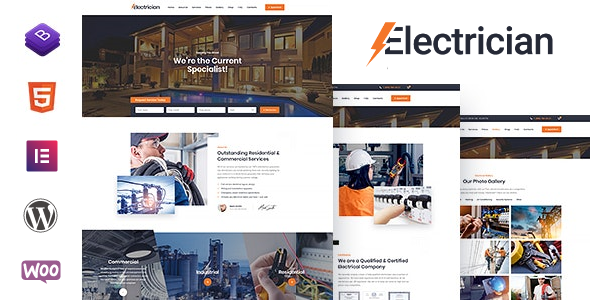
Stuck on your Electrician WordPress theme? Let's fix it.
No endless back-and-forth. Just send us the details and we'll get it done.
No obligation · Replies within 1 hour · Quote within 1 day
Setup · Customization · Bug fixes · WooCommerce integration
About Electrician WP Theme
Electrician is a WordPress theme by SmartDataSoft built specifically for electrical contractors, electricians, and trade service businesses. It ships with a clean service-focused layout, an appointment booking section, a project portfolio, and a team showcase. The homepage is structured to drive leads, with service icons, a call-to-action banner, and a testimonials block all included out of the box.
Built on Bootstrap, it is responsive across devices and includes basic WooCommerce compatibility for businesses that sell products or parts online. The theme is designed with local service businesses in mind, making it a practical starting point for any electrician or contractor looking to establish a professional online presence without building from scratch.
Get matched with a Electrician developer in under one day
Tell us about your Electrician project. Small fixes, Electrician theme customization, or a full website build, whatever you need, we've got it covered.
We'll connect you to the right Electrician developers, define the scope, and get everything 100% clear.
You'll get one estimate, hire your preferred developer, and start collaborating.
Electrician is a focused theme, but getting it to work exactly as your business needs it often requires hands-on development. From custom booking flows to local SEO structure and plugin conflicts, the details matter. Codeable connects you with vetted WordPress developers who have hands-on experience with trade service themes like this one. You post your project, get a clear estimate, and only move forward if you want to. There is no pressure, no guesswork, and no junior developers learning on your site.
Pros
- Purpose-built layout for electricians and trade service businesses, so the homepage structure requires minimal reworking
- Includes an appointment or contact request section out of the box, which most generic themes require a plugin to add
- Bootstrap-based responsive design holds up well on mobile, which matters for customers searching on phones
- WooCommerce compatible, useful for businesses selling electrical parts, safety kits, or bundled service packages
- Service icons and project portfolio sections are pre-built, saving time on the most common content blocks for this niche
Cons
- Theme updates from SmartDataSoft have been infrequent, which can create compatibility issues with newer versions of WordPress and PHP
- The default typography and color scheme look dated compared to current design standards and usually need significant visual updates
- Customization beyond the built-in Customizer options requires PHP and CSS knowledge, which is not beginner-friendly
- Limited documentation makes troubleshooting plugin conflicts or layout issues harder without developer support
- No page builder integration by default, so non-technical users cannot freely rearrange sections without code or plugin additions
Who is Electrician for?
Local Electrician Business
Solo electricians and small local firms get a ready-made site structure with service listings, a contact form, and a testimonials block. The layout is designed to convert local search visitors into calls or quote requests without needing much additional configuration.
Electrical Contractor Company
Larger contractor companies can use the project portfolio section to showcase completed commercial or residential jobs. Adding a team section and multiple service categories makes it easy to communicate scale and specialisation to prospective clients browsing the site.
Emergency Electrical Services
Emergency service providers benefit from the bold call-to-action areas in this theme. A developer can configure prominent phone numbers, a 24-hour badge, and a fast-loading page structure to ensure urgent visitors find what they need within seconds of landing on the site.
Home Wiring and Inspection Services
Inspection and home wiring businesses can use the service blocks to break down each offering clearly. Adding a booking plugin on top of the existing inquiry form gives homeowners a way to schedule directly, reducing back-and-forth and improving lead conversion from organic traffic.
Commercial Electrical Installation
Commercial electrical installers working on office fitouts or industrial projects can adapt the portfolio section to display project types, scale, and client sectors. Pairing this with strong local SEO configuration helps target high-value commercial search queries in specific geographic areas.

Customizing Electrician
Out of the box, Electrician covers the essentials, but most businesses will need customization to match their branding, service structure, and booking flow. Color schemes, typography, and section layouts can be adjusted through the WordPress Customizer, but deeper changes to page templates or custom post types typically require direct code edits.
Adding a specific service area map, custom quote request form, or restructured homepage layout is where many site owners hit a wall. An Electrician expert can handle these modifications cleanly without breaking existing functionality. Whether you need a revised header, a new service category structure, or a booking form that connects to a CRM, hiring an Electrician specialist saves significant time and avoids the trial-and-error of DIY edits.
Recommended plugins for Electrician
Electrician pairs well with several plugins depending on your business needs. WPForms or Gravity Forms handle quote and contact requests. Yoast SEO or Rank Math help with local search visibility, and a developer can configure them properly alongside your WordPress SEO setup. For speed, image optimization tools like Smush, combined with a caching layer, make a measurable difference. A proper WordPress performance audit is worth doing once the site is fully built. Booking plugins like Amelia or Simply Schedule Appointments integrate well with this theme’s layout and are commonly added to Electrician-based sites.
Not sure which plugins to use? This WordPress plugins directory covers the most popular options with reviews and setup guides.
Electrician common issues
Electrician theme not updating in WordPress dashboard
This usually means the theme was installed manually and is not connected to a ThemeForest or SmartDataSoft license. Log in to your purchase account, download the latest version, and update via Appearance > Themes by uploading the zip. If the update still fails or breaks something, a developer can handle the migration cleanly. Check WordPress bug fixing if the issue persists after a manual update.
Electrician homepage sections not showing on mobile
Mobile display problems in Electrician are often caused by custom CSS overriding Bootstrap breakpoints, or a plugin injecting styles that conflict with the theme. Open Chrome DevTools on a mobile viewport and check for hidden overflow or fixed width values on section containers. Removing conflicting plugin styles or adjusting the theme’s responsive CSS usually resolves this without touching core files.
Electrician theme contact form not sending emails
If the Electrician contact form is not sending emails, the issue is almost always server-side mail delivery rather than the theme itself. Install the WP Mail SMTP plugin and connect it to a transactional mail provider like Mailgun or SendGrid. Set a from address that matches your domain. Test using the plugin’s built-in tool. This fix resolves the problem in most cases within minutes.
Electrician theme broken after WordPress update
Theme breakage after a WordPress core update usually points to a PHP compatibility issue or a deprecated function in the theme code. Check your PHP version in the hosting dashboard and compare it against what SmartDataSoft recommends. Enable WP_DEBUG temporarily to identify the specific error. If the theme has not been updated in some time, a WordPress bug fix may be the faster route to a stable site.
How to change colors in Electrician WordPress theme
Color changes in Electrician are managed through Appearance > Customize. Primary and accent colors can usually be changed there without any coding. If you need to adjust colors that are hardcoded in the theme’s CSS, locate the relevant selector in style.css and override it in a child theme’s stylesheet. Always use a child theme for any custom CSS so updates do not wipe your changes.
Electrician theme slider not working
Slider issues in Electrician are commonly caused by a JavaScript conflict with another plugin, or the slider plugin not being activated separately. Check the browser console for JS errors. Deactivate plugins one by one to isolate the conflict. If the slider relies on Revolution Slider or a bundled plugin, make sure it is activated and updated. A stale or missing API key can also prevent bundled slider plugins from functioning.
Electrician theme slow page load speed
Slow load times with Electrician usually come from unoptimized images, render-blocking scripts, and lack of caching. Install a caching plugin like WP Rocket or LiteSpeed Cache, compress images with Smush or ShortPixel, and defer non-critical JavaScript. If the theme loads heavy scripts on every page regardless of whether they are needed, a developer can conditionally enqueue them. See the full WordPress performance approach for a structured fix.
WooCommerce not displaying correctly with Electrician theme
WooCommerce display issues with Electrician usually mean the theme’s WooCommerce template files are outdated. Go to WooCommerce > Status > Templates and check for outdated overrides. If Electrician has its own WooCommerce folder in the theme directory, those files may need updating to match the current WooCommerce version. Copy updated templates from the WooCommerce plugin folder into the theme and adjust styling as needed.
Electrician theme logo not showing in header
If the logo is not appearing, check Appearance > Customize > Site Identity and confirm the logo image is set. If it is set but not showing, a CSS rule may be hiding it or setting its dimensions to zero. Inspect the header element in your browser and look for display:none or max-height:0 being applied. A child theme CSS fix targeting the header logo selector will resolve it without editing core theme files.
White screen of death on Electrician theme
A white screen on Electrician typically means a fatal PHP error. Enable WP_DEBUG by adding define(‘WP_DEBUG’, true); to wp-config.php to see the error message. Common causes include a plugin conflict, a PHP version mismatch, or a corrupted theme file. Deactivate all plugins via FTP by renaming the plugins folder, then reactivate them one by one. If the issue started after a theme change, reinstalling Electrician from a clean download usually resolves it. For persistent issues, use a WordPress bug fixing service.
Electrician FAQ
SmartDataSoft still has the theme listed on ThemeForest, but update frequency has been inconsistent. Before purchasing or building on it, check the changelog on the ThemeForest listing to see when it was last updated and whether recent WordPress versions are confirmed compatible. If you already own it and need support, a third-party WordPress developer familiar with SmartDataSoft themes is a practical option.
Electrician was not built with Elementor in mind, but it can work alongside it with some configuration. You may need to disable or override the theme’s default page templates to give Elementor full-width control. A developer can set this up properly. Using Elementor without adjustments can cause styling conflicts between the theme’s own CSS and Elementor’s layout engine.
The layout and sections in Electrician are generic enough to be repurposed for other trade service businesses like plumbing, HVAC, or general contracting. You would need to swap out icons, images, and copy. The core structure, services grid, portfolio, and contact section all translate well to similar industries without major structural changes.
Electrician includes a contact or inquiry form section by default, but not a full appointment booking system. For actual calendar-based booking, you would need to add a plugin like Amelia, Simply Schedule Appointments, or Bookly. These integrate cleanly with the theme’s layout and a developer can style them to match the existing design.
Create a new folder in wp-content/themes called electrician-child. Inside it, add a style.css file with the correct template header referencing the parent theme, and a functions.php file that enqueues both the parent and child stylesheets. Activate the child theme from Appearance > Themes. All custom CSS and template overrides should go in the child theme only.
The theme produces clean HTML and is responsive, which are baseline SEO requirements. However, it does not do anything advanced for SEO on its own. You should install a dedicated SEO plugin like Yoast or Rank Math and configure meta titles, schema markup for local business, and page speed. Schema for service businesses and local SEO signals are not built into the theme.
WPBakery is commonly bundled with SmartDataSoft themes, and Electrician may include it. If you want a more modern workflow, Elementor or Bricks Builder can be made to work, though they require some setup to override the theme’s default templates. A developer familiar with the Electrician theme can set up whichever builder suits your editing style.
Yes, migrating content from an existing site to the Electrician theme is straightforward for standard pages and posts. Custom layouts, widgets, and plugin-generated content need to be rebuilt within the new theme structure. If you are moving from a different host as well, a WordPress migration service handles both the server move and the theme transition together.
Cost depends on the scope of work. A specific fix like a broken contact form or layout issue typically runs between $50 and $150. A full custom build or significant redesign on the Electrician theme can range from $500 to $2000 depending on complexity. Post your project on Codeable to get an accurate estimate based on exactly what you need done.
Electrician is translation-ready, meaning it uses WordPress’s standard localization functions. You can use WPML or Polylang to create a multilingual site. The theme strings can be translated using a .po/.mo file with a tool like Poedit. RTL language support depends on whether the theme includes an RTL stylesheet, which should be verified before committing to a multilingual build.
Hire an Electrician WordPress Developer
If your Electrician theme needs custom work, whether that is a redesigned layout, a booking integration, performance fixes, or something breaking that you cannot track down, a specialist can sort it quickly. Get a Free Estimate and describe what you need. You will be matched with a developer who knows WordPress trade service themes, and you only hire if the estimate works for you.
You'll need a free Codeable account so developers can ask questions and send their quotes.