Manufacturer WordPress Theme
by StylemixThemes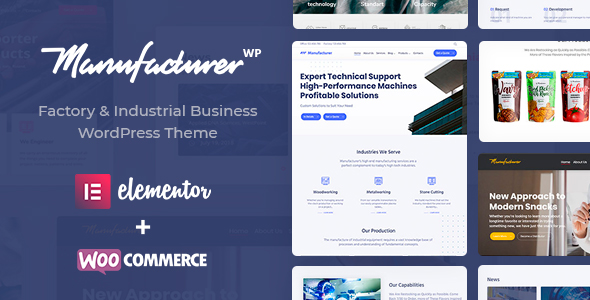
Stuck on your Manufacturer WordPress theme? Let's fix it.
No endless back-and-forth. Just send us the details and we'll get it done.
No obligation · Replies within 1 hour · Quote within 1 day
Setup · Customization · Bug fixes · WooCommerce integration
About Manufacturer WP Theme
Manufacturer is a WordPress theme built by StylemixThemes specifically for industrial and manufacturing companies. It ships with purpose-built page templates for factories, engineering firms, heavy equipment suppliers, and B2B product catalogues. The theme runs on the WPBakery page builder and includes a set of dedicated widgets for showcasing services, team members, case studies, and client logos.
Out of the box it includes multiple homepage layouts, a project portfolio section, and pre-built inner pages for About, Services, and Contact. The design leans heavily industrial with strong typography, dark sections, and grid-based layouts that work well for companies that need to look credible rather than creative. It supports WooCommerce for basic product listings and integrates with popular contact form plugins.
Get matched with a Manufacturer developer in under one day
Tell us about your Manufacturer project. Small fixes, Manufacturer theme customization, or a full website build, whatever you need, we've got it covered.
We'll connect you to the right Manufacturer developers, define the scope, and get everything 100% clear.
You'll get one estimate, hire your preferred developer, and start collaborating.
StylemixThemes builds solid base themes, but every business has requirements that go beyond what a theme ships with. A vetted Manufacturer developer on Codeable can handle custom layouts, WooCommerce integration, third-party API connections, or a full site build from the supplied demo. Codeable screens developers before they join the platform, so you are not sorting through unknown freelancers. You post your project, get matched with a relevant developer, and receive a fixed estimate before committing to anything.
Pros
- Purpose-built for industrial and manufacturing niches with relevant demo content included
- Multiple homepage layouts let you start with a close match to your industry without building from scratch
- WooCommerce compatible for basic product and parts catalogue pages
- Includes dedicated portfolio and case study post types suited to project-based industrial companies
- StylemixThemes has an active support team and regular theme updates
Cons
- WPBakery is aging and heavier than block-based or Elementor alternatives, which affects page speed scores
- Demo import can produce inconsistent results depending on server environment
- Customizer options are limited compared to themes with dedicated options panels
- Advanced filtering for product or project archives requires additional development work
- Some bundled shortcodes look dated and need CSS overrides to match modern design expectations
Who is Manufacturer for?
Heavy Equipment Suppliers
Equipment suppliers need credible product pages, spec sheets, and clear enquiry paths. Manufacturer’s grid layouts and WooCommerce support give you a solid starting point for listing machinery, attachments, and accessories. A developer can add filterable catalogues and PDF spec downloads to suit buyers doing serious research before making contact.
Engineering and Fabrication Firms
Fabrication and engineering firms sell expertise and track record. The theme’s project portfolio and case study templates let you present past work with images, scope descriptions, and client details. Combine that with a services structure and a contact form built around quote requests, and you have a lead generation site that fits the sales process.
Industrial Service Companies
Maintenance, inspection, and industrial services companies need clear service pages, geographic coverage information, and fast contact options. Manufacturer’s service block layouts and icon sets cover the basics. Custom development can add service area maps, booking forms, or dynamic pricing tables depending on how the business operates.
B2B Parts and Components Retailers
Selling parts online to trade buyers requires more than standard WooCommerce. Manufacturer provides the B2B visual frame, and a Manufacturer developer can extend it with trade pricing, bulk order forms, part number search, and account-based purchasing. That combination handles the gap between a generic shop theme and a bespoke catalogue system.
Factory and Plant Operators
Factories and plant operators often need a corporate site that communicates capacity, certifications, and process capabilities to procurement teams. Manufacturer’s layout flexibility handles that content well. Developer work can add downloadable certification documents, a supplier contact workflow, and custom landing pages for specific industry verticals.

Customizing Manufacturer
Manufacturer gives you control over colors, fonts, header styles, and layout widths through the WordPress Customizer. WPBakery handles page structure, and the theme includes a library of pre-built content blocks you can drag into any page. That covers most surface-level changes without touching code.
Deeper customization is a different story. Custom post types, unique product catalogue structures, filterable project grids, or anything outside the default templates will require PHP and CSS work. A Manufacturer expert can extend the theme cleanly without breaking future updates. Whether you need a custom mega menu, a parts catalogue with advanced filtering, or a quote request workflow, a qualified Manufacturer developer will get it done faster and with less technical debt than piecing it together through plugins.
Recommended plugins for Manufacturer
Manufacturer pairs well with a focused plugin stack. For lead generation, Gravity Forms or WPForms handles enquiry and quote request forms. WPML or Polylang covers multilingual requirements common in international manufacturing businesses. For search, SearchWP improves on WordPress defaults significantly.
Performance is critical for B2B sites where slow load times cost real enquiries. Pairing Manufacturer with a proper caching and image optimisation setup makes a measurable difference. See the WordPress performance service for specifics. If organic search is part of your strategy, structured data, schema markup for products and services, and technical SEO foundations matter. The WordPress SEO optimisation service covers exactly that.
Not sure which plugins to use? This WordPress plugins directory covers the most popular options with reviews and setup guides.
Manufacturer common issues
Manufacturer theme demo import not working
Demo import failures in Manufacturer usually come down to PHP memory limits or execution time settings. Set memory_limit to at least 256MB and max_execution_time to 300 in your php.ini or wp-config.php. Also confirm the required plugins are installed and activated before running the importer. If the import stalls or produces blank pages, try importing XML content manually via Tools > Import rather than using the one-click importer.
WPBakery page builder not loading in Manufacturer theme
If WPBakery is not loading inside Manufacturer, first check that the bundled plugin version matches the theme’s requirements listed in the changelog. A mismatch after a theme update is a common cause. Deactivate and reactivate the plugin, then clear any caching layers. If the visual editor tab is missing entirely, check for JavaScript errors in the browser console, which usually point to a plugin conflict. Disable other plugins one by one to isolate the cause.
Manufacturer theme header layout broken on mobile
Mobile header issues in Manufacturer are typically caused by custom CSS overriding the responsive breakpoints, or a plugin injecting styles that conflict with the theme’s mobile menu. Open browser dev tools at 375px width and inspect which rule is collapsing or misaligning the header. If the issue appeared after a recent change, check any custom CSS added through the Customizer. For persistent layout bugs, the WordPress bug fixing service can diagnose and resolve it cleanly.
Portfolio section not displaying projects in Manufacturer
When the portfolio grid is not showing projects, the first thing to check is whether the Manufacturer portfolio custom post type is set to public and the permalink structure has been refreshed. Go to Settings > Permalinks and click Save without changing anything. Also verify that the WPBakery portfolio element is pointing to the correct post type and that posts have been assigned to a portfolio category. Unpublished or password-protected posts will not appear in the grid.
Manufacturer theme slow page speed scores
Manufacturer running on WPBakery loads a significant amount of CSS and JavaScript by default. Start by enabling script concatenation inside WPBakery settings. Then use a caching plugin with CSS and JS minification turned on. Audit what is loading with the Network tab in browser dev tools and remove or defer anything not needed on the first paint. For a structured approach to speed gains, the WordPress performance service covers server-level and front-end optimisation together.
Contact form not sending emails on Manufacturer site
Email delivery failures on Manufacturer sites are almost always a server configuration issue rather than a theme problem. WordPress uses PHP mail by default, which many hosts block or route to spam. Install an SMTP plugin such as WP Mail SMTP and connect it to a transactional email service like Mailgun, SendGrid, or your Google Workspace account. After configuring, use the plugin’s test email feature to confirm delivery before relying on it for live enquiries.
Manufacturer theme update broke layout
Layout breaks after a Manufacturer update are usually caused by changes to shortcode output or CSS class names that conflict with customisations made in a child theme or via the Customizer. Compare your custom CSS against the new theme stylesheet and update any selectors that have changed. If you were not using a child theme, some modifications may have been overwritten by the update. Going forward, all custom code should live in a child theme. For urgent fixes, the WordPress bug fixing service can restore your layout quickly.
WooCommerce product pages not styled correctly in Manufacturer
WooCommerce styling issues in Manufacturer typically occur because the theme’s WooCommerce template files are outdated relative to the installed version of WooCommerce. Go to WooCommerce > Status > System Status and check for outdated templates. Copy any flagged templates to your child theme folder under woocommerce/ and update them to match the current WooCommerce templates. This preserves your customisations while aligning with WooCommerce’s current markup.
Custom fonts not loading in Manufacturer theme
If custom fonts set through the Manufacturer Customizer are not loading, check that the Google Fonts API is not being blocked by a browser privacy extension or a content security policy header on your server. If you are self-hosting fonts for performance or GDPR reasons, make sure the @font-face declarations are correctly placed in your child theme stylesheet and the font files are accessible at the specified paths. Also clear your caching plugin after any font changes, as cached CSS can serve stale font references.
Manufacturer theme slider images not showing
Slider images failing to display in Manufacturer are often linked to image size registration. After switching themes or updating, run the Regenerate Thumbnails plugin to rebuild all registered image sizes. Also check that the slider plugin bundled with Manufacturer is active and up to date. If the slider container renders but images are blank, inspect the image URLs in the browser network tab. Broken paths or missing attachments in the media library are the most common causes.
Manufacturer FAQ
Yes. Manufacturer is specifically designed for industrial and manufacturing businesses. It includes relevant demo content, service and portfolio templates, and a layout style suited to B2B audiences. It works best for companies that need to present credentials and services rather than run a content-heavy blog. Some custom development is usually needed to match specific business requirements.
Manufacturer is built around WPBakery, not Elementor. You can install Elementor alongside it, but you are likely to run into styling conflicts and redundant page builder overhead. If you want to use Elementor, a developer can audit compatibility and either resolve conflicts or help you select a better-suited base theme for an Elementor workflow.
Yes, Manufacturer is WooCommerce compatible. It handles basic product listing pages, shop archives, and single product pages with theme-consistent styling. For more complex requirements like trade pricing, bulk ordering, or advanced product filtering, additional development work on top of the theme and WooCommerce is needed.
After purchasing and installing the theme, activate the required plugins when prompted. Then go to Appearance > Import Demo Data and select the demo closest to your layout preference. Before importing, ensure your host’s PHP memory limit is at least 256MB. If the import fails, try the manual XML import method available under Tools > Import using the content file from the theme package.
Manufacturer is listed as WPML compatible by StylemixThemes. For full multilingual functionality you need WPML plus the String Translation and WooCommerce Multilingual add-ons if applicable. Some theme strings may need manual registration in the WPML configuration. A developer familiar with both Manufacturer and WPML can set this up without translation gaps.
Create a folder in /wp-content/themes/ named something like manufacturer-child. Inside it, add a style.css with a proper header declaring the parent theme as Manufacturer, and a functions.php that enqueues the parent stylesheet. Activate the child theme from Appearance > Themes. All customisations should live in the child theme to survive future Manufacturer updates.
Manufacturer uses WPBakery Page Builder as its primary content editor. WPBakery is a front-end and back-end drag-and-drop builder that uses shortcodes to store layout data in post content. It is functional but heavier than modern alternatives. The theme includes custom WPBakery elements built specifically for industrial and manufacturing content types.
Yes, Manufacturer is built with responsive layouts that adapt to mobile and tablet screen sizes. That said, complex WPBakery layouts with many nested columns sometimes need manual CSS adjustments to look correct on smaller screens. Testing across real devices after building a page is recommended, particularly for navigation menus and large grid sections.
Start by enabling WPBakery’s script optimisation options, then add a caching plugin with minification. Compress images and serve them in WebP format. Use a CDN for static assets. On the server side, PHP 8.x and object caching with Redis or Memcached make a significant difference. For a structured audit and fix, see the WordPress performance service.
Migrating an existing site to Manufacturer involves rebuilding pages in WPBakery using the theme’s layouts and elements. Content can be moved across, but design will need to be rebuilt rather than simply transferred. If you are also changing hosting at the same time, a staged migration is the safer approach. See the WordPress migration service for help with the technical side of moving the site.
Hire a Manufacturer WordPress Expert
Need a Manufacturer developer who knows the theme inside out? Whether the job is a full build, a specific feature, or cleaning up an existing site, FoxyConcept matches you with a vetted specialist through Codeable. Fixed estimates, no surprise invoices. Get a Free Estimate and describe your project. You will hear back within 24 hours with a clear scope and price.
You'll need a free Codeable account so developers can ask questions and send their quotes.