SOHO WordPress Theme
by GT3themes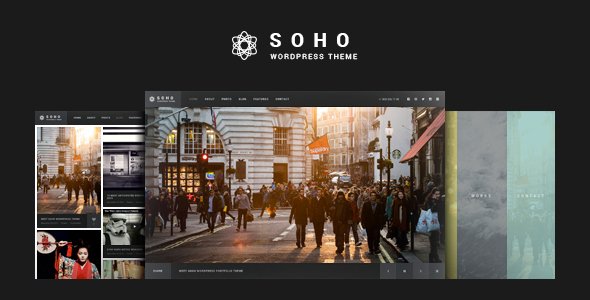
Stuck on your SOHO WordPress theme? Let's fix it.
No endless back-and-forth. Just send us the details and we'll get it done.
No obligation · Replies within 1 hour · Quote within 1 day
Setup · Customization · Bug fixes · WooCommerce integration
About SOHO WP Theme
SOHO is a WordPress theme by GT3themes built for small businesses, freelancers, and creative studios. It ships with a drag-and-drop page builder, a library of pre-built section blocks, and a clean visual style that works across industries without heavy configuration.
The theme supports WooCommerce out of the box, includes multiple header layouts, and uses a modular structure that keeps pages fast and easy to manage. GT3themes maintains the codebase actively, and SOHO has accumulated a solid user base on ThemeForest. It suits operators who want a polished site without hiring a full development team, though customization beyond the defaults does require some technical knowledge to do properly.
Get matched with a SOHO developer in under one day
Tell us about your SOHO project. Small fixes, SOHO theme customization, or a full website build, whatever you need, we've got it covered.
We'll connect you to the right SOHO developers, define the scope, and get everything 100% clear.
You'll get one estimate, hire your preferred developer, and start collaborating.
GT3themes builds solid foundations, but every business has requirements the theme doesn’t cover by default. A vetted SOHO developer on Codeable can handle the work that falls outside the documentation: custom layouts, plugin conflicts, WooCommerce modifications, speed issues, and anything that needs real PHP or JavaScript.
Codeable screens all developers before they take projects, so you’re not rolling the dice on someone’s portfolio. Post a project, get a scoped estimate within 24 hours, and decide from there. No payment until you’re ready to move forward.
Pros
- Ships with a solid library of pre-built sections that speed up initial page construction significantly
- WooCommerce compatibility is built in, not bolted on, which reduces plugin conflicts on store builds
- GT3themes provides regular updates and responds to support tickets on ThemeForest
- Multiple header and footer layouts included without needing a third-party header builder plugin
- Modular section-based structure keeps the DOM relatively clean compared to heavier multipurpose themes
Cons
- The page builder is proprietary, so layouts don't transfer cleanly if you switch themes later
- Documentation covers basics but lacks detail on advanced customization and PHP filter hooks
- Some pre-built demos require exact plugin versions to import correctly, which causes occasional setup friction
- Font and color controls are limited compared to Gutenberg-native themes with full site editing support
- Support response times slow down during high-volume periods and can take several days on complex issues
Who is SOHO for?
Creative Agencies
SOHO’s grid-based layouts and full-width section options work well for agencies displaying case studies, team profiles, and service breakdowns. The clean default typography keeps the focus on visual content. A SOHO developer can extend the project grid with custom filtering or add a client portal without restructuring the existing design.
Freelance Consultants
Consultants running solo operations benefit from SOHO’s straightforward page structure and built-in contact sections. Setting up a lead generation funnel with a booking plugin or CRM integration requires some configuration work, but a SOHO specialist can wire that up without custom theme development from scratch.
Local Service Businesses
Plumbers, electricians, photographers, and similar local businesses get a lot of value from SOHO’s service section templates and location-focused layouts. Pairing the theme with a local SEO setup and a Google Maps integration gives these sites a functional starting point that converts visitors into inquiries.
Small Online Stores
With WooCommerce support built in, SOHO handles small product catalogs cleanly. Stores with fewer than 200 SKUs and standard checkout flows can launch without heavy customization. Beyond that, a SOHO developer can add custom product fields, conditional shipping logic, or payment gateway modifications the theme doesn’t cover natively.
Portfolio Sites
Photographers, designers, and illustrators use SOHO’s full-width image sections and gallery blocks to present work without distractions. The theme handles high-resolution images well when properly optimized. A SOHO expert can build out filterable portfolio grids or lightbox integrations that go beyond what the default builder supports.

Customizing SOHO
SOHO gives you control over colors, fonts, spacing, and layout through the WordPress Customizer and its built-in page builder. You can swap header styles, adjust footer columns, and manage section backgrounds without touching code. That covers most standard use cases.
Where it gets harder is when you need off-template layouts, custom post types, conditional logic, or third-party integrations. A SOHO expert can build on top of the theme’s existing structure using child themes, custom PHP, and CSS overrides without breaking updates. If you need pixel-accurate design, checkout customization, or feature work that the builder doesn’t support natively, working with a SOHO specialist saves significant time and avoids the trial-and-error that comes with DIY workarounds.
Recommended plugins for SOHO
SOHO pairs well with several plugin categories depending on your site’s goals. WooCommerce extends it into a functional online store. Contact Form 7 or Gravity Forms handles lead capture. WPML adds multilingual support for international audiences.
For speed, plugins like WP Rocket or Perfmatters work alongside SOHO without conflicts when configured correctly. See our WordPress performance services if load time is a concern. On the visibility side, Yoast or Rank Math integrate cleanly with the theme’s output. Our WordPress SEO optimisation service covers schema, metadata, and crawlability improvements specific to SOHO-built sites.
Not sure which plugins to use? This WordPress plugins directory covers the most popular options with reviews and setup guides.
SOHO common issues
SOHO theme page builder not loading in WordPress admin
This usually comes down to a JavaScript conflict with another active plugin. Start by deactivating plugins one at a time and refreshing the builder. Caching plugins are a common culprit. Clear all cached files after each deactivation. If the builder still won’t load, check the browser console for specific script errors. A PHP memory limit under 256MB can also block the builder from initializing. If you’re stuck, our bug fixing service can isolate and resolve the conflict quickly.
SOHO demo import failing or stopping halfway
Demo imports fail most often due to server timeout limits, low PHP memory, or a missing required plugin. Increase max_execution_time to 300 and memory_limit to 256M in your php.ini or wp-config.php. Make sure all plugins listed in the theme’s requirements are installed and activated before importing. If the import stops at a specific point repeatedly, the XML or JSON file itself may be corrupted. Download a fresh copy from ThemeForest and retry.
SOHO theme header layout not showing correctly on mobile
SOHO’s mobile menu behavior depends on the header layout selected in the Customizer. Some layouts have breakpoints set in CSS that don’t adapt well to narrow viewports without overrides. Open browser DevTools, switch to a mobile viewport, and inspect which CSS rules are conflicting. The fix is usually a targeted media query override added to the child theme’s stylesheet. Avoid editing the parent theme files directly or your changes will be lost on the next update.
SOHO WooCommerce product pages missing styles
Missing WooCommerce styles in SOHO typically happen after a WooCommerce update changes template file structures. Check if SOHO’s WooCommerce template files are outdated using the System Status page in WooCommerce. Go to WooCommerce > Status > Tools and look for template overrides flagged as outdated. Updating those files to match the current WooCommerce versions usually restores the styling. If you’re not comfortable editing template files, our bug fixing service handles this type of WooCommerce conflict directly.
SOHO theme update broke my homepage layout
Theme updates sometimes reset or overwrite customizations made in the parent theme files. This is why child themes matter. If you weren’t using a child theme before the update, your changes are gone from the files, but your Customizer settings should still be intact. Rebuild the layout using the builder and, going forward, create a child theme to hold all modifications. If the update introduced a genuine bug, check the GT3themes changelog and their ThemeForest comments section for a patch.
SOHO contact form not sending emails
Contact form email failures in SOHO are almost always a mail delivery issue, not a form configuration issue. WordPress’s default wp_mail() function relies on the server’s sendmail setup, which most shared hosts block or route poorly. Install an SMTP plugin like WP Mail SMTP and connect it to a transactional email service such as SendGrid, Mailgun, or Amazon SES. Set the from address to a domain-matched email. Test delivery using the plugin’s built-in send test feature after configuring credentials.
SOHO site loading slowly with large images
SOHO doesn’t compress or lazy-load images automatically. Large unoptimized images are the most common cause of slow load times on SOHO sites. Install a plugin like ShortPixel or Imagify to compress existing uploads and auto-optimize new ones. Enable lazy loading for below-the-fold images. Also check whether the theme is loading all its section scripts and styles globally instead of conditionally. Our WordPress performance service covers a full audit if you want a thorough fix.
SOHO custom CSS not applying after changes
Custom CSS added through the WordPress Customizer or the theme’s CSS field may be overridden by more specific selectors in the theme’s own stylesheets. Check specificity first. Use browser DevTools to confirm your rule is being parsed but overridden. Add !important temporarily to confirm it’s a specificity issue, then write a more specific selector instead of relying on !important in production. Also verify you’re not working on a cached version of the page after making changes.
SOHO theme conflict with Elementor or other page builders
SOHO is not designed to run alongside Elementor or other full page builders simultaneously. Running two builders creates asset conflicts, duplicate wrappers, and unpredictable layout behavior. Choose one and disable the other. If you prefer Elementor, you can use SOHO as a base theme for its header, footer, and global styles while building page content exclusively in Elementor. This hybrid setup works but requires careful CSS scoping to prevent style bleed between the two systems.
SOHO footer widgets not displaying correctly
Footer widget display issues in SOHO usually come from column count settings mismatched with the number of active widgets, or from a CSS conflict introduced by a plugin. Go to Appearance > Widgets and confirm widgets are assigned to the correct footer regions. In the Customizer, check the footer column layout setting and align it with how many widget areas have content. If widgets appear stacked or invisible, inspect the footer container in DevTools for overflow or display property conflicts from a plugin stylesheet.
SOHO FAQ
Yes, SOHO suits small businesses well. It has service section templates, contact layouts, and a clean visual style that doesn’t require heavy configuration. Most standard small business pages can be built using the included section library without custom development. Complex requirements like booking systems or custom quoting tools will need additional plugin work or developer help.
SOHO includes WooCommerce support out of the box. Product pages, cart, and checkout inherit the theme’s styles without requiring a separate WooCommerce child theme. For more advanced store features like custom product fields, subscription products, or complex shipping rules, you’ll want a SOHO developer to handle the integration properly.
For straightforward sites, yes. SOHO’s builder and Customizer cover layout, colors, fonts, and section content without requiring code. If you need features beyond the default templates, such as custom post types, conditional content, or API integrations, a developer becomes necessary. The theme’s documentation is adequate for standard setups but thin on advanced topics.
Create a new folder in wp-content/themes/ named soho-child. Add a style.css file with the correct theme header referencing SOHO as the parent template. Then add a functions.php that enqueues the parent stylesheet. Activate the child theme in Appearance > Themes. All custom CSS and PHP modifications go into the child theme to survive parent theme updates.
SOHO has partial Gutenberg compatibility. You can use the block editor for basic content editing, but the theme’s section-based page builder operates separately and doesn’t integrate with full site editing. If you need complete FSE support with block-based headers and footers, SOHO is not the right fit. It’s better suited to its own builder workflow.
Start with image optimization using ShortPixel or Imagify. Add a caching plugin like WP Rocket. Minify CSS and JavaScript. Check whether SOHO is loading all assets globally and restrict scripts to the pages that need them. A CDN helps with static asset delivery. If performance is still poor after these steps, a full audit will identify theme-level issues.
Yes, SOHO sites migrate like any standard WordPress installation. Export the database, move the files, update the site URL, and update wp-config.php with the new database credentials. The theme’s builder data is stored in post meta, so it transfers with the database. Test all pages after migration since absolute URLs sometimes break image and link references during the move.
GT3themes updates SOHO periodically on ThemeForest. Updates generally address compatibility with new WordPress and WooCommerce versions, security issues, and occasional feature additions. The update frequency is reasonable for a commercial theme. Always backup your site and child theme before applying any update, as some releases have affected builder layouts on existing pages.
Rates on Codeable for SOHO developers typically range based on project scope. A single bug fix might cost under a few hundred dollars. A full custom layout build or WooCommerce integration project runs higher. All projects start with a free estimate so you know the cost before committing. There’s no obligation to hire after receiving the estimate.
Commonly used plugins with SOHO include WP Rocket for caching, ShortPixel for image optimization, Yoast SEO or Rank Math for search visibility, WP Mail SMTP for reliable email delivery, and Contact Form 7 or Gravity Forms for lead capture. WPML works with SOHO if you need a multilingual site. Avoid running multiple page builder plugins alongside SOHO’s built-in builder.
Hire a SOHO WordPress Expert
Whether you need a one-time fix or ongoing development, a SOHO developer can take your project further than the theme’s built-in tools allow. Work is scoped, estimated, and delivered through Codeable’s vetted network. You get a clear price before any work starts.
Get a Free Estimate and connect with a SOHO specialist who knows the GT3themes codebase inside out.
You'll need a free Codeable account so developers can ask questions and send their quotes.