Podcaster WordPress Theme
by Themestation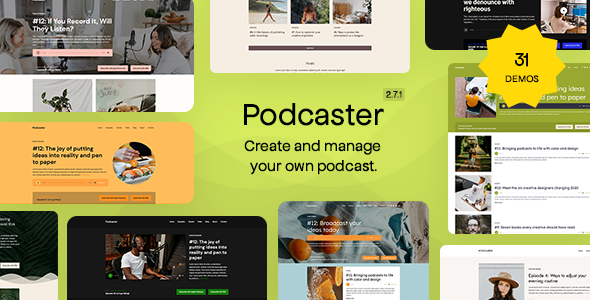
Stuck on your Podcaster WordPress theme? Let's fix it.
No endless back-and-forth. Just send us the details and we'll get it done.
No obligation · Replies within 1 hour · Quote within 1 day
Setup · Customization · Bug fixes · WooCommerce integration
About Podcaster WP Theme
Podcaster is a WordPress theme built by Themestation specifically for podcast creators. It gives hosts a dedicated home for episodes, show notes, and audio players without stitching together a generic blog theme with podcast plugins.
The theme ships with a custom post type for episodes, a built-in HTML5 audio player, and a clean layout that puts audio content first. Episode archives, season sorting, and guest profiles are all handled natively. The design is minimal by default, which keeps load times reasonable and lets the content lead.
Themestation built Podcaster around the needs of solo hosts and small podcast networks alike. Whether you run one show or several, the structure accommodates both without requiring a developer for the basics. That said, any customisation beyond the theme options panel will need someone who knows the codebase.
Get matched with a Podcaster developer in under one day
Tell us about your Podcaster project. Small fixes, Podcaster theme customization, or a full website build, whatever you need, we've got it covered.
We'll connect you to the right Podcaster developers, define the scope, and get everything 100% clear.
You'll get one estimate, hire your preferred developer, and start collaborating.
Podcaster is focused enough that a good developer can move quickly inside it, but specific enough that generic WordPress advice often misses the mark. Codeable connects you with vetted developers who have worked on podcast sites before and know what Themestation themes expect.
You post your project, get matched within 24 hours, and receive a free estimate before any commitment. No bidding wars, no guessing at qualifications. If the fit isn’t right, you walk away at no cost.
Pros
- Purpose-built for podcasts with native episode post types and structured archives
- HTML5 audio player included out of the box, no extra plugin required for basic playback
- Minimal default design keeps page weight low compared to multi-purpose themes
- Guest and host profile sections are built into the theme structure
- Compatible with major podcast plugins like Seriously Simple Podcasting for extended feed management
Cons
- Theme options panel is limited, meaningful layout changes require template edits
- Not suited for multi-show networks without custom development work
- Updates from Themestation have been infrequent, which creates long-term compatibility concerns
- No built-in chapter markers or transcript display, those require additional plugins
- Block editor support is partial, some episode meta fields still rely on classic editor metaboxes
Who is Podcaster for?
Solo Podcast Host
A solo host running one show gets the most out of Podcaster without touching the code. Episode archives, show notes, and an audio player are all handled cleanly. The minimal design keeps the focus on the content and makes it easy to maintain without a developer on call.
Interview Show
Interview shows benefit from the guest profile feature built into Podcaster. Each guest gets a dedicated entry linked to their episodes. Hosts covering a recurring cast of contributors can build a searchable guest library over time, which also helps with SEO for guest names.
Educational Audio Series
Educators publishing audio lessons or course content in podcast format can use Podcaster’s episode structure to organise material by season or topic. Show notes become lesson summaries. The archive functions like a course index, which works well for self-paced learners browsing back through episodes.
Podcast Network
Running multiple shows under one domain is possible with Podcaster but requires custom development to separate episode feeds and archives cleanly. A Podcaster developer can build the taxonomy structure needed to keep shows distinct while sharing a single WordPress installation and theme.
Brand or Business Podcast
Companies using a podcast to build an audience around their brand need the site to match their existing visual identity. Podcaster’s clean base makes it a workable starting point for a Podcaster specialist to apply brand colors, custom player styling, and sponsor placement without rebuilding from scratch.

Customizing Podcaster
Podcaster includes a theme options panel covering colors, fonts, header layout, and player styling. For most hosts, that covers the basics. The moment you need a custom episode layout, a membership paywall for premium episodes, or integration with a specific podcast hosting provider, the options panel runs out of road.
A Podcaster expert can modify episode templates, build custom player skins, connect the theme to tools like Seriously Simple Podcasting or PowerPress, and adjust the archive structure for multi-show setups. If you want a landing page for a new season or a sponsor slot wired into the header, that work requires hands inside the theme files.
Getting a Podcaster specialist involved early avoids the trial-and-error of patching things yourself and keeps your episode library clean as the site grows.
Recommended plugins for Podcaster
Podcaster works well with a handful of targeted plugins. Seriously Simple Podcasting and PowerPress both complement the theme’s episode structure. For email capture, ConvertKit and Mailchimp integrations slot in cleanly.
Speed matters on podcast sites because episode pages carry audio embeds and often large featured images. A proper caching setup and image optimisation routine will make a real difference. See the WordPress performance service for specifics.
If your show pages aren’t ranking for your topic, structured data for podcast episodes and proper meta handling will help. The WordPress SEO service covers that ground in detail.
Not sure which plugins to use? This WordPress plugins directory covers the most popular options with reviews and setup guides.
Podcaster common issues
Podcaster theme audio player not showing on episode pages
The most common cause is a plugin conflict that dequeues the theme’s audio scripts. Start by deactivating plugins one by one and reloading the episode page. If the player reappears, the last deactivated plugin is the culprit. Also check that the audio file URL in the episode meta field is correctly formatted and publicly accessible. A missing or malformed URL will silently prevent the player from rendering.
Podcaster episode custom post type not displaying in archives
If episodes aren’t appearing in archives, the episode custom post type may not be set to public, or the rewrite rules may need flushing. Go to Settings, Permalinks, and save without changes to force a flush. If episodes were registered correctly during setup, that usually resolves it. A persistent issue may indicate a theme file conflict, which a WordPress bug fixing specialist can diagnose quickly.
Podcaster theme not compatible with Gutenberg block editor
Podcaster was built before the block editor became standard. Some episode meta fields use classic metaboxes that don’t fully integrate with the block editor interface. The most reliable fix is using the Classic Editor plugin for episode posts while keeping the block editor active for other content types. Alternatively, a Podcaster developer can rebuild those fields as block editor compatible components.
Podcaster theme podcast feed not working with RSS
Podcaster doesn’t manage your podcast RSS feed independently. You need a plugin like Seriously Simple Podcasting or PowerPress to generate a valid podcast feed for Apple Podcasts, Spotify, and other directories. If the feed URL is returning errors, check the plugin settings first, then validate the feed using a tool like Cast Feed Validator. Namespace conflicts between the theme and the plugin occasionally cause malformed output.
Podcaster theme featured image not showing on episode list
If featured images aren’t appearing in the episode list, check that the image dimensions meet the theme’s registered sizes. Regenerating thumbnails using a plugin like Regenerate Thumbnails often fixes display issues after a theme change. If images were uploaded before the theme was activated, the correct crop sizes may not exist. Also verify that your episode template file includes the correct template tag for the thumbnail.
Podcaster theme styles broken after WordPress update
A WordPress core update can break theme styles if the theme uses deprecated functions or enqueues stylesheets in a non-standard way. Open the browser console on the broken page and look for 404 errors on CSS files. If a stylesheet path has changed, you’ll need to update the enqueue call in functions.php. For repeated breakage after updates, a WordPress bug fixing service can audit the theme for compatibility issues.
Podcaster episode meta fields not saving correctly
Episode meta fields not saving is usually a nonce failure or a permissions issue. First check that the user role editing the episode has the correct capabilities. Then look for JavaScript errors in the console that might be preventing the save action from completing. Plugin conflicts with page builders or SEO plugins occasionally interfere with custom metabox save hooks. Deactivate non-essential plugins and test the save again.
Podcaster theme slow loading with many episodes
Podcast sites with large episode libraries slow down primarily because of unoptimised queries on archive pages. Each episode archive query can become expensive without proper indexing. Add a caching plugin, optimise images on episode pages, and consider lazy loading the audio player. If queries are the bottleneck, a developer can rewrite archive templates to use leaner WP_Query arguments. The WordPress bug fixing service covers performance investigations too.
Podcaster theme guest profile page showing 404 error
A 404 on guest profile pages almost always means the custom post type rewrite rules are stale. Go to Settings, Permalinks, and save to flush rewrite rules. If the 404 persists, check that the guest post type is registered as public with has_archive set correctly. A misconfigured registration in the theme’s functions.php will produce 404s regardless of how many times you flush the rules.
Podcaster theme not mobile responsive on episode player
If the audio player breaks the layout on mobile, the player container likely has a fixed width set in the theme CSS. Inspect the player element in your browser’s developer tools and find the fixed width rule. Override it in a child theme stylesheet with max-width: 100% and width: 100%. If the player is an embedded iframe, add a responsive wrapper div with a padding-bottom technique to maintain the correct aspect ratio.
Podcaster FAQ
Themestation has been slow with updates in recent years. The theme still functions on current WordPress versions for most users, but long-term support is uncertain. If you’re building a new podcast site, factor in the cost of maintenance work to keep the theme compatible as WordPress evolves. A WordPress maintenance plan is worth considering alongside any Podcaster setup.
Yes. Seriously Simple Podcasting works alongside Podcaster theme and takes over feed management, episode distribution, and analytics. You’ll want to configure SSP to use Podcaster’s episode post type or run episodes through SSP’s own post type. Some overlap exists in functionality, so decide which plugin handles what before setting up both.
Not without custom development. Podcaster is structured around a single show by default. Separating multiple shows into distinct archives with separate feeds requires custom taxonomy work and template modifications. A Podcaster specialist can build that structure, but it’s not something the theme handles out of the box.
Podcaster uses a built-in HTML5 audio player that reads a file URL from the episode meta field. It plays MP3 and other browser-supported formats directly. There’s no paid subscription required for the player. For more advanced players with speed controls, chapter markers, or playlist features, a third-party plugin like Fusebox or Smart Podcast Player is a better fit.
Podcaster theme doesn’t include WooCommerce templates, so selling premium episodes or memberships requires custom integration. WooCommerce can run alongside the theme, but product pages will use default WooCommerce styling unless a developer matches them to the theme’s design. A plugin like MemberPress is often a cleaner fit for podcast paywalls.
Podcaster has no native transcript field. The most practical approach is adding transcript content inside the episode’s standard content area, either collapsed behind a toggle or displayed in full below the show notes. A plugin like Seriously Simple Transcripts adds a dedicated field. A developer can add a custom metabox if you want a cleaner separation between show notes and transcripts.
Elementor will work for standard pages on a Podcaster site, but episode templates are controlled by the theme’s own template files. You can’t edit episode layouts visually inside Elementor without a custom integration. Most Podcaster users keep Elementor for landing pages and about pages while leaving episode templates to the theme or a developer.
Podcaster doesn’t automatically output podcast schema markup. For structured data that helps Google surface your episodes in search, you need a plugin like Rank Math or Yoast SEO with their podcast schema support, or a developer to add schema.org PodcastEpisode markup directly to the episode template. Schema alone won’t rank your episodes but it does improve how they appear in results.
Migrating an existing podcast site to WordPress with Podcaster theme involves importing episode content, reassigning audio file URLs, and reconnecting your RSS feed. If you’re moving from a hosted platform like Buzzsprout or Podbean, check whether your hosting provider offers redirect tools for the feed URL. For a full site migration, the WordPress migration service can handle the technical side.
Codeable is the most reliable place to find a vetted Podcaster theme developer. You post your project, describe what you need, and get matched with a specialist within 24 hours. There’s a free estimate before any work starts and no obligation to proceed. For straightforward Podcaster work, most projects are scoped and started within a couple of days.
Hire a Podcaster Expert Developer
If your Podcaster site needs custom episode layouts, player modifications, plugin integrations, or anything the theme panel can’t handle, a specialist is the faster route. Work is scoped clearly before anything starts, and you only pay if you decide to proceed. Get a Free Estimate and describe exactly what your show site needs.
You'll need a free Codeable account so developers can ask questions and send their quotes.