Green Earth WordPress Theme
by GoodLayers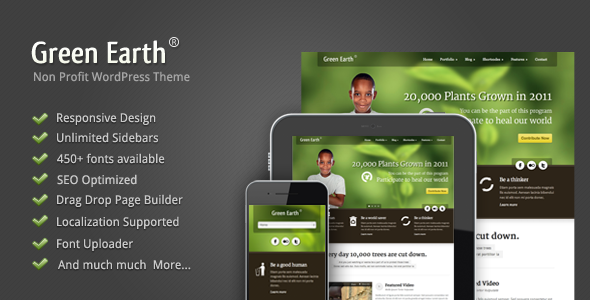
Stuck on your Green Earth WordPress theme? Let's fix it.
No endless back-and-forth. Just send us the details and we'll get it done.
No obligation · Replies within 1 hour · Quote within 1 day
Setup · Customization · Bug fixes · WooCommerce integration
About Green Earth WP Theme
Green Earth is a WordPress theme built by GoodLayers, a Thai-based studio known for clean code and well-documented themes. It targets environmental organizations, nonprofits, eco-friendly businesses, and sustainability-focused projects.
The theme ships with the GoodLayers page builder, a drag-and-drop interface that works independently of Gutenberg or Elementor. It includes pre-built demo pages for charity fundraising, green energy, and organic product brands. WooCommerce compatibility is baked in, so eco-stores can be up and running quickly.
Typography and color controls are thorough. Header and footer layouts offer several variations. Donation and event modules are included out of the box, which saves time for nonprofits that need those features without buying separate plugins. Translation-ready and WPML compatible, it suits multilingual environmental campaigns too.
Get matched with a Green Earth developer in under one day
Tell us about your Green Earth project. Small fixes, Green Earth theme customization, or a full website build, whatever you need, we've got it covered.
We'll connect you to the right Green Earth developers, define the scope, and get everything 100% clear.
You'll get one estimate, hire your preferred developer, and start collaborating.
GoodLayers themes have quirks that only show up mid-project. The page builder stores content in shortcodes, which means switching builders later is painful. A Green Earth developer on Codeable has dealt with these issues before. Codeable vets every developer on the platform, so you are not guessing about skill level. You post your project, get matched within 24 hours, and receive a free estimate with no obligation to hire. That process works whether you need a full site build or a single stubborn layout problem fixed.
Pros
- GoodLayers page builder included at no extra cost, no need for Elementor or Divi
- Built-in donation and event modules suited to nonprofits and environmental charities
- WooCommerce compatible out of the box for eco-product stores
- WPML compatible and translation-ready for multilingual campaigns
- Multiple pre-built demo pages covering green energy, organic brands, and charity layouts
Cons
- Page builder stores content in shortcodes, making future migration away from GoodLayers difficult
- Builder outputs bloated CSS and JS that requires manual performance optimization
- Theme options panel is complex for non-technical users without documentation open
- Demo import can fail on shared hosting due to memory and timeout limits
- Updates are infrequent compared to more actively maintained themes on ThemeForest
Who is Green Earth for?
Environmental Nonprofit
Green Earth suits nonprofits running donation campaigns and awareness events. The built-in donation module and event listings reduce the need for third-party plugins. A Green Earth specialist can connect payment gateways, set up campaign pages, and configure email confirmation flows so donors get a proper response without extra tools bolted on.
Organic Food & Product Store
WooCommerce integration makes Green Earth a workable base for organic and eco-product brands. Product pages can be styled to match the earthy aesthetic using the GoodLayers builder. A Green Earth developer can configure variable products, set up filtered category pages, and ensure the checkout process works cleanly on mobile without layout breaks from the builder shortcodes.
Green Energy Company
Green energy companies need service pages, project portfolios, and contact forms that load fast. Green Earth provides the layout tools, but a developer familiar with the theme can structure pages for SEO, set up schema for local service areas, and reduce asset bloat so pages score well on Core Web Vitals. That combination matters for industrial and B2B search visibility.
Eco-Tourism Business
Eco-tourism operators need booking integrations, gallery layouts, and location-specific content. Green Earth’s flexible row and column system handles visual storytelling well. A Green Earth expert can integrate booking plugins cleanly, style availability calendars to match the theme, and set up multilingual pages for international visitors using WPML without layout inconsistencies.
Sustainability Blog & Media
Sustainability-focused publishers benefit from Green Earth’s clean typography and category structures. A developer can set up a content hub with pillar pages, configure related post modules, and wire up email list tools. Getting the blog archive and single post templates optimized for reading time and ad placement makes a measurable difference to both engagement and revenue.

Customizing Green Earth
Green Earth customization goes deeper than swapping colors and fonts. The GoodLayers page builder controls layout at the row and column level, with element-specific padding, parallax backgrounds, and custom CSS fields per section. That flexibility is useful, but it also means the learning curve is steeper than a standard Gutenberg setup.
A Green Earth expert can map your brand properly across the theme options panel, set up header variants, configure mega menus, and wire up the donation or event modules correctly. Without someone who knows the GoodLayers system, clients often end up with inconsistent spacing, broken mobile layouts, or a homepage that looks nothing like the demo.
Hiring a Green Earth specialist ensures the customization holds up across browsers and screen sizes, and that custom CSS does not conflict with future theme updates.
Recommended plugins for Green Earth
Green Earth works well with caching plugins like WP Rocket and LiteSpeed Cache, but the GoodLayers builder outputs additional CSS and JavaScript that needs proper minification and deferral. Getting this wrong slows page loads significantly. A developer familiar with WordPress performance optimization can audit asset loading and reduce time-to-first-byte without breaking builder functionality.
For SEO, the theme does not enforce any particular plugin, so pairing it with Yoast or Rank Math is straightforward. That said, schema setup for events and products needs attention. A proper WordPress SEO setup ensures Green Earth pages rank for the right local and topical searches.
Not sure which plugins to use? This WordPress plugins directory covers the most popular options with reviews and setup guides.
Green Earth common issues
Green Earth demo import not working
Demo import failures in Green Earth almost always come down to server limits. The XML file is large and the process needs adequate PHP memory and max execution time. Set memory_limit to at least 256MB and max_execution_time to 300 in your php.ini or wp-config.php. If the import still stalls, try importing sections separately using the GoodLayers import tool rather than the full package at once. Shared hosting environments often need a host-level tweak to complete the process.
Green Earth page builder elements not showing on frontend
When GoodLayers builder elements render in the editor but disappear on the frontend, the usual cause is a JavaScript conflict or a caching layer serving a stale version of the page. Clear all caches first, including server-side and CDN. Then check the browser console for JS errors pointing to a conflicting plugin. Deactivate plugins one by one to isolate the conflict. If the issue persists after that, the WordPress bug fixing service can trace the exact conflict without hours of manual testing.
Green Earth mobile menu not opening
A non-functional mobile menu in Green Earth usually points to a jQuery loading issue or a CSS conflict from a customization. Open the browser console on mobile emulation and check for script errors. Confirm jQuery is loading once and not duplicated by a plugin. Also check that the hamburger icon is not hidden by a z-index conflict from custom CSS added via the theme options panel. Reverting recent CSS changes one at a time usually isolates the culprit quickly.
Green Earth WooCommerce product page layout broken
WooCommerce layout breaks in Green Earth typically happen after a WooCommerce update changes template structure. The theme may use outdated product template overrides that no longer match the plugin’s current output. Check which WooCommerce templates Green Earth overrides by going to WooCommerce > Status > System Status and looking for outdated templates. Update or remove those overrides. A WordPress bug fix targeting template conflicts resolves this reliably without losing custom styling.
Green Earth slider not displaying images
If the Green Earth slider shows no images or shows placeholder boxes, the issue is usually tied to image attachment IDs not resolving correctly after a migration, or a script conflict blocking the slider library from initializing. Check the browser console for errors referencing the slider script. If images were migrated from another server, run the Media Library regeneration to fix broken attachment references. Also confirm the featured images are set at the required dimensions for the slider to pull correctly.
Green Earth header overlapping page content
A header overlapping page content in Green Earth is almost always caused by incorrect top padding on the main content wrapper. The theme applies a top offset to compensate for a fixed or sticky header, and that value can break when you switch header styles or add a custom header height. Go to the Green Earth theme options, find the header height setting, and match the top padding value in the page builder row settings or the body offset field. A few pixel adjustments usually resolves the overlap.
Green Earth fonts not loading correctly
Font loading problems in Green Earth usually come down to Google Fonts being blocked by a consent or privacy plugin, or the font variant selected in theme options not matching what the stylesheet requests. Check network requests in the browser for any blocked font calls. If you are using a GDPR consent plugin that blocks Google Fonts by default, either self-host the fonts using a plugin like OMGF or whitelist the Google Fonts domain. Also confirm the correct font weight variants are selected in the theme typography settings.
Green Earth slow page load after update
Page load slowdowns after a Green Earth update are often caused by newly added scripts or styles loading on every page rather than conditionally. Use a performance audit tool to identify which new assets are loading. The GoodLayers builder can accumulate unused CSS from deactivated elements that still gets enqueued. A proper WordPress performance fix includes deferring non-critical scripts, minifying builder output, and ensuring only required assets load per page type.
Green Earth donation form not submitting
If the Green Earth donation form is not submitting, first check whether a security plugin or Cloudflare firewall is blocking the form POST request. Review the browser console and network tab for blocked requests or 403 errors. Confirm the payment gateway credentials are entered correctly in the settings and that SSL is active, as most payment processors reject requests over HTTP. Test with a minimal plugin environment to rule out a conflict with a form validation script from another plugin.
Green Earth contact form not sending emails
Contact form emails not sending in Green Earth is a server mail configuration problem, not a theme issue. Most shared hosts block the default PHP mail() function. Install an SMTP plugin like WP Mail SMTP and connect it to a transactional mail provider such as Mailgun, SendGrid, or your Google Workspace account. Test the connection using the plugin’s built-in diagnostic tool. Once SMTP is configured correctly, contact form submissions route through authenticated channels and reach inboxes reliably.
Green Earth FAQ
Yes, Green Earth is well suited to nonprofits. It includes built-in donation and event modules, which reduces reliance on third-party plugins. Campaign pages, volunteer sign-up forms, and charity-focused layouts are all covered in the pre-built demos. A Green Earth specialist can configure the donation setup and connect it to a payment gateway without needing a separate plugin stack.
Green Earth uses the GoodLayers proprietary page builder, not Elementor. You can technically install Elementor alongside it, but running two page builders simultaneously causes conflicts and performance issues. Most Green Earth developers recommend sticking with the GoodLayers builder for pages built with the theme, and using Elementor only if you are planning a full builder migration.
Go to Appearance > Import Demo Data after installing Green Earth and the required plugins. Select the demo pack you want and run the import. If it times out or stalls, your server likely needs higher PHP memory and execution time limits. Setting memory_limit to 256MB and max_execution_time to 300 resolves most import failures on shared hosting.
Yes, Green Earth is WooCommerce compatible. Product pages, cart, and checkout are styled within the theme. After major WooCommerce updates, check for outdated template overrides under WooCommerce > Status to catch layout issues early. A Green Earth developer can handle template updates and custom shop page styling without breaking the existing design.
Before updating Green Earth, back up your database and files. Check the changelog for template changes that might affect custom overrides. If you have made changes in a child theme, review them against the new parent theme files after updating. Using a staging environment for updates is the safest approach, particularly if the site runs WooCommerce or custom builder layouts.
Green Earth is WPML compatible and ships as translation-ready with a .pot file. You can run a multilingual site by pairing the theme with WPML or Polylang. A Green Earth developer familiar with multilingual setups can configure language switchers in the header and ensure the GoodLayers builder content translates correctly across language variants without layout issues.
Green Earth supports custom post types through the GoodLayers framework, which includes portfolio and team post types by default. Additional custom post types can be registered via a child theme or a plugin like CPT UI. The page builder can then display custom post type content using the included listing and grid elements without requiring manual template work for standard layouts.
Rates for a Green Earth developer on Codeable typically range based on project scope. Simple fixes or small customizations cost less than full builds. Codeable provides a free estimate before any work begins, so you know the cost upfront. There is no obligation to hire after receiving the estimate. Get a Free Estimate to get a specific number for your project.
Green Earth uses the GoodLayers page builder, a drag-and-drop system built specifically for GoodLayers themes. It is not a standalone product and does not work outside of GoodLayers themes. Content is stored in shortcodes, which means switching to a different page builder later requires rebuilding pages. Keep that in mind when planning long-term site architecture.
Yes, Green Earth sites can be migrated to a new host. Use a plugin like Duplicator or All-in-One WP Migration to export the full site package. After migrating, update the site URL in Settings > General and run a search-replace on the database for any hardcoded URLs. GoodLayers builder shortcodes do not contain absolute URLs, so migration is generally straightforward compared to some other builders.
Hire a Green Earth Expert Developer
Need a Green Earth developer who knows the GoodLayers builder inside out? Whether you are launching a new environmental site, fixing layout issues, or extending the theme with WooCommerce or donation features, a specialist gets it done without guesswork. Get a Free Estimate and describe your project. You will be matched with a vetted Green Earth expert within 24 hours, no commitment required.
You'll need a free Codeable account so developers can ask questions and send their quotes.