Manon WordPress Theme
by Edge-Themes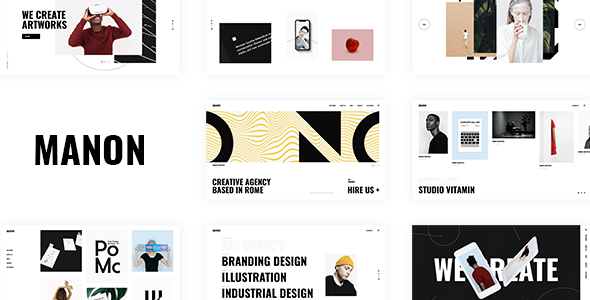
Stuck on your Manon WordPress theme? Let's fix it.
No endless back-and-forth. Just send us the details and we'll get it done.
No obligation · Replies within 1 hour · Quote within 1 day
Setup · Customization · Bug fixes · WooCommerce integration
About Manon WP Theme
Manon is a WordPress theme by Edge-Themes, built for fashion, lifestyle, and editorial websites. It ships with a large set of pre-built demos that cover everything from single-product boutiques to full magazine layouts. The theme runs on Edge-Themes’ in-house page builder, giving you visual control over headers, footers, and interior pages without touching code.
Under the hood, Manon supports WooCommerce, custom post types for portfolios and testimonials, and a wide selection of shortcodes. It also integrates with WPML for multilingual builds. The theme is sold on ThemeForest and has built up a consistent record of updates since launch. If you need a polished starting point for a fashion or creative brand site, Manon is a solid pick that holds up well with proper configuration.
Get matched with a Manon developer in under one day
Tell us about your Manon project. Small fixes, Manon theme customization, or a full website build, whatever you need, we've got it covered.
We'll connect you to the right Manon developers, define the scope, and get everything 100% clear.
You'll get one estimate, hire your preferred developer, and start collaborating.
Edge-Themes builds feature-heavy themes and Manon is no exception. The theme panel has hundreds of options, demo imports rarely match production needs exactly, and WooCommerce customizations often require child theme work to survive updates. Finding a developer who knows this specific theme makes a real difference.
Through Codeable, you get matched with vetted WordPress developers who have hands-on experience with Edge-Themes products. Post your project, get a clear estimate within 24 hours, and only move forward if the scope and price work for you. No guesswork, no generic freelancers.
Pros
- Large library of fashion and editorial demo templates that cover real use cases out of the box
- Deep WooCommerce integration including product quick view, wishlist support, and custom shop layouts
- Built-in portfolio, testimonials, and lookbook post types reduce plugin dependencies
- WPML compatible for multilingual and multi-currency fashion stores
- Active update history from Edge-Themes with consistent WordPress core compatibility
Cons
- The custom page builder locks content to the theme, making future migrations to Gutenberg or Elementor difficult
- Default asset loading is heavy and requires manual optimization to hit acceptable Core Web Vitals scores
- Theme panel has hundreds of settings with minimal documentation on how options interact
- Demo imports frequently need significant cleanup before they match the marketing previews
- Support from Edge-Themes is forum-based and response times can be slow for complex issues
Who is Manon for?
Fashion Boutique
Manon’s WooCommerce templates are built for apparel. Product galleries, variation swatches, and quick view all work without extra plugins. A Manon developer can extend these with custom size guides, shoppable lookbooks, and filtered collection pages that match your brand identity rather than the default demo styling.
Lifestyle Blog
The theme handles long-form editorial content well, with magazine-style category grids, featured post layouts, and a clean reading experience. A Manon specialist can configure custom homepage sections that surface recent posts, sponsored content areas, and newsletter opt-in blocks without the layout collapsing on mobile.
Beauty and Skincare Brand
Manon’s minimal aesthetic fits beauty brands. Product detail pages can be customized to highlight ingredients, routines, and before-and-after imagery. Pairing the theme with WooCommerce subscriptions for replenishment orders or bundled kits is straightforward work for an experienced Manon developer.
Photography Portfolio
The built-in portfolio post type supports full-screen galleries and filterable project grids. For photographers who also sell prints or presets, the WooCommerce layer adds a shop without needing a separate platform. A Manon expert can tighten up image loading performance, which matters heavily for portfolio sites.
Online Magazine
Multi-category editorial sites benefit from Manon’s flexible header options and post format support. A Manon developer can set up distinct category templates, ad placement zones, and archive pages that keep readers moving through content. The theme’s typography options give editorial sites real control over reading hierarchy.

Customizing Manon
Manon gives you a lot of options inside its theme panel, but that breadth can slow you down if you are not familiar with how Edge-Themes structures its settings. Header styles, typography stacks, color schemes, and WooCommerce shop layouts all live in separate panel sections that interact with each other in non-obvious ways.
A Manon expert can map out those dependencies before making changes, which prevents the common problem of fixing one thing and breaking another. Custom work like adding a lookbook section, restructuring a product grid, or wiring up a third-party booking plugin requires both theme knowledge and solid PHP and CSS skills. If your project goes beyond swapping colors and fonts, working with a Manon specialist will save you significant time and avoid hard-to-trace conflicts between the theme’s scripts and your added functionality.
Recommended plugins for Manon
Manon pairs well with a focused set of plugins. For contact and lead forms, WPForms or Gravity Forms slot in without styling conflicts. WooCommerce extensions like YITH Wishlist and Variation Swatches work cleanly with the theme’s product templates. For multilingual builds, WPML is the tested choice.
Performance needs attention because the theme loads a full suite of scripts by default. A proper WordPress performance audit will identify which assets can be deferred or removed. If you are running a content-heavy fashion blog alongside a shop, pairing Manon with a structured WordPress SEO setup will make sure your category and product pages rank efficiently.
Not sure which plugins to use? This WordPress plugins directory covers the most popular options with reviews and setup guides.
Manon common issues
Manon theme demo import not working
Demo import failures in Manon almost always come down to server limits. The XML and media files are large. Raise max_execution_time to 300 seconds, upload_max_filesize to 64MB, and memory_limit to 256MB in your php.ini or via a custom .htaccess rule. Run the import through the Edge-Themes importer, not the native WordPress importer. If it still fails mid-way, try importing content and media separately using the built-in split import option.
Manon WooCommerce product page layout broken
Broken WooCommerce product pages in Manon usually appear after a WooCommerce major version update. Edge-Themes ships its own product templates inside /woocommerce/ in the theme directory. When WooCommerce updates its template structure, outdated theme templates stop rendering correctly. Check the WooCommerce status screen under System Info for template override warnings. Update your child theme’s WooCommerce templates to match the new version. If you need help tracking down the conflict, a WordPress bug fixing service can resolve this quickly.
Manon header not showing on mobile
If the Manon header disappears on mobile, check the responsive settings inside the theme panel under Header and Mobile Header. Manon uses a separate mobile header configuration that needs to be enabled and populated independently from the desktop header. If the header is enabled but still not showing, inspect for a z-index conflict with a plugin adding a sticky bar or cookie notice. Temporarily deactivate plugins one by one to isolate the conflict.
Manon theme slow loading speed
Manon loads a significant number of CSS and JS files by default, including icon fonts and slider libraries that may not be active on every page. Use a plugin like Asset CleanUp to disable unused scripts per page type. Enable lazy loading for images, set up a CDN, and consider a caching plugin like WP Rocket. For a full breakdown, a WordPress performance audit will give you a prioritized fix list based on your actual Core Web Vitals data.
Manon portfolio filter not working
Manon’s portfolio filter relies on jQuery Isotope. If filtering stops working, the most common cause is a JavaScript conflict introduced by another plugin loading its own jQuery version. Open the browser console and look for JS errors on the portfolio page. Also confirm that the portfolio items have been assigned to at least one portfolio category, as the filter will not render if no taxonomy terms exist. If you recently updated the theme, check whether the scripts were re-enqueued correctly in the new version.
Manon theme update broke my layout
Layout breaks after a Manon theme update are usually caused by CSS changes that affect sections you had customized via the theme panel or custom CSS. Always run theme updates on a staging site first. After updating, compare your custom CSS against any new class names the update introduced. If you are using a child theme, verify your overrides still target the correct selectors. For complex breaks affecting multiple page templates, a WordPress bug fixing service can audit the diff and restore your layout without losing your configuration.
Manon custom fonts not loading
Manon supports Google Fonts and custom font uploads through the theme panel. If custom fonts are not loading, first confirm the font files were uploaded correctly and that the file paths in the panel are not returning 404 errors. For Google Fonts, check whether your server blocks external requests, which can happen in some hosting environments. Also verify that your caching plugin is not serving a stale CSS file that references the old font stack. Clear all caches after any font change in the theme panel.
Manon theme white screen after activation
A white screen after activating Manon points to a PHP error, usually a memory exhaustion or a fatal conflict with an active plugin. Enable WP_DEBUG in your wp-config.php file to surface the actual error message. Increase PHP memory to at least 256MB. If the white screen appears only with Manon active and disappears with a default theme, deactivate all plugins and reactivate them one at a time to find the conflict. Edge-Themes themes require PHP 7.4 or higher, so also confirm your server meets that requirement.
Manon slider not displaying on homepage
If the Manon homepage slider is not showing, check the slider configuration inside the theme panel under the Home section. Confirm a slider type is selected and that slides have been created and assigned. Manon supports both its own internal slider and Revolution Slider. If using Revolution Slider, make sure it is activated with a valid license since the bundled version included with the theme requires activation. Also check that the homepage template is set to the correct page template in the Page Attributes panel.
Manon WooCommerce cart page styling broken
WooCommerce cart page styling breaks in Manon typically follow a WooCommerce update that restructures the cart block or shortcode HTML. Check whether you are using the legacy cart shortcode or the newer cart block, as Manon’s styles target the shortcode version by default. If you have switched to blocks, add targeted CSS in your child theme to restyle the block output. For persistent conflicts between Manon’s stylesheet and WooCommerce’s block styles, inspect with browser dev tools to identify which rules are being overridden.
Manon FAQ
Edge-Themes updates Manon regularly to stay current with WordPress core releases. Check the ThemeForest changelog for the version you are running. If you are more than two major versions behind, update the theme on a staging site before pushing to production. Running an outdated version is the most common source of compatibility issues.
Manon is built around the Edge-Themes custom page builder and is not officially tested with Elementor. You can technically use Elementor on pages where you are not using Edge-Themes shortcodes, but mixing the two builders on the same page leads to conflicts. Most Manon developers stick with the native builder for consistency.
Yes. WooCommerce is optional in Manon. The theme works as a purely editorial or portfolio site without activating WooCommerce at all. Simply do not install it, and the shop-related menu items and templates will not appear. All non-commerce features including portfolios, blogs, and contact layouts function independently.
Create a folder in /wp-content/themes/ named manon-child. Add a style.css with the correct Template: manon header and a functions.php that enqueues the parent theme stylesheet. Activate the child theme from the WordPress admin. All customizations go into the child theme to survive future updates.
Manon produces clean HTML and supports SEO plugins like Yoast and Rank Math without conflict. However, the default page speed scores are not strong out of the box due to heavy asset loading. A proper WordPress SEO setup combined with performance optimization will significantly improve your rankings potential.
Manon is WPML compatible. Edge-Themes lists it as a tested integration. You will need both the WPML core plugin and WooCommerce Multilingual if you are running a multilingual shop. String translation inside the theme panel works through WPML’s String Translation module. Budget time for QA across each language as layouts can shift between translations.
Manon site migrations follow the standard WordPress process. Export the database, move all files, update the site URL in the database, and reconfigure any hardcoded paths. Use a plugin like Duplicator or All-in-One WP Migration to handle the packaging. For a reliable move with no downtime, a WordPress migration service handles the full process.
Codeable is the best place to find a vetted Manon theme developer. You post your project, describe what you need, and get matched with developers who have relevant experience. Estimates are free and there is no obligation to hire. It is a faster and more reliable route than posting on generic freelance platforms.
Yes. A WordPress maintenance plan covers theme and plugin updates, uptime monitoring, backups, and security checks for your Manon site. Given that Manon updates can occasionally affect layouts, having a developer apply and QA updates before they go live is a practical safeguard for any active site.
Demo features in Manon depend on required plugins being installed and activated, including Edge-Themes’ own CPT and shortcode plugins bundled with the theme. After import, go to Appearance and check for plugin installation notices. Revolution Slider also needs activation. Without all required plugins active, sections that rely on them will appear blank or broken.
Hire a Manon WordPress Developer
Whether you need a Manon expert to fix a layout issue, build out a custom WooCommerce flow, or take a demo import from rough to production-ready, the right developer matters. Describe your project and get a free, no-obligation estimate matched to developers with direct Edge-Themes experience. Get a Free Estimate and see who is available for your project today.
You'll need a free Codeable account so developers can ask questions and send their quotes.