Fitness Zone WordPress Theme
by designthemes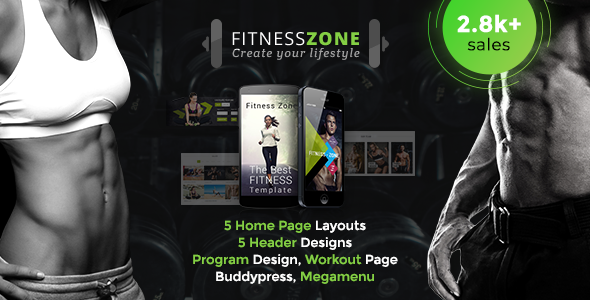
Stuck on your Fitness Zone WordPress theme? Let's fix it.
No endless back-and-forth. Just send us the details and we'll get it done.
No obligation · Replies within 1 hour · Quote within 1 day
Setup · Customization · Bug fixes · WooCommerce integration
About Fitness Zone WP Theme
Fitness Zone is a WordPress theme by Designthemes built for gyms, personal trainers, fitness studios, and sports facilities. It ships with a drag-and-drop page builder, pre-built demo content, and a set of fitness-specific shortcodes and widgets that cover class schedules, trainer profiles, pricing tables, and BMI calculators.
The theme supports WooCommerce for selling memberships and merchandise, integrates with popular booking plugins, and includes a handful of header and footer layout options. It runs on Designthemes’ custom framework, which gives you control over typography, colors, and layout without touching code. Initial setup is fast if you import the demo, but deeper configuration takes time to get right. The theme is regularly updated and comes with documentation and support access through Designthemes’ own ticket system.
Get matched with a Fitness Zone developer in under one day
Tell us about your Fitness Zone project. Small fixes, Fitness Zone theme customization, or a full website build, whatever you need, we've got it covered.
We'll connect you to the right Fitness Zone developers, define the scope, and get everything 100% clear.
You'll get one estimate, hire your preferred developer, and start collaborating.
Fitness Zone runs on Designthemes’ custom framework, which behaves differently from standard themes. Troubleshooting conflicts, building custom layouts, or extending the WooCommerce integration all go faster with someone who knows the framework. Codeable connects you with vetted WordPress developers who have hands-on experience with niche themes like this one. You post a project, get matched within 24 hours, and receive a free estimate before any work starts. No risk, no obligation.
Pros
- Includes fitness-specific components: class schedules, trainer profiles, BMI calculator, and pricing tables built in
- Demo importer gets a working site up quickly with realistic gym content
- WooCommerce support allows membership sales and merchandise without a separate theme
- Multiple header layouts and sticky nav options give layout flexibility without custom code
- Regular updates from Designthemes keep the theme compatible with current WordPress versions
Cons
- Built on a proprietary Designthemes framework that creates vendor lock-in and learning curve
- Visual Composer dependency makes migrating content to another theme difficult
- Theme Options panel is large and disorganized, making it hard to locate specific settings
- Default page speed scores are poor due to heavy asset loading without optimization
- Support is limited to Designthemes' own ticket system with inconsistent response times
Who is Fitness Zone for?
Gym and Fitness Club Websites
Fitness Zone is built for full gym operations. The class schedule shortcode, membership pricing tables, and trainer profile post type cover the core pages a gym needs. Combined with WooCommerce, you can sell memberships directly. A Fitness Zone developer can extend this with a booking plugin to handle class reservations and capacity limits.
Personal Trainer Portfolios
Personal trainers need a clean portfolio with a strong call to action. Fitness Zone’s trainer profile layouts and testimonial sections handle this well. A specialist can strip back the heavier gym-oriented elements and build a focused one-page or multi-page site that highlights services, credentials, transformation results, and a contact or booking form.
Yoga and Pilates Studios
Yoga and Pilates studios benefit from the class schedule and pricing table features. The theme’s softer layout options and Google Fonts flexibility let a Fitness Zone expert adapt the visual style away from the default gym aesthetic. Integration with a booking plugin like Amelia handles class sign-ups and instructor-specific scheduling cleanly.
CrossFit and Functional Fitness Boxes
CrossFit boxes need a site that communicates intensity and community. Fitness Zone’s full-width sections, video background support, and WOD or schedule display work well here. A Fitness Zone developer can customize the class schedule post type to display daily WODs and integrate with a members-only area for programming access.
Online Fitness Membership Sites
With WooCommerce built in, Fitness Zone can support an online membership model. A developer can set up subscription products using WooCommerce Subscriptions, restrict video or program content by membership tier using a plugin like MemberPress, and build a dashboard experience. The theme’s flexible page builder handles the front-end layout of member areas.

Customizing Fitness Zone
Out of the box, Fitness Zone gives you the Theme Options panel for global styling, but hitting its real potential takes more than clicking through defaults. A Fitness Zone WordPress Theme expert can map your brand properly by configuring the custom color palette, loading the right Google Fonts, and adjusting the class schedule layout to match your actual timetable.
More involved work includes building custom page templates using the included Visual Composer elements, setting up trainer profile post types with filtered archive pages, and connecting WooCommerce to membership tiers. If you need a custom booking flow or want to modify the BMI calculator widget, that requires direct PHP and CSS work inside the theme’s child theme. A Fitness Zone WordPress Theme specialist can handle those changes cleanly without breaking core functionality on updates.
Recommended plugins for Fitness Zone
Fitness Zone pairs well with a focused plugin stack. For performance, a caching plugin like WP Rocket combined with image optimization keeps load times down, especially on pages with large hero images and video backgrounds. Read more about WordPress performance optimization to get that right.
On the SEO side, Rank Math or Yoast integrates cleanly with the theme’s page builder output, but schema markup for gym classes and trainers needs manual setup. A proper WordPress SEO strategy matters when you’re competing in local fitness searches. Booking plugins like Amelia or Bookly also extend the theme’s built-in class schedule into a fully functional reservation system.
Not sure which plugins to use? This WordPress plugins directory covers the most popular options with reviews and setup guides.
Fitness Zone common issues
Fitness Zone WordPress Theme class schedule not displaying correctly
The class schedule shortcode relies on specific post type data structured correctly in the backend. If the table displays empty or misaligned, check that class post types are published and assigned to the right category. Also verify the shortcode parameters match your category slugs exactly. A common cause is a caching plugin serving stale output after content updates. Flush cache and test without shortcode caching enabled first.
Fitness Zone theme demo import failing or incomplete
Demo import failures in Fitness Zone are usually caused by server timeout limits or max upload size restrictions. Increase max_execution_time and upload_max_filesize in your php.ini or wp-config.php. Import in stages if the theme supports it. If dummy content imports but images fail, the server may be blocking remote requests. Check your host’s outbound HTTP settings. If this keeps failing, get professional help with the fix.
Fitness Zone WordPress Theme slow loading on mobile
Fitness Zone loads several scripts and large images by default, which hits mobile performance hard. Start by enabling lazy loading for images, deferring non-critical JavaScript, and removing unused Visual Composer elements from pages that do not need them. Use a CDN for static assets and compress images before upload. The theme does not self-optimize, so these steps need to be done manually or through a dedicated performance plugin stack.
Visual Composer not working after Fitness Zone theme update
After a Fitness Zone update, Visual Composer sometimes loses its activation or its bundled version conflicts with a separately installed copy. Go to the plugins list and check which version is active. The theme bundles its own licensed copy of WPBakery, so you should not have a standalone paid version running alongside it. Deactivate duplicates, re-save Theme Options, and check for JavaScript errors in the browser console pointing to the conflict.
Fitness Zone WordPress Theme WooCommerce pages broken layout
WooCommerce layout breaks in Fitness Zone usually come from missing theme support for WooCommerce templates or a CSS conflict. Check whether the theme has a woocommerce.php or a /woocommerce/ template folder. If custom overrides exist and WooCommerce has updated its templates, they may be outdated. Update template files to match the current WooCommerce version. For persistent issues, a bug fixing service can trace the conflict efficiently.
Fitness Zone trainer profile custom post type not showing
If trainer profiles are not showing on the front end, first confirm the custom post type is registered and posts are published. Check that the page template or shortcode used for the archive is set correctly. Permalink flush is often needed after post type registration changes. Go to Settings > Permalinks and click Save without changing anything. Also check that any page caching is not serving an old version of the archive page.
Fitness Zone theme header logo not displaying on mobile
Mobile logo issues in Fitness Zone are often tied to the sticky header or mobile header settings in Theme Options. The theme sometimes uses a separate logo setting for mobile that overrides the main logo. Check the Header settings section in Theme Options for a mobile-specific logo upload field. If the field is empty, upload the logo there separately. CSS conflicts from a child theme or plugin can also hide the logo element on small viewports.
Fitness Zone WordPress Theme booking plugin conflict
Booking plugin conflicts with Fitness Zone usually surface as broken calendar displays, missing form fields, or JavaScript errors on booking pages. Disable other plugins one by one to isolate the conflict. Amelia and Bookly both add their own scripts, which can collide with Visual Composer’s front-end editor scripts. Check whether the conflict disappears in the WordPress default theme. If it does, the issue is in Fitness Zone’s enqueued scripts. Professional debugging can resolve this faster.
Fitness Zone child theme not inheriting parent styles
A Fitness Zone child theme that does not inherit parent styles is almost always missing the correct wp_enqueue_scripts function in its functions.php. The child theme must explicitly enqueue the parent stylesheet using get_template_directory_uri() for the parent and get_stylesheet_directory_uri() for the child. Do not use @import in style.css for this. Also confirm the child theme’s Template: header in style.css matches the parent theme’s folder name exactly.
Fitness Zone theme typography settings not saving
Typography settings not saving in Fitness Zone Theme Options is typically a browser caching issue or a conflict with a security plugin blocking the options save request. Clear browser cache and test in incognito mode. If the save appears to work but reverts, check whether a plugin like Wordfence is blocking the admin-ajax.php request used by the options framework. Also check for JavaScript errors in the console that might be stopping the save function from completing.
Fitness Zone FAQ
Yes, Fitness Zone is purpose-built for gyms and fitness studios. It includes class schedule management, trainer profiles, BMI calculators, and pricing tables out of the box. It works well for gyms of any size, but you will get more from it with configuration work done by a Fitness Zone WordPress Theme expert who knows the Designthemes framework.
Yes, Fitness Zone includes native WooCommerce support. You can sell memberships, supplements, and branded merchandise directly. For subscription-based memberships, you will need WooCommerce Subscriptions as an add-on. A Fitness Zone WordPress Theme developer can set up the full membership purchase flow with tier-based access control.
Fitness Zone is built around WPBakery Page Builder (Visual Composer) and its shortcodes are tightly coupled to that builder. Switching to Elementor is possible but requires rebuilding all page content. The fitness-specific shortcodes will not transfer. A Fitness Zone specialist can advise whether a rebuild or migration to another theme makes more sense for your situation.
Go to Appearance > Import Demo Data after installing and activating Fitness Zone and its required plugins. Select the demo you want and click Import. Increase your server’s PHP memory limit and max execution time before importing to avoid timeouts. If the import stalls or images do not load, your hosting environment may need adjustments before it will complete.
Fitness Zone is responsive and adapts to mobile and tablet viewports. However, the default mobile experience is not always well-optimized out of the box, particularly for pages with heavy visual builder layouts. A Fitness Zone WordPress Theme expert can fine-tune breakpoints, improve mobile navigation, and reduce load times for mobile users specifically.
Fitness Zone includes a class schedule display but not a full booking system. You can show class times and instructors, but for actual reservations and capacity management you need a separate booking plugin like Amelia or Bookly. These integrate cleanly with the theme’s layout when configured correctly by a Fitness Zone WordPress Theme developer.
Create a folder in wp-content/themes/ named something like fitnesszone-child. Add a style.css with the correct Template: header pointing to the parent theme folder name. Then add a functions.php that enqueues both the parent and child stylesheets using wp_enqueue_scripts. Activate the child theme from Appearance > Themes.
Migrating away from Fitness Zone means rebuilding page content because WPBakery shortcodes do not transfer to other builders. Trainer profiles, class schedules, and custom post type content also need manual recreation. It is doable but time-consuming. A WordPress migration specialist can plan and execute this without data loss.
Fitness Zone loads multiple scripts, fonts, and Visual Composer assets on every page by default. Without optimization, this results in slow load times, especially on mobile. Common fixes include enabling caching, lazy loading images, deferring scripts, and using a CDN. The theme itself does not self-optimize, so these steps need to be applied manually or through a performance plugin.
Codeable is a vetted WordPress developer network where you can post your Fitness Zone project and get matched with an experienced developer within 24 hours. You get a free estimate before any commitment. FoxyConcept works through Codeable and specializes in theme-specific customization, bug fixing, and performance work for themes like Fitness Zone.
Hire a Fitness Zone WordPress Theme Expert
Whether you need a full site build, a specific feature added, or a bug fixed, working with a Fitness Zone WordPress Theme developer gets it done correctly and without shortcuts. Our developers on Codeable are vetted, experienced, and matched to your project within 24 hours. Get a Free Estimate and describe what you need. No obligation to hire, no upfront payment.
You'll need a free Codeable account so developers can ask questions and send their quotes.