Theratio WordPress Theme
by OceanThemes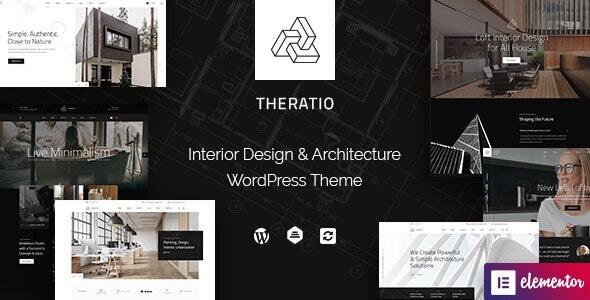
Stuck on your Theratio WordPress theme? Let's fix it.
No endless back-and-forth. Just send us the details and we'll get it done.
No obligation · Replies within 1 hour · Quote within 1 day
Setup · Customization · Bug fixes · WooCommerce integration
About Theratio WP Theme
Theratio is a WordPress theme built by OceanThemes, designed specifically for architecture firms, interior designers, and construction companies. It ships with a clean grid-based layout, full-width project galleries, and a set of purpose-built page templates that cover services, team profiles, and project case studies.
The theme is built on Elementor, so every section is editable without touching code. It includes multiple homepage demos, custom post types for projects, and WooCommerce compatibility for selling design services or digital products. Typography is handled through Google Fonts, and the layout responds well across device sizes. For studios that need a polished portfolio online fast, Theratio covers the core requirements without heavy configuration.
Get matched with a Theratio developer in under one day
Tell us about your Theratio project. Small fixes, Theratio theme customization, or a full website build, whatever you need, we've got it covered.
We'll connect you to the right Theratio developers, define the scope, and get everything 100% clear.
You'll get one estimate, hire your preferred developer, and start collaborating.
Most Theratio issues come down to one thing: the gap between what the demo looks like and what a real project requires. Codeable connects you with vetted WordPress developers who have worked with architecture and design themes before. You post your project, get a clear estimate, and only proceed if the scope and price work for you. No cold outreach, no guessing who is qualified. The developers on Codeable have been screened, which cuts out a lot of wasted time on both sides.
Pros
- Purpose-built for architecture and interior design portfolios with relevant page templates included
- Elementor-based layout means all sections are editable visually without writing PHP
- Multiple pre-built homepage demos covering different studio styles and project focuses
- Custom project post type with gallery support and categorization built in from the start
- WooCommerce compatible for studios that sell consultation packages or digital assets
Cons
- Heavily dependent on Elementor, so switching page builders later requires rebuilding pages
- Demo import can be slow and does not always load cleanly on shared hosting environments
- Limited built-in filtering for project archives without adding a third-party plugin
- Typography options in the customizer are basic and rely on Google Fonts only
- OceanThemes support response times can be slow for complex customization questions
Who is Theratio for?
Architecture Firms
Theratio’s project archive and full-width gallery layouts suit architecture firms that need to present completed buildings clearly. The case study format works for showing site context, design intent, and finished photography without needing a custom theme build from scratch.
Interior Design Studios
Interior design studios benefit from Theratio’s clean grid layouts and room for large images. The before-and-after project structure maps well to residential and commercial fit-out work. A Theratio specialist can extend it with client testimonials tied directly to project pages.
Construction Companies
Construction companies can use Theratio’s services templates to list trade specialisms and pair them with project galleries showing completed work. The team profile templates support licensing credentials and contact details without custom development for most standard needs.
Landscape Design Practices
Landscape designers need space for seasonal photography and project scale. Theratio handles both with full-width featured images and flexible grid columns. Category filtering by project type, garden scale, or location can be added by a Theratio developer using standard WordPress taxonomy.
Real Estate Development Agencies
Real estate developers can use Theratio to present completed developments, current projects, and upcoming sites. The WooCommerce integration supports basic enquiry or deposit workflows. Custom fields for floor plans, specifications, and location maps extend the theme usefully for this sector.

Customizing Theratio
Theratio gives you a solid starting point, but real client work usually requires going further than the demo content. A Theratio expert can restructure the project archive, build custom filtering by category or project type, and wire up Advanced Custom Fields to give your team control over project data without editing templates manually.
Common customization requests include adding animated counters, custom header layouts with sticky navigation, multi-language setup with WPML, and contact forms tied to specific service pages. If the demo layout does not match your brand, a Theratio developer can rebuild sections in Elementor with custom CSS, replace the default color scheme, and adjust spacing and typography to match a design brief precisely.
Recommended plugins for Theratio
Theratio pairs well with a focused set of plugins. Elementor Pro unlocks form widgets, popups, and dynamic content useful for project pages. WooCommerce handles service packages or digital downloads. WPML covers multilingual needs common in international design studios.
For speed, image optimization and caching are worth setting up early. Theratio’s gallery-heavy layouts benefit from lazy loading and a CDN. See the WordPress performance service for practical setup options. If you need search visibility, schema markup for services and local SEO configuration matters more than most themes suggest. The WordPress SEO service covers that ground properly.
Not sure which plugins to use? This WordPress plugins directory covers the most popular options with reviews and setup guides.
Theratio common issues
Theratio demo import fails or freezes
Demo import failures on Theratio are usually caused by PHP memory limits or max execution time set too low on the host. Raise memory_limit to at least 256MB and max_execution_time to 300 in php.ini or wp-config.php. If importing via the theme panel, try the XML import through WordPress Tools instead. Make sure all required plugins are active before importing. If it still hangs, a developer can import the demo manually and clean up any post conflicts.
Theratio header not showing on mobile
If the Theratio header disappears or breaks on mobile, check the Elementor header template assigned via the theme’s header builder. Mobile visibility settings in Elementor can hide sections unintentionally. Open the header template in Elementor, check each section’s responsive settings, and make sure no column is set to hidden on mobile. Also verify the sticky header option is not conflicting with a custom z-index on other elements.
Theratio project images not displaying correctly
Project images failing to display in Theratio are often a media regeneration issue after migration or a thumbnail size mismatch. Run the Regenerate Thumbnails plugin to rebuild image sizes after any server move. If images show broken in the Elementor gallery widget, check the attachment URL matches the current domain. For recurring image issues, the WordPress bug fixing service can diagnose and resolve media problems cleanly.
Theratio contact form not sending emails
Theratio uses Contact Form 7 or Elementor forms depending on the demo. If emails are not sending, the most common cause is the server’s default PHP mail function being blocked by the host. Install WP Mail SMTP and connect it to a transactional mail provider like Mailgun or SendGrid. Verify the from address matches a domain the mail server is authorized to send from. Test with the SMTP plugin’s send test tool before going live.
Theratio Elementor sections overlapping on tablet
Overlapping sections on tablet in Theratio are almost always caused by fixed pixel padding values that do not scale down. In Elementor, switch to tablet view in the editor and check section padding and column minimum height settings. Replace fixed pixel values with responsive values or percentages. Also check if any absolute-positioned elements inside sections lack a defined container, which causes them to break out on mid-size screens.
Theratio footer widgets not aligned
Misaligned footer widgets in Theratio usually come down to unequal content length across widget columns or a column width set in percentage that does not account for padding. Go to Appearance > Widgets and check if all footer widget areas have the same number of active widgets. In the customizer, adjust the footer column layout setting. If you have customized the footer via Elementor, check that flex alignment is set consistently across all widget containers.
Theratio custom fonts not loading
Custom fonts not loading in Theratio can be caused by a caching plugin serving an old stylesheet or a Content Security Policy on the host blocking external font requests. Clear all caches after updating font settings in the customizer. If using self-hosted fonts uploaded via a plugin like Use Any Font, verify the font-face declaration is in the correct stylesheet and not being overridden by a theme style. Check the browser console for any blocked resource errors.
Theratio WooCommerce pages showing unstyled layout
Unstyled WooCommerce pages in Theratio mean the theme’s WooCommerce stylesheet is not loading. This happens after a theme update that resets support declarations or when a child theme does not inherit the parent’s WooCommerce setup. Check that add_theme_support('woocommerce') is present. If using a child theme, copy the relevant woocommerce.css or add the support call in functions.php. For persistent styling issues, the WordPress bug fixing service can audit the template hierarchy.
Theratio page speed score low despite clean content
Theratio’s gallery-heavy layout loads a lot of image data by default. Enable lazy loading for images in Elementor settings, compress all project images before upload, and set up a caching plugin like WP Rocket or LiteSpeed Cache. Remove unused Elementor widget CSS by enabling the optimized asset loading option in Elementor’s performance settings. Also check if the Google Fonts load is triggering multiple requests and combine them into a single call where possible.
Theratio project category filter not working
If the project category filter in Theratio is not working, the issue is usually a missing or incorrectly enqueued JavaScript file for the isotope or MixItUp filtering library. Check the browser console for JS errors referencing filter scripts. Confirm the plugin or theme feature providing the filter is active and updated. If filtering was set up via a custom Elementor widget, check that the taxonomy slugs in the filter settings match the ones assigned to projects. Recheck after clearing cache.
Theratio FAQ
Theratio is a practical choice for architecture firms and design studios. It includes project post types, full-width gallery layouts, and service page templates that map directly to how architecture sites are typically structured. The Elementor base makes it editable without custom development for most standard setups.
Yes, Theratio is built on Elementor and works with Elementor Pro. Pro unlocks additional widgets like forms, popups, and dynamic content. Most of the demo templates use free Elementor features, but combining Theratio with Elementor Pro gives you more control over dynamic project data and conversion elements.
You can build from scratch without importing demo content. The theme’s Elementor templates and customizer settings are accessible without demo data. Starting fresh avoids cleaning up placeholder content but means more initial setup time. A Theratio developer can set up the structure and page templates without relying on the demo import.
Theratio uses WordPress custom taxonomies for project categories. Go to the Projects section in the WordPress admin and add categories there. You can then assign categories to individual projects and use them in archive page filters. For more advanced filtering with visual toggles, a filtering plugin like Ajax Load More or JetEngine is typically needed.
Theratio is compatible with WPML and Polylang for multilingual builds. String translation for theme-specific text requires WPML’s String Translation module or manual registration in the theme. Project post types and custom taxonomies need to be set as translatable in the WPML configuration. Testing the translated archive and single project templates is recommended after setup.
Yes, Theratio declares WooCommerce support and includes basic styling for shop, product, cart, and checkout pages. It suits studios selling consultation packages or downloadable assets. Complex store layouts may need custom template adjustments, but standard WooCommerce functionality works without modification.
Focus on image compression, lazy loading, and a caching plugin. Theratio’s portfolio layouts load large images by default, which hurts scores. Use WebP images, enable Elementor’s optimized CSS loading, and remove unused Google Fonts requests. A CDN makes a noticeable difference on image-heavy pages. See the WordPress performance service for a structured approach.
Yes. A Theratio specialist can handle layout customization, plugin integration, custom post type extensions, and performance work. Post your project on Codeable to get a scoped estimate from a vetted WordPress developer. There is no obligation to proceed after the estimate, and the whole process takes less than 24 hours to get responses.
Theratio works with Elementor (free and Pro), Contact Form 7, WooCommerce, WPML, and Yoast SEO. The theme’s demo content is built using these plugins. For performance, WP Rocket or LiteSpeed Cache are reliable additions. Smush or ShortPixel handle image compression. Advanced Custom Fields is useful for extending project data fields.
OceanThemes updates Theratio regularly to maintain WordPress core compatibility. Check the theme changelog on ThemeForest before updating to confirm compatibility with your current WordPress and Elementor versions. Always test updates on a staging environment first, particularly after major WordPress releases, to catch any template or widget conflicts before they affect the live site.
Hire a Theratio Developer
If your Theratio site needs custom functionality, a layout overhaul, or a specific fix that keeps coming back, working with a specialist saves time. Post your project and get a scoped estimate before committing to anything. Get a Free Estimate and describe what you need. A Theratio developer will review it and come back with a clear plan.
You'll need a free Codeable account so developers can ask questions and send their quotes.