HealthPress WordPress Theme
by InspiryThemes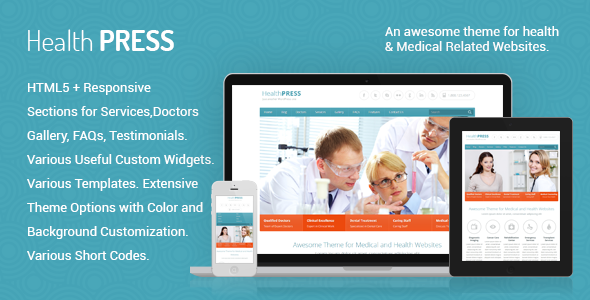
Stuck on your HealthPress WordPress theme? Let's fix it.
No endless back-and-forth. Just send us the details and we'll get it done.
No obligation · Replies within 1 hour · Quote within 1 day
Setup · Customization · Bug fixes · WooCommerce integration
About HealthPress WP Theme
HealthPress is a medical WordPress theme built by InspiryThemes, designed specifically for clinics, hospitals, doctors, and healthcare professionals. It ships with a patient appointment booking system, doctor profile pages, department listings, and a timetable for scheduling. The theme is built on a custom framework with Bootstrap, giving it a clean layout that works across devices.
HealthPress includes multiple pre-built page templates, a working contact form, and WooCommerce support for selling health products or services. It integrates with popular plugins like WPBakery Page Builder and Revolution Slider, which are bundled in the package. For a niche medical theme, it covers the core functionality most healthcare websites need without requiring a separate booking plugin out of the box.
Get matched with a HealthPress developer in under one day
Tell us about your HealthPress project. Small fixes, HealthPress theme customization, or a full website build, whatever you need, we've got it covered.
We'll connect you to the right HealthPress developers, define the scope, and get everything 100% clear.
You'll get one estimate, hire your preferred developer, and start collaborating.
HealthPress has enough moving parts that small configuration mistakes can break the appointment system or cause display issues across device sizes. A developer who knows the theme’s custom post types, plugin dependencies, and hook structure will get things right the first time. Through Codeable, you get matched with vetted WordPress developers who have hands-on experience with themes like HealthPress. No hiring process, no risk. Post your project and get a free estimate within 24 hours.
Pros
- Built-in appointment booking system with timetable and doctor profiles, no separate plugin needed
- Includes WPBakery Page Builder and Revolution Slider bundled at no extra cost
- Custom post types for doctors, departments, and services make content management organised
- WooCommerce ready for health product or prescription supplement stores
- Active support from InspiryThemes with regular updates and detailed documentation
Cons
- WPBakery Page Builder dependency makes switching page builders or going Gutenberg-native difficult
- Revolution Slider adds noticeable page weight and can hurt performance scores without optimisation
- Appointment system lacks advanced features like payment collection or SMS reminders without extra plugins
- Theme options panel can feel cluttered and some settings have unclear labels without consulting docs
- Heavy reliance on shortcodes means content is tied to the theme and harder to migrate later
Who is HealthPress for?
Private Medical Clinics
HealthPress suits private clinics that need a professional online presence with appointment booking, staff profiles, and service listings. The department and doctor post types map directly to how clinics organise their teams. A HealthPress developer can configure booking forms to route appointments to the right department automatically.
Individual Doctor or Specialist Practice
Solo practitioners benefit from HealthPress’s clean doctor profile layouts, testimonial sections, and appointment form. It presents credentials, specialisations, and availability in a format patients trust. A HealthPress expert can strip out multi-doctor features and focus the layout on a single-practitioner setup with a personal brand feel.
Dental Clinics
Dental practices need service pages, before-and-after galleries, and a clear booking process. HealthPress supports all three out of the box. The timetable feature handles multiple dentists’ schedules. A HealthPress specialist can extend this with custom service pricing tables and patient FAQ sections specific to dental care.
Hospital or Multi-Department Health Centre
Larger health centres with multiple departments get the most from HealthPress’s department post type and timetable system. Each department can have its own doctors, hours, and services. A HealthPress developer can build a filtered doctor directory that lets patients find the right specialist by department, condition, or availability.
Health and Wellness Centres
Yoga studios, physiotherapy centres, and wellness clinics can use HealthPress’s booking and service structure even outside traditional medicine. WooCommerce integration supports class packages or product sales. A HealthPress expert can restyle the theme to match a wellness brand while keeping the appointment and scheduling functionality intact.

Customizing HealthPress
HealthPress customization covers more ground than most medical themes, but it does require some technical knowledge to configure properly. The theme options panel controls typography, colours, layout widths, header styles, and footer settings. Appointment form fields, doctor profiles, and department pages are managed through custom post types, which need to be set up correctly from the start.
A HealthPress expert can handle the parts that slow most users down: custom appointment workflows, conditional logic on forms, colour scheme changes that go beyond the panel options, and integration with third-party booking or CRM systems. InspiryThemes provides documentation, but a HealthPress specialist saves significant time when the project involves custom department structures, multilingual support, or a non-standard layout.
Recommended plugins for HealthPress
HealthPress works with WooCommerce for a pharmacy or supplement store, and it supports popular form plugins like Gravity Forms for more advanced patient intake forms. For site speed, image optimisation and caching plugins are important given the theme’s bundled sliders and large hero sections. A full WordPress performance audit is worthwhile before launch.
HealthPress also pairs well with SEO plugins like Yoast or Rank Math, but structured data for medical content needs manual setup. A proper WordPress SEO strategy for healthcare sites should include local SEO, schema for doctors and clinics, and page-level optimisation for each department or service.
Not sure which plugins to use? This WordPress plugins directory covers the most popular options with reviews and setup guides.
HealthPress common issues
HealthPress appointment form not sending email notifications
Email delivery failures in HealthPress are almost always a server SMTP issue, not a theme bug. WordPress’s default mail function gets blocked by most hosting providers. Install an SMTP plugin like WP Mail SMTP and configure it with your email provider’s credentials. Test the form after setup. If the form still fails to submit, check for JavaScript console errors that may point to a conflict with another plugin.
HealthPress doctor timetable not displaying correctly
Timetable display issues usually come from incorrect data entry in the doctor post type or a caching plugin serving a stale version of the page. First, clear all caches and reload. Then check each doctor’s assigned department and hours in the backend. If the grid still breaks, inspect the page with browser dev tools to identify any CSS conflicts introduced by a plugin or child theme override.
HealthPress Revolution Slider not showing on homepage
If Revolution Slider is not showing on the HealthPress homepage, check that the slider is assigned correctly in the page’s meta settings. Open the page in the backend and confirm the slider alias matches what’s entered in the theme settings. Also verify that Revolution Slider is activated and not showing a licence warning. A plugin conflict or missing activation can cause the slider container to render empty without an error message.
HealthPress theme update broke the layout
Layout breaks after a HealthPress update usually mean a CSS or template file conflict with your child theme. Compare the updated parent theme template files against any overrides in your child theme. Updates to style.css or core page templates often need to be merged manually. If you do not have a child theme, some custom code may have been overwritten. The WordPress bug fixing service can identify and restore the affected files quickly.
HealthPress WPBakery elements not loading on page
WPBakery elements failing to load in HealthPress often point to a missing or outdated plugin version. Check that WPBakery is updated to a version compatible with your current HealthPress release. Also verify there are no JavaScript errors in the browser console blocking the page builder scripts. Deactivate other plugins one by one to rule out a script conflict, particularly with security or optimisation plugins that defer or block JS.
HealthPress mobile menu not working
A broken mobile menu in HealthPress is typically a JavaScript conflict or a CSS z-index issue introduced by a plugin. Open the browser console on mobile or in responsive mode and check for JS errors. If the menu toggle fires but the menu does not open, a z-index conflict with a sticky header plugin or a custom CSS override is likely the cause. Review any custom CSS added to the child theme or Customizer for menu-related rules.
HealthPress custom logo not displaying in header
If your custom logo does not appear in the HealthPress header, check the Customizer under Site Identity first. HealthPress also has its own logo upload field in the theme options panel, which takes priority over the Customizer setting. If both are set correctly but the logo still does not show, check for a caching plugin serving old header markup. Clear cache and hard refresh the browser. Also confirm the image file path is accessible and the file was not deleted from the media library.
HealthPress department pages showing 404 error
Department pages returning 404 errors in HealthPress almost always mean the WordPress permalink structure needs to be refreshed. Go to Settings, Permalinks, and click Save Changes without making any edits. This flushes the rewrite rules and re-registers the theme’s custom post type URLs. If the 404 persists, check that the Department custom post type is still registered, which can be disrupted by theme deactivation or a failed update. The WordPress bug fixing service can restore custom post type registration if needed.
HealthPress slow loading speed after adding doctors
HealthPress can become slow when many doctor profiles and department pages load unoptimised images and multiple plugin scripts. Start by compressing all images in the media library using a tool like ShortPixel. Then audit scripts loaded by Revolution Slider and WPBakery, both of which add significant page weight. A page caching plugin and a CDN will reduce load times noticeably. For a full diagnosis, a WordPress performance review will identify the specific bottlenecks on your installation.
HealthPress contact form not working after plugin update
Contact form failures after a plugin update in HealthPress are usually caused by a JavaScript conflict between the form plugin and another recently updated plugin. Check the browser console for errors on the form page. If using Contact Form 7, also verify the reCAPTCHA settings are still valid. SMTP configuration sometimes resets after updates, so re-test email delivery. If the issue started with a specific update, rolling back that plugin temporarily will confirm whether it is the source of the conflict.
HealthPress FAQ
InspiryThemes releases regular updates to keep HealthPress compatible with current WordPress versions. Always check the changelog before updating to confirm compatibility with your PHP version and bundled plugins. Running the update on a staging site first is the safest approach, especially if you have customisations applied.
HealthPress is built around WPBakery Page Builder, not Elementor. You can install Elementor alongside it, but the pre-built demo content and shortcodes are designed for WPBakery. Using Elementor on HealthPress requires rebuilding page layouts from scratch, which a HealthPress developer can handle if you prefer the Elementor workflow.
Yes. HealthPress works well for a single doctor or specialist practice. You can create one doctor profile, hide or remove the multi-doctor directory features, and use the appointment form as a straightforward contact and booking tool. A HealthPress expert can configure this setup quickly.
HealthPress includes a built-in appointment request system based on custom post types and forms. It handles basic scheduling and timetables but does not process payments or send SMS reminders natively. For more advanced booking needs, it can be extended with a dedicated booking plugin.
Always use a child theme before making any code-level changes to HealthPress. This keeps your customisations separate from the parent theme files so updates do not overwrite them. Changes made through the theme options panel and Customizer are stored in the database and are not affected by theme updates.
HealthPress does not handle GDPR compliance automatically. You need to add a cookie consent plugin, update your privacy policy pages, and ensure any forms collect only necessary data with appropriate consent checkboxes. A WordPress developer familiar with healthcare sites can help configure this correctly.
HealthPress is translation-ready and includes a .pot file for use with tools like Poedit or WPML. For full multilingual support, WPML or Polylang are the standard choices. A HealthPress specialist can set up the translation workflow so doctor profiles and department pages are fully translatable.
Yes, HealthPress includes WooCommerce compatibility. You can add a shop section for health products, supplements, or paid consultations. Basic WooCommerce styling is included, though a HealthPress developer may need to adjust the shop templates to match your clinic’s visual style closely.
HealthPress developer rates on Codeable typically range based on project scope. Simple fixes or configuration tasks cost less than full builds. You can post your project on Codeable and receive a free, no-obligation estimate from a vetted specialist before committing to anything.
Migrating an existing medical site to HealthPress is possible but requires careful planning. Content like doctor profiles and department pages needs to be mapped to the theme’s custom post types. A WordPress migration specialist can handle the data transfer and ensure the new HealthPress setup matches your existing content structure.
Hire a HealthPress Developer or Expert
Whether you need a HealthPress expert to build your clinic site from scratch, fix a broken appointment form, or customise the theme beyond its default settings, the right developer makes the difference. Work is handled through Codeable, a vetted WordPress developer network. You get a free estimate with no obligation to hire. Get a Free Estimate and describe your project today.
You'll need a free Codeable account so developers can ask questions and send their quotes.