PRESSO WordPress Theme
by envirra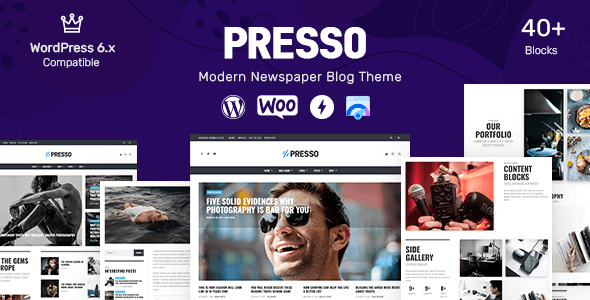
Stuck on your PRESSO WordPress theme? Let's fix it.
No endless back-and-forth. Just send us the details and we'll get it done.
No obligation · Replies within 1 hour · Quote within 1 day
Setup · Customization · Bug fixes · WooCommerce integration
About PRESSO WP Theme
PRESSO is a WordPress theme by envirra built around a minimal, magazine-style layout. It suits content-heavy sites that need clean typography and a structured grid without unnecessary visual noise. The theme ships with multiple homepage layouts, a customizable header, and support for the WordPress Customizer, making it straightforward to configure without touching code.
PRESSO handles post formats well, including video, gallery, and standard articles, which makes it a practical choice for editorial teams and bloggers. It is translation-ready and built with basic SEO structure in mind. Performance is decent out of the box, though like most feature-rich themes, it benefits from proper caching and image optimization. If you need a content-first design with a clean grid and solid typography defaults, PRESSO is worth a serious look.
Get matched with a PRESSO developer in under one day
Tell us about your PRESSO project. Small fixes, PRESSO theme customization, or a full website build, whatever you need, we've got it covered.
We'll connect you to the right PRESSO developers, define the scope, and get everything 100% clear.
You'll get one estimate, hire your preferred developer, and start collaborating.
Most PRESSO customization questions come down to one thing: knowing where envirra drew the lines in their code. A general WordPress developer can work through it, but a developer who has worked with PRESSO specifically will move faster and make fewer assumptions. Through Codeable, you get matched with vetted WordPress developers who have demonstrated real project experience. No auctions, no guesswork. You describe your project, get an estimate, and decide whether to proceed. There is no obligation to hire.
Pros
- Clean, grid-based magazine layout that works well for text-heavy content sites
- Multiple homepage layout options available without requiring page builder plugins
- Good support for WordPress post formats including video, gallery, and quote
- Translation-ready with .po/.mo file support for multilingual setups
- Customizer-based settings cover most common design adjustments without code
Cons
- Limited WooCommerce styling out of the box, requires extra work for shop pages
- Template overrides require a child theme, which new users often skip and regret later
- Typography customization is functional but limited compared to page builder themes
- No built-in mega menu support, which is a gap for large editorial sites
- Plugin compatibility issues can surface with heavily customized setups, especially for forms and sliders
Who is PRESSO for?
Online Magazine
PRESSO’s grid layout and post format support make it a natural fit for online magazines publishing multiple articles daily. Categories surface cleanly on the homepage, and the structured layout keeps readers moving through content. A PRESSO developer can extend the grid to handle sponsored content slots or custom ad placements without disrupting the editorial flow.
Personal Blog
For personal bloggers, PRESSO offers a clean reading experience without the overhead of a full page builder. Typography is the focus, and the sidebar options give enough flexibility for social links, recent posts, and newsletter widgets. Setup is fast, and a PRESSO specialist can handle any tweaks to match your personal brand within a few hours of work.
News Website
News sites need fast load times and clear category navigation. PRESSO handles both reasonably well, and with proper caching and image optimization added, it performs solidly under consistent traffic. Breaking news tags, category filters, and featured post areas all work within PRESSO’s default structure, with room for a developer to build custom query templates for specific sections.
Photography Blog
Photography bloggers benefit from PRESSO’s gallery post format support and clean image presentation. The minimal design keeps focus on visuals rather than chrome. A PRESSO expert can add lightbox functionality, custom portfolio templates, or a masonry grid layout to better showcase image-heavy content without overcomplicating the base theme.
Niche Content Publisher
Niche publishers covering topics like travel, food, or finance need a theme that organizes depth of content clearly. PRESSO’s category and tag structure supports that well. With the right developer, you can add custom taxonomy landing pages, content recommendation blocks, and structured data markup to strengthen topical authority and search performance.

Customizing PRESSO
PRESSO gives you a reasonable amount of control through the WordPress Customizer. You can adjust color schemes, typography settings, header layout, and widget areas without writing a line of CSS. The theme also supports custom logos, sticky navigation, and sidebar positioning per post or page.
Where things get more involved is when you need structural changes: custom post type templates, non-standard grid configurations, or deeper WooCommerce integration. That is where a PRESSO expert becomes necessary. A developer familiar with envirra’s codebase can build child themes, override templates cleanly, and extend functionality without breaking future updates. If your customization needs go beyond what the Customizer offers, working with a PRESSO specialist will save you significant time and avoid the technical debt that comes from hacking the parent theme directly.
Recommended plugins for PRESSO
PRESSO works well with standard WordPress plugin ecosystems. For performance, pairing it with a caching plugin and a CDN makes a measurable difference, especially on image-heavy editorial sites. You can read more about that on our WordPress performance optimization page.
For search visibility, PRESSO’s clean markup is a solid foundation, but you still need proper schema, sitemap configuration, and meta control from a dedicated SEO plugin. If you want to get more out of PRESSO on the search side, our WordPress SEO optimization service covers the full setup.
Not sure which plugins to use? This WordPress plugins directory covers the most popular options with reviews and setup guides.
PRESSO common issues
PRESSO homepage layout not displaying correctly after update
Homepage layout breaks after an update usually point to a conflict between the updated theme files and cached page output. Start by clearing your caching plugin and any server-level cache. If the layout is still broken, check whether you modified the parent theme directly rather than using a child theme. Direct edits get overwritten on update. A PRESSO developer can audit the diff and restore your layout through proper child theme overrides.
PRESSO featured image not showing on blog posts
If featured images are not showing on blog posts, check three things: whether the image is actually set in the post editor, whether your image sizes have been regenerated after the theme was activated, and whether a plugin is filtering or removing post thumbnail support. Running the Regenerate Thumbnails plugin often fixes size mismatches. If the problem persists, the issue may be in PRESSO’s template files and worth a proper look from a WordPress bug fixing specialist.
PRESSO sidebar disappearing on mobile
PRESSO sidebars are typically hidden on mobile via CSS media queries. If your sidebar is disappearing unexpectedly, check whether a caching plugin is serving a mobile-optimized version that strips sidebar markup entirely. Also verify that your active mobile plugin or theme option is not overriding the layout. If you need the sidebar visible on mobile, a PRESSO developer can adjust the breakpoints in a child theme stylesheet without touching core files.
PRESSO custom logo not appearing in header
Custom logos failing to appear in the PRESSO header are usually a Customizer publishing issue or a caching problem. Go to Appearance, Customizer, Site Identity, and re-upload the logo. Hit Publish, then clear all caches. If the logo field is missing entirely, confirm that PRESSO’s functions.php registers add_theme_support for custom-logo. A missing support declaration can happen if a child theme’s functions.php is overriding the parent without calling the parent functions correctly.
PRESSO typography settings not saving in Customizer
Typography settings that do not save in the PRESSO Customizer are often caused by a JavaScript conflict from another plugin, a permissions issue preventing writes to the database, or a caching layer intercepting the save. Open your browser console while saving and look for JS errors. Disable plugins one at a time to isolate the conflict. If settings save but do not display, a CSS specificity conflict from another plugin may be overriding PRESSO’s font declarations.
PRESSO social icons not showing in widget area
Social icons not appearing in PRESSO widget areas usually comes down to one of two issues: the widget was not saved correctly, or the icon font the theme relies on is not loading. Check your browser’s network tab for any blocked or failed font requests. Ad blockers and aggressive security headers can block icon font files. If the font is loading but icons still do not display, the widget configuration itself may need to be re-entered and saved. Contact a WordPress bug fixing service if the problem persists across browsers.
PRESSO page template showing blank white screen
A blank white screen on a PRESSO page template is almost always a PHP error being suppressed. Enable WP_DEBUG in your wp-config.php file temporarily to surface the actual error message. Common causes include a missing closing tag in a customized template file, a plugin function that does not exist being called from PRESSO’s template, or a memory limit being hit on complex pages. Fix the specific error shown in the debug log rather than guessing.
PRESSO related posts section not working
PRESSO’s related posts section depends on either a built-in query or a plugin integration, depending on the theme version. If it stops working, check whether a recent plugin update broke the expected function call. If PRESSO uses a custom query, also verify that the post category or tag structure has not changed in a way that returns zero results. An empty result set with no fallback will make the section appear broken when it is actually just returning nothing.
PRESSO contact page not sending emails
Contact form emails not sending from a PRESSO site is almost never a theme issue. It is nearly always a mail delivery problem. WordPress’s default wp_mail function relies on the server’s sendmail, which most hosting providers block or rate-limit. Install an SMTP plugin like WP Mail SMTP and configure it with your email provider’s outgoing mail settings. Once SMTP is configured correctly, form submissions from any plugin on the PRESSO site will route through it reliably. Check your spam folder first as a quick test.
PRESSO theme slowing down site load time
If PRESSO is slowing your site down, start with a performance audit using GTmetrix or PageSpeed Insights to identify exactly what is causing the delay. Common culprits include unoptimized images, render-blocking scripts from the theme or plugins, and no caching layer in place. PRESSO itself is not a particularly heavy theme, so the slowdown is usually environmental. Our WordPress bug fixing service includes performance diagnosis and can help you pinpoint whether the bottleneck is theme-side or elsewhere in the stack.
PRESSO FAQ
PRESSO’s update cadence from envirra has slowed in recent years, which is worth checking before you build a new site on it. Verify the last update date on the theme’s ThemeForest or envirra product page. If updates have stalled, a PRESSO developer can audit the codebase for compatibility with your current WordPress version and patch any deprecated function calls before they cause problems.
PRESSO has basic WooCommerce compatibility, but shop pages and product templates do not receive the same styling attention as the editorial side of the theme. Simple stores work without major issues. If you need a polished shop experience with custom product layouts or checkout modifications, a PRESSO specialist will need to write targeted CSS and template overrides to bring the WooCommerce pages in line with the rest of the design.
PRESSO works with Gutenberg since it uses standard WordPress template structure, though it was not designed with full-site editing in mind. Elementor can be used alongside PRESSO for specific pages, but mixing a classic theme with a page builder across the entire site creates inconsistencies in layout and performance. A PRESSO developer can advise on the right approach depending on how much of the site you actually need to customize.
Yes, you should always use a child theme with PRESSO before making any code-level customizations. Without a child theme, every PRESSO update will overwrite your changes. Creating a child theme takes about ten minutes and protects all your custom CSS and template modifications. If you have already customized the parent theme directly, a PRESSO developer can migrate those changes into a child theme safely.
PRESSO’s magazine layout is configured through the homepage template settings in the Customizer. You select which categories feed into each grid section and set the number of posts per block. If the default grid options do not match your editorial structure, a PRESSO expert can build custom homepage template sections using WordPress query arguments to pull exactly the content you need into each zone.
PRESSO uses clean semantic HTML, which gives it a reasonable SEO baseline. It does not ship with schema markup or advanced meta control built in. For serious SEO work, you will want a plugin like Rank Math or Yoast on top of the theme. The theme’s code structure does not fight against SEO plugins, so they integrate without conflict in most standard setups.
Yes. The most direct route is to post your project through Codeable, where vetted WordPress developers with experience on themes like PRESSO can review your requirements and provide a free estimate. You are not obligated to hire after getting the estimate. It is a low-risk way to scope the work and understand actual cost before committing to anything.
PRESSO’s Customizer may include a Google Fonts selector depending on the version. If your desired font is not listed, you can enqueue it manually through a child theme’s functions.php file using wp_enqueue_style and then reference it in your child theme’s style.css. Avoid adding fonts directly to the parent theme’s files since updates will remove your changes.
PRESSO is translation-ready and works with WPML and Polylang without major conflicts. The theme ships with a .pot file for translation. For full multilingual setups, you will also want to ensure that any plugins you use alongside PRESSO are WPML-compatible. A PRESSO developer can help configure the multilingual structure if you are building a site targeting multiple language markets.
PRESSO performs well on any hosting that provides adequate PHP memory and decent I/O speed. For content-heavy sites, managed WordPress hosting from providers like Kinsta, WP Engine, or Cloudways gives you the caching and CDN infrastructure that makes the biggest difference at scale. Shared hosting works for low-traffic sites but tends to create bottlenecks once traffic grows consistently past a few thousand visits per day.
Hire a PRESSO Developer for Your Project
Whether you need a PRESSO expert for a one-time customization, a full site build, or ongoing development work, the process is straightforward. Post your project through our team, get a free estimate from a vetted developer, and move forward only if it makes sense for you. No pressure, no hidden costs. Get a free estimate and see what your PRESSO project would actually cost.
You'll need a free Codeable account so developers can ask questions and send their quotes.