XStore WordPress Theme
by 8theme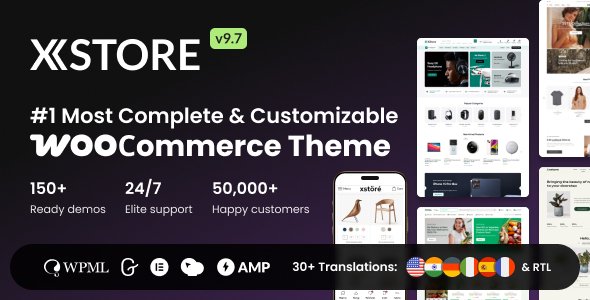
Stuck on your XStore WordPress theme? Let's fix it.
No endless back-and-forth. Just send us the details and we'll get it done.
No obligation · Replies within 1 hour · Quote within 1 day
Setup · Customization · Bug fixes · WooCommerce integration
About XStore WP Theme
XStore is a WooCommerce theme built by 8theme with a focus on eCommerce performance and flexibility. It ships with over 100 pre-built shop demos, a dedicated product page builder, and a custom header and footer builder. The theme integrates tightly with WooCommerce, offering features like quick view, ajax product filters, wishlist, compare, and a sticky add-to-cart bar out of the box.
8theme maintains XStore actively, with regular updates that track WooCommerce and WordPress core changes. The $39 Envato license includes 6 months of support, which is standard for ThemeForest. XStore is built on a modular system, so you enable only what you need, keeping the codebase relatively lean compared to many bloated eCommerce themes. It is a solid starting point for stores that want control over layout without writing everything from scratch.
Get matched with a XStore developer in under one day
Tell us about your XStore project. Small fixes, XStore theme customization, or a full website build, whatever you need, we've got it covered.
We'll connect you to the right XStore developers, define the scope, and get everything 100% clear.
You'll get one estimate, hire your preferred developer, and start collaborating.
XStore has a lot of moving parts. The demo importer, the 8theme plugin dependencies, the product builder, and third-party plugin conflicts can all create friction if you’re not familiar with the theme’s structure. Hiring a vetted XStore specialist through Codeable means you get a developer who has worked with the theme before, not someone figuring it out on your time. Projects are estimated upfront, and you only hire if the estimate works for you. No retainers, no guesswork.
Pros
- 100+ pre-built shop demos covering most niches, importable in one click
- Dedicated product page builder lets you rearrange WooCommerce elements without template edits
- Bundles premium plugins like wishlist, compare, and ajax filters at no added cost
- Active development by 8theme with consistent WooCommerce compatibility updates
- Modular feature system lets you disable unused components to reduce overhead
Cons
- Relies heavily on the 8theme core plugin, creating tight coupling that complicates theme switching
- WPBakery is included but feels dated; Elementor support exists but is secondary to the native builder
- Default asset loading can be heavy on stores with many features enabled, requiring manual optimization
- ThemeForest support is limited to 6 months unless extended, and response times vary
- Some advanced layout options are buried in nested panels, making the learning curve steeper than expected
Who is XStore for?
Fashion and Apparel Stores
XStore has multiple fashion-specific demos with lookbook layouts, size guide support, and variation swatches built in. An XStore developer can configure color and image swatches, set up a sticky add-to-cart for mobile shoppers, and build out collection landing pages that match brand guidelines without custom plugin stacks.
Electronics and Tech Shops
The theme handles complex product data well. Specification tables, comparison features, and layered filtering by attribute work out of the box. An XStore specialist can configure tabbed product specs, set up category-level filters for memory or storage variants, and wire up a quick comparison sidebar that keeps shoppers on the page.
Home Decor and Furniture
XStore’s room scene demos and large image layouts suit furniture and home goods stores. The theme supports fullscreen product galleries, video embeds in product pages, and room builder-style lookbook sections. An XStore developer can adapt these demos to match a specific brand aesthetic while keeping checkout conversion paths clean.
Health and Beauty eCommerce
Health and beauty stores often need ingredient lists, certifications, and before-after content alongside standard product data. XStore’s product page builder makes this straightforward to configure without plugin overhead. An XStore expert can also set up subscription product flows using WooCommerce Subscriptions alongside the theme’s standard purchase path.
Multi-Vendor Marketplaces
XStore is compatible with Dokan and WCFM for multivendor setups. An XStore developer can integrate vendor dashboards, configure per-vendor store pages using the theme’s layout system, and handle the permission and styling work needed to make vendor storefronts look consistent with the main site design.

Customizing XStore
XStore uses its own Page Builder panel alongside WPBakery and Elementor compatibility, giving developers multiple paths for layout work. The product page builder is the standout feature, letting you rearrange product detail elements without touching templates. Headers, footers, and category pages are all customizable through dedicated builders.
For deeper work, an XStore expert can extend the theme using its built-in hooks and the 8theme child theme framework. Custom product tabs, branded checkout flows, conditional headers for different product categories, and AJAX-heavy filter setups are common customization requests. If you need something beyond the theme panel options, an XStore developer can work directly with WooCommerce template overrides and the theme’s structured SCSS variables to keep changes upgrade-safe and consistent across the store.
Recommended plugins for XStore
XStore bundles several premium plugins at no extra cost, including Swiper-based product sliders, a wishlist plugin, and the 8theme core plugin that powers most of the theme’s eCommerce features. It also supports popular extensions like YITH WooCommerce plugins, WooCommerce Subscriptions, and Dokan for multivendor setups.
For stores focused on speed, pairing XStore with proper caching and image optimization is important since the theme loads several scripts by default. A developer can audit and optimize asset loading to keep scores high. See our WordPress performance service for that. If organic traffic matters, the theme is compatible with Rank Math and Yoast. Our WordPress SEO service covers technical SEO tuning on top of the theme layer.
Not sure which plugins to use? This WordPress plugins directory covers the most popular options with reviews and setup guides.
XStore common issues
XStore demo import fails or gets stuck
Demo import failures in XStore are usually caused by server memory limits, execution time limits, or a missing required plugin. Set memory_limit to at least 256MB and max_execution_time to 300 in your php.ini or wp-config.php. Make sure the 8theme Core plugin is installed and active before importing. If the import stalls on media files, try importing without media first, then run it again for images only.
XStore product page builder not saving changes
When the XStore product page builder won’t save, the most common cause is a JavaScript conflict with another plugin or a nonce timeout on slower connections. Open the browser console and check for JS errors. Disable other plugins temporarily to isolate the conflict. If saving times out, increase PHP max_input_vars to 5000 or higher. If the issue persists after those steps, a WordPress bug fixing specialist can trace the exact conflict.
XStore header not showing on mobile
XStore uses separate header configurations for desktop and mobile. If the mobile header is not showing, check that you have a mobile header assigned under XStore Settings > Header Builder. Each header template has a visibility setting per device breakpoint. Also confirm the 8theme Core plugin is active, since the header builder depends on it. Clearing your caching plugin after making changes is required for header updates to appear.
XStore AJAX filter not working after update
AJAX filter breakage after an XStore or WooCommerce update is usually a script handle conflict or a changed filter hook. First, clear all caches including server-side and CDN. Then check if the 8theme Core plugin is on its latest version matching the theme version. If the filter widget shows but returns no results or reloads the full page, a JavaScript console error will usually point to the broken handler. Regenerate WooCommerce product lookup tables under WooCommerce > Status > Tools as well.
XStore wishlist button disappeared
The wishlist in XStore is powered by the bundled 8theme Wishlist plugin. If the button disappears, confirm the plugin is installed and active under Plugins. Then go to XStore Settings > Shop and verify the wishlist option is enabled. The button also depends on the product card template. If you are using a heavily customized product loop, the wishlist shortcode or hook may have been removed. Re-add it through the product card builder in XStore settings.
XStore quick view popup showing blank
A blank XStore quick view popup is almost always caused by a PHP error in the product template or a JavaScript conflict. Enable WP_DEBUG temporarily to catch template errors. Check that no plugin is conflicting with XStore’s quick view modal script by disabling plugins one at a time. Also verify that the quick view is enabled under XStore Settings > Shop > Quick View, and that the 8theme Core plugin is up to date. If the issue follows a WooCommerce update, check 8theme’s changelog for a patch. For persistent issues, see our WordPress bug fixing service.
XStore child theme not applying custom CSS
If custom CSS in an XStore child theme is not applying, first confirm the child theme’s style.css has the correct Template: xstore header and the child theme is active. XStore’s main stylesheet loads after most child theme styles by default. Add your CSS via the child theme’s functions.php using wp_enqueue_style with a later priority, or use the Additional CSS field in the Customizer for quick overrides that load last in the stack.
XStore compatible with WooCommerce latest version
8theme generally releases XStore compatibility updates within a few days of major WooCommerce releases. Check the ThemeForest changelog or 8theme’s changelog page to confirm the current theme version supports your installed WooCommerce version. If you updated WooCommerce before an XStore patch was available, you may see layout or functional regressions. Keep both in sync and avoid updating either on a live store without testing on staging first.
XStore page builder conflict with Elementor
XStore supports Elementor but its native page builder runs separately. Conflicts usually appear when both try to control the same template, such as the product page. Assign one builder per template type. If Elementor is your primary builder, disable XStore’s product page builder for those templates. JavaScript conflicts between Elementor widgets and XStore scripts can be resolved by loading Elementor in compatibility mode or dequeuing conflicting handles. A WordPress bug fixing developer can trace asset conflicts efficiently.
XStore checkout page layout broken
A broken XStore checkout layout is usually caused by a CSS conflict from a plugin, a missing WooCommerce template file, or a theme update that changed checkout markup. Start by switching to a default WooCommerce checkout by temporarily disabling XStore customizations. If checkout renders correctly without the theme’s custom styles, the issue is a CSS override. Check XStore’s checkout settings panel and disable any custom checkout layout option, then re-enable and restyle incrementally to find the breaking rule.
XStore FAQ
Yes. XStore is built specifically for WooCommerce and integrates tightly with it. Features like AJAX filters, quick view, wishlist, compare, variation swatches, and a product page builder are all WooCommerce-aware. It is one of the more capable WooCommerce themes on ThemeForest and suits stores that need layout control without heavy custom development.
XStore is sold on ThemeForest for $39 for a regular license, which covers one site. That includes 6 months of 8theme support and lifetime updates. Extended support can be purchased for an additional fee. The license includes several bundled premium plugins that would otherwise cost extra, making the price competitive for a full-featured WooCommerce theme.
XStore is compatible with Elementor. You can build pages using Elementor page builder alongside XStore’s native header, footer, and product builders. The two can coexist but should be kept to separate template responsibilities to avoid conflicts. For product pages specifically, use one builder consistently rather than mixing both on the same template.
Go to XStore Settings > Import Demo in your WordPress dashboard. Select a demo and choose whether to import content with or without media. Make sure the 8theme Core plugin is active first. Your server needs at least 256MB PHP memory and a 300-second execution time for imports to complete without timing out. Importing to a fresh installation avoids content conflicts.
XStore is listed as WPML-compatible. The theme’s text strings can be translated using WPML’s string translation module, and WooCommerce product data works with WPML’s WooCommerce Multilingual add-on. Custom headers and layouts built with XStore’s builder require per-language configuration within WPML. Testing on a staging site before going multilingual on production is strongly recommended.
XStore is designed for WooCommerce stores. While you can technically activate it on a site without WooCommerce, many features and settings panels depend on WooCommerce being present. For non-eCommerce sites, XStore is not the right choice. There are better general-purpose themes that do not carry the WooCommerce dependency overhead.
Before updating XStore, back up your site files and database. If you are using a child theme, your customizations will be preserved, but test on staging first. Update the 8theme Core plugin at the same time as the theme since the two are versioned together. After updating, clear all caches and check key pages including product pages, cart, and checkout for visual or functional regressions.
Yes. 8theme provides an official XStore child theme that you can download from your ThemeForest account. Using the child theme is the correct way to make code customizations that survive theme updates. Custom template overrides, functions, and style additions should all go into the child theme rather than editing the parent theme files directly.
Yes. An XStore developer can customize the checkout page layout, styling, and field configuration. XStore includes checkout customization options in its settings panel, and a developer can extend those with custom WooCommerce hooks for field reordering, custom sections, or branded styling. More complex work like a one-page checkout or multi-step checkout requires additional plugin integration alongside the theme.
Start by disabling unused XStore features in the settings panel to reduce script and style loading. Use a caching plugin and a CDN, and enable lazy loading for product images. Minify and combine scripts carefully since XStore’s scripts have dependencies. For deeper optimization like critical CSS extraction and third-party script deferral, see our WordPress performance service.
Hire an XStore Developer for Your WooCommerce Store
Whether you need a full XStore build from a demo, a custom product page layout, a plugin conflict resolved, or performance work on an existing store, a vetted XStore developer can scope and deliver it cleanly. Work is done through Codeable, so every developer is pre-screened and reviewed by real clients. Get a free estimate and describe your project. You’ll have developer options within 24 hours and no obligation to proceed.
You'll need a free Codeable account so developers can ask questions and send their quotes.