Brooklyn WordPress Theme
by UnitedThemes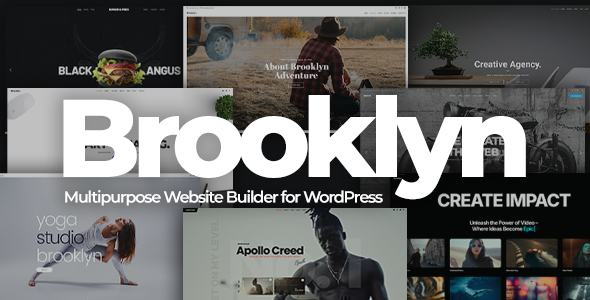
Stuck on your Brooklyn WordPress theme? Let's fix it.
No endless back-and-forth. Just send us the details and we'll get it done.
No obligation · Replies within 1 hour · Quote within 1 day
Setup · Customization · Bug fixes · WooCommerce integration
About Brooklyn WP Theme
Brooklyn is a multi-purpose WordPress theme built by UnitedThemes. It ships with over 40 pre-built demo sites, a drag-and-drop page builder, and a large library of content blocks. It targets creative agencies, freelancers, and portfolio-heavy businesses that need visual flexibility without writing custom code.
The theme uses its own builder rather than WPBakery or Elementor, which gives it a consistent interface but also means your layout choices are tied to UnitedThemes’ ecosystem. It supports WooCommerce, WPML, and most major plugins. Updates have been regular since its launch on ThemeForest, where it holds a strong rating. If you need a visually polished site without starting from scratch, Brooklyn gives you a solid foundation.
Get matched with a Brooklyn developer in under one day
Tell us about your Brooklyn project. Small fixes, Brooklyn theme customization, or a full website build, whatever you need, we've got it covered.
We'll connect you to the right Brooklyn developers, define the scope, and get everything 100% clear.
You'll get one estimate, hire your preferred developer, and start collaborating.
Brooklyn has enough moving parts that small configuration mistakes cause real problems: broken layouts after updates, slider conflicts, or WooCommerce styles that stop matching the rest of the site. A vetted Brooklyn developer fixes these quickly and builds cleanly from the start.
FoxyConcept delivers Brooklyn development through Codeable, a network of hand-screened WordPress specialists. You post a project, get a free estimate within 24 hours, and only proceed if the scope and price make sense. No risk, no obligation.
Pros
- 40+ pre-built demos cover a wide range of industries and reduce setup time
- Built-in page builder is self-contained and doesn't require a separate plugin license
- WooCommerce integration is stable and styled consistently with the theme
- Revolution Slider is bundled, saving the separate purchase cost
- WPML compatible out of the box, making multilingual builds straightforward
Cons
- Proprietary page builder creates vendor lock-in; switching themes means rebuilding pages
- Page builder outputs heavy markup that can slow performance without optimization
- Some demo sections rely on Revolution Slider, which adds to page weight
- Theme options panel is large and can be confusing for first-time users
- Community support forums are less active than themes backed by larger ecosystems like Elementor
Who is Brooklyn for?
Creative Agency
Brooklyn’s agency-oriented demos include multi-column service layouts, animated counters, and team sections. A Brooklyn developer can wire up custom project post types, filter portfolios by category, and ensure the agency’s brand colors apply consistently across every block without hardcoding values that break on update.
Freelance Portfolio
The theme’s portfolio grid and full-screen project layouts suit freelancers who need their work to lead. A Brooklyn specialist can configure case study templates, add password-protected client areas, and optimize image delivery so the portfolio loads fast even with high-resolution photography.
WooCommerce Store
Brooklyn’s WooCommerce support covers product pages, cart, and checkout with styling that matches the rest of the site. A Brooklyn expert can extend this with custom product tabs, upsell sections built in the page builder, and performance tuning to keep conversion rates high on product listing pages.
Restaurant or Food Business
Several Brooklyn demos target hospitality with menu layouts, reservation sections, and full-width food photography. A developer can connect OpenTable or a booking plugin, set up a custom menu post type for easy content updates, and make the mobile experience match what customers expect when searching on a phone.
Corporate Business Site
Brooklyn’s corporate demos include service pages, team grids, and testimonial sections that suit B2B businesses. A Brooklyn specialist can add lead generation forms, integrate a CRM, and build a modular page structure so marketing teams can update content without touching code or breaking layouts.

Customizing Brooklyn
Brooklyn’s Theme Options panel covers typography, colors, headers, footers, and layout settings without touching code. The built-in page builder lets you stack and configure content blocks, but complex customizations quickly hit the limits of what the panel exposes.
A Brooklyn expert can go further. Custom CSS, child theme development, and PHP overrides let you change how templates render, add functionality the builder doesn’t support, and integrate third-party tools cleanly. If you need a header layout the theme doesn’t offer out of the box, or a custom post type wired into Brooklyn’s styling, that work needs a developer who knows the theme’s structure. Hiring a Brooklyn specialist saves you from breaking things that are already working while you experiment.
Recommended plugins for Brooklyn
Brooklyn works well with WooCommerce for product listings, WPML for multilingual sites, and Contact Form 7 or WPForms for lead capture. Revolution Slider is bundled, which handles most hero and banner needs.
For performance, Brooklyn sites often carry bloated page builder output and large slider assets. A developer can audit and reduce load times significantly. See our WordPress performance service for specifics. If search visibility matters, Brooklyn is SEO-friendly in structure but still needs proper schema, metadata, and technical SEO work. Our WordPress SEO service covers that in detail.
Not sure which plugins to use? This WordPress plugins directory covers the most popular options with reviews and setup guides.
Brooklyn common issues
Brooklyn theme page builder not loading in WordPress admin
This is usually caused by a JavaScript conflict with another plugin or a failed asset load. Open your browser console and look for JS errors. Disable plugins one by one to find the conflict, starting with caching and optimization plugins that rewrite scripts. If the builder still won’t load, clear all caches and check whether your PHP version meets Brooklyn’s requirements. If the problem persists, a WordPress bug fixing specialist can trace the conflict quickly.
Brooklyn theme update broke my homepage layout
Brooklyn updates occasionally change block markup or CSS class names, which breaks custom layouts. Before updating, always test on a staging site. After a bad update, compare your current page builder output against the previous version using a backup. Re-save each affected page in the builder to regenerate markup. If custom CSS was targeting old class names, update your selectors. Restore from backup if the damage is widespread and rebuild carefully.
Revolution Slider not working after Brooklyn update
Revolution Slider ships bundled with Brooklyn but has its own version number. When Brooklyn updates, the bundled Slider version may conflict with a separately installed or older Slider plugin. Go to Plugins, deactivate Revolution Slider if it’s installed standalone, then reinstall the version bundled with Brooklyn from the theme’s dashboard. Clear cache after. If sliders still error, check the browser console for asset 404s pointing to missing files.
Brooklyn WooCommerce product page not styled correctly
Brooklyn applies WooCommerce styles through its own stylesheet. If product pages look unstyled, a plugin or manual CSS may be overriding Brooklyn’s WooCommerce rules. Check for a WooCommerce-specific stylesheet in your child theme. Also confirm Brooklyn’s WooCommerce integration is enabled in Theme Options. After any theme update, clear caches and re-save theme settings to regenerate dynamic CSS. For persistent issues, a WordPress bug fixing service can audit style conflicts precisely.
Brooklyn theme mobile menu not opening
Mobile menu failures in Brooklyn are almost always JavaScript errors. Open the browser console on a mobile viewport or use Chrome’s device emulation. Look for errors referencing Brooklyn’s navigation scripts. A caching plugin that excludes or defers these scripts incorrectly is the most common cause. Exclude Brooklyn’s core JS files from deferral in your optimization plugin settings. Also check that no custom CSS is setting the menu toggle to display:none on mobile by mistake.
Brooklyn header logo not showing or too small
Logo display issues in Brooklyn usually come from the Retina Logo setting in Theme Options. Brooklyn has separate fields for standard and retina logos. If the retina field is populated with an oversized image and no explicit width is set, the logo renders huge or invisible. Check both logo fields in Theme Options under Header. Set an explicit max-width for the logo in custom CSS if the theme options don’t constrain it to your preferred size.
Brooklyn theme slow loading speed
Brooklyn’s page builder generates nested div structures and loads several JavaScript files that affect Time to First Byte and Total Blocking Time. Start by running a GTmetrix or PageSpeed Insights report to identify the heaviest assets. Compress images, enable lazy loading, and configure a caching plugin. Defer non-critical JS and remove unused Google Fonts variants. For deeper gains, see the WordPress performance service which covers Brooklyn-specific optimization in full.
Brooklyn child theme not inheriting parent styles
A Brooklyn child theme must enqueue the parent theme’s stylesheet correctly in its functions.php. Use wp_enqueue_style with the parent stylesheet as a dependency rather than relying on @import. Also confirm the child theme’s style.css header includes the correct Template field pointing to the Brooklyn parent directory name. After fixing the enqueue setup, test that the child theme’s custom CSS loads after the parent, overriding rules as expected without conflicts.
Brooklyn portfolio filter not working
Brooklyn’s portfolio filter uses jQuery Isotope for category filtering. If filters click but nothing rearranges, a JavaScript conflict is usually the cause. Check the console for Isotope errors. Conflicts with jQuery versions loaded by other plugins are common. Set jQuery to load in the footer or switch to the WordPress-bundled jQuery version via functions.php. Also confirm that portfolio items have categories assigned, since empty category terms don’t trigger Isotope correctly.
Brooklyn theme contact form not sending emails
Brooklyn uses Contact Form 7 or similar plugins for contact forms. If emails aren’t arriving, the issue is almost always server-level email delivery, not the theme. Install WP Mail SMTP and configure it to send through an authenticated SMTP service like SendGrid, Mailgun, or your email host’s SMTP. Test delivery using the plugin’s built-in test tool. Check spam folders before assuming failure. The theme itself has no control over email delivery once the form submits successfully.
Brooklyn FAQ
Brooklyn is still a viable choice for creative and business sites. It has a mature codebase, regular updates, and strong demo variety. The main trade-off is its proprietary page builder, which creates lock-in. If you’re starting a new site and are comfortable staying in Brooklyn’s ecosystem, it performs well. If portability matters, consider a theme built on Elementor or the block editor instead.
Brooklyn has its own built-in page builder and is not designed to work alongside Elementor. You can technically activate Elementor on a Brooklyn site, but the two builders conflict on layout pages. Most Brooklyn users stick with the native builder. If you want an Elementor-based setup, a different theme is a better starting point than trying to force the two together.
Create a new folder in wp-content/themes named brooklyn-child. Add a style.css with the correct header including Template: brooklyn, and a functions.php that enqueues the parent stylesheet using wp_enqueue_style with the parent handle as a dependency. Activate the child theme from the WordPress dashboard. Any custom CSS or PHP goes into the child theme to survive Brooklyn updates safely.
Yes, Brooklyn has built-in WooCommerce support. Product pages, cart, and checkout are styled to match the theme. Some advanced WooCommerce layouts may need custom CSS or a developer’s help, but standard store functionality works without additional plugins or workarounds.
Brooklyn developer rates through Codeable typically range from $70 to $120 per hour depending on the scope and developer experience. Fixed-price projects for defined tasks like demo setup, a custom section, or a specific fix are also common. Post your project for a free estimate to get accurate pricing for your specific requirements.
Brooklyn is WPML compatible. You can build multilingual sites using WPML with Brooklyn without major conflicts. The theme’s content blocks translate through WPML’s string translation interface. Some layout settings in Theme Options may need to be duplicated manually for each language, but the core structure supports multilingual setups without custom code.
Start by compressing images and enabling a caching plugin. Defer non-critical JavaScript, limit the number of Revolution Slider animations, and remove unused Google Fonts weights. Use a CDN for static assets. Brooklyn’s page builder output is div-heavy, so reducing DOM size on key pages helps measurably. A performance audit can identify exactly which assets are causing the most delay.
UnitedThemes has maintained Brooklyn with updates since its launch. Updates cover compatibility with new WordPress versions, WooCommerce, and PHP. The update cadence is not as fast as some larger theme shops, but critical compatibility issues are generally addressed. Always test updates on a staging site before applying them to production.
You can migrate an existing site to Brooklyn, but it requires rebuilding page layouts in Brooklyn’s builder unless your current content is in standard WordPress blocks. The migration process involves transferring posts, media, and settings, then reconstructing designed pages. For a full site migration, see the WordPress migration service to understand what’s involved before starting.
Brooklyn’s demo importer gives you the option to import only the demo content or also overwrite settings. To avoid touching existing content, choose a selective import and only bring in the pages or sections you want to reference as templates. Clone the demo pages manually into your site rather than running a full import, which resets widgets, menus, and theme options to the demo defaults.
Hire a Brooklyn WordPress Expert
Whether you need a full Brooklyn site built from a demo, a custom layout that goes beyond the builder, or a fix for something that broke after an update, a specialist makes the difference. FoxyConcept works with Brooklyn projects of all sizes through Codeable’s vetted developer network.
Get a Free Estimate and describe what you need. You’ll hear back within 24 hours with a clear scope and price.
You'll need a free Codeable account so developers can ask questions and send their quotes.