Oshine WordPress Theme
by brandexponents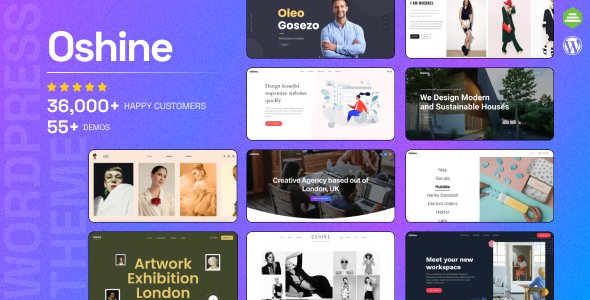
Stuck on your Oshine WordPress theme? Let's fix it.
No endless back-and-forth. Just send us the details and we'll get it done.
No obligation · Replies within 1 hour · Quote within 1 day
Setup · Customization · Bug fixes · WooCommerce integration
About Oshine WP Theme
Oshine is a multi-purpose WordPress theme built by BrandExponents. It ships with Tatsu, a front-end page builder developed specifically for the theme, and includes over 40 pre-built demos covering portfolios, agencies, photography, and more. The theme is built around visual presentation, making it a common choice for creatives who want full control over layout without writing code.
Oshine supports WooCommerce, WPML, and most major plugins out of the box. Performance has improved across recent versions, though heavily designed pages still require careful optimisation. The codebase is maintained regularly, and updates are consistent. If you need a visually rich site without a heavy reliance on third-party builders like Elementor, Oshine is a practical option worth evaluating.
Get matched with a Oshine developer in under one day
Tell us about your Oshine project. Small fixes, Oshine theme customization, or a full website build, whatever you need, we've got it covered.
We'll connect you to the right Oshine developers, define the scope, and get everything 100% clear.
You'll get one estimate, hire your preferred developer, and start collaborating.
Oshine gives you a lot out of the box, but production-ready sites usually need extra work. Custom Tatsu modules, performance tuning, WooCommerce integration, and multilingual setup all take time to get right. FoxyConcept matches you with a vetted Oshine developer through Codeable, a platform where every developer has been manually reviewed. You post a project, get matched within 24 hours, and receive a free estimate before committing to anything.
Pros
- Tatsu builder is purpose-built for Oshine, avoiding the bloat that comes with generic page builders
- 40+ professionally designed demos covering a wide range of creative industries
- Strong portfolio and gallery features with animation controls built directly into the builder
- WooCommerce and WPML compatibility is well maintained across updates
- BrandExponents provides regular theme updates and active support through Envato
Cons
- Tatsu builder has a learning curve and behaves differently from Elementor or Gutenberg, which can slow down new users
- Heavy demo imports can slow down a site if performance optimisation is not handled separately
- Some modules in Tatsu have limited styling options without custom CSS
- Switching away from Oshine later requires significant rebuilding due to Tatsu shortcode lock-in
- Documentation is functional but lacks depth for advanced use cases like custom module development
Who is Oshine for?
Creative Agencies
Oshine suits agencies that need a polished front-end with service pages, case studies, and team sections. The demo library includes agency-specific layouts that can be imported and modified quickly. An Oshine developer can extend these with custom post types for client work and project showcases.
Photographers and Videographers
The theme’s gallery and portfolio modules handle image-heavy work well. Fullscreen sliders, masonry grids, and lightbox options are built in. Photographers benefit from the clean presentation defaults, and an Oshine specialist can configure protected galleries or client delivery pages with minimal plugin dependency.
Freelance Designers and Illustrators
Freelancers can use Oshine to present a portfolio, list services, and collect enquiries without needing a developer for the initial setup. For those who want something more tailored, an Oshine expert can build a custom one-page layout with specific animation sequences and branded typography settings.
eCommerce Stores
Oshine’s WooCommerce support covers product pages, archive layouts, and cart styling. It is a reasonable choice for stores where brand presentation matters as much as product function. An Oshine developer can configure custom product templates, checkout styling, and category page layouts to match the overall site design.
Architecture and Interior Design Studios
Architecture and interior design firms need strong visual layouts with project filtering, before-and-after images, and clean typographic hierarchy. Oshine handles all of these through Tatsu without custom development. An Oshine specialist can add enquiry forms, project category filtering, and map integrations suited to studio workflows.

Customizing Oshine
Oshine’s customisation happens primarily through the Tatsu builder, which handles sections, columns, modules, and global styles from the front end. You can control typography, spacing, colours, and animations without touching code. The Theme Options panel handles site-wide settings like header layouts, footer styles, and blog templates.
For anything beyond what Tatsu exposes, an Oshine expert can step in to modify templates, extend custom post types, register new Tatsu modules, or build custom demo content from scratch. Child theme setup is straightforward and recommended before making any direct edits. An Oshine developer can also handle white-label builds, client handoffs, and custom shortcode integrations that go beyond the default module library.
Recommended plugins for Oshine
Oshine works well alongside caching plugins, image optimisation tools, and CDN setups. Given the theme’s visual weight, pairing it with a proper WordPress performance optimisation strategy makes a measurable difference in load times, especially on portfolio and gallery-heavy pages.
For content-driven sites, the theme supports Yoast SEO and Rank Math without conflicts. Structured data, canonical tags, and schema markup can all be layered in. If you want to go further, a dedicated WordPress SEO optimisation setup ensures Oshine-built pages rank as well as they look.
Not sure which plugins to use? This WordPress plugins directory covers the most popular options with reviews and setup guides.
Oshine common issues
Oshine Tatsu builder not loading in WordPress admin
This is usually caused by a JavaScript conflict with another plugin or a PHP memory limit that is too low. Start by deactivating plugins one at a time to isolate the conflict. If that does not resolve it, increase the PHP memory limit to at least 256MB in your wp-config.php file. Clearing browser cache and switching to a default browser can also rule out local issues. If the problem persists after these steps, a WordPress bug fixing service can diagnose the root cause quickly.
Oshine demo import failing or stuck at 0%
Demo import failures in Oshine are often caused by server timeout limits or upload size restrictions. Increase max_execution_time and upload_max_filesize in your php.ini file or contact your host to do so. It also helps to import the demo in stages rather than all at once if the theme offers that option. Make sure the required plugins listed for the demo are activated before importing.
Oshine portfolio grid not displaying correctly on mobile
Portfolio grid issues on mobile are usually tied to column settings inside Tatsu that have not been adjusted for smaller breakpoints. Open the row or module settings in Tatsu, switch to the mobile view, and check the column count and spacing values. Oshine applies desktop settings by default and requires separate mobile configurations. If you are seeing overlapping elements, check for custom CSS that may not account for responsive breakpoints.
Oshine custom fonts not showing after upload
Custom fonts in Oshine are uploaded through the Theme Options panel under the typography section. After uploading, you need to assign the font to specific elements using the typography controls. If the font still does not appear, check that the font files are in the correct format (WOFF2 is recommended) and that there are no browser caching issues. Purge your caching plugin after making any font changes.
Oshine slider images blurry or not loading
Blurry slider images in Oshine are almost always a resolution issue. The theme requires images at a minimum width of 1920px for full-width sliders. Check the recommended dimensions in the Tatsu slider module settings and replace images accordingly. If images are the right size but still appear blurry, check whether a lazy load plugin is interfering with the slider’s native load behaviour and disable lazy loading for that module.
Oshine WooCommerce product page layout broken
WooCommerce layout issues in Oshine often appear after a WooCommerce update that changes template structure. Oshine ships with its own WooCommerce templates, and these can become outdated when WooCommerce releases a major version. Go to WooCommerce > Status > System Status and check for outdated templates. Updating or regenerating those templates usually resolves the layout. A WordPress bug fixing specialist can handle template reconciliation without losing custom styling.
Oshine page loading slowly after demo import
Slow load times after a demo import are expected because demo content includes large images, unused CSS, and multiple scripts. Start by running an image compression pass on all imported media. Then install a caching plugin and configure CSS and JS minification. Disable Tatsu animations on elements below the fold. Review which scripts Oshine loads site-wide and dequeue any that are not used on specific page types.
Oshine header menu not showing on mobile
If the mobile menu is not appearing, check the header layout settings in Oshine’s Theme Options. Some header styles require you to manually enable the mobile toggle or set a breakpoint at which it activates. Also check whether a custom CSS rule is hiding the toggle button. If you have recently added a plugin that modifies the header or navigation area, deactivate it temporarily to check for conflicts.
Oshine update broke the site layout
Layout breaks after an Oshine update are most commonly caused by changes to Tatsu module markup or CSS class names. Always run updates on a staging site first. If the update has already been applied to production, restore from a backup and reapply the update on staging. Compare the Tatsu module output before and after the update to identify what changed. A WordPress bug fixing service can patch the affected templates without reverting to the previous version.
Oshine contact form not sending emails
Oshine typically uses Contact Form 7 or a similar plugin for contact forms. If emails are not sending, the problem is almost never the theme itself. Check your WordPress hosting for SMTP restrictions and configure an SMTP plugin like WP Mail SMTP with a transactional email service such as Mailgun or SendGrid. Test with the plugin’s built-in diagnostic tool. Also verify the form’s recipient address is correct and not filtered into spam.
Oshine FAQ
Oshine can technically run alongside Elementor, but it is not the intended setup. The theme is built around Tatsu, and mixing both builders on the same site creates unnecessary bloat and potential conflicts. If you need Elementor specifically, a different theme will serve you better. An Oshine developer can advise on the right setup for your project.
Yes, but with limitations. You can use the classic editor or Gutenberg blocks on Oshine pages without activating Tatsu. However, most of the theme’s demos and visual features are built for Tatsu. Skipping the builder means you lose access to most of the layout modules that make Oshine distinct from simpler themes.
Yes. Oshine includes WooCommerce-specific templates for product pages, shop archives, and cart and checkout pages. These are maintained with theme updates. Custom styling for WooCommerce pages is handled through Tatsu and the Theme Options panel. An Oshine specialist can extend these templates for more complex store requirements.
Go to Appearance > Import Demo Data after installing Oshine and its required plugins. Select the demo you want, choose whether to import media files, and start the import. Large demos can take several minutes. Ensure your server meets the minimum PHP requirements and that required plugins are active before starting.
Oshine generates clean HTML and is compatible with Yoast SEO and Rank Math. The theme does not produce excessive heading tag issues or broken schema by default. That said, SEO performance depends heavily on how pages are built inside Tatsu. Poorly structured content and oversized images will hurt rankings regardless of theme quality.
Yes, Oshine is WPML-compatible. String translations, page translations, and language switcher placement all work within the theme’s standard setup. For complex multilingual builds, an Oshine developer can configure WPML with Tatsu content so translated pages inherit the correct layout without needing to be rebuilt manually.
Create a new folder in wp-content/themes with a name like oshine-child. Add a style.css file with the required header comment referencing oshine as the template, and a functions.php file to enqueue the parent theme stylesheet. Activate the child theme from the WordPress dashboard. All customisations should go into the child theme to survive future Oshine updates.
Yes. Migrating an Oshine site follows the same process as any WordPress migration. Export the database, transfer all files, update the site URL in the database, and reconfigure any server-specific settings. Tatsu content is stored in the database, so it migrates with the rest of the site data without special handling. See the WordPress migration service for managed assistance.
Oshine recommends Contact Form 7, WooCommerce, WPML, and Slider Revolution for full feature coverage. The theme also works well with WP Rocket or LiteSpeed Cache for performance, and Yoast SEO or Rank Math for search visibility. Most major plugins in these categories have been tested against Oshine by BrandExponents.
Start with image compression on all media files, then configure a caching plugin. Disable unused Tatsu modules and avoid loading custom fonts from external sources where possible. Use a CDN for static assets. For ongoing performance management, a WordPress performance optimisation setup tailored to Oshine’s asset structure will give you the most consistent results.
Hire an Oshine Expert Developer
Whether you need a full site build, a specific feature added, or an existing Oshine site fixed and improved, you can get matched with a specialist through FoxyConcept. Work is delivered via Codeable, so every developer is vetted and accountable. Get a Free Estimate with no obligation to hire. You describe what you need, and a qualified Oshine developer will respond with a clear scope and price.
You'll need a free Codeable account so developers can ask questions and send their quotes.