Electro Electronics Store WooCommerce Theme WordPress Theme
by MadrasThemes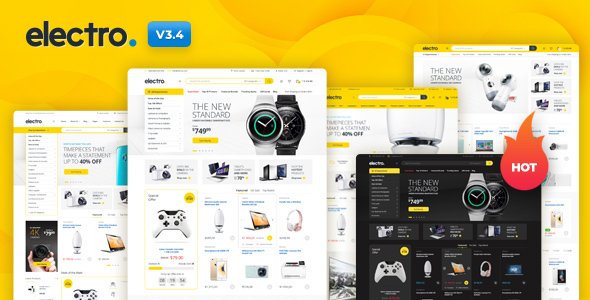
Stuck on your Electro Electronics Store WooCommerce Theme WordPress theme? Let's fix it.
No endless back-and-forth. Just send us the details and we'll get it done.
No obligation · Replies within 1 hour · Quote within 1 day
Setup · Customization · Bug fixes · WooCommerce integration
About Electro Electronics Store WooCommerce Theme WP Theme
Electro is a WooCommerce theme built by MadrasThemes specifically for electronics and tech product stores. It ships with a feature-rich homepage, Ajax-powered product filtering, comparison tables, and a layout designed to handle large catalogs without feeling cluttered.
The theme integrates tightly with WooCommerce and supports popular plugins like YITH Wishlist, Dokan for multivendor setups, and WC Vendors. It also includes a dedicated deals section, brand filtering, and a mega menu builder — tools that matter for stores selling phones, laptops, cameras, and accessories.
MadrasThemes maintains the theme actively, and it receives regular updates for WooCommerce compatibility. If you are building a store that needs to compete visually with major electronics retailers, Electro gives you a solid foundation without starting from scratch.
Get matched with a Electro Electronics Store WooCommerce Theme developer in under one day
Tell us about your Electro Electronics Store WooCommerce Theme project. Small fixes, Electro Electronics Store WooCommerce Theme theme customization, or a full website build, whatever you need, we've got it covered.
We'll connect you to the right Electro Electronics Store WooCommerce Theme developers, define the scope, and get everything 100% clear.
You'll get one estimate, hire your preferred developer, and start collaborating.
Finding a developer who knows Electro’s template structure, WooCommerce hooks, and MadrasThemes’ custom options saves time and avoids mistakes. On Codeable, every developer is vetted — no bidding wars, no guesswork. You post your project, get matched with specialists who have worked on WooCommerce stores like yours, and receive a clear estimate before any work begins. It is a straightforward way to get qualified help on an Electro build or fix.
Pros
- Built specifically for electronics stores with product comparison tables and brand filtering built in
- Deep WooCommerce integration including Ajax cart, wishlist support, and deals countdown timers
- Mega menu builder handles large product category structures cleanly
- Supports multivendor setups via Dokan and WC Vendors out of the box
- Actively maintained by MadrasThemes with regular WooCommerce version compatibility updates
Cons
- Initial setup is time-consuming due to the large number of theme options and demo content import steps
- Heavy on scripts by default — performance tuning is needed for acceptable Core Web Vitals scores
- Some layout customizations require editing template files, which breaks if done in the parent theme
- Mobile menu behavior can be inconsistent when the mega menu has deeply nested categories
- Documentation covers basics but gaps appear when configuring advanced plugin combinations like Dokan plus YITH
Who is Electro Electronics Store WooCommerce Theme for?
Consumer Electronics Retailer
Electro’s category layout, product comparison tool, and deals section make it a natural fit for general consumer electronics retailers selling across categories like TVs, laptops, and kitchen appliances. An Electro developer can configure the homepage to highlight featured categories and push promotional products without custom coding from scratch.
Mobile Phone and Accessories Store
Phone stores benefit from Electro’s variant display, brand filtering, and specification-heavy product pages. The theme handles color and storage variants well within WooCommerce’s standard attributes system. An Electro Electronics Store WooCommerce Theme specialist can set up accessory cross-sells and case compatibility filters that match how customers actually shop.
Computer Hardware and Components Shop
Hardware stores need detailed spec tables and compatibility filtering. Electro’s product comparison feature works well for components like GPUs or RAM where customers compare specs side by side. A developer can extend this with custom fields and filterable attributes to match the complexity of a components catalog.
Multivendor Electronics Marketplace
Electro’s built-in Dokan and WC Vendors support makes it a practical starting point for electronics marketplaces. Vendor dashboards, commission management, and individual store pages all integrate without heavy custom work. An Electro specialist helps configure vendor-specific branding and payout rules correctly from the start.
Audio and Home Entertainment Store
Audio and home theater stores rely on strong product imagery and spec comparisons. Electro’s gallery options and comparison tables fit this use case well. An Electro Electronics Store WooCommerce Theme developer can build out category pages for speakers, amplifiers, and receivers with filters that match how audio customers browse by brand and price range.

Customizing Electro Electronics Store WooCommerce Theme
Out of the box, Electro covers a lot of ground, but most stores need adjustments. Product page layouts, color schemes, typography, and homepage sections all need to match your brand. An Electro Electronics Store WooCommerce Theme expert can handle these changes cleanly inside the theme’s options panel or through a child theme, keeping your customizations safe across updates.
More complex work includes custom product comparison logic, modified checkout flows, category-specific layouts, and brand or badge filtering. If you are running a multivendor setup with Dokan, the configuration options multiply quickly. Getting the mega menu to behave correctly across mobile and desktop often needs hands-on CSS and JavaScript work. A developer familiar with Electro knows where the theme’s structure supports customization and where it needs workarounds.
Recommended plugins for Electro Electronics Store WooCommerce Theme
Electro pairs well with performance plugins like WP Rocket or FlyingPress, but large electronics catalogs load a lot of images and scripts. Proper lazy loading, image compression, and caching configuration matter here. See our WordPress performance services for help tuning a high-SKU WooCommerce store.
Product-heavy stores also need solid SEO foundations. Schema markup for products, breadcrumb configuration, and optimized category pages give Electro stores better search visibility. Our WordPress SEO service covers the technical and on-page work specific to WooCommerce.
Not sure which plugins to use? This WordPress plugins directory covers the most popular options with reviews and setup guides.
Electro Electronics Store WooCommerce Theme common issues
Electro theme product comparison not working after WooCommerce update
The comparison feature in Electro relies on a custom plugin bundled with the theme. After a WooCommerce update, hook changes or database table conflicts can break it. Check that the Electro companion plugin is updated to match your current WooCommerce version. If the comparison table still fails, the issue is often in the AJAX handler returning a null response. A WordPress bug fixing specialist can trace the exact conflict and patch it without disrupting your product data.
Electro WooCommerce theme mega menu not showing on mobile
Electro’s mega menu uses JavaScript that depends on specific DOM triggers. On mobile, viewport breakpoint conflicts between the theme’s scripts and a caching plugin’s minified JS are a common culprit. Start by disabling JS minification for the menu scripts in your caching plugin. If the problem persists, the issue is likely a CSS z-index conflict or a missing touch event handler. Testing in a staging environment with caching off isolates the cause quickly.
Electro theme homepage sections not loading after demo import
Electro’s demo content import requires the companion plugin and all required plugins to be active before importing. Missing plugins during import leaves widgets, shortcodes, or Elementor sections empty. Check the required plugin list in the theme documentation and verify all are installed and active. If sections are still blank after a clean import, try importing the demo XML file manually through Tools > Import rather than using the one-click demo importer.
Electro theme Ajax add to cart button not responding
Ajax add-to-cart failures in Electro usually come from a JavaScript conflict with another plugin or a missing nonce. Open your browser console during the add-to-cart action and look for 400 or 403 errors. A security plugin blocking the Ajax request is a frequent cause. Whitelist the WooCommerce Ajax endpoint in your firewall settings. If the error is a nonce mismatch, clearing all caches and regenerating WooCommerce pages usually resolves it. Visit our WordPress bug fixing service if the issue continues.
Electro WooCommerce theme slow loading on product category pages
Category pages in Electro load product images, filter widgets, and Ajax scripts simultaneously, which causes slow page loads without proper optimization. Start by enabling lazy loading for product images, setting up server-side caching, and deferring non-critical JavaScript. Reduce the number of products per page and check whether heavy third-party scripts like live chat or review widgets are blocking render. See our WordPress performance service for a full audit process.
Electro theme deal countdown timer showing wrong time
Electro’s countdown timer uses the scheduled sale end date set in the WooCommerce product editor. If the timer shows an incorrect time, the most common cause is a timezone mismatch between your WordPress settings and your server timezone. Go to Settings > General and confirm the timezone matches your intended store location. Also check that the sale end date in the product is set correctly, as a missing or malformed date can cause the timer to display zero or a negative value.
Electro theme product images not displaying correctly on single product page
Product image display issues in Electro often trace back to WooCommerce image regeneration after a thumbnail size change. Run the Regenerate Thumbnails tool after modifying image dimensions in WooCommerce > Settings > Products. If images still appear cropped or missing, check whether a CDN is serving stale versions. Purge the CDN cache and test on a device that is not using a local browser cache to confirm the correct images are loading.
Electro WooCommerce theme Dokan vendor pages showing 404
Dokan vendor store pages returning 404 in Electro usually means the Dokan store base slug conflicts with a WordPress permalink or the rewrite rules need flushing. Go to Settings > Permalinks and click Save Changes without making any edits — this flushes rewrite rules. If the 404 persists, check whether the Dokan store slug in Dokan > Settings matches what Electro expects. A WordPress bug fix can resolve deeper slug registration conflicts.
Electro theme breaking after child theme CSS update
If a child theme CSS update breaks the Electro layout, the issue is almost always incorrect enqueue priority or a missing parent stylesheet call. Verify that your child theme’s functions.php enqueues the parent stylesheet using wp_enqueue_style with the parent theme handle as a dependency. Avoid using @import in the child theme CSS. Any changes to Electro’s template files should live in the child theme’s folder using the same directory structure as the parent.
Electro theme checkout page layout broken on mobile
Checkout layout problems on mobile in Electro often come from a plugin adding custom checkout fields without responsive styles. Use browser dev tools to identify which element is overflowing or collapsing. Common offenders are payment gateway plugins that inject unstyled iframes or custom field plugins that add full-width inputs without mobile breakpoints. Adding targeted CSS in your child theme for the specific checkout field classes usually fixes the layout without affecting desktop behavior.
Electro Electronics Store WooCommerce Theme FAQ
Electro handles large catalogs reasonably well given its Ajax filtering and layered navigation support. Performance does degrade under very high SKU counts without server-side caching and query optimization. Stores with thousands of products should invest in proper hosting, object caching, and image delivery via a CDN. The theme’s structure supports large inventories but the default configuration is not optimized for scale out of the box.
Electro is primarily built around its own page builder options and WooCommerce shortcodes rather than Elementor. Basic Elementor usage works, but some Electro-specific widgets and homepage sections are not Elementor blocks. For full Elementor control, a developer may need to rebuild certain sections. The theme does not conflict with Elementor, but the two systems do not integrate deeply by default.
Electro’s comparison feature is enabled through the bundled Electro Toolkit companion plugin. Once active, a compare button appears on product cards and category pages. Products added to the comparison list can be viewed side by side with attributes and specifications. The compared attributes pull from WooCommerce product attributes, so setting up attributes correctly in your product data is necessary for the table to display meaningful information.
Yes. Electro includes built-in compatibility with Dokan and WC Vendors, two of the most widely used multivendor plugins for WooCommerce. Vendor store pages, product listings, and dashboards integrate with the theme’s layout. Configuration still requires setup work, particularly for commission structures, vendor registration flows, and store page styling. An Electro Electronics Store WooCommerce Theme developer can handle this setup correctly from the start.
Electro does not ship with a pre-built child theme, but MadrasThemes recommends creating one before making any customizations. A child theme ensures your CSS and template changes are not overwritten when the parent theme updates. Creating a basic child theme takes only a few minutes and requires a style.css file and a functions.php file referencing the parent theme.
Start with a caching plugin like WP Rocket, enable lazy loading for product images, and reduce the number of products per page. Minifying and deferring JavaScript helps, but test carefully as Electro’s Ajax features can break if the wrong scripts are deferred. Using a CDN for static assets and choosing a hosting plan with object caching makes a measurable difference on catalog pages with many product images.
Electro is listed as WPML-compatible by MadrasThemes. Most theme strings are translatable through WPML’s String Translation module. Some custom Electro widgets may need additional registration in WPML’s configuration. Full multilingual store setups with WooCommerce Multilingual also work but require careful configuration of translated products, currencies, and checkout pages to function correctly across languages.
Costs vary depending on the scope of work. Small fixes or configuration tasks typically run from $100 to $300. Full store builds with custom layouts, plugin integrations, and performance work range from $1,500 upward. On Codeable, you post your project and receive a transparent estimate before committing. There is no obligation to hire after receiving an estimate, so you can budget accurately before starting.
Yes, Electro works with WooCommerce’s native digital and downloadable product type. Product pages display a download button after purchase and the customer’s account area shows their downloads. There are no Electro-specific restrictions on digital products. If you are selling a mix of physical and digital items, WooCommerce handles the distinction at the product level and Electro displays both correctly.
Always use a child theme for customizations. When a theme update is available, update the parent theme and your child theme’s styles will remain intact. Back up your site before updating. After updating, check key pages including the homepage, product pages, cart, and checkout for any layout changes. If you have modified template files in a child theme, compare them against the updated parent templates to catch any structural changes that need to be carried over.
Hire an Electro Electronics Store WooCommerce Theme Developer
Whether you need a full Electro store build, specific customizations, or fixes to an existing site, working with a specialist makes the difference. Our developers know WooCommerce, MadrasThemes’ codebase, and the plugin integrations Electro depends on. Get a free estimate and describe your project — no obligation, no upfront cost, and you only move forward when you are ready.
You'll need a free Codeable account so developers can ask questions and send their quotes.