Infinite WordPress Theme
by GoodLayers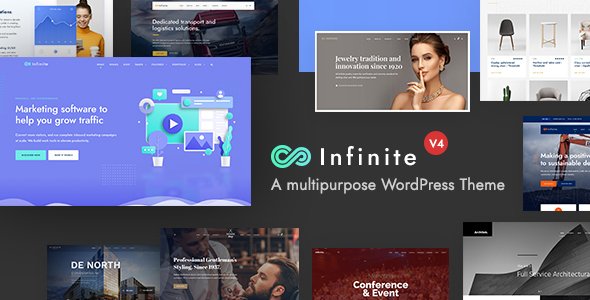
Stuck on your Infinite WordPress theme? Let's fix it.
No endless back-and-forth. Just send us the details and we'll get it done.
No obligation · Replies within 1 hour · Quote within 1 day
Setup · Customization · Bug fixes · WooCommerce integration
About Infinite WP Theme
Infinite is a multi-purpose WordPress theme built by GoodLayers, the same team behind the popular Goodlayers Page Builder. It ships with a large library of pre-built demo sites covering travel, business, portfolio, and magazine layouts. The theme uses GoodLayers’ own drag-and-drop page builder, which is bundled at no extra cost and gives you granular control over sections, columns, and typography without touching code.
Infinite supports WooCommerce, custom headers, sticky navigation, and multiple blog formats out of the box. It also includes a built-in mega menu builder and supports WPML for multilingual sites. Performance-wise, the theme loads reasonably well on clean installs, though heavy use of the page builder can add render-blocking scripts if left unconfigured. Overall, Infinite suits agencies and freelancers who need a flexible starting point without buying multiple licences.
Get matched with a Infinite developer in under one day
Tell us about your Infinite project. Small fixes, Infinite theme customization, or a full website build, whatever you need, we've got it covered.
We'll connect you to the right Infinite developers, define the scope, and get everything 100% clear.
You'll get one estimate, hire your preferred developer, and start collaborating.
Finding a developer who knows the GoodLayers framework specifically saves a lot of back-and-forth. Codeable connects you with vetted WordPress specialists who have hands-on experience with Infinite and similar GoodLayers themes. Every project starts with a free estimate, and you only proceed if the scope and price make sense. There are no bidding wars and no anonymous contractors. You get a single developer matched to your project within 24 hours.
Pros
- Bundled GoodLayers Page Builder included at no extra cost, no Elementor or WPBakery licence required
- Large demo library covering travel, business, portfolio, and magazine niches with one-click import
- Built-in mega menu builder with image and column support, no plugin dependency
- WooCommerce and WPML compatible out of the box with no known major conflicts
- Single-theme licence covers all the bundled plugins, reducing total project cost
Cons
- Theme options panel is separate from the WordPress Customizer, which creates a steeper learning curve for new users
- GoodLayers Page Builder is proprietary, so switching themes later means rebuilding all page layouts
- Demo import can bring in large media files that inflate database size if not cleaned up afterwards
- Built-in scripts and styles are not split by page, so unused assets load on every page by default
- Documentation is functional but thin on advanced use cases like custom element registration or REST API integration
Who is Infinite for?
Travel Blogs and Tour Operator Sites
GoodLayers built Infinite with travel sites as a primary use case. The theme ships with destination-focused demo layouts, map integration support, and tour listing structures. An Infinite specialist can extend these with custom post types for destinations, itinerary templates, and booking plugin integrations like WP Travel Engine or Tourmaster.
Creative Agency Portfolios
Infinite’s portfolio post type and filterable grid layouts make it a solid base for agency and freelancer sites. The page builder handles case study layouts cleanly. An Infinite developer can create custom grid filters, lightbox galleries, and client-specific password-protected project pages without third-party plugins.
WooCommerce Stores
Infinite’s WooCommerce support covers product pages, shop archives, and cart styling through the theme options panel. For more specific needs like custom product tabs, size guides, or subscription flows, an Infinite expert will extend the WooCommerce templates directly within a child theme to keep upgrade paths clean.
Corporate and Business Sites
The business demo layouts in Infinite include service sections, team grids, testimonial sliders, and contact page templates. These work well for professional services firms. An Infinite developer can add CRM integrations, custom form routing, and multi-location schema markup to make the site functional beyond the visual layer.
Online Magazines and News Sites
Infinite supports multiple blog post formats and category-based layouts suitable for editorial sites. The built-in mega menu handles deep category structures. An Infinite specialist can configure custom taxonomy archives, ad placement zones, and reading time indicators to match standard magazine site requirements.

Customizing Infinite
Infinite gives you a theme options panel built on top of the GoodLayers framework, separate from the WordPress Customizer. Most global settings live there, including typography stacks, color schemes, header layouts, and footer columns. The bundled GoodLayers Page Builder handles per-page layouts with a visual editor that mirrors front-end output reasonably closely.
For advanced work, an Infinite expert will typically override panel settings using child theme CSS, register custom post types, or extend the page builder with custom elements. If you need white-labelled layouts, custom shortcodes, or third-party API integrations baked into the theme, that work requires PHP-level customization. An experienced Infinite developer can also tune the theme options export/import workflow so your configurations are version-controlled and portable across staging and production environments.
Recommended plugins for Infinite
Infinite works well with WooCommerce, Contact Form 7, and WPML without any compatibility shims. For performance, pairing it with a caching plugin and a CDN is straightforward, but the GoodLayers scripts do need manual exclusion rules. Read our guide on WordPress performance optimization to see exactly which files to defer or exclude.
On the SEO side, Infinite outputs clean heading hierarchies and supports Yoast SEO and Rank Math without conflicts. Schema markup does require a dedicated plugin. If you want to go further, our WordPress SEO service covers technical audits and structured data implementation specifically for GoodLayers-based builds.
Not sure which plugins to use? This WordPress plugins directory covers the most popular options with reviews and setup guides.
Infinite common issues
Infinite theme page builder not loading in WordPress editor
This usually points to a JavaScript conflict with another plugin or a PHP memory limit issue. Open your browser console and check for JS errors on the edit screen. If you see script failures, deactivate plugins one by one to isolate the conflict. Also increase WP_MEMORY_LIMIT to at least 256M in wp-config.php. If the builder still won’t load after that, a WordPress bug fixing specialist can trace the exact conflict quickly.
Infinite theme demo import fails or stops halfway
Demo imports fail most often due to PHP execution time limits, max upload size restrictions, or server memory caps. In your php.ini or wp-config.php, set max_execution_time to 300, upload_max_filesize to 64M, and memory_limit to 256M. Try importing without demo media first, then import media separately. If the process keeps stalling, the issue may be server-side and worth flagging to your host.
Infinite theme header not showing on mobile
Infinite uses separate header settings for mobile breakpoints inside the theme options panel. Go to GoodLayers Options > Header and check the mobile header section. If you’ve set a custom header template, verify it has a mobile toggle element added. Also clear your caching plugin after saving. If a CSS override is forcing display: none on the header, inspect the element in DevTools to find the conflicting rule.
Infinite theme WooCommerce product page layout broken
WooCommerce layout breaks in Infinite often happen after a WooCommerce update that changes template file structures. Check if you have overridden WooCommerce templates in your child theme under /woocommerce/. If those files are outdated, WooCommerce will flag them in WooCommerce > Status > System Status. Update the overridden templates to match the current WooCommerce version. If you need help tracing template conflicts, our bug fixing service covers this.
Infinite theme custom fonts not applying after save
Custom fonts in Infinite are set through the GoodLayers Options panel, not the Customizer. After saving, make sure your caching plugin is cleared, including any server-side object cache. If you’re using a CDN, purge it too. If the font still doesn’t apply, inspect the element in your browser and check whether the font-family rule is being overridden by a more specific selector. Add a targeted CSS override in GoodLayers Options > Custom CSS if needed.
Infinite theme slider not displaying images correctly
Infinite uses its own built-in slider element through the GoodLayers Page Builder. Image display issues usually come from incorrect image dimensions set in the slider settings or lazy loading conflicts. Open the slider element settings and verify the image size option matches your uploaded image dimensions. If you’re using a lazy loading plugin, add the slider’s image class to its exclusion list. Regenerate thumbnails using a plugin like Regenerate Thumbnails if images were uploaded before sizes were defined.
Infinite theme update breaks page builder layouts
After a theme update, GoodLayers may add new page builder elements or change existing shortcode structures. If layouts break, first check whether you’re using a child theme. If you’re editing the parent theme directly, updates will overwrite your changes. Roll back the update using a backup, move customizations into a child theme, then re-apply the update. For complex layout recovery, a WordPress bug fixing developer can diff your old and new templates efficiently.
Infinite theme mega menu not working on touchscreen devices
Infinite’s mega menu uses hover-triggered dropdowns that don’t translate directly to touch events on tablets and phones. The fix is to add a small JavaScript snippet that converts the first tap on a parent menu item to a toggle instead of a link follow. Alternatively, enable the mobile menu for tablet breakpoints inside the GoodLayers Options header settings. If the mobile menu still overlaps or doesn’t open, check for z-index conflicts with sticky header CSS.
Infinite theme slow loading on first paint
Infinite loads all GoodLayers page builder scripts globally regardless of whether a given page uses them. To reduce first paint time, configure your caching plugin to defer non-critical JavaScript and inline critical CSS. Use a tool like GTmetrix or PageSpeed Insights to identify which GoodLayers scripts block rendering. You can also minify and combine scripts through your caching plugin, but test carefully as GoodLayers scripts can break if combined in the wrong order.
Infinite theme contact form not sending emails
Contact form email issues in Infinite are almost always a server mail delivery problem, not a theme issue. By default, WordPress uses PHP mail, which most shared hosts block or flag as spam. Install an SMTP plugin like WP Mail SMTP and connect it to a transactional email provider like Mailgun, SendGrid, or your Google Workspace account. After configuring, use the plugin’s test email feature to confirm delivery. Check your spam folder first before assuming the form is broken.
Infinite FAQ
GoodLayers continues to update Infinite, though release frequency is lower than high-volume marketplace themes. Updates typically address WordPress core compatibility and WooCommerce template changes. Check the ThemeForest changelog for the current version before purchasing. If you need ongoing compatibility maintained automatically, a WordPress maintenance plan covers theme and plugin updates with testing.
Infinite is built around the GoodLayers Page Builder, not Elementor. You can technically install Elementor alongside it, but you’ll encounter CSS conflicts and redundant assets. It’s not a recommended setup. If you want to use Elementor, you’d be better served by a theme built specifically for it. An Infinite specialist works within the GoodLayers builder rather than fighting against it.
Create a folder in /wp-content/themes/ named something like infinite-child. Add a style.css with the correct Template: infinite header and a functions.php that enqueues the parent stylesheet. Activate the child theme from the WordPress dashboard. All customizations go into the child theme to survive future parent theme updates.
Yes. Infinite includes WooCommerce-compatible templates for shop pages, product archives, and single product layouts. Basic store functionality works without modification. For custom product page designs, checkout flow changes, or advanced WooCommerce extensions, you’ll want an Infinite developer to handle template overrides inside a child theme.
Demo import in Infinite will overwrite your menu locations, widget areas, and front page settings. It will not delete existing posts or pages, but it adds new ones. Back up your site before importing. Use the selective import option if available, which lets you skip media files and import only the page structures. After import, manually reassign your original menus and widgets.
Infinite is listed as WPML-compatible on the ThemeForest product page. GoodLayers Options settings can be translated using WPML’s String Translation module. Page builder content is translated through WPML’s standard page duplication workflow. For complex multilingual setups with custom post types or translated theme options, an Infinite specialist can configure WPML correctly from the start.
Infinite uses the proprietary GoodLayers Page Builder, which is bundled with the theme at no extra cost. It is not Gutenberg, Elementor, or WPBakery. The builder works through a front-end-adjacent interface within the WordPress admin. It outputs shortcode-based markup stored in post content, which means content is tied to the GoodLayers ecosystem.
Start by enabling a caching plugin, deferring non-critical JavaScript, and using a CDN for static assets. GoodLayers scripts load globally, so excluding them from pages that don’t use the page builder helps. Optimize images before upload and configure lazy loading. For a full audit, our WordPress performance service covers GoodLayers-specific optimizations in detail.
Switching themes will not delete your posts or media, but all GoodLayers Page Builder layouts will render as raw shortcode text in a new theme. There is no automatic migration path. You’d need to rebuild page layouts in the new theme’s editor. If you’re considering a WordPress migration to a new theme or platform, plan for layout reconstruction time in your project scope.
GoodLayers provides support through their ThemeForest comments section and a dedicated support forum for verified buyers. Response times vary. For faster resolution of bugs, customization requests, or conflicts with plugins, hiring a vetted Infinite developer through Codeable is usually quicker than waiting in the official support queue, especially for complex issues.
Hire an Infinite Developer for Your GoodLayers Project
Whether you need a full custom build on Infinite or targeted fixes to an existing site, working with a developer who knows GoodLayers’ page builder and options framework makes the job faster and cleaner. Post your project and you’ll receive a scoped estimate from a vetted Infinite expert at no cost. Get a Free Estimate and describe what you need. No obligation to hire.
You'll need a free Codeable account so developers can ask questions and send their quotes.