Basel WordPress Theme
by xtemos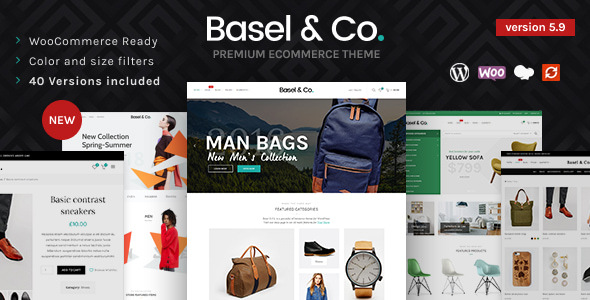
Stuck on your Basel WordPress theme? Let's fix it.
No endless back-and-forth. Just send us the details and we'll get it done.
No obligation · Replies within 1 hour · Quote within 1 day
Setup · Customization · Bug fixes · WooCommerce integration
About Basel WP Theme
Basel is a WooCommerce-focused WordPress theme built by xtemos. It ships with a drag-and-drop page builder, a large library of pre-built shop demos, and deep WooCommerce integration out of the box. The theme targets online store owners who want a polished storefront without starting from scratch.
Basel uses its own custom framework alongside Elementor and WPBakery support. It includes a built-in mega menu, AJAX filtering, quick view, wishlist, and a sticky header — features that most themes charge separately for or leave to plugins. Performance is reasonable for a feature-heavy theme, though it requires tuning on larger catalogs. Basel is a solid starting point for WooCommerce stores that need flexibility without heavy custom development from day one.
Get matched with a Basel developer in under one day
Tell us about your Basel project. Small fixes, Basel theme customization, or a full website build, whatever you need, we've got it covered.
We'll connect you to the right Basel developers, define the scope, and get everything 100% clear.
You'll get one estimate, hire your preferred developer, and start collaborating.
Basel has a lot of moving parts. The theme panel, header builder, WooCommerce templates, and page builder layers can conflict when you’re pushing beyond defaults. A developer who knows Basel’s architecture can work directly in the child theme, override templates correctly, and avoid the mistakes that come from guessing. Through Codeable, you’re matched with vetted WordPress developers who have real experience with WooCommerce themes like Basel. You get a free estimate before committing to anything.
Pros
- Ships with 80+ pre-built WooCommerce demo shops ready to import
- Built-in mega menu, wishlist, AJAX cart, and quick view — no extra plugins needed
- Header builder with drag-and-drop control over every header element
- Deep WooCommerce template overrides built into the theme framework
- WPML compatible for multilingual store builds out of the box
Cons
- Theme panel has hundreds of options with limited documentation on what each does
- Page builder reliance (WPBakery or Elementor) creates portability issues if you switch themes
- Default asset loading is heavy and needs manual optimization for good Core Web Vitals scores
- Demo import can bring in unwanted plugins and content that takes time to clean up
- Template overrides in Basel's structure are non-standard and can break after major theme updates
Who is Basel for?
Fashion and Apparel Stores
Basel’s lookbook layouts, large image grids, and product variation swatches make it a practical choice for fashion stores. You can display products with color and size swatches directly on archive pages, and the quick view keeps shoppers on the catalog without interrupting the browsing flow. A Basel developer can extend this further with custom filters and size guide integration.
Electronics and Gadgets Shops
Electronics stores need detailed product pages, comparison tables, and fast filtering by specification. Basel supports custom product tabs and works well with plugins that add comparison functionality. The AJAX layered navigation handles large catalogs without full page reloads. A Basel expert can configure the attribute filtering system to match how customers actually search for tech products.
Home Decor and Furniture Retailers
Basel’s wide layout options and full-width section support suit home decor brands that rely on visual storytelling. The page builder lets you mix editorial content with shoppable product grids. Large product images display well in Basel’s gallery layouts, and the sticky cart reduces friction for high-consideration purchases typical in the furniture category.
Beauty and Cosmetics Brands
Beauty brands need strong brand consistency and clear product presentation. Basel’s color scheme controls and typography settings cover most branding needs without code. The built-in wishlist is a useful feature for beauty shoppers who browse across multiple sessions. A Basel specialist can also integrate subscription or loyalty plugins cleanly into the existing theme layout.
Multi-Vendor Marketplaces
Basel works with Dokan and WCFM for multi-vendor marketplace builds. The theme’s flexible header and product card layouts can adapt to multi-seller catalog structures. Building a marketplace on Basel requires developer involvement to configure vendor pages, commissions, and storefront templates — this is not a setup that works well without a Basel developer guiding the build.

Customizing Basel
Basel exposes a wide range of options through its theme settings panel. You can control header layouts, typography, color schemes, product card styles, and checkout appearance without touching code. The built-in header builder lets you rearrange elements with drag-and-drop, and the sticky cart and search overlays are configurable per breakpoint.
Beyond the panel, real customization requires PHP hooks, child theme overrides, and a solid understanding of how Basel structures its WooCommerce templates. A Basel expert can modify the single product layout, add custom product tabs, adjust the AJAX cart behavior, or build entirely new section types inside the page builder. If your store has specific UX requirements or branding guidelines that the panel can’t reach, working with a Basel developer will get you there faster and cleaner than trial and error.
Recommended plugins for Basel
Basel integrates cleanly with WPML, Yoast SEO, and Rank Math — useful if you’re running a multilingual store or actively working on WordPress SEO. It also supports Wishlist plugins, Advanced Custom Fields, and Contact Form 7 without conflicts in most configurations.
On the performance side, Basel works with caching plugins like WP Rocket and LiteSpeed Cache, though its built-in scripts need selective loading to avoid bloat. If you’re serious about store speed, pairing Basel with a proper WordPress performance setup makes a real difference, especially on product archive pages with heavy filtering enabled.
Not sure which plugins to use? This WordPress plugins directory covers the most popular options with reviews and setup guides.
Basel common issues
Basel theme header not showing on mobile
Mobile header issues in Basel are usually caused by a breakpoint conflict in the header builder or a CSS override from a plugin. Open the Basel header builder and check which header is assigned to mobile. Make sure you’ve built a separate mobile header layout — Basel treats desktop and mobile as distinct configurations. Also check for any custom CSS in the theme panel targeting .header-main that may be hiding elements below a certain viewport width.
Basel AJAX add to cart not working
AJAX add to cart failures in Basel usually trace back to a JavaScript conflict with another plugin or a caching layer that’s serving a stale version of the cart fragment. Start by disabling other plugins one at a time to isolate the conflict. Then flush all caches and test with a default WordPress theme to confirm the issue is Basel-specific. If the problem persists, the WordPress bug fixing service can trace the JS error and resolve it cleanly.
Basel mega menu not displaying correctly
Basel’s mega menu requires the menu item to have the mega menu option enabled in the WordPress menu editor. Go to Appearance > Menus, expand the top-level item, and look for the Basel mega menu toggle. If columns aren’t displaying correctly, check that the sub-items are assigned to the right column groups. CSS conflicts from third-party plugins can also collapse the mega menu — inspect the element in browser dev tools to check for overriding styles.
Basel product quick view not loading
Quick view failures in Basel are often tied to a missing nonce, a PHP error in the product template, or a conflict with a page caching plugin returning a cached response for the AJAX request. Enable WordPress debug mode and check the error log for template errors. If you’re using a caching plugin, exclude the Basel AJAX endpoints from caching. The WordPress bug fixing service can diagnose and fix quick view issues across plugin combinations.
Basel theme demo import stuck or failing
Basel demo imports fail when the server has low memory limits, short execution times, or slow file handling. Before importing, increase memory_limit to at least 256MB and set max_execution_time to 300 in your PHP config or wp-config.php. Also make sure the One Click Demo Import plugin is active and updated. If the import stalls mid-process, try importing XML content and widgets separately rather than using the full one-click method.
Basel WooCommerce variable product swatches not showing
Basel’s variation swatches require the WooCommerce product attributes to be set as global attributes, not local ones. Go to Products > Attributes and confirm the attribute is listed there, not just added locally on the product edit screen. In the Basel theme settings, enable the swatches option and set the attribute type to color, image, or label. If swatches still don’t appear on the archive page, check that AJAX filtering is not overriding the variation display template.
Basel page builder section not saving changes
When Basel’s WPBakery or Elementor sections fail to save, the issue is usually a permission error, a REST API conflict, or an expired nonce. Check that your WordPress user has the correct capabilities. Test the REST API by visiting yoursite.com/wp-json/ — if it returns an error, a security plugin or server rule is blocking it. Also disable any aggressive caching during editing sessions, as cached admin responses can prevent saves from registering correctly.
Basel theme update broke my layout
After a Basel update, broken layouts are almost always caused by changes to template files that conflict with overrides in your child theme. Check the /woocommerce/ folder in your child theme and compare each file against the updated versions in Basel. Outdated template overrides are the most common cause. The WordPress bug fixing service can audit your child theme templates and update them to match the new Basel version without losing your customizations.
Basel sticky header overlapping page content
Sticky header overlap in Basel is typically a z-index or top-offset issue. The theme adds a body class when the sticky header activates, which applies a margin-top to compensate for the header height. If this margin isn’t calculating correctly, check whether the header height is fixed or dynamic. A dynamic header that changes height on scroll can cause the offset to misfire. Add a small CSS fix targeting .header-sticky-cloned height or adjust the body offset in the Basel panel under Header settings.
Basel AJAX shop filter returning no results
AJAX filter returning no results in Basel often means a permalink structure mismatch or a conflict between Basel’s filter parameters and a caching plugin. Go to Settings > Permalinks and save without changes to flush rewrite rules. If you’re using WP Rocket or similar, exclude Basel’s ?action=basel_load_products requests from caching. Also check whether the filter widget is using the correct WooCommerce attribute slugs — a renamed attribute won’t match stored filter queries.
Basel FAQ
Basel is built specifically for WooCommerce and includes built-in support for AJAX filtering, product swatches, quick view, wishlist, and cart. It’s a solid choice for stores that want these features without stacking multiple plugins. Performance needs attention on larger catalogs, but the WooCommerce integration is one of the strongest parts of the theme.
Yes, Basel supports Elementor alongside WPBakery. You can choose your preferred page builder during setup. Note that mixing both builders on the same site is not recommended and can cause conflicts. Basel also includes its own section types within each builder, so some custom elements are builder-specific and won’t transfer if you switch.
Create a child theme by making a new folder in /wp-content/themes/, adding a style.css with the correct Template: basel header, and a functions.php that enqueues the parent stylesheet. Always develop Basel customizations in a child theme to avoid losing changes when the parent theme updates.
Basel is WPML compatible and supports multilingual stores when used with the WPML plugin. String translations, switcher placement in the header builder, and per-language product pages all work with the standard WPML setup. For large multilingual catalogs, a Basel specialist can configure the translation workflow and test frontend behavior across languages.
Start by enabling lazy loading for product images, disabling unused Basel features in the theme panel, and configuring a caching plugin like WP Rocket. Limit the number of homepage sections built with the page builder, and use a CDN for static assets. For deeper gains, a proper WordPress performance audit will identify the heaviest bottlenecks specific to your setup.
Basel includes built-in RTL stylesheet support. Activate RTL by setting your WordPress site language to a right-to-left language under Settings > General. The theme automatically loads the RTL styles. Some custom CSS added through the theme panel may need manual RTL adjustments depending on how it was written.
Basel includes its own wishlist feature. Enable it under Basel Theme Options > Shop > Wishlist. Once active, a wishlist button appears on product cards and single product pages. You can configure the button position and page assignment in the same panel section. No additional wishlist plugin is required unless you need cross-device syncing or account-based wishlists.
Xtemos updates Basel regularly to maintain WooCommerce compatibility. Always check the changelog before updating either Basel or WooCommerce on a live store, as major WooCommerce versions occasionally require Basel template file updates. Testing updates on a staging environment first is strongly recommended, especially if you have child theme template overrides.
Yes. Through Codeable, you can hire a vetted Basel developer for customization, layout work, bug fixes, or full store builds. Post your project, get a free estimate, and review it before deciding. There’s no obligation. Get a free estimate here and describe what you need done.
Migrating a Basel store involves moving the database, files, and updating site URLs. The process is the same as any WordPress migration but pay attention to Basel’s license activation on the new host. After migration, regenerate thumbnails if the image sizes differ and check that AJAX endpoints resolve correctly on the new domain. A WordPress migration service can handle this cleanly with no downtime.
Hire a Basel Developer or Expert
Whether you need a Basel expert to build a store from a demo, customize the layout, fix a conflict, or optimize performance, you can get matched with a vetted developer within 24 hours. No guesswork, no cold outreach. Get a free estimate and describe your project — there’s no obligation to hire.
You'll need a free Codeable account so developers can ask questions and send their quotes.